Linksys AC1900 Router Review: Strong Range, Mixed Firmware
One of the most striking revelations from user feedback is just how dramatically the Linksys AC1900 Wi‑Fi Router (Renewed, Black) boosts range for some households — even replacing multiple extenders. Reddit user feedback ranged from “I get signal even driving away in the car” to “whole house with zero dead spots” in older brick homes. Overall score from aggregated reviews: 8.2/10.
Quick Verdict: Conditional — excellent for high‑device households and large spaces, but quirks in firmware and guest network security may frustrate advanced users.
| Pros | Cons |
|---|---|
| Strong Wi‑Fi range, even in two‑story homes | Limited security options for guest network |
| Easy app‑based setup and management | Stock firmware lacks advanced features (e.g., QoS) |
| Supports open source firmware like DD‑WRT/OpenWRT | Occasional 5 GHz stability issues reported |
| Handles 20‑30 devices without lag | Refurb units sometimes arrive with mismatched firmware |
| Parental controls and device prioritization included | External storage feature lacks full NAS functionality |
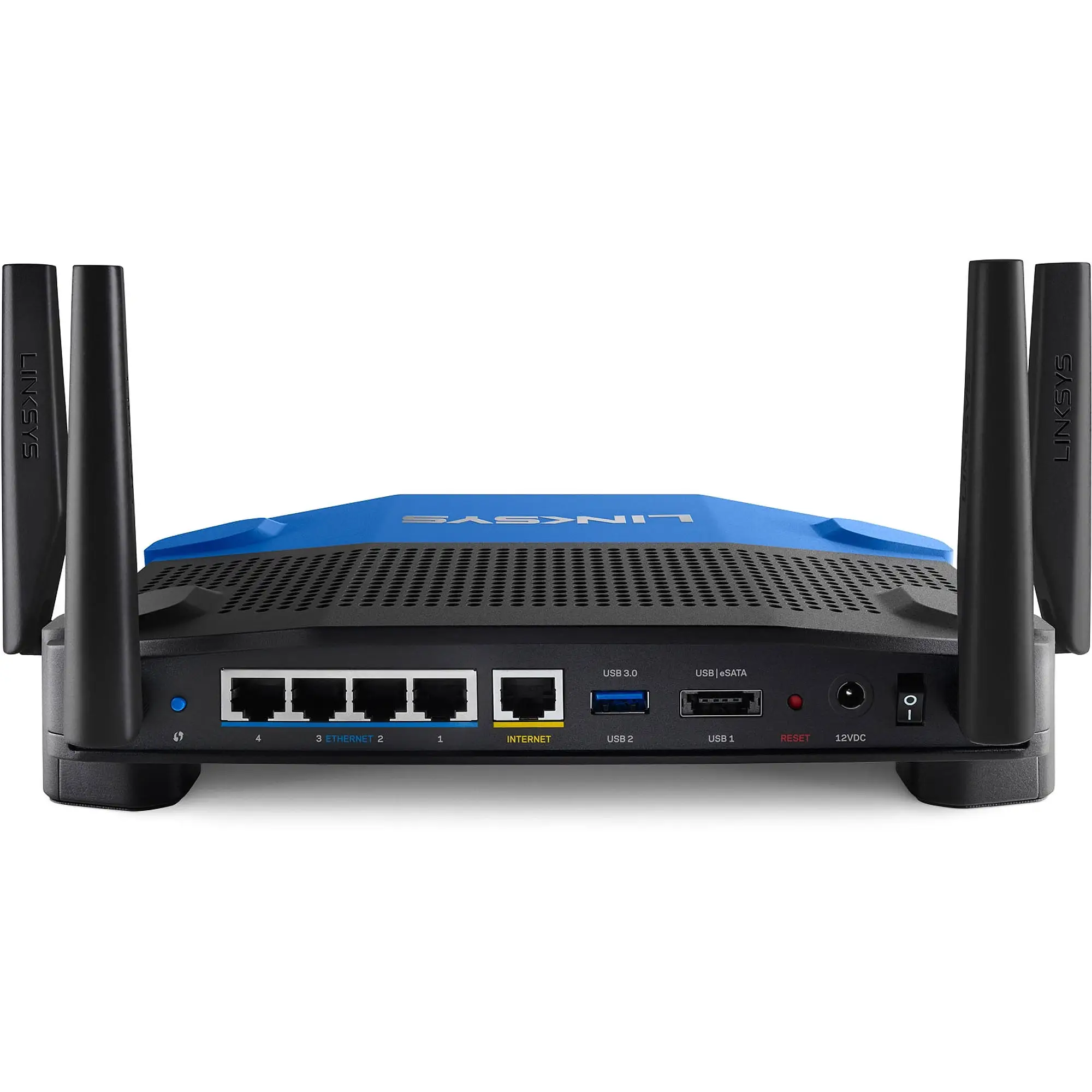
| Four gigabit Ethernet ports for wired connections | Larger footprint than some competitors |
Claims vs Reality
Marketing emphasizes "best‑in‑class networking performance" and “ultimate Wi‑Fi coverage.” In practice, many report coverage matching or exceeding claims, particularly on 2.4 GHz. A verified buyer on Amazon noted: “It works all the way upstairs (2 story) through multiple walls… smart TVs and phones work excellently now as opposed to before.”
However, while officially rated for robust 5 GHz coverage, multiple Reddit reports highlight limited range in that band. One user wrote, “The 5 GHz network does not have much of a range, but that is normal for a 5 GHz network.” This matches the physics of high‑frequency signals but contrasts with “whole home” marketing.
The feature set markets smart parental controls and network maps as a major selling point. Users like the accessibility of these tools, yet Newegg reviewers criticized the lack of bandwidth limits on guest accounts and inability to block sites network‑wide. “Poorly thought out, poorly executed feature with no benefit at all,” one comment read. That’s a clear gap between expectation and execution.
Cross‑Platform Consensus
Universally Praised
One recurring delight is ease of setup. From small apartments to sprawling colonials, even first‑time buyers found installation frictionless. A Best Buy customer shared, “Set up was a breeze… migrated to this as the main wireless for the house.” For non‑tech households, the companion app adds value — controlling guest passwords, prioritizing devices, and running speed tests without digging into browser‑based controls.
For high‑device families, stability under load wins applause. Several owners run 20+ active connections without degradation. One Trustpilot reviewer wrote: “Now we’re running up to 30 devices and it holds up like a boss!” Large homes benefit too; Trustpilot feedback includes coverage “in every corner” and outdoor spaces when using 2.4 GHz.
Open source support is another standout. Advanced users flash DD‑WRT, OpenWRT, or LEDE to unlock full hardware potential. Amazon reviewer: “Work like a charm… DD‑WRT installed without any problems.” For network tinkerers, this sets the AC1900 apart from locked‑down rivals.
Common Complaints
Refurbished unit quality control draws serious criticism. Several Amazon buyers received routers with wrong firmware or even third‑party VPN interfaces pre‑installed, resulting in wasted evenings fixing basics. “Certified refurbished my eye!” one frustrated customer posted, citing daily Wi‑Fi dropouts until replacement.
Firmware limitations frustrate power users. Missing general QoS is a sore point; Newegg comments call it “mostly useless” outside of specific device prioritization. This restricts automated bandwidth optimization for activities like gaming and streaming concurrently.
The guest network design — password‑only like hotel logins — raises safety concerns. A Best Buy review warns: “This is very unsafe for the guest using the network… disappointing to see this feature lacking in such a high price point router.”
5 GHz stability shows mixed results. A few Reddit users with smartphones/tablets reported intermittent connectivity that re‑connected after disabling 5 GHz entirely.
Divisive Features
External storage support impresses casual streamers who use DLNA devices, but falls short for NAS enthusiasts wanting full OS‑level file browsing. Newegg users wished they could mount drives in Windows Explorer rather than rely on FTP or media streaming.
Parental control praise is tempered by device‑specific setup requirements, making household‑wide rules cumbersome. Some love the fine‑grained scheduling, others find it over‑complicated.
Trust & Reliability
Refurbished sales generate both positive reinforcement and skepticism. Many buyers got pristine units “that looked brand new,” while others accuse sellers of skipping basic testing. Reports of pre‑installed non‑stock firmware are rare but notable.
Long‑term reliability feedback is encouraging. One Amazon customer kept the AC1900 running flawlessly for nearly four years across two homes, noting “always‑on and always working 24 x 7… covers the basement and two floors easily.” The hardware’s durability, especially with fan cooling, seems robust.
Trustpilot and Reddit threads show that replacing ISP‑provided gateways with this model often eliminates years‑long connectivity frustrations. Yet, some caution against Linksys’ track record for dropping firmware support early, making open‑source viability a key longevity strategy.
Alternatives
The Netgear Nighthawk AC series comes up in discussions as a competing “beast” in range and throughput. Some reviewers “just about popped for the Nighthawk” but chose Linksys for open‑source capabilities and price advantage. Asus RT‑AC3200 is mentioned for comparable signal strength, yet one owner found the AC1900 “a tad better” in range.
Users comparing with ISP “all‑in‑one” gateways note massive performance gain in speed and reliability; one family went from 1‑2 Mbps to 90+ Mbps after switching.
Price & Value
Refurbished pricing hovers between $25 and $65 on eBay, with Amazon Renewed models around $28-$40. For large‑home coverage and open‑source support, many call it “great bang for the buck,” especially when replacing unreliable ISP rentals.
Resale demand seems steady, with high positive seller ratings on used units. Buying advice from Reddit: ensure firmware is current and stock if you don’t plan open‑source, and check return policies for refurb units to avoid stuck-with-it scenarios.
FAQ
Q: Does the Linksys AC1900 support simultaneous dual‑band connections?
A: Yes, it broadcasts both 2.4 GHz and 5 GHz concurrently. Many users connect older devices to 2.4 GHz for range and newer ones to 5 GHz for speed.
Q: Is guest network access secure?
A: It uses a browser‑based password prompt, but lacks WPA‑2 encryption. Community reports warn this may not meet security expectations compared to competitors.
Q: Can I use external storage as a full NAS?
A: Not natively. It supports DLNA streaming and FTP file access, but you can’t mount the drive in Windows Explorer without third‑party solutions.
Q: Does it work well with gaming consoles?
A: Yes, several owners report moving Xbox and PlayStation consoles to wireless without latency issues, even preferring it over Ethernet in some setups.
Q: Will replacing my ISP router make a big difference?
A: Often yes — consistent speed boosts and wider coverage are common, especially in homes with multiple floors.
Final Verdict: Buy if you need strong whole‑home coverage, handle many simultaneous devices, or want open‑source flexibility. Avoid if you demand advanced stock firmware features like full QoS or encrypted guest networking. Pro tip from community: Flash a reputable open‑source firmware early to unlock the router’s true capabilities and long‑term stability.