Lenovo USI Stylus Pen Review: Worth It or Risky?
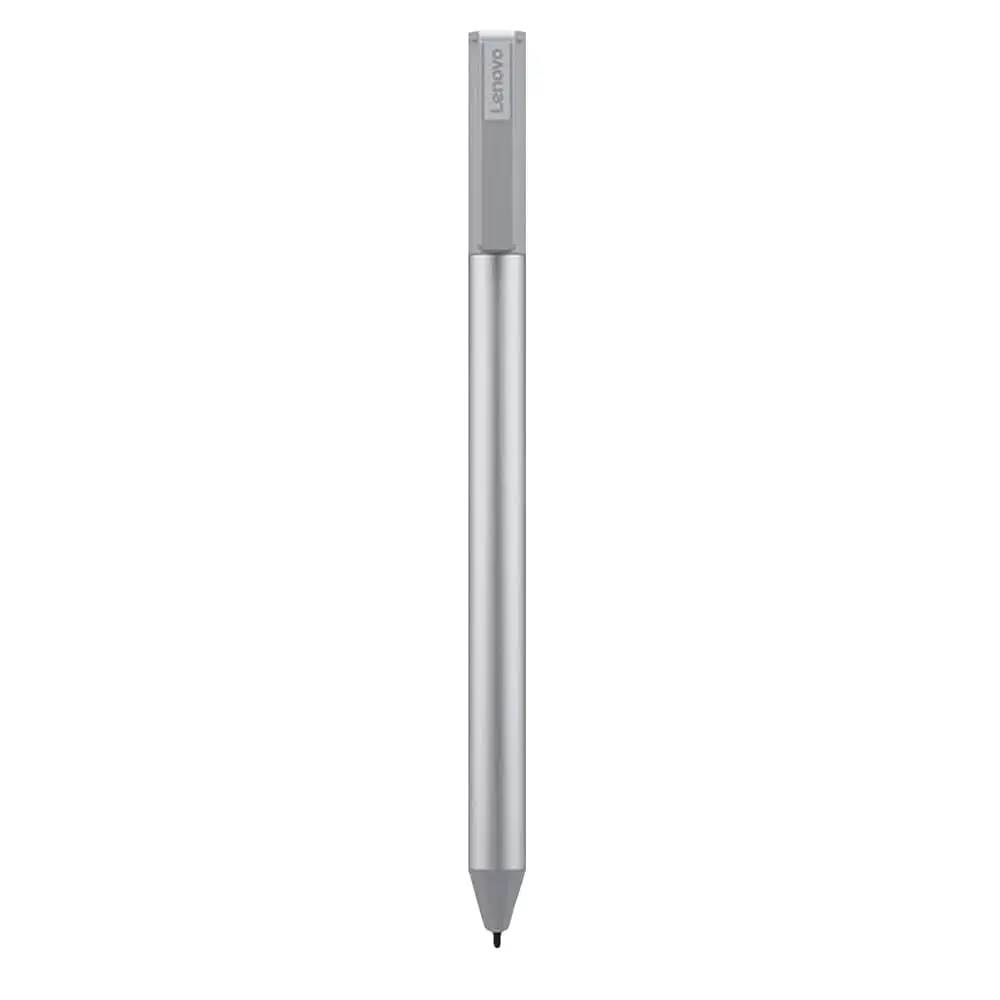
A 1.9-star average on Amazon for the original model sets a stark tone for the Lenovo USI Stylus Pen for Chromebook, Grey, but newer iterations—like the USI Pen 2—score closer to 4.0/5 on Best Buy. This dramatic gap suggests the experience depends heavily on which version you buy, your device, and your intended use. While some Chromebook owners call it “the best pen ever” for note-taking, others dismiss it as “terrible” for artistic work and complain about skipped lines and poor palm rejection.
Quick Verdict: Conditional — worth it for basic ChromeOS note-taking, risky for art or precision-heavy work.
| Pros | Cons |
|---|---|
| Smooth integration with most USI-compatible Chromebooks | Performance is app-dependent; poor in some art programs |
| Solid build and comfortable weight | No strong magnet/holder; easy to lose |
| No pairing/bluetooth needed – works right out of the box | Some users report hypersensitivity and skipped strokes |
| Decent pressure sensitivity for notes/sketches (4096 levels) | Stylus tips wear quickly or break for heavy artists |
| Long battery life advertised (150 days or 1 year USI Pen 2) | Some units hard to initially connect; no on/off button |
| Lightweight but sturdy feel | Not ideal for precision shading or fast drawing |
Claims vs Reality
Lenovo markets the pen with “industry-leading 4096 levels of pressure sensitivity” and “paper-like writing,” plus “up to 150 days battery life” for the original model and “1 year” for the Pen 2. On paper, that pushes it toward premium territory, promising natural note-taking and sketching for ChromeOS.
Yet feedback shows these claims hinge on the app used. Reddit user u/(name redacted) reported, “Squid was excellent. Little to no latency, great palm rejection, smooth lines. Onenote had noticeable latency… Medibang was just simply… awful. No pressure sensitivity detection, awful latency, terrible palm rejection.” This app dependency means “paper-like” is only achievable in certain scenarios—fine for general notes, but far from universal.
Battery life claims also draw mixed reactions. An Amazon reviewer warned, “the battery hardly lasts a week with intermittent use,” directly contradicting Lenovo’s 150-day estimate. Others, using it less intensively, haven’t yet run theirs down. This suggests the claim represents best-case usage, not the average.
Lenovo also pushes “seamless ChromeOS compatibility.” That’s generally accurate: a Best Buy buyer said, “It works right out of the box — no pairing or Bluetooth needed.” But another customer noted, “Took forever for it to connect the first time… and it shuts off when you don’t use it for a bit,” revealing occasional syncing frustrations despite the plug‑and‑play promise.
Cross-Platform Consensus
Universally Praised
For basic note-takers and students, this pen earns consistent praise. Best Buy user sheirah enthused, “I love this pen! It works so well with my Lenovo Duet 5… I use it to journal as well.” Many highlight the comfort of use: shaffer1205 said, “Glides well on my Chromebook, has a nice size and weight to it. It’s nothing fancy… but I don’t need anything fancy either.”
The lack of pairing requirements appeals to casual users switching between multiple USI devices. As celindat described, “Works with any device that supports the USI standard, super convenient.” This makes it a flexible tool for people who move between Chromebooks, tablets, and even supported non-Lenovo devices.
Even early critics see hardware promise. The Reddit reviewer observed, “I firmly believe the hardware is good and will be improved by software,” pointing to potential longevity if ChromeOS stylus support continues to mature.
Common Complaints
Two recurring frustrations dominate: attachment/storage and tip durability. Multiple Best Buy buyers, like pjk002, complained, “No where to attach the stylus… not strong enough to hold in place on my Duet.” Lost pens are common—Amazon users lament buying a second unit after misplacing the first. Without a clip, magnet, or case slot, portability feels precarious.
Tip wear is another pain point, especially for artists. User jazz noted, “After about 4 months it needs to be replaced… the tip breaks off.” For those sketching daily, this short lifespan can add upkeep costs.
Performance flaws surface more in creative use. The Reddit test saw solid UI navigation but pronounced latency in Onenote and Krita, and unusable performance in Medibang. Palm rejection inconsistencies plague artists: “Palm rejection malfunctions from time to time,” wrote one Amazon buyer, who also found the pen registering strokes “before contact is made with the screen.”
Divisive Features
Pressure sensitivity splits opinion. Some, like celindat, call it “solid… great for drawing or shading.” Others, including that Reddit reviewer, found it unusable in certain apps lacking proper USI support. Similarly, the smooth plastic tip is divisive—jeffersonm found it “a little too smooth on my screen,” wishing for an Apple Pencil‑style alternative.
Battery life sparks debate too. Light users back Lenovo’s longevity claims, but heavy or inconsistent users—like the Amazon buyer who saw just a week’s use—feel misled. Factors like auto-sleep timing, battery brand, and daily app choice all seem to affect run time.
Trust & Reliability
Long‑term durability is mixed. While no pattern emerges of unit failure within months, tip fragility and cosmetic wear are concerns. The biggest reliability threat is from ChromeOS app support: as Reddit’s review emphasized, software performance is “quite app‑dependent,” meaning an OS update or app change could drastically alter the pen’s usefulness for your workflow.
The original GX81B10212’s low Amazon rating (1.9/5) points to early‑model flaws and possibly inconsistent quality control. Newer Pen 2 models fare far better, averaging 4.0/5 at Best Buy, suggesting Lenovo addressed some earlier shortcomings.

Alternatives
One Amazon reviewer replaced their Lenovo pen with a Penoval USI stylus, praising its USB‑C charging and top‑of‑pen eraser: “No glitching! Way better than Lenovo’s USI pen.” For artists, this suggests exploring third‑party USI options could bring better latency and ergonomics, especially if you want rechargeable rather than disposable AAAA power.
ChromeOS’ USI standard means competitors will mostly work cross‑brand, allowing for experimentation beyond Lenovo’s own ecosystem.
Price & Value
Pricing fluctuates widely: $15.99 on Amazon for older versions (plus steep shipping in some regions), $40.99 retail for the Pen 2, and higher for international imports. eBay sees $24.99 new to $89.98 for open‑box collectibility or rare bundles. Given the risk of loss and tip wear, budget buyers may balk at repeated replacements.
Community tips include buying rechargeable AAAA batteries to cut long‑term costs and checking your Chromebook’s USI support list before purchase. Some note UK bundles include a pen holder that US buyers must source separately—adding $20+ to match that convenience.
FAQ
Q: Does the Lenovo USI Pen work with all Chromebooks?
A: It works with USI-compatible ChromeOS devices. Best Buy users confirm success on Duet, Flex 5/5i, and even Pixel Tablet. Some models (like IdeaPad Duet Chromebook in Japan) may be excluded—check Lenovo’s compatibility list.
Q: How long does the battery actually last?
A: Lenovo claims 150 days (Pen 1) or 1 year (Pen 2) at 2 hours daily use. Light users report long life, but heavy users on Amazon saw as little as a week per AAAA battery.
Q: Is it good for drawing and art apps?
A: For now, only select apps like Squid deliver smooth, low‑latency drawing. Many art programs on ChromeOS suffer from lag or lack full pressure sensitivity with this pen.
Q: Can the tip be replaced?
A: Yes, tips are replaceable, but replacements aren’t always bundled. Several users wish for alternative textures like Apple Pencil’s.
Q: Does it have a built‑in magnet or clip?
A: No strong attachment is built in. Some report weak magnetic points on certain devices, but many rely on separate holders to prevent loss.
Final Verdict: Buy if you’re a Chromebook note‑taker, student, or light sketcher wanting instant USI compatibility. Avoid if you need pro‑level art performance or secure pen storage. Pro tip: as one Amazon buyer learned, invest in a rechargeable AAAA battery set and a third‑party holder to get the most from it.





