TP-Link Tapo T100 Review: Conditional Buy (7.6/10)
A one-minute bottleneck inside Google Home is the detail that keeps popping up—and it shapes how TP-Link Tapo Motion Sensor (Tapo T100) feels in real homes. Verdict: Conditional buy — 7.6/10.
On paper, TP-Link positions the T100 as a compact, battery-powered motion sensor with “instant alerts,” a “modifiable detection interval,” and a claimed “2-year battery life.” Digging deeper into user reports, the hardware itself often gets described as quick, but cloud integrations and automation settings can introduce delays that some people initially mistake for sensor lag.
Reddit user [u/17su1m***] said: “After motion is detected, lights will turn on in 1-2 seconds… the notification will arrive in 3-4 seconds,” but also warned that “google home won’t update the state during a whole minute.”
Quick Verdict
Yes/No/Conditional: Conditional — strong value if you’re already in the Tapo ecosystem (or willing to add a hub), but expectations should be set around hub dependency and third‑party automation timing.
| What matters | What feedback suggests | Who it impacts most |
|---|---|---|
| Speed to turn on lights | “Lights will turn on in 1-2 seconds” (Reddit) | Hallways, closets, night lighting |
| Notification speed | “Notification… in 3-4 seconds” (Reddit) | Security-minded users |
| Cooldown / state updates in Google Home | “Won’t update… during a whole minute” (Reddit) | Google Home automations |
| Detection range realism | “Tapo says 7 meters, i got 6” (Reddit) | Larger rooms/hallways |
| Setup friction | “Connected it up in no time” (TP-Link Community) | New smart-home users |
| Hub requirement | Explicitly required in specs and reviews | Anyone expecting standalone |
Claims vs Reality
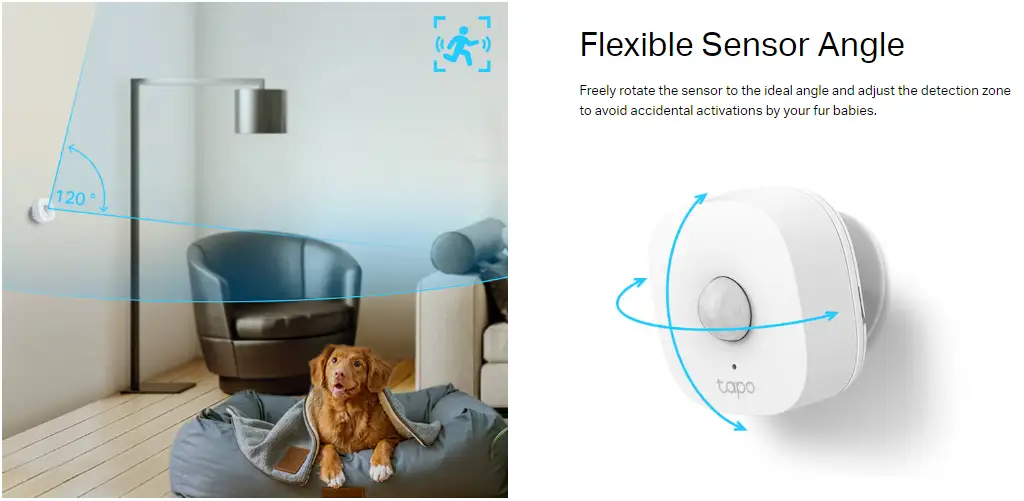
TP-Link’s marketing leans hard on configurability: adjustable sensitivity, rotatable sensor angle, and a “detection interval from 4 to 60 seconds.” The gap shows up when people try to use those fast intervals through third-party platforms.
Reddit user [u/17su1m***] said: “In the tapo app you can set a cool down time as low as 4 seconds… however, in google home it looks like the minimum time between events is 1 minute.” For a Google Home household automation user, that means the app may show fewer state transitions than the hardware is actually detecting, which can make presence-based routines feel sluggish.
Another big claim is “instant alerts & app notification.” One Reddit report supports near-real-time behavior in practice: Reddit user [u/17su1m***] said, “The notification will arrive in 3-4 seconds,” describing it as consistent across multiple tests. But that same user framed it as “cloud based,” adding: “Being cloud based is not bad, should get better when it gets matter support.” The reality, for that user, wasn’t unreliability—it was that cloud integration has ceilings depending on where you’re viewing the state.
Finally, “flexible sensor angle… to avoid accidental activations by your fur babies” is a promise about cutting false triggers. In the limited user data specifically about the T100, one Reddit user described good results on higher sensitivity without false positives in their corridor: Reddit user [u/17su1m***] said, “In the high setting works great even at long distance… and i’ve not had false positives so far.” That’s encouraging—but it contrasts with broader TP-Link community complaints about motion detection quality on cameras, where a forum poster said their device was “getting triggered by almost everything, like car lights and all kind of shadows.” (TP-Link Community). Those reports aren’t the T100 sensor itself, but they show how “motion detection” experiences can vary wildly across the ecosystem.
Cross-Platform Consensus
A recurring pattern emerged: people who treat the T100 as an automation trigger (lights, routines, occupancy-like behavior) often describe it as fast and “good value,” while people expecting granular control through Google Home can run into timing limits that feel like an artificial delay.
Universally Praised
Speed is the headline when the sensor is used to trigger lights. Reddit user [u/17su1m***] framed it in human terms—walking into a space and having the lighting respond almost immediately: “Lights will turn on in 1-2 seconds.” For hallway lighting, bathroom night trips, or closet/wardrobe scenarios, that kind of response time is what makes motion-based automation feel natural rather than gimmicky.
Setup also gets framed as simple when the user already accepts the hub model. A TP-Link Community poster (feature request thread about non-movement time) said: “Just purchased the motion sensor and hub, connected it up in no time and it works great.” That “in no time” phrasing suggests the app flow is approachable for beginners—especially people already buying into the Tapo Hub requirement.
Configurability—especially sensitivity—shows up as a practical tool rather than a marketing bullet. Reddit user [u/17su1m***] said, “By default it’s normal… but in the high setting works great even at long distance,” and quantified it: “Tapo says 7 meters, i got 6.” For renters or apartment dwellers, that “close to spec” distance can mean one sensor covers a corridor without needing multiple units.
- Reported fast light triggers: “1-2 seconds” (Reddit)
- Straightforward setup with hub: “connected it up in no time” (TP-Link Community)
- Range near claimed spec in one corridor: “got 6” meters (Reddit)
Common Complaints
The most specific and repeated frustration is not the sensor’s detection, but how third-party platforms interpret its states. Reddit user [u/17su1m***] described a hard limit: “Google home won’t update the state during a whole minute.” If you’re a Google Home Script Editor power user trying to build nuanced “motion started” vs “motion ended” logic, that can ripple into longer-than-expected off-delays. The same user explained the downstream effect: “the motion ended notification will arrive after 3 minutes instead of the expected 2 minutes.”
There’s also confusion between “detection interval” and “how long the lights stay on,” which appears in the TP-Link Community thread. The original poster complained: “2 mins for non detection of movement is far too long,” then later clarified after staff replied that they meant the automation’s on-duration, not the sensor interval: “It wasn’t the detection time… it was the time the lights stayed on… found another setting in my automation profile.” That arc suggests a learning curve: the T100 has multiple timing layers (sensor interval vs automation duration), and it’s easy to blame the hardware for what’s really an automation rule setting.
Finally, hub dependence is consistently flagged in official materials and third-party writeups. The T3 review put it plainly: “don’t forget you’ll need a tapo hub to make it work.” For buyers expecting a direct Wi‑Fi sensor, that requirement can feel like an extra hidden cost.
- Google Home timing limit: “won’t update… during a whole minute” (Reddit)
- Confusion over timing settings: “wasn’t the detection time… it was the time the lights stayed on” (TP-Link Community)
- Hub requirement reminder: “you’ll need a tapo hub” (T3)
Divisive Features
Cloud-based integration is where opinions split. Reddit user [u/17su1m***] took a pragmatic stance: “being cloud based is not bad,” especially given their consistent performance and expectation that Matter support improves things. For automation-first households, a stable 1–2 second light trigger can outweigh concerns about cloud hops.
On the other hand, if your smart home philosophy is “local-first,” the same cloud dependency becomes a risk factor—less about speed and more about platform limitations (like the one-minute Google Home state update window) and how those limits shape what the sensor can do in practice.
Trust & Reliability
False alerts and “fussy” motion systems show up in TP-Link community discussions, particularly around cameras and motion alerting. A TP-Link Community user (robintes) said their motion alert system “gives way to many false alerts,” and complained there were “only 3 settingd for sensitivity low med and high,” plus a persistent notification sound they “could nt turn… off.” That thread reads like someone overwhelmed by alert spam and trying to throttle notifications to cope.
At the same time, the most detailed Tapo T100-specific Reddit report is the opposite tone: Reddit user [u/17su1m***] said timing was “pretty consistent and hasn’t failed in any of the tests,” and added, “i’ve not had false positives so far.” Digging deeper into user reports, that contrast may reflect product category differences (sensor vs camera analytics) and setup context, but it’s still a trust signal split: some TP-Link motion experiences frustrate people; one T100 owner describes stable behavior.
Long-term durability stories are limited in the provided data. The closest “time horizon” signal comes from the same Reddit post referencing ongoing usage and a later platform change: Reddit user [u/17su1m***] noted a “matter update (2024)” and described how the device was then recognized differently (“occupancy sensor instead of motion sensor”). That points to evolving behavior via hub firmware updates—good for feature growth, but it can also change how automations need to be written.

Alternatives
Only a few direct alternatives are mentioned in the dataset, but they clarify the T100’s positioning as a value play.
Reddit user [u/17su1m***] framed their purchase as impatience with another ecosystem: “tired of waiting for the aqara p2 motion sensor, i just got a tapo t100.” For someone who prioritizes availability and quick setup over waiting for a specific standard (like Thread-based sensors), the T100 becomes the pragmatic choice.
The same user also contrasted pricing and ecosystem flexibility: “the eve motion sensor alone is more expensive than the t100 sensor and h100 hub together.” That’s a clear value narrative: even after adding the required hub, the Tapo route can still come out cheaper than premium sensors.
- Aqara P2: cited as a “waiting” alternative (Reddit)
- Eve Motion Sensor: cited as pricier than T100 + hub (Reddit)
Price & Value
The pricing signals in the dataset paint the T100 as budget-friendly, but with a catch: the hub. The TP-Link Tapo official store listing shows the Tapo T100 at “$19.99,” while the Reddit user [u/17su1m***] referenced the hub cost as “like the 20 € tapo h100.” That frames a realistic starting cost as “sensor + hub,” not just the sensor.
From a value perspective, the strongest argument is that users see real automation speed at a low buy-in. Reddit user [u/17su1m***] even compared it favorably to a prior product: “i had a wiz motion sensor… acting weird and this one… seems to perform better.” For frugal smart-home builders, that story suggests the T100 can be an inexpensive fix for flaky motion-triggered lighting.
Community buying tips also show up as practical configuration advice rather than shopping hacks. Reddit user [u/17su1m***] suggested removing smart bulb fade-in to make automation feel faster: “remove the fade-in… with 0 seconds the automation will be perceived as faster.” That’s an example of maximizing perceived value without spending more.
- Typical outlay: sensor price plus required hub cost (Official store + Reddit)
- Perceived value lever: adjust bulb fade-in for faster feel (Reddit)
FAQ
Q: Does the TP-Link Tapo T100 need a hub?
A: Yes. Official specs state “hub required: yes,” and reviewers repeat it. T3 noted: “don’t forget you’ll need a tapo hub to make it work.” Reddit user [u/17su1m***] also said it “needs the tapo hub (like the… tapo h100).”
Q: How fast is it for motion-activated lights?
A: One detailed Reddit report describes near-instant lighting: Reddit user [u/17su1m***] said, “After motion is detected, lights will turn on in 1-2 seconds.” They also described notifications arriving in “3-4 seconds,” suggesting the sensor can feel responsive for hallway or room lighting automations.
Q: Why do my Google Home automations feel delayed?
A: A Reddit user points to a platform limit rather than sensor lag. Reddit user [u/17su1m***] said Google Home “won’t update the state during a whole minute,” even though the Tapo app can set cooldown to “4 seconds.” That can delay “motion ended” logic in scripts and routines.
Q: Can I adjust sensitivity and range?
A: Yes—there are three sensitivity levels, and one user found higher sensitivity improved corridor performance. Reddit user [u/17su1m***] said “in the high setting works great even at long distance,” adding, “Tapo says 7 meters, i got 6.” Official specs list a max “7 m / 23 ft.”
Q: Can I change how long the lights stay on after I leave?
A: Often yes, but the setting may live in the automation or the bulb rule—not the sensor itself. A TP-Link Community user initially complained “2 mins… is far too long,” then clarified: “It wasn’t the detection time… it was the time the lights stayed on… found another setting in my automation profile.”
Final Verdict
Buy TP-Link Tapo Motion Sensor (Tapo T100) if you want affordable motion-triggered lighting or basic alerts and you’re fine adding a hub; Reddit user [u/17su1m***] described “lights… in 1-2 seconds” and performance that “hasn’t failed in any of the tests.”
Avoid it if your main use case depends on rapid state transitions inside Google Home scripts; the same Reddit user warned Google Home “won’t update the state during a whole minute,” which can stretch “motion ended” timing beyond what you expect.
Pro tip from the community: Reddit user [u/17su1m***] said to “remove the fade-in” on smart bulbs so the automation “will be perceived as faster.”