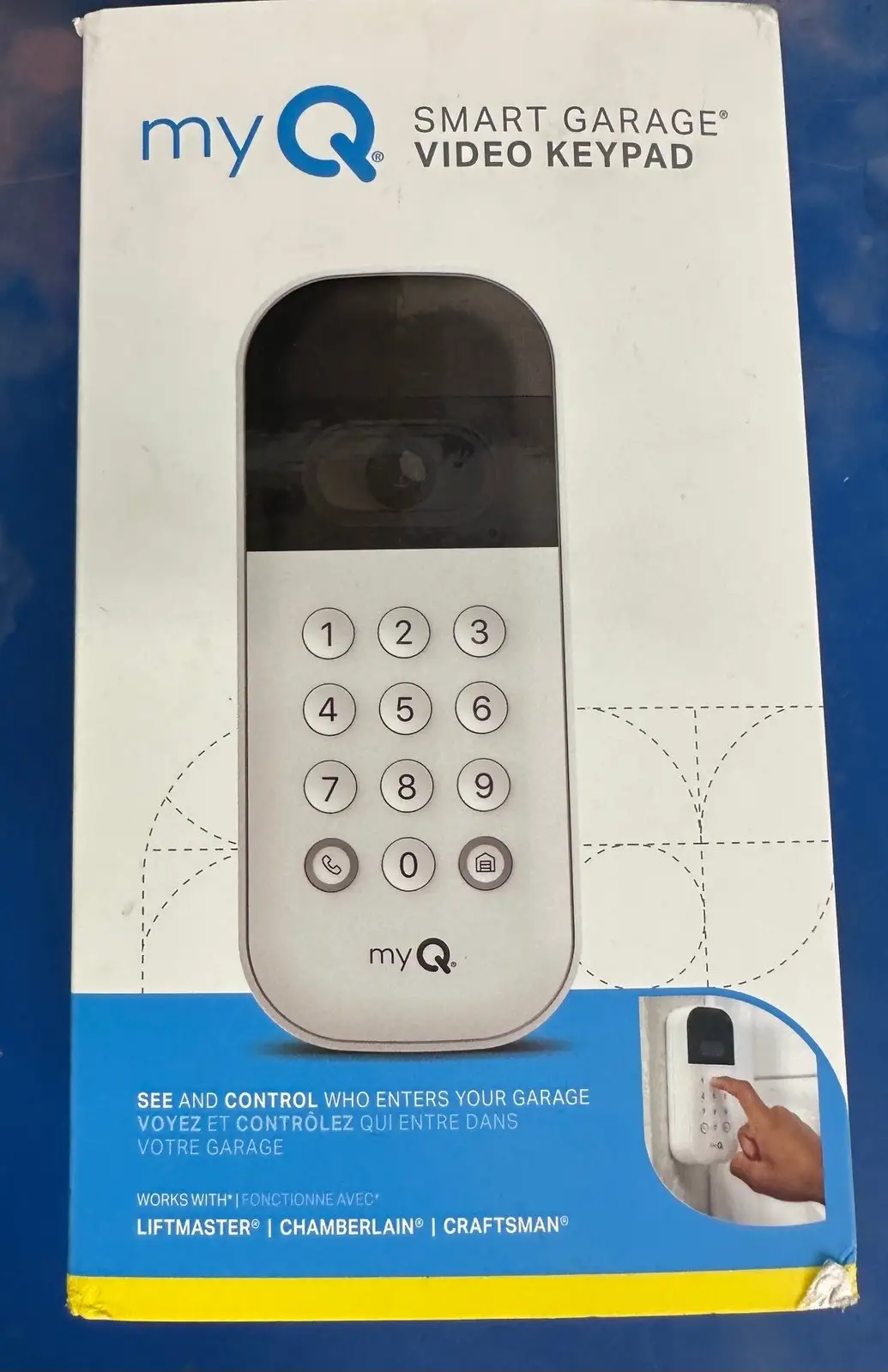
myQ Smart Garage Video Keypad Review: Conditional Buy 7.2/10
“Changing the battery, which dies every week is a hassle…” That single Best Buy line captures the biggest tension around the myQ Smart Garage Video Keypad: people love the idea of a “video doorbell for the garage,” but real-world upkeep, Wi‑Fi dependence, and paywalled features can turn the promise into a chore. Verdict: Conditional buy — 7.2/10.
Quick Verdict
The myQ Smart Garage Video Keypad is a conditional yes: it shines for single-door garages with solid Wi‑Fi and households that value PIN management and live video, but it’s a tougher sell if you have two doors, spotty signal, or low tolerance for charging routines and subscriptions.
| Decision | What Users Loved | What Users Disliked |
|---|---|---|
| Best for | Easy keypad upgrade + video | Battery removal/charging hassle |
| Single-door homes | Guest codes + “call” button | Cannot control multiple openers |
| Tech-comfortable users | Smooth app setup | App glitches / delayed alerts |
| Busy driveways | Wide view, notifications | Motion sensing inconsistency |
| Subscription-okay | Video history usefulness | Cloud storage paywall |
Claims vs Reality
The myQ Smart Garage Video Keypad is marketed as “all-seeing, always alert,” with “advanced motion detection” and instant notifications. Digging deeper into user reports, motion detection and alerting look highly dependent on placement, traffic level, and Wi‑Fi strength. A Best Buy reviewer named dan 0 sterling liked the concept but said motion sensing wasn’t dependable: “It will also record for some movement, but not reliably. Cameras I have from euffy and arlo work much more reliably.” For a homeowner expecting doorbell-like motion performance, that gap matters—especially if the garage faces a sidewalk or street.
Battery life is another area where marketing language (“battery-powered, wireless design”) collides with day-to-day reality. Some users describe acceptable drain, but others hit worst-case outcomes. Best Buy reviewer spekta tor 66 wrote: “Changing the battery, which dies every week is a hassle… The wireless signal always shows as middle to low… waste of money.” Meanwhile, other owners plan around it by buying extra batteries: Best Buy reviewer corey said, “I bought a second when they were on sale to have another battery and that works really awesome.” For practical buyers, the device may work best as a system you maintain—more like a gadget with a charging schedule than a “set-and-forget” keypad.
Cloud recording and “smart detection” features are widely presented as part of the security story, but user feedback repeatedly points to the paywall as the dividing line. Best Buy reviewer call me ageeth praised the device while still pushing back on subscriptions: “The biggest drawback is that cloud storage is put behind a paywall… I wish there was some free option for a shorter amount of cloud video storage.” For shoppers who want a simple keypad plus occasional live check-ins, the no-subscription experience can be fine; for anyone buying it as a true video security system, multiple users warn the “optional” plan doesn’t feel optional.
Cross-Platform Consensus
Universally Praised
A recurring pattern emerged: when the myQ Smart Garage Video Keypad is installed in the “right” environment—single-door garage, decent Wi‑Fi near the mounting spot, and an owner comfortable with app-based setup—people describe it as a meaningful upgrade from a basic membrane keypad.
Ease of installation is one of the most consistent wins, especially for homeowners replacing an older keypad. A verified Best Buy reviewer named shopper kept it simple: “Easy to install. Great picture. Happy with the upgrade.” Another Best Buy reviewer, techgeek, echoed the setup experience: “Installation and set up were a breeze… seamlessly detected the local wi-fi for connectivity via the myq app.” For DIY-okay users, the impact is straightforward: the device feels like a modern swap-in that adds video and smart access without running wires.
PIN management is repeatedly framed as the feature that changes routines for families and frequent visitors. Best Buy reviewer pooh kado explained the household benefit: “I can assign friends / family their own codes so they have access if i’m not home.” This matters for parents, pet sitters, cleaners, and delivery coordination—especially for people who dislike sharing a single static code.
The camera + “call”/two-way audio concept also lands well as a “garage doorbell.” Best Buy reviewer corey described the value in real life: “You get to see who is ‘calling’ when they are trying to get in.” Another verified Best Buy reviewer, as tu lr, focused on media quality: “The video and audio is excellent and i am happy with the purchase.” For households using the garage as the main entry, those interactions can replace texts like “I’m outside” with a single button press and live check.
Common Complaints
The most repeated complaint is battery management—both how long it lasts and how annoying it is to recharge. For users in cold climates or high-traffic driveways, the battery story can get grim fast. A reviewer on Sharvibe wrote: “In cold chicago winters, i only get about 6-7 weeks before needing to recharge. And when it dies, you lose all functionality until it’s charged again—no keypad, no camera.” That “all-or-nothing” failure mode hits hard for anyone who relies on the keypad as their primary entry method.
Even when battery life is acceptable, the charging process is a sore spot because it can mean downtime. Best Buy reviewer jc 1503 contrasted it with old-school keypads: “My ‘dumb’ garage door key pad… battery has lasted almost 3 years…” and argued the smart version should last longer. Best Buy reviewer spekta tor 66 made the maintenance burden explicit: “Changing the battery… is a hassle because of a small screw that secures it.” The user-type impact is clear: for people who want a traditional keypad’s “years-long battery” simplicity, this product can feel like a step backward in convenience.
Connectivity and Wi‑Fi sensitivity is the other major theme. Users frequently recommend extenders or note poor signal warnings. The Sharvibe reviewer offered a blunt workaround: “If your wi-fi signal is weak near your garage, consider getting an extender… The camera feed gets choppy without strong connectivity.” Best Buy reviewer spekta tor 66 described consistently weak signal despite an extender: “No other wireless device i own… performs as poorly as this thing.” For garages at the edge of a property or with thick walls, this becomes a deciding factor—because the keypad’s “smart” features and even some core functionality can depend on a stable connection.
Finally, multiple reviewers complain that key security-camera expectations are locked behind a subscription and that there’s no local storage fallback. Best Buy reviewer suhd wrote: “At this price point, a local sd card option should be available.” For privacy-focused buyers or anyone tired of adding monthly fees, the paywall shows up as a recurring frustration across platforms.
Divisive Features
Subscriptions are the most polarizing issue, and the split isn’t just about cost—it’s about principle and precedent. On Reddit, a Tesla Model Y community discussion about MyQ integration captured the emotional divide around paying for connected features. Reddit user (username not provided in the excerpt) said: “Having a subscription for this is stupid.” Yet that same poster admitted: “…it works flawlessly… works out to about $4 and change per month. To me, it’s worth it.” For convenience-driven owners, the fee becomes “just another subscription,” tolerated because it simplifies daily life.
Other Reddit commenters were far less forgiving. Reddit user (username not provided in the excerpt) argued the fee is unjustified: “…it’s 5 completely unjustified dollars that i wasn’t spending before.” Another Reddit user (username not provided in the excerpt) framed it as a dangerous trend: “…it sets a precedent for companies milking extra dollars from customers through subscription fees for unremarkable features.” The practical takeaway: shoppers who already pay for cloud cameras may accept it; subscription-averse users often see it as a deal-breaker, especially without local storage.
Trust & Reliability
Digging deeper into reliability, two trust themes emerge: occasional app glitches and long-term “will I keep this on my wall” doubts. In an expert-style review by Chirag Rohilla, the report mentions “the occasional glitch in the myq app” and describes errors that sometimes appear while loading live video: “A force-quit and restart of the app usually resolved these issues.” That kind of workaround can be fine for tech-forward households, but for anyone expecting “appliance-grade” reliability, it becomes a confidence problem.
On Reddit’s Home Assistant community, the hostility is less about this specific keypad’s hardware and more about broader distrust of MyQ’s ecosystem direction. Reddit user (username not provided in the excerpt) mocked the charging design: “Reminds me of that apple mouse where you have to turn it upside down to charge it.” Another user (username not provided in the excerpt) predicted future monetization: “I’m sure there’s a monthly subscription fee waiting in the wings.” For buyers who value platform openness and long-term stability, those sentiments suggest a trust gap that can outweigh the hardware’s day-one appeal.
Alternatives
Only a few alternative brands are explicitly mentioned in the provided data, and they appear mostly as comparisons for camera reliability. Best Buy reviewer dan 0 sterling said: “Cameras i have from euffy and arlo work much more reliably.” That comparison is less about keypad functionality and more about motion detection consistency and camera ecosystem maturity.
For shoppers deciding between “one integrated garage solution” versus “separate keypad + separate camera,” those comments hint at a practical split: myQ Smart Garage Video Keypad offers convenience and a unified app for garage access, while brands like Eufy and Arlo are brought up as more dependable for camera-style motion capture. If your priority is video surveillance quality first, the feedback suggests some owners trust dedicated camera brands more.
Price & Value
Officially, the myQ Smart Garage Video Keypad is positioned around the $79.99–$99.99 range depending on listing and timing, and the value perception swings heavily based on whether buyers need extra accessories (Wi‑Fi extenders, spare batteries, optional mounts) and whether they plan to pay for cloud storage.
Discounts change the tone dramatically. Best Buy’s listing shows the product appearing at a steep sale price, and several reviewers hint that buying “on sale” improves satisfaction. Verified Best Buy reviewer bby 23 said: “Glad we bought it on sale…” That matches a broader pattern: people are more forgiving of battery and subscription limitations when the upfront price feels like a bargain.
Resale and secondary-market pricing appears active, with new and used listings on eBay around the mid-$40 range in the provided data. For deal-hunters, that suggests a buying tip: if you’re unsure about battery life in your climate or your garage’s Wi‑Fi, a discounted price may reduce the risk of disappointment.
FAQ
Q: Can the myQ Smart Garage Video Keypad control two garage doors?
A: No—multiple users say it only controls one opener. A verified Best Buy reviewer named Scott S wrote: “This keypad cannot control more than a single garage opener.” Another verified Best Buy reviewer, jc 1503, called it out bluntly: “It can only control one door!!!”
Q: Do you need a subscription to use it?
A: You can use core features without paying, but cloud video history and some advanced alerts are tied to a plan. Verified Best Buy reviewer call me ageeth said: “The biggest drawback is that cloud storage is put behind a paywall.” Several reviewers treat the subscription as necessary for “full” functionality.
Q: How is battery life in real use?
A: It varies wildly by traffic, temperature, and settings. A Sharvibe reviewer reported: “In cold chicago winters, i only get about 6-7 weeks before needing to recharge.” But Best Buy reviewer buck babes said: “In a week, it used 9% of its capacity.”
Q: Is charging straightforward?
A: Users often describe charging as inconvenient because it can require removing the device and dealing with a security screw. Best Buy reviewer spekta tor 66 said: “Changing the battery… is a hassle because of a small screw that secures it.” Several people recommend buying a spare battery to avoid downtime.
Q: Does it work well with weak garage Wi‑Fi?
A: Many reports suggest Wi‑Fi quality strongly affects experience, especially video. A Sharvibe reviewer advised: “If your wi-fi signal is weak near your garage, consider getting an extender… The camera feed gets choppy without strong connectivity.” Some Best Buy users also complain about persistently low signal.
Final Verdict
Buy the myQ Smart Garage Video Keypad if you have one garage door, strong Wi‑Fi at the mounting spot, and you’ll genuinely use features like guest PIN scheduling, live view, and the “call” button—Best Buy reviewer pooh kado summed up that lifestyle shift: “I just wanted a keypad but got so much more!”
Avoid it if you need multi-door control from one keypad, hate recurring subscriptions, or want a truly low-maintenance keypad with years-long battery life—Best Buy reviewer jc 1503 captured that frustration: “My old ‘dumb’ keypad could open and close both doors… but myQ ‘smart’ video keypad can’t???”
Pro tip from the community: plan for real-world upkeep—Best Buy reviewer corey recommends the practical workaround: “I bought a second… to have another battery and that works really awesome.”