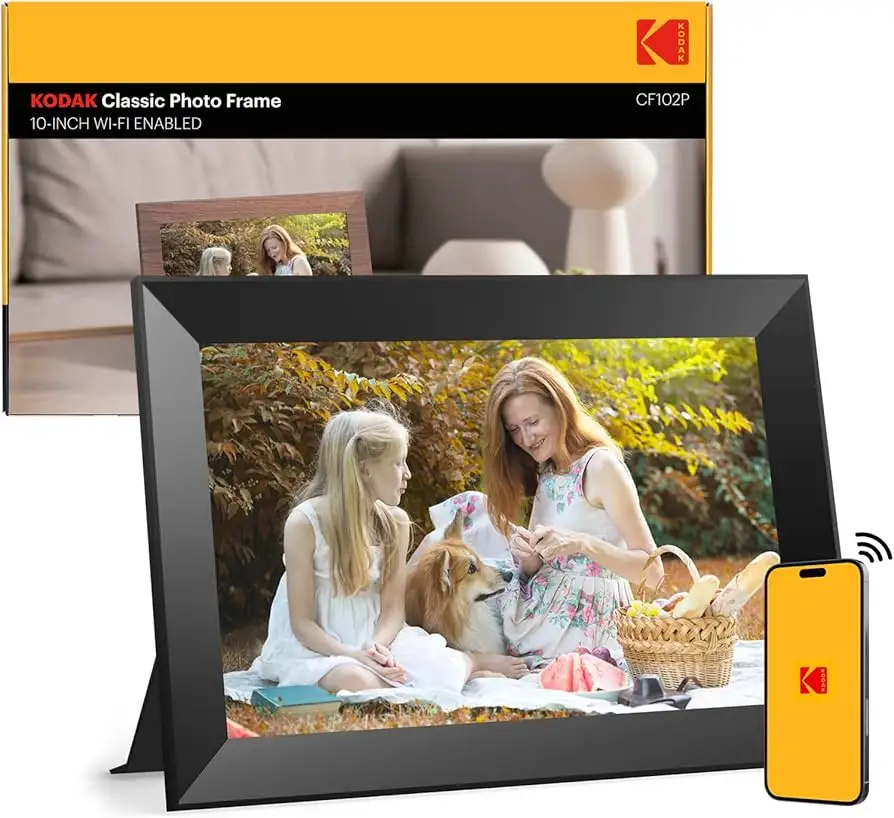
KODAK 10.1 WiFi Digital Picture Frame Review: 6.8/10
A battery-powered photo frame that “only lasted 16 months” for one buyer—yet “one of the best and most convenient products” for another. That whiplash sums up the KODAK 10.1 Inch WiFi Digital Picture Frame: appealing hardware with software and service risks that can sink the experience. Verdict: conditional buy, 6.8/10.
Quick Verdict
Yes—conditionally. If you’re comfortable troubleshooting Wi‑Fi/app quirks (or loading photos via SD card/USB), many owners love the screen and the “family connection” angle. If you need a smooth, reliable cloud/app experience for non‑tech users, complaints about setup, upload limits, and paywalls show up fast.
| What shows up in feedback | Evidence (platform) | What it means |
|---|---|---|
| Strong display quality | Amazon reviewer said: “High quality screen… picture quality is great.” | Great for desks/living rooms where image quality matters |
| Software/app friction | Amazon reviewer said: “Great hardware, bad software.” | Expect setup and Wi‑Fi headaches for some households |
| Upload/workflow limits | Amazon reviewer said: “Upload them 9 at a time… that is the upload limit.” | Sharing lots of photos can feel slow and tedious |
| Wi‑Fi band limitation | Amazon reviewer said: “It does not support 5ghz wifi, only 2.4 ghz.” | Modern routers may require extra configuration |
| Longevity concerns | Amazon reviewer said: “Only lasted 16 months!” | Durability risk if you want a “set and forget” frame |
| Potential cloud paywall surprise | Amazon reviewer said: “I need to pay $3, $5, or $10 a year…” | Ongoing costs may appear depending on model/service |
Claims vs Reality
Marketing for KODAK 10.1 Inch WiFi Digital Picture Frame leans hard on “easy to use,” instant sharing, and a modern connected experience. Digging deeper into buyer reviews, the gap isn’t the screen—it’s the system around it: the app, account verification, Wi‑Fi compatibility, and how you actually manage photos day to day.
One marketing promise is that setup is quick and friendly “for people of all ages.” Yet an Amazon reviewer described the opposite: “I received lots of errors when trying to connect it to wifi… finally discovered it does not support 5ghz wifi, only 2.4 ghz (outdated!).” For households that upgraded routers and forgot about 2.4 GHz naming and band steering, that limitation turns “a few steps” into an afternoon of troubleshooting—especially when the frame is meant for parents or grandparents.
Another promise is frictionless photo sharing through the app and cloud. Multiple users said the app experience can be the weak link. One Amazon reviewer wrote: “The app that’s supposed to simplify the process doesn’t work… their web site sends you a verification code… isn’t working as of this writing.” When the app breaks, people fall back to SD cards—ironically undermining the key reason to buy a Wi‑Fi digital picture frame in the first place.
Finally, product pages highlight video sharing, but real-world expectations get tempered by limits. A frustrated Amazon reviewer said: “Last thing I don’t like is you have to edit your videos so they are tiny clips… I like the videos the way I took them!” Another reported storage and upload constraints in practice: “I had to email myself over 80 photos and upload them 9 at a time through the app… (seriously?).” While officially positioned as a modern “share anywhere” frame, several stories frame it as a device that works best when you treat it like a traditional SD/USB slideshow.
Cross-Platform Consensus
Universally Praised
The clearest bright spot for KODAK 10.1 Inch WiFi Digital Picture Frame is the screen and overall “hardware feel.” Even reviews that criticize software tend to compliment the display. An Amazon reviewer who liked the experience said: “High quality screen, does a nice picture show.” Another echoed that baseline: “Picture quality is great.” For users who primarily want a clean 10-inch display for a desk—something that makes phone photos look “frame-worthy”—this is where Kodak gets the most consistent applause.
A recurring pattern emerged around gifting and family connection. For adult children setting up a frame for parents who don’t use social media, the product can deliver exactly the emotional punch promised. One Amazon reviewer called it “the picture frame that keeps families connected,” explaining: “My parents have no clue how to use social media… we simply connected it to their wi-fi and added images to the cloud which would appear on their frames instantly.” That story highlights the ideal persona: a tech-comfortable buyer who can do the initial setup and then keeps the photos flowing.
Build and aesthetics also show up as meaningful, especially for gift-givers who want something that looks like décor rather than a gadget. An Amazon reviewer described: “This is a beautiful photo frame, and feels very sturdy.” Another appreciated the physical design and placement: “It’s easy to position with the swivel stand, and the blue accents look great.” For wedding photographers or people giving client gifts, that “display piece” quality matters as much as specs.
Even customization gets some praise when the software cooperates. One Amazon reviewer highlighted slideshow controls: “You can change how it displays the photo transitions. You can also set the timing.” For office workers or home users who want a calmer, curated slideshow rather than chaotic motion effects, those controls can be the difference between “always on my desk” and “back in the box.”
Summary (praised most often):
- Display clarity and brightness (“high quality screen”)
- Giftability and emotional impact (“keeps families connected”)
- Sturdy feel/design and easy positioning (“feels very sturdy”)
Common Complaints
The most consistent complaint thread for KODAK 10.1 Inch WiFi Digital Picture Frame is software: setup friction, app/account issues, and Wi‑Fi quirks. One Amazon reviewer put it bluntly: “Great hardware, bad software.” They described “lots of errors” connecting to Wi‑Fi and then discovered the 2.4 GHz-only limitation. For non-technical households—or anyone buying it specifically to avoid tech support calls—that’s a major mismatch between marketing and lived experience.
Photo organization is another pain point, especially for users with large libraries. Instead of simple album workflows, one Amazon reviewer said: “I wish… you could make your own albums… It is tedious selecting like 40 pictures, then accidentally touching the wrong part of the screen & all of the pictures unselect!” Another review distilled the same desire: “Would like to be able to create individual albums.” For power users who want to curate “grandkids,” “vacations,” and “holidays,” the lack of smooth album management turns daily use into a chore.
Upload limits and media restrictions show up as a workflow breaker. One Amazon reviewer described being forced into a slow process: “I had to email myself over 80 photos and upload them 9 at a time through the app… only to have them not show up on the photo frame at all!” Another complaint focused on video: “You have to edit your videos so they are tiny clips.” For families who share lots of photos after events—or who want longer clips of birthdays and holidays—these constraints can make the device feel less like a living album and more like a restricted portal.
Durability and service expectations can also sour the experience. One Amazon reviewer warned: “Only lasted 16 months!” and described repeated troubleshooting with support, resets, and then a surprise message about needing to pay for cloud storage tiers: “I need to pay $3, $5, or $10 a year… Can’t find anywhere where it says I’d have to pay in the future.” For buyers who assume “Wi‑Fi frame” implies free sharing forever, that perceived paywall is a trust breaker.
Summary (complaints most often):
- Setup/app reliability issues (“verification code… isn’t working”)
- Wi‑Fi limitations (“only 2.4 ghz”)
- Tedious selection and weak album management
- Upload limits and short video expectations
- Longevity concerns (“only lasted 16 months”)
Divisive Features
The “connected” promise of KODAK 10.1 Inch WiFi Digital Picture Frame splits users into two camps: those for whom the cloud/app flow works, and those who feel trapped by it. On the positive side, an Amazon reviewer described a smooth experience where photos “would appear… instantly,” framing it as a way to keep parents “up to date with our current adventures.” That’s the best-case scenario: easy Wi‑Fi setup, reliable sync, and a family member willing to keep sharing.
On the negative side, another Amazon reviewer experienced the opposite: “The app that’s supposed to simplify the process doesn’t work.” A separate reviewer went further, saying: “Can only upload pics via the app,” and described USB/SD functions “did not work,” forcing email and app uploads “9 at a time.” For buyers who want redundancy—app plus easy local transfer—the device can feel brittle if one pathway fails.
Even “battery life” and portability themes collide with expectations. One buyer said “the battery life is what sold us on it,” yet their overall experience became “so much frustration” due to reliability issues. Meanwhile, other reports (including Trustpilot/Fakespot summaries) mention concerns like “the battery can’t even last a day,” showing how power expectations can vary sharply depending on model, settings, and usage.

Trust & Reliability
Trust signals around KODAK 10.1 Inch WiFi Digital Picture Frame get complicated when you look beyond star ratings. A Trustpilot/Fakespot-style analysis flagged potential review-quality issues, noting “there may be deception involved,” while also claiming “66.1% of the reviews are reliable.” That doesn’t prove any single review is fake—but it does suggest shoppers should weigh detailed, specific narratives (setup steps, Wi‑Fi bands, upload limits) more heavily than vague praise.
Long-term reliability is one of the most consequential risks in the dataset. The most concrete durability story comes from Amazon: “Only lasted 16 months!” The reviewer described multiple rounds with customer service, attempts to reset and rebuild folders, and then encountering a storage payment prompt. For buyers gifting this to older relatives, the worst-case scenario isn’t just failure—it’s remote troubleshooting across distance.
There’s also a “supportability” layer to trust: setup materials and instructions. One Amazon reviewer complained: “There should be a manual included… about 5 sentences of english was not a lot of help.” When a product is marketed as easy for all ages, thin documentation can amplify every software hiccup into a perceived defect.
Alternatives
Only a few competitors are explicitly named in the provided data, and they’re mentioned mostly as comparisons when Kodak falls short.
Pix-Star’s blog positions Kodak frames as having “buggy software and confusing interface,” and claims Kodak’s cloud setup is “very limiting,” including a statement that you can “only send 6 photos at a time” and only to “one kodak frame at a time.” Whether or not every limitation applies to every Kodak model, that critique overlaps with Amazon stories about upload limits and app friction. If your priority is managing multiple frames across a family, Pix-Star’s described “multi-frame control group” and remote management features are presented as the reason to switch.
Nixplay is also name-checked in the Pix-Star comparison set as a “top frame.” The key takeaway from the comparison text is less about panel specs and more about ecosystem: cloud features, remote control, and multi-frame management. If you’re buying for grandparents and want fewer tech-support calls, those ecosystem capabilities are the deciding factors more than “1280×800 IPS.”
Finally, a real buyer explicitly named Frameo as a replacement path after a bad experience: “Not happy… going to buy a frameo digital frame… hers is working great.” That’s not a lab test—just a direct consumer decision driven by frustration with cloud/paywall surprises and longevity concerns.

Price & Value
Pricing for KODAK 10.1 Inch WiFi Digital Picture Frame varies widely across listings in the provided data, which shapes value more than small spec differences. On Amazon US, one listing shows $129.99 for the 10.1-inch Wi‑Fi model with 32GB. Kodak’s own promo pages show steep discounts like $51.59 for a similar 10.1-inch Wi‑Fi model, and another Kodak promo shows $32.99 for a light-brown variant. Meanwhile, Amazon Belgium shows a different configuration (16GB) around €151.87. The result: “Is it worth it?” depends heavily on what you pay and which model you actually receive.
Resale and secondary market pricing (eBay) suggests a broad spread: newer Wi‑Fi touch frames and older EasyShare models appear from bargain prices up to triple digits. That matters for value because the connected experience is the biggest risk; if you’re buying at a deep discount, some buyers may accept SD-card-first usage. But at full retail, complaints like “Great hardware, bad software” and “Only lasted 16 months!” loom larger.
Buying tips implied by user stories are practical: if the app or verification process fails, users fall back to SD cards (“It works just fine if you load your pix to the se card”). If you’re gifting, budget time for setup and ensure the recipient’s Wi‑Fi supports 2.4 GHz. And if cloud storage prompts appear, buyers may want to clarify what’s included up front to avoid the “can’t find anywhere where it says I’d have to pay” frustration.
FAQ
Q: Does the KODAK 10.1 Inch WiFi Digital Picture Frame support 5GHz Wi‑Fi?
A: No—at least one Amazon reviewer reported it “does not support 5ghz wifi, only 2.4 ghz.” For homes with modern routers, that can make setup harder if the network is band-steered or the 2.4 GHz SSID isn’t obvious.
Q: Can you create albums/folders easily on the frame?
A: Feedback suggests it’s not as smooth as people want. An Amazon reviewer said they “wish… you could make your own albums,” calling photo selection “tedious,” and another simply wrote: “Would like to be able to create individual albums.”
Q: Is photo sharing from a phone truly easy and instant?
A: It depends. One Amazon reviewer said photos “would appear… instantly” after connecting to Wi‑Fi, but another said “the app… doesn’t work” and described verification-code issues. Several users fall back to SD card/USB when the app is unreliable.
Q: Are there limits on uploads or videos?
A: Some users hit constraints. One Amazon reviewer complained about uploading “9 at a time through the app,” and another said videos must be edited into “tiny clips.” If you plan to share lots of photos after events, these limits can shape daily usability.
Q: How reliable is it long term?
A: Durability reports vary, but there’s at least one strong negative story: “Only lasted 16 months!” That buyer described repeated troubleshooting and resets. Others praise the device over shorter windows, so reliability may depend on unit quality and how you use the cloud features.
Final Verdict
Buy the KODAK 10.1 Inch WiFi Digital Picture Frame if you’re a “family IT person” setting it up for relatives and you care most about a “high quality screen” and a frame that “keeps families connected.” Avoid it if you need a low-maintenance Wi‑Fi photo frame for non-tech users, or if you’ll be frustrated by upload limits, 2.4 GHz-only Wi‑Fi, and reports like “great hardware, bad software.”
Pro tip from the community: if cloud/app setup gets shaky, several owners say it “works just fine if you load your pix to the… card,” making SD/USB the dependable fallback when the connected features disappoint.