Dell UltraSharp U3425WE Review: Great Dock, Mixed Gaming
A casual-gaming “do-it-all” monitor that triggered a full-on return debate: Dell UltraSharp 34 Monitor U3425WE earns a 7.8/10 as a productivity-first ultrawide, with gaming and dark-room uniformity as the recurring friction points.
Quick Verdict
Conditional — Yes for productivity-first setups; No if gaming or dark-room media is a priority.
| What shows up in feedback | Evidence from sources | Who it’s for |
|---|---|---|
| Single-cable laptop docking is a standout | Reddit: “swap notebooks with power delivery using a single cable” | Laptop workers, hot-deskers |
| PBP + KVM are real productivity tools | Reddit: “PBP works great”; RTINGS highlights KVM + daisy chain | Two-computer users |
| Motion clarity disappoints many gamers | RTINGS: “very blurry motion”; Reddit initially: “downgrade… input lag… screen tearing” | Competitive gamers (avoid) |
| Backlight bleed / black uniformity can be visible | Reddit: “light bleed… all four corners”; RTINGS: “black uniformity is poor… visible backlight bleed” | Dark-room viewers |
| HDR is absent (by design) | Dell specs: “hdr: no”; RTINGS: “doesn’t support hdr at all” | HDR movie editors (avoid) |
| Price is a sticking point | Digital Trends: “too expensive”; Trustpilot/testberichte: “teuer” | Value shoppers (watch deals) |
Claims vs Reality
Dell’s official positioning leans into comfort, smoothness, and “Thunderbolt hub” convenience. Digging deeper into user reports and lab-style reviews, the core story is less about raw picture quality and more about whether the monitor’s productivity feature stack actually matches how people work day-to-day.
Claim 1: “Single-cable Thunderbolt hub” simplifies your desk.
On paper, the U3425WE is built around that promise: Thunderbolt 4 with up to 90W power delivery, an integrated USB hub, and Ethernet (Dell UK/Dell USA specs list Thunderbolt 4, multiple USB-A/USB-C ports, and RJ45). In community use, that convenience reads as the monitor’s main win. Reddit user (no visible handle in the provided excerpt) described it plainly: “the ability to swap notebooks with power delivery using a single cable is very practical.” For laptop-heavy workflows, this isn’t a luxury feature—it’s the difference between a clean dock-like setup and cable sprawl.
But the reality gets more complicated when software enters the picture. The same Reddit poster praised the hardware side while calling out the experience of Dell’s companion tools: “Dell display manager is functional but lags, especially noticeable on macos.” The gap isn’t that the ports don’t work—it’s that users sometimes end up bypassing the “smart” layer and doing things the old-fashioned way, because “accessing the monitor’s OSD directly is quicker.”
Claim 2: “120Hz for smoother visual experience.”
Dell marketing emphasizes 120Hz as a comfort and smoothness upgrade, and reviewers echo that it’s a meaningful step up from typical office 60Hz panels (Dell specs: “3440 x 1440 at 120 hz”). However, the user experience depends heavily on what “smooth” means. For scrolling and productivity, RTINGS notes the monitor has “good text clarity” and positions it as “good for office use,” while Digital Trends frames the 120Hz refresh rate as one of the big “pros.”
For gaming motion clarity, the tone changes sharply. RTINGS’ verdict is blunt: “disappointing for pc gaming” with “very blurry motion due to the monitor’s slow response time.” That’s a different kind of smoothness problem—refresh rate can be high, but if pixel response is slow, moving objects still look smeared. The Reddit thread mirrors this conflict: the original poster first wrote gaming felt like “a downgrade overall” with “screen tearing,” then later reversed course after setting changes: “I take back what I said earlier about gaming… enabling vrr in the windows settings… made a significant difference.”
Claim 3: “Made for clear focus and greater comfort” (eye comfort + productivity).
Comfort claims include features like ambient light sensing and “5-star eye comfort” language in Dell listings. The lived reality is that productivity users largely validate the “clear focus” part through workflow outcomes—multi-window usage, PBP, and ultrawide real estate—while the comfort narrative can get undercut in dark rooms by uniformity issues. Reddit user feedback points to “light bleed… in all four corners,” and RTINGS corroborates the underlying panel behavior: “black uniformity is poor… visible backlight bleed, especially at the top corners.”

Cross-Platform Consensus
Universally Praised
A recurring pattern emerged: people who bought the U3425WE for coding, office work, and multi-device laptop setups talk about it like a productivity appliance—less a “display,” more a dock, switcher, and workspace organizer.
The single-cable Thunderbolt workflow is the centerpiece. For laptop-based professionals and hybrid workers, the benefit isn’t theoretical. Reddit user feedback describes the convenience directly: “swap notebooks with power delivery using a single cable.” RTINGS reinforces that this monitor is “loaded with productivity-focused perks,” calling out “a massive usb hub” and Thunderbolt 4 with “90W of power delivery.” For anyone bouncing between a work laptop and personal machine, that reduces friction to a plug-and-go routine.
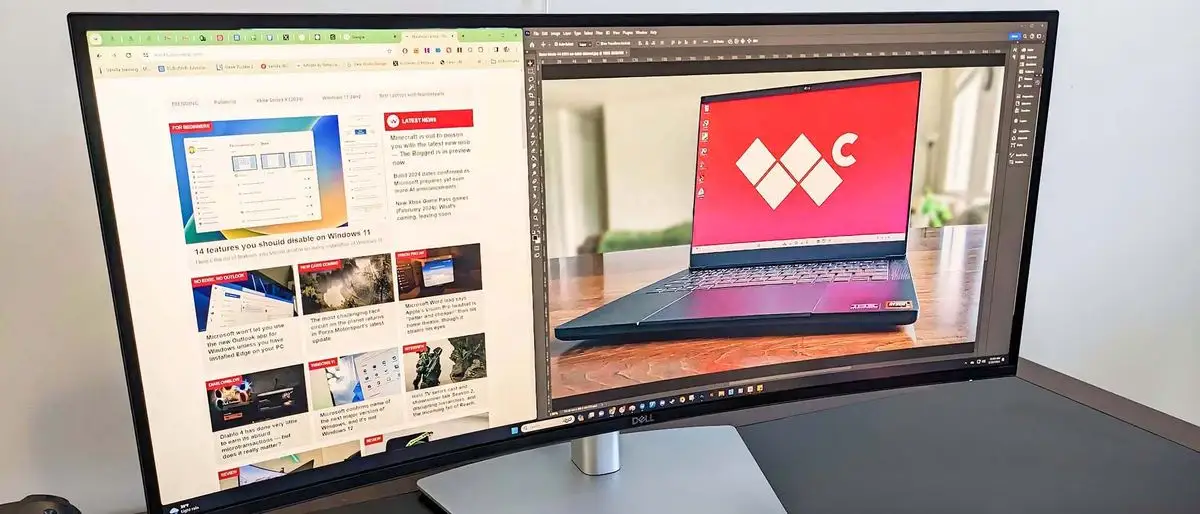
The ultrawide + PBP setup shows up as a real-world productivity multiplier. The same Reddit poster highlighted how “PBP works great with two different input sources,” describing usage that’s common for coders and multitaskers: editor on one side, docs/terminal/meetings on the other. RTINGS frames the same value proposition: the “34-inch screen is big enough to open multiple windows side by side,” and it explicitly praises “features like kvm and thunderbolt daisy chaining” as part of the office story.
Even the built-in speakers—usually an afterthought—get more positive mentions than expected. Reddit described them as “decent for monitor speakers,” and Windows Central lists “surprisingly good speakers” as a major pro, arguing they’re better than typical monitor audio. For video calls, background music, or quick media playback in a work setup, that matters to users who don’t want extra desk clutter.
Common Complaints
Complaints cluster around a few themes: software sluggishness, dark-room uniformity, and the monitor’s suitability for gaming—especially for people accustomed to fast gaming panels.
On the software side, the Dell Display Manager experience can be a sticking point. Reddit user feedback characterizes it as “functional but lags, especially noticeable on macos,” with the practical implication that users sometimes choose the physical OSD because it’s faster. For people who expected “dock + KVM + software control” to feel integrated, that lag becomes a daily annoyance—especially when switching devices or tweaking settings frequently.
For dark-room media and uniformity, users repeatedly mention backlight bleed. The Reddit poster didn’t describe it as catastrophic for work but did call it out as “present in all four corners,” and “inconvenient for media consumption and gaming.” RTINGS backs up the core issue in measurement language: “black uniformity is poor,” with “visible backlight bleed.” This is where the U3425WE’s productivity identity clashes with the expectations of movie watchers who value inky blacks.
Gaming feedback is the most complicated complaint category because it mixes settings, expectations, and panel behavior. RTINGS’ measurement-based summary is consistent: “very blurry motion” and “slow response time.” The Reddit thread starts with frustration—“don’t pick this monitor for gaming”—then pivots after configuration changes. The same user later said: “it works well for single-player and multiplayer games,” and listed titles like “Titanfall 2,” “Control,” and “Overwatch 2” as working “very well.” The investigative takeaway isn’t “good at gaming” or “bad at gaming”—it’s that the monitor’s gaming experience is highly sensitive to VRR configuration and to whether you’re chasing competitive clarity versus casual play.
Divisive Features
Two features split opinions: VRR support in practice and the KVM experience across PBP screens.
VRR sparked direct “conflicting info online” questions in the Reddit thread, and the original poster replied with connector-specific observations: “it does detect as vrr supported over displayport,” and later shared Windows reporting differences—HDMI showing “48 to 100 hz” and DisplayPort showing “48 to 120 hz.” That aligns with RTINGS’ bandwidth notes: HDMI max refresh is lower (they report 100Hz over HDMI), and the full 120Hz experience is tied to DisplayPort/USB-C DP Alt Mode. The divisive part is that some users expect VRR to “just work” regardless of port, and get surprised by how much connector choice changes the experience.
The KVM also lands differently depending on expectations. The Reddit user said the “usb kvm works well” but “lacks seamless mouse cursor movement between pbp screens,” which matters most to people who want a dual-monitor-like feel on one panel. Windows Central, by contrast, describes built-in KVM as making it “very easy to swap between two connected devices,” emphasizing the switching convenience rather than cross-screen cursor behavior.
Trust & Reliability
Looking at trust signals, the most relevant “reliability” material in the provided data is less about scams and more about durability and support expectations. Dell’s own listings emphasize a “3-year advanced exchange service and premium panel exchange,” and that kind of warranty becomes part of how users justify the price—especially compared with competitors that may offer shorter coverage (a Reddit participant contrasted Dell’s “3 years” with Gigabyte’s “1 year” in their region).
That said, the most alarming reliability note comes from RTINGS’ long-form review: “the thunderbolt 4 port on our unit broke after we tried changing the color space setting on a macbook.” Even though they add that it still provided power, a report like that can shape buyer anxiety around a monitor whose identity is built on being a “Thunderbolt hub.” At the community level, the Reddit thread includes ongoing “still testing” language rather than true “6 months later” durability stories, so long-term field reliability is more implied through warranty confidence than through deep long-term anecdotes in this dataset.
Alternatives
Only a few direct alternatives appear in the user discussions, and the most concrete is the Gigabyte M34WQ. One Reddit participant described buying it after debating the two, then considering a return because of “lack of curve” and “a lot less charging output,” while also noting the appeal of “144hz refresh.” Price becomes the counterweight: they cited getting the M34WQ for “$359,” rising to “$450” after add-ons, versus paying more for the Dell but getting “a good warranty… and it’s own thunderbolt cable.”
The original Reddit poster also floated the idea of “OLED” as an alternative if your usage flips toward gaming—though framed with the tradeoff of “worry of burn-in while using the display for work.” RTINGS echoes that strategic idea in a different way, noting that if you want a “dual-purpose ultrawide for gaming and office work, there are better options,” while still positioning the U3425WE as worth considering when you want “premium office features.”
Price & Value
Pricing data across sources shows the U3425WE living in “premium productivity monitor” territory: Dell UK lists £746.46 (with a struck higher price shown), Dell USA lists $834.99, and Digital Trends pegs MSRP at $1,020 while calling it “eye-watering.” The value story is therefore highly dependent on whether you actually use the hub/KVM/PBP stack—otherwise, users and reviewers repeatedly imply you’re paying for features you won’t touch.
Resale and deal behavior shows up indirectly through the eBay listing: $769.99 with “more than 10 available” and “3 sold,” suggesting an active market at a discount from list pricing. Community buying logic also appears in the Reddit comparison to the Gigabyte: the buyer factored in “allstate insurance,” the “thunderbolt 4 wire required for mac,” and taxes—effectively arguing that accessory costs can narrow the apparent price gap if you’re trying to replicate the Dell’s docking experience on a cheaper monitor.
FAQ
Q: Does the Dell UltraSharp U3425WE support VRR / Adaptive Sync?
A: Yes, but user reports show it depends on the connection. In the Reddit thread, the poster said it “detect[s] as vrr supported over displayport,” and later reported different ranges on Windows: HDMI “48 to 100 hz” vs DisplayPort “48 to 120 hz.” RTINGS also lists VRR support with connector limits.
Q: Is the Dell UltraSharp U3425WE good for gaming?
A: It depends on expectations and settings. RTINGS calls it “disappointing for pc gaming” due to “very blurry motion” from slow response time. In Reddit feedback, one user first warned “don’t pick this monitor for gaming,” then later said “I take back what I said,” reporting good results after enabling Windows VRR and disabling Dell Display Manager and KVM while gaming.
Q: Does it have HDR for movies or HDR editing?
A: No. Dell’s official specs list “hdr: no,” and RTINGS repeatedly states it “doesn’t support hdr at all.” Reviewers frame this as a limitation for HDR content creation and HDR-focused media viewing, even though SDR color accuracy is praised.
Q: Are there issues with backlight bleed or IPS glow?
A: Multiple sources mention uniformity issues in dark scenes. A Reddit user reported “light bleed… in all four corners,” especially noticeable “in a dark room.” RTINGS also notes “black uniformity is poor” with “visible backlight bleed,” which can matter most for dark-room media and gaming.
Q: Is Dell Display Manager necessary, and does it work well on macOS?
A: It’s optional, and experiences vary. A Reddit user said Dell Display Manager is “functional but lags, especially noticeable on macos,” adding that using the monitor’s OSD can be quicker. Windows Central, however, describes Dell Display Manager as making “adjustments easy,” indicating a smoother experience for some users.
Final Verdict
Buy if you’re a productivity-first user—especially coding, office multitasking, and multi-device laptop workflows—who wants Thunderbolt docking, PBP, and KVM in one ultrawide. Reddit user feedback sums up the core appeal: “swap notebooks with power delivery using a single cable,” and “PBP works great with two different input sources.”
Avoid if you mainly game competitively or watch lots of dark-room content; RTINGS flags “very blurry motion” and “visible backlight bleed,” and a Reddit user called corner bleed “inconvenient for media consumption and gaming.”
Pro tip from the community: if gaming feels off, one Reddit poster said enabling “vrr in the windows settings” (not only in AMD software) and turning off Dell Display Manager/KVM during play “made a significant difference.”