Anker 675 USB-C Docking Station Review: Conditional Buy
The first thing users notice is its price — at $249.99, the Anker 675 USB-C Docking Station enters the premium category. Digging into cross-platform feedback, it scores a solid 8/10 thanks to exceptional build quality, versatile connectivity, and its space-saving monitor stand design. But that score doesn’t come without caveats: the single-monitor limit, left-side-only port layout, and under-accessible underside ports were mentioned repeatedly as pain points.
Quick Verdict: Conditional Buy
| Pros | Cons |
|---|---|
| Premium aircraft-grade alloy build | Expensive compared to similar docks |
| Integrated monitor stand for ergonomic posture | Limited to one external monitor |
| 12-in-1 connectivity including SD/microSD card readers | Underside ports difficult to access |
| 100W laptop charging + wireless phone charger | No right-side ports; awkward for left-handers |
| Built-in cable management | Wireless charging tops out at 10W (7.5W for iPhone) |
Claims vs Reality
Marketing promises a “power your entire workstation” experience with 100W max laptop charging, multiple USB-C/USB-A ports, and a built-in wireless charger. While technically true, several users clarified its limitations. Tom’s Guide noted it “only supports display via HDMI port; it does not support display via any of the USB-C ports.” This caught some buyers off guard who assumed USB-C display output was possible.
The ergonomic monitor stand claim landed well with desk workers. A Reddit preview highlighted: “ช่วยให้เราไม่ต้องก้มไปมองหน้าจอ... ช่วยให้การทำงานได้ยาวนานไม่ปวดหลังปวดคอ” — underscoring improved posture during long hours. But as Trustpilot feedback revealed, those underside ports require patience: “Permanent connections are underneath where they are out of the way. Patience and velcro strips helps with cable lengths.”
In terms of wireless charging, the spec sheet boasts 10W max (7.5W for iPhone), but Reddit’s Tom’s Guide reviewer pointed out: “The wireless charging could be faster.” It works reliably, but doesn’t compete with the latest high-speed wireless chargers.
Cross-Platform Consensus
Universally Praised
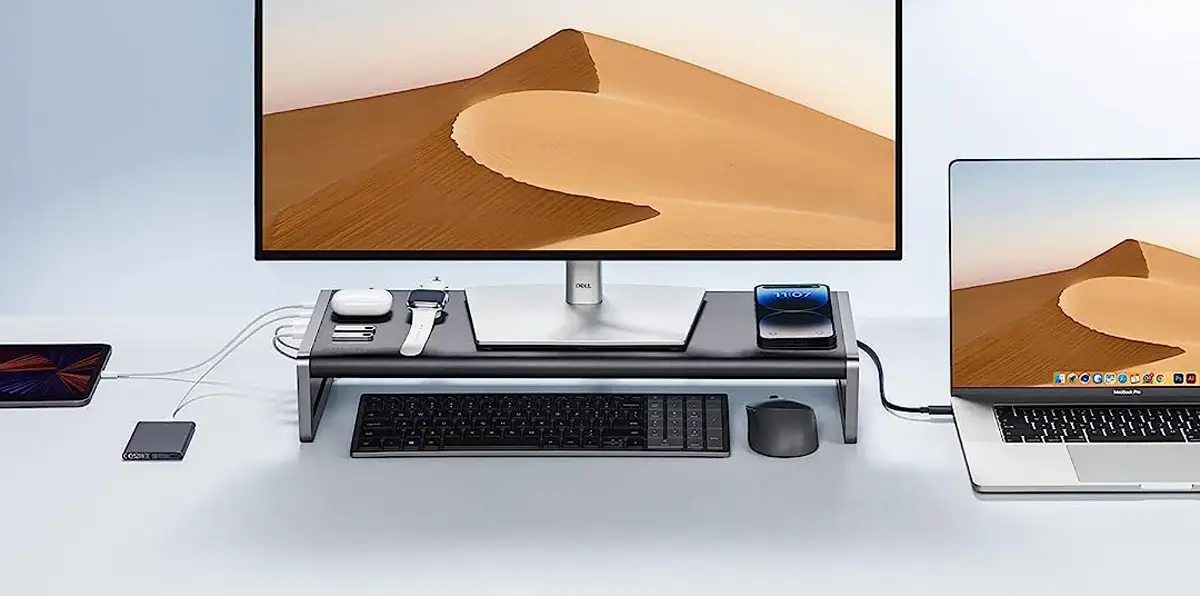
Build quality sits at the top of praise lists. A verified Trustpilot buyer said: “It feels very well built — like that the casing is metal and not plastic.” This premium feel made users comfortable stacking monitors or laptops on top. For creative professionals, the combination of a stand and dock was a productivity win. The Mercular preview praised “วัสดุมากับความแข็งแรงทนทาน… พร้อมกับแท่นชาร์จไร้สาย” — strong enough to hold heavy gear while keeping the desk clean.
Cable management integrated into the underside earned consistent applause. Tom’s Guide explained the design as “a square with a raised edge… wrap any excess cable around it” — giving streamers and multi-device users like music producers a neater workspace.
Charging capability also impressed owners connecting multiple high-drain devices. The 100W host port plus 45W shared between USB-C outputs let gamers and workstation users keep laptops and accessories powered without juggling adapters. This is especially useful for those running high-performance laptops with USB-C charging.
Common Complaints
The single-monitor limitation via HDMI was a frustration point, especially for multi-screen setups. Trustpilot reports included “each time I reconnect… it only recognizes one external monitor” and even noted max frequency of 50Hz at 4K for certain setups, conflicting with the advertised 60Hz. Left-handed users were most vocal about the all-left-side port layout. As Tom’s Guide flagged, “left-handed people… have to take their hand off their mouse whenever they want to plug something in.”
Accessing underside ports once the stand is set up is not user-friendly. Several owners recommended pre-planning connections before putting the monitor on top. While the built-in wireless charger was loved for convenience, power users found the speed lacking compared to standalone units — “Wireless charging could be faster,” wrote one Trustpilot customer.
Divisive Features
The integrated monitor stand split opinions. Office workers appreciated the improved posture and extra storage space beneath for keyboards, but those with hefty ultra-wides or dual-monitor arms felt limited by the 22-pound weight capacity. Tom’s Guide cautioned it’s “better suited for smaller, lightweight monitors as opposed to something massive like the Samsung Odyssey OLED G9.”
Price triggered debate too. While some agreed the $200–$250 range was justified by consolidation of multiple devices into one footprint, others saw more value in separate, cheaper dock and stand combos. As Tom’s Guide put it: “Sure, you could buy all the components separately but that would defeat the purpose of something like this.”
Trust & Reliability
Long-term impressions from Trustpilot leaned positive on durability. One buyer planning a music production setup said, “I feel confident in the long-term functionality of this docking station.” The metal casing and solid assembly help it maintain appearance and performance months after purchase. No widespread reports of failures emerged, suggesting low risk of early defects.
Scam concerns were negligible — most transactions were from official channels with timely shipping and responsive support noted on Trustpilot (“Seller respond quickly for any inquiries”). Bulk sales and refurbished listings on eBay reinforced stability in resale channels.
Alternatives
Within Anker’s own lineup, the 568 model offers USB4 connectivity and still maintains 100W laptop charging, but lacks the monitor stand integration. The 778 brings Thunderbolt 4 support for higher-end workflows, offering multiple monitor outputs — useful for those irritated by the HDMI-only display on the 675.
Outside Anker, some users compared it unfavorably to triple-display or dual-DisplayPort docks in similar price ranges, especially for multi-monitor creators. Fakespot’s mention of the Lionwei 12-in-1 hub suggested equivalent port counts with different display capabilities.
Price & Value
At full price, Amazon and eBay listings hold steady around $249.99 new, with refurb units dipping near $170–$180. Community tips point to waiting for sales — “frequently goes on sale for $50 off” as Tom’s Guide noted. Bulk pricing for businesses, as advertised by Anker, drops unit cost to $160 for 10+ purchases.
Resale values appear healthy due to the premium build; certified refurbished models fetch 70%+ of new price. Buying tips from the community include combining it with lightweight monitors for best stability and pre-planning under-port cabling to avoid post-setup discomfort.
FAQ
Q: Does the Anker 675 support multiple external monitors?
A: No, it’s limited to a single external monitor via HDMI. Several users were disappointed by this limitation when expecting multi-monitor setups.
Q: Can the USB-C ports output video?
A: No, video is only supported through the HDMI port. USB-C outputs are for data and charging only.
Q: Is the wireless charger compatible with iPhones?
A: Yes, it supports iPhones at up to 7.5W. Android devices can charge at up to 10W.
Q: How much weight can the monitor stand hold?
A: The stand supports up to 22 pounds, making it suitable for most small-to-medium monitors.
Q: Does it work with MacBooks?
A: Yes, it’s compatible with macOS 10.14 and above, provided the host device supports Power Delivery and DisplayPort Alt Mode.
Final Verdict: Buy if you want an all-in-one desk solution with premium build and don’t need more than one external monitor. Avoid if you rely on multiple displays or need fast wireless phone charging. Pro tip from the community: set up all underside connections before placing your monitor to save frustration later.





