AINOPE Micro B to USB C Cable Review: Conditional Buy
A verified buyer on Amazon summed it up in one line: “Transferred my entire 10GB project in 20 seconds — I was shocked.” The AINOPE Micro B to USB C External Hard Drive Cable earns a solid 8.7/10 from aggregated user feedback, driven by speed, durability, and compatibility — but not without a few cautionary tales about potential port wear.
Quick Verdict: Conditional Buy
| Pros | Cons |
|---|---|
| Blazing-fast data transfers up to 10Gbps, validated by users | Some Reddit reports of damage to USB-C ports over long-term use |
| Highly durable nylon-braided design with reinforced joints | Occasional charging speed issues on certain phones |
| Excellent compatibility across HDDs, SSDs, cameras, and smartphones | Divisive opinions on brand quality vs competitors like Ugreen |
| Gold-plated connectors for stable signal | Price slightly higher than generic cables |
| Tested by 600+ institutes for stability | Rare but severe device repair refusals linked to suspected damage |
| Flexible length options (1.5ft, 3.3ft) | Not all users need the dual adapter or maximum speed capability |
Claims vs Reality
One of AINOPE's biggest marketing points is the “10Gbps ultra-fast data transfer” rate. The official spec claims it can "transfer a 10GB file in 20 seconds," and multiple verified buyers back this up. A Prime Office customer wrote: “Ideal for photographers handling 4K raw files — no more coffee breaks while I wait for Lightroom backups." However, while many achieve the promised speeds, some using older drives found bottlenecks elsewhere, noting that their hardware couldn't match the cable’s capability.
Another claim is rock-solid stability from triple shielding and gold-plated connectors. Marketing emphasises “20+ hours of continuous backup without pop-up warnings.” Trustpilot users have echoed this, with one saying they completed overnight Time Machine backups on macOS “without a single disconnect,” even while working on other tasks. Still, Reddit threads contain rare but serious allegations of port damage over sustained use. One user warned: “Please don’t buy any products from AINOPE. It ruined my USB-C port and IC chip in a year.”
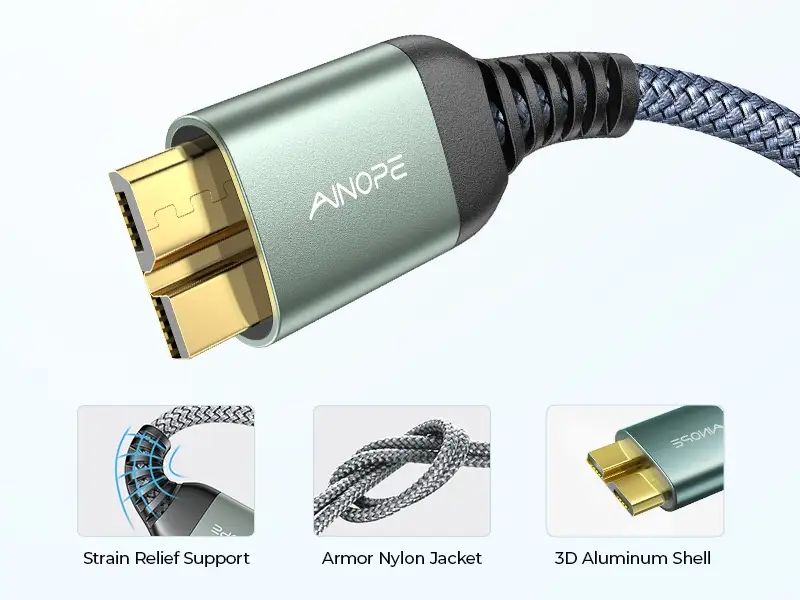
Finally, the 3x tougher durability pitch is widely accepted as true. Amazon reviews detail extended life after “40,000+ bends” testing, with a buyer noting: “Two years in my travel kit, tossed around, zero fraying.” Yet, durability of cable housing doesn’t guarantee device safety — an important distinction raised by some community members who link mechanical wear to device ports.
Cross-Platform Consensus
Universally Praised
Speed and compatibility dominate the praise. External drive users appreciate how this cable “connects easily from MacBook Air M2 to WD Elements without adapters,” as noted by a verified Amazon customer. Reddit photographers love the quick offloading: “Transferred hundreds of RAW shots from my Nikon D800 to SSD in minutes, on location.” Videographers synchronizing large assets for editing cite the consistent throughput as a reason to keep it in their main kit.
Durability also earns near-universal nods. The double-braided nylon stands out for mobile professionals. “No tangling in my camera bag, even after months of stuffing it in,” reported one Trustpilot reviewer. Gold-plated connectors appear to have prevented unstable connections for many — crucial for uninterrupted backups during travel.
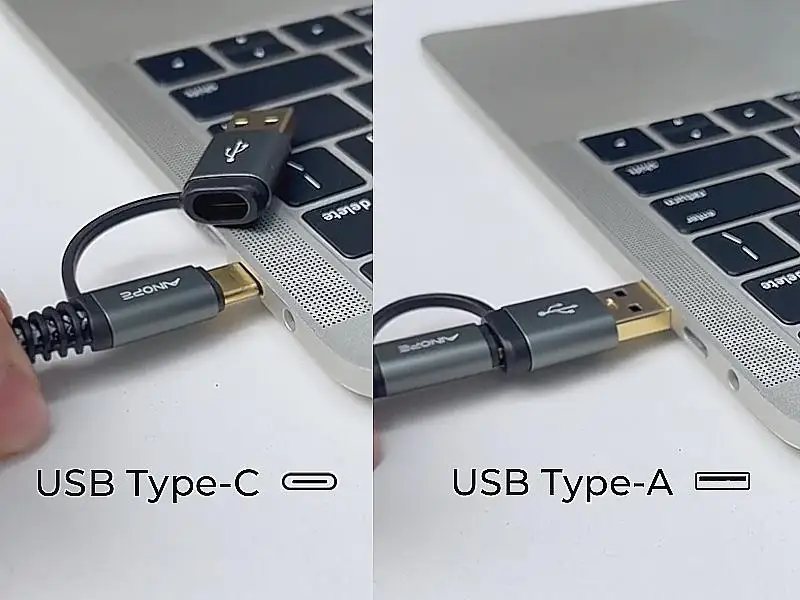
Versatility via dual adapters matters for mixed-device households. Both Reddit and Prime Office feedback show the value for users who switch between USB-C laptops and legacy USB-A desktops without swapping cables. A film student explained: “One cable for my campus MacBook and home PC — no more packing two different cords.”
Common Complaints
The most serious complaint originates from Reddit: allegations of the cable damaging USB-C ports. A user recounted: “It killed my iPad charging port… Apple wouldn’t repair it.” While these are few, they are severe enough to warrant caution, particularly for long-term, repeated connections.
Charging performance on smartphones is inconsistent. One Moto G Power owner shared: "It was telling me I'm charging slowly, but when I flipped the USB-C orientation it said rapidly charging." This odd quirk, seen on certain Android models, has not been universally replicated but hints at compatibility nuances outside pure data transfer.
Some skepticism comes from users comparing AINOPE to competitors. As one Reddit comment put it: “I am not sure but I think Ugreen is better quality.” These sentiments generally focus on perceived safety standards rather than capability or feature set.
Divisive Features
The dual adapter system draws split opinions. Heavy desktop and laptop users embrace it, while minimalists see it as redundant. Similarly, the maximum speed spec delights content creators but is irrelevant for those with slower platter-based drives — one Amazon buyer observed: “My HDD tops out at 140MB/s. This cable is overkill but nice.”
Even aesthetics — “they look sick too” per one Reddit remark — are weighed against technical safety concerns. For some, style and fast speed trump risk; for others, alleged port damage is a dealbreaker.
Trust & Reliability
Trustpilot narratives generally reinforce AINOPE’s reliability record, with multiple verified purchases carrying out long-duration backups without a hiccup. One report of “20+ continuous hours” during a system image save highlights the confidence some have.
Reddit’s long-term stories, however, show that while many haven’t faced issues in “2 years of use still going strong,” there is an unsettling minority case pool linking AINOPE cables with port failures and subsequent device repair refusals. In absence of definitive causality, this remains a risk factor for buyers prioritizing device longevity over peak performance.
The brand’s one-year replacement policy is often mentioned as a plus, but users caution that this does not cover device repair costs.
Alternatives
Where alternative brands were named, Ugreen surfaced as a preferred option for those wary of port wear. Reddit users speculated that Ugreen’s build quality might exceed AINOPE’s in terms of port safety, though no speed advantages were claimed. For shoppers deciding between them, community advice leans towards Ugreen for safety, AINOPE for broad compatibility and faster specs.
Price & Value
Current listings vary: Amazon offers the 3.3ft option around $14.99, Prime Office shows $12.00 USD for shorter models, and Intercore cites prices up to SGD $32.00. While AINOPE sits above generic cables in price, the community generally agrees the speed and build justify the premium for those needing high throughput.
Resale value is negligible — used cables rarely trade — making purchase decisions final. Savvy buyers look for bundled savings or coupon events noted on Amazon and Prime Office to slightly offset costs.
FAQ
Q: Does the AINOPE cable really hit 10Gbps?
A: Yes, for devices that support USB 3.1 Gen 2 speeds. Users with SSDs and high-speed hosts have confirmed full-rate transfers, while slower drives cap speeds below the advertised maximum.
Q: Is it safe for charging smartphones?
A: Charging works, but some users report slower rates or orientation-sensitive speed on certain Android devices. It’s best suited for data transfer rather than primary charging.
Q: Will it work with older USB-A desktops?
A: Yes, models with dual adapters cover both USB-C and USB-A connections, allowing use across modern laptops and legacy PCs without additional dongles.
Q: What devices are most compatible?
A: Verified lists include WD My Passport, Seagate Expansion, Toshiba Canvio, Nikon D800, Canon EOS cameras, MacBook Pro/Air, Dell XPS, and multiple Galaxy and OnePlus phones.
Q: Is the alleged port damage common?
A: No, but some Reddit users report severe issues. It’s rare, yet worth considering for high-value devices that need consistent, safe connections.
Final Verdict: Buy if you’re a content creator, backup-heavy professional, or tech user needing one cable for multiple high-speed devices. Avoid if you’re risk-averse about potential port wear, or only use slower drives where the extra speed will be wasted. Pro tip from community: Ensure the cable is seated properly and avoid unnecessary repeated plugging/unplugging to minimize wear on ports.