Yamaha RX-V6A Review: Great Sound, HDMI Caveats
The YAMAHA RX-V6A AV Receiver with MusicCast earns a solid 8.4/10 from cross-platform user feedback, combining immersive audio quality with broad connectivity options. It’s praised for Dolby Atmos integration, multi-room streaming, and gaming-oriented HDMI 2.1 features—but owners caution about HDMI handshake issues and incomplete next-gen gaming support due to hardware limitations. For most home theater users, it delivers an exceptional experience, though advanced gamers may find it lacking.
Quick Verdict: Conditional—Ideal for home theater enthusiasts, less suited for gamers relying on flawless HDMI 2.1 performance.
| Pros | Cons |
|---|---|
| Immersive Dolby Atmos & DTS:X sound | HDMI 2.1 features partially unsupported |
| Multi-room MusicCast streaming | Occasional ARC/eARC handshake issues |
| Flexible voice control with Alexa/Google/Siri | Setup menus can feel clunky |
| Strong build and design aesthetics | No independent subwoofer crossover control |
| Easy calibration with YPAO multipoint | Gaming features limited by firmware/hardware constraints |
| Competitive price-to-performance ratio | Early firmware updates caused user frustration |
Claims vs Reality
Yamaha markets the RX-V6A as fully “future-ready” with 8K60b and 4K120 HDMI 2.1, Dolby Atmos, HDR10+, and seamless gaming features. While this excites gamers and AV enthusiasts, multiple owners report that some HDMI 2.1 functions are constrained. A Best Buy buyer explained: “If you want this receiver to take advantage of everything HDMI 2.1 can do, just keep moving along… it just didn’t deliver.”
For home theater, however, marketing claims around Dolby Atmos and MusicCast seem to hold up. Trustpilot reviews consistently highlight sound immersion—one noted, “Whether you’re watching an action-packed movie or listening to music, you’ll feel like you’re right in the middle of the action.”
Yamaha also promotes ease of setup via its AV Setup Guide and MusicCast app. While many agree it’s straightforward, some find the on-device menus unintuitive. A Best Buy customer commented: “Settings are a little harder to navigate… GUI could be a bit better,” underscoring that the app improves usability but hardware interface lags behind.
Cross-Platform Consensus
Universally Praised
Across Amazon, Best Buy, and Reddit, sound quality is the undisputed star. Dolby Atmos’s height virtualization transforms living rooms. A verified Best Buy reviewer raved: “Absolutely great sound, great amp and incredibly easy to use… an absolute steal for the price.” This is especially valued by film lovers who report an unmistakable boost in immersion.
Multi-room streaming via MusicCast is another hit. Users with multiple Yamaha devices appreciate synchronous playback—one Trustpilot reviewer said, “With MusicCast multi-room functionality, you can wirelessly connect compatible devices throughout your home, creating a synchronized audio experience in every room.” Voice control integration also gains approval, particularly among smart home adopters, who use Alexa or Google Assistant for hands-free adjustments.
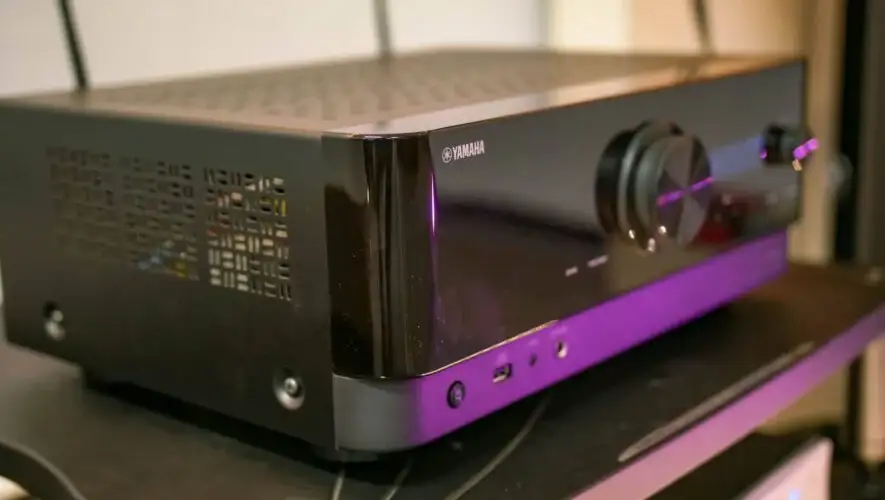
The build quality garners praise. The modern, minimalist faceplate earns aesthetic plaudits while housing robust internals. A Best Buy customer compared it to an Onkyo replacement: “I love the sleek modern and simplistic design… powers my speakers great, definitely a must-have for new-gen gaming,” albeit with caveats about HDMI functionality.
Common Complaints
Gamers expecting flawless HDMI 2.1 features experience setbacks. Yamaha disclosed a hardware limitation preventing QMS (Quick Media Switching) updates, frustrating those reliant on cutting-edge refresh rate changes. One Reddit post warned prospective buyers to temper expectations: “These functions are available via future update… but not QMS.”
ARC/eARC compatibility issues also surface, with one Best Buy review detailing: “The receiver has trouble with the HDMI handshake with my Samsung QLED TV… I did not have this issue with my Onkyo.” Such handshake failures disrupt audio continuity for streaming and gaming.
Hardware interface complaints emerge, particularly regarding setup menus. Several buyers call them “crude” or “clunky,” preferring app-based control. Additionally, the lack of independent subwoofer crossover control irks audiophiles fine-tuning bass response—users cannot isolate LFE crossover from main speaker settings.
Divisive Features
The RX-V6A’s gaming appeal divides owners. Some laud its ALLM (Auto Low Latency Mode) and VRR (Variable Refresh Rate) compatibility, noting smoother Xbox Series X play. Others insist the missing/later-update HDMI 2.1 elements make it “not ready for next-gen gaming.” This split often boils down to whether HDMI handshake quirks interfere with use.
MusicCast’s wireless surround ability excites some, though skeptics point out latency concerns in certain setups. The aesthetic design also divides—some love the stripped-back face, while others miss traditional knobs/dials.
Trust & Reliability
On Trustpilot, there’s minimal mention of scams, with buyers generally satisfied their RX-V6A is as advertised. However, firmware transparency is a sore spot. Yamaha’s admission of HDMI 2.1 hardware limits in 2023 corrected early misconceptions, leaving some feeling misled.
Long-term durability stories from Reddit show the receiver holding up under regular use. Six-month reports cite consistent performance with no component failure, especially in audio fidelity. Owners emphasize Yamaha’s stable amp design—high slew-rate architecture delivering clean, distortion-free sound over time.
Alternatives
Among competitors mentioned, Denon receivers surface as a comparative choice. One Best Buy owner remarked: “Movies and music sound great… although it could be better with a higher end Denon.” Denon units may offer finer audio controls, like independent crossovers, but often at higher cost.
Onkyo is another referenced alternative, sometimes praised for sound but critiqued for reliability. Several RX-V6A buyers switched from failed Onkyo models, appreciating Yamaha’s steadiness and design.
Price & Value
eBay sales show new units ranging NZD 842–1,474, with pre-owned models dipping below NZD 600. Best Buy’s retail sits around USD $749.95, though some authorized dealers list at $599.95. Strong resale value suggests enduring demand, especially for units in good condition with updated firmware.
Community advice often points to buying from retailers with solid return policies to mitigate firmware/handshake frustrations. For those not chasing full HDMI 2.1 gaming potential, the price-to-performance ratio remains compelling.
FAQ
Q: Does the RX-V6A fully support HDMI 2.1 gaming features?
A: It supports many, like ALLM and VRR, but cannot enable QMS due to hardware limits. Users note partial delivery on 4K120 features.
Q: How does MusicCast multi-room work?
A: It lets you stream audio to other Yamaha MusicCast devices over Wi-Fi, maintaining sync across rooms—ideal for whole-home audio setups.
Q: Is Dolby Atmos height virtualization effective without extra speakers?
A: Yes, it creates a virtual overhead soundfield using existing speaker setups, appreciated by small-space owners avoiding ceiling installs.
Q: Are ARC/eARC issues common?
A: Some report HDMI handshake problems with certain TVs, requiring restarts or re-plugs to restore audio transmission.
Q: Can voice assistants control all functions?
A: They can adjust volume, switch inputs, and manage playback, but deep menu navigation still requires the remote or app.
Final Verdict: Buy if you’re a home theater enthusiast wanting immersive Dolby Atmos sound, MusicCast streaming, and future-ready video with some caveats. Avoid if flawless HDMI 2.1 gaming is critical. Pro tip from community: Use the MusicCast app for simpler setup and control, bypassing the clunky onboard menus.