Logitech MK710 Review: Comfort Wins, Durability Mixed
The surprising thing about the Logitech MK710 Wireless Desktop Set is how often users keep theirs for years despite a steady trickle of minor complaints. Across platforms, it earns a solid 8.4/10, with comfort, battery life, and typing feel winning over office workers and home users — while durability quirks and a polarizing mouse design temper enthusiasm.
Quick Verdict: Conditional — excellent for productivity-focused users who prioritize comfort and battery life, less ideal for those who demand high durability of key legends or backlit features.
| Pros | Cons |
|---|---|
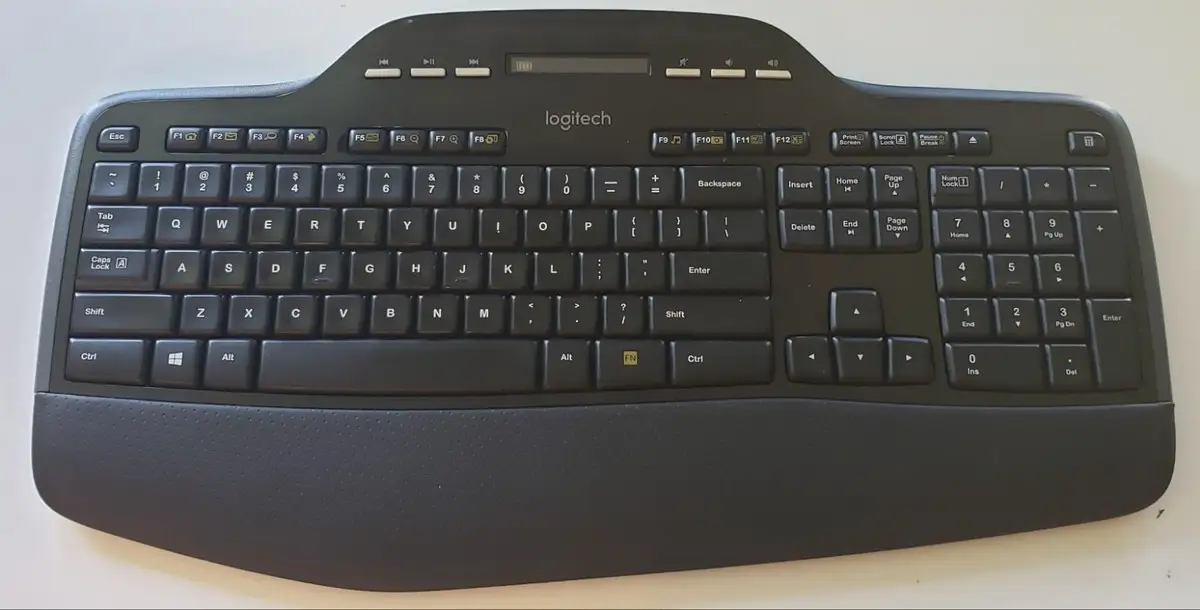
| Cushioned palm rest praised for all‑day comfort | Key legends can wear off in under a year for some |
| Exceptional battery life (often 1–3 years) | LCD screen is small and not backlit |
| Quiet, comfortable key action | Mouse too small for some hands |
| Reliable wireless connection with unifying receiver | Price higher than some similar sets |
| Full-size layout with number pad and media keys | Occasional complaints about rubber grips/standoffs wearing out |
| Programmable mouse buttons and hyper‑fast scroll | Glossy surfaces attract fingerprints |
Claims vs Reality
One of Logitech's main marketing hooks is the "up to three-year battery life" for both keyboard and mouse. While officially rated for that, several long-term owners on ProductReview.com.au report more modest figures for the mouse: “The mouse… need[s] replacing about every 2–3 months. The keyboard… lasts about 12 months,” wrote one verified owner. Others, however, back the claim, with Best Buy buyers saying they've “never had to worry about batteries” and even switched to rechargeables for convenience.
Another claim is the LCD dashboard’s utility. Logitech pitches it as a quick way to check battery level and lock key status without disrupting work. Users across Reddit and Best Buy confirm it's functional but note its shortcomings: “Digital read out is hard to see,” one left‑handed user wrote, while a Reddit discussion highlighted the “low luminosity of the LCD” making it “only usable during the day.”
Comfort is also a headline feature — cushioned palm rest, concave keys, sculpted mouse — and here the marketing largely aligns with reality. “The attached padded wrist pad is one of the most comfortable I’ve ever used,” said a Best Buy reviewer, while a Reddit user called the typing experience “excellent” with “tactile key response.” But not everyone fully agrees; one TechSpot review noted the “keyboard’s muffled typing action” felt less crisp than expected.
Cross-Platform Consensus
Universally Praised
Comfort emerges as the MK710’s strongest point. Office workers, coders, and casual gamers alike report reduced strain during long sessions. A verified Best Buy buyer who replaced a gaming keyboard said, “It is easy on my hands and wrists… keys are silent and easy to strike.” Reddit threads echo this, citing the “comfortable wrist rest” and “concave keys” that guide fingers naturally.
Battery performance, while not universally matching the three-year claim, still wins praise for being far beyond average. One Best Buy user described the set as “very reliable” with “great battery life,” while another on ProductReview.com.au noted replacing keyboard batteries “yearly” despite daily gaming use — still above many competitors.
The wireless connection also receives broad approval. Multiple Best Buy reviewers mention “no issues with connection or lag,” even in multi-device setups via the unifying receiver. This reliability extends to plug-and-play ease; one user quipped setup was “not rocket science, Oppenheimer!” after a failed experience with another brand.
Common Complaints
Durability of key legends is the most consistent gripe. Several Best Buy reviewers report letters wearing off in under a year: “Only took about 8 months for the letters to wear away,” wrote one. Rubber grips on the keyboard’s adjustable feet also come up — one owner said they “fell off after a few months.”
The LCD dashboard, while functional, disappoints in visibility. “The LCD is not backlit… difficult to see sometimes,” noted an Amazon reviewer. For those working in low-light environments, this is more than a minor annoyance.
Mouse ergonomics divide users sharply. Some praise it as “full size and works great,” but others — particularly those with larger hands — find it too small. TechSpot’s pros/cons list explicitly calls it a “small mouse,” while one Redditor labeled it “too small” outright. The glossy frame’s tendency to pick up fingerprints also draws criticism.
Divisive Features
Typing feel is a point of contention. Many love the quiet, cushioned action, but others find it “muffled” or less responsive compared to mechanical boards. Gamers and heavy typists sometimes prefer a crisper switch feel.
The price is another sticking point. At around $84.99 new, some feel it’s justified for the build quality and comfort, while others, like a TechSpot reviewer, argue that “similar quality alternatives such as Logitech’s MK520 are better value.”
Trust & Reliability
Long-term owners often keep the MK710 in service for years. One Redditor said their first unit was “still going strong after 6+ years” before upgrading to a newer revision. Another on ProductReview.com.au described it as having “taken a beating” through daily gaming and still functioning, aside from predictable wear items like mouse feet.
However, not all experiences are positive. A minority report units failing early. One ProductReview.com.au user called it “unreliable” from day one, citing a non-functional wireless mouse and sticky keys. These seem to be exceptions rather than the norm, as the bulk of feedback points to a dependable set with occasional replaceable-part wear.
Trustpilot data from Best Buy mirrors this — high overall ratings (4.6/5) but with recurring mentions of cosmetic or minor mechanical wear over time.
Alternatives
The only direct competitor mentioned in user discussions is Logitech’s own MK520. TechSpot reviewers note it offers “similar quality” at a lower price, making it potentially better value for those who don’t need the MK710’s premium palm rest or LCD display. For users sensitive to mouse size, pairing a standalone full-size Logitech mouse with a different keyboard could be a more comfortable choice.
Price & Value
New units retail around $84.99 from mainstream sellers like Best Buy, with occasional discounts under $80. On eBay, used prices vary widely — from as low as $15 for a keyboard without a receiver to $76.99 for a full set in good condition. The strong resale market suggests enduring demand, especially for units with the unifying receiver included.
Community buying tips include checking that the receiver is present (as replacements add cost), and considering open-box or gently used sets given their long service life. Several users also recommend switching to rechargeable AA batteries to eliminate running costs.
FAQ
Q: How long does the battery really last?
A: Many users see close to the advertised 3 years on the keyboard, but the mouse often needs AA changes every few months to a year depending on use. Heavy gamers may burn through mouse batteries faster.
Q: Is the LCD screen backlit?
A: No. Multiple owners note that it is small and not backlit, making it hard to read in dim lighting.
Q: Can the mouse be used left-handed?
A: The included mouse is sculpted for right-handed use. Left-handed users can still operate it, but button placement is optimized for right-hand ergonomics.
Q: Does it work with macOS or ChromeOS?
A: Officially designed for Windows, but basic functions work on other OSes. Some advanced features may require Logitech’s software, which may not support all platforms.
Q: How durable is it?
A: Mechanically solid for years of use, but key labels and rubber grips may wear. Many owners keep theirs for 5+ years with only cosmetic degradation.
Final Verdict: Buy if you’re a productivity-focused user seeking comfort, long battery life, and a reliable wireless connection for Windows PCs. Avoid if you need backlighting, a large gaming mouse, or ultra-durable key legends. Pro tip from the community: grab rechargeable AAs and download the latest drivers from Logitech’s site instead of using the included CD.