TP-Link Omada ER707-M2 Review: Conditional Buy (7.6/10)
A “2.5G router” that can drop a gigabit fiber line to ~140 Mbps when a security feature is enabled is the kind of whiplash that shows up again and again in community threads. TP-Link Omada ER707-M2 Multi-Gigabit VPN Router lands as a conditional recommendation: strong for fast basic routing and Omada-managed setups, but with sharp performance tradeoffs and controller/software frustrations. Verdict: Conditional buy — 7.6/10.
Quick Verdict
For buyers who want multi-gig routing, VLANs, and Omada adoption, the TP-Link Omada ER707-M2 Multi-Gigabit VPN Router is often described as “worth it” when used for straightforward routing and VPN basics. For anyone expecting IDS/IPS at near wire speed—or needing specific advanced controller features—multiple threads describe a harsher reality.
| What matters | Pros (from feedback) | Cons (from feedback) |
|---|---|---|
| Raw routing speed (no IDS/IPS) | “so much faster… worth it if you need 2.5g lan.” (Reddit) | IDS/IPS can drastically reduce throughput (Reddit/TP-Link forum) |
| VPN for home/remote access | “once you get it working it works perfectly.” (Reddit) | Setup can be “kinda complicated” (Reddit) |
| Stability vs older TP-Link gateways | “the er 707 is much more reliable” (TP-Link forum/Reddit) | Some VPN disconnect issues reported pre-update (TP-Link forum) |
| Omada ecosystem | “adopt feature… easy to use” (Reddit) | “omada software just sucks” + missing features (Reddit) |
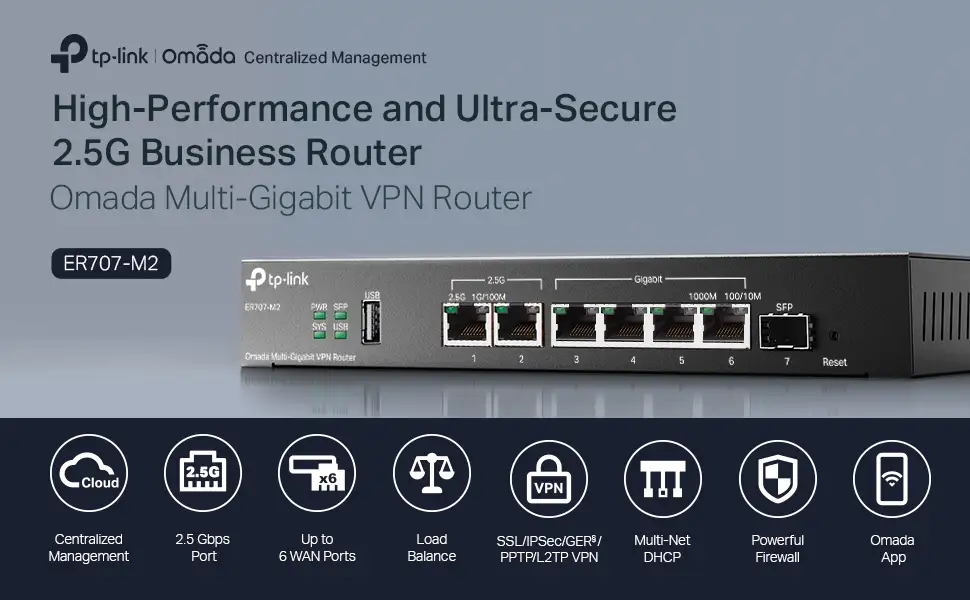
| Ports & multi-WAN flexibility | Up to 6 WAN ports, dual 2.5G ports (official specs) | Confusion around LAN port speeds in community (“lan ports seems to be 1 gb?”) |
Claims vs Reality
The marketing pitch around the TP-Link Omada ER707-M2 Multi-Gigabit VPN Router centers on “high-performance and ultra-secure” multi-gig routing and business security tooling (DPI, IDS/IPS, VPN). Digging deeper into user reports, the big gap isn’t that the features don’t exist—it’s that turning them on can change the entire performance profile and even the day-to-day feel of the network.
Claim #1: Multi-gig performance that matches the “2.5G router” framing. In community discussion, the router often delivers the “feels faster” outcome when used as a basic gateway. A Reddit commenter upgrading from the ER605 framed it plainly: Reddit user (username not provided in dataset) said: “i upgraded from the 605 to the 707 for the 2.5 g lan. its so much faster. its worth it if you need 2.5 g lan.” Another Reddit participant described routing their 2.5Gbps WAN/LAN port to a PoE++ injector feeding an EAP670 to better tap into a fast broadband plan: Reddit user (username not provided in dataset) said it was “mainly because of one 2.5 gbps wan / lan port… my eap670 utilizing the full 1.6 gbps speed of my broadband.”
But the same threads show confusion (and likely mismatched expectations) about which ports actually deliver multi-gig on the LAN side. Reddit user (username not provided in dataset) asked bluntly: “lan ports seems to be 1 gb ?” That aligns with the official port layout: two 2.5G RJ45 ports, with the remaining copper ports being gigabit.
Claim #2: “Enhanced security” with IDS/IPS and DPI. The headline contradiction is speed under inspection. In a detailed thread, Reddit user Gastr1c said: “simply enabling it with its default setting of detect only on low cripples my wired throughput… from a reliable 900-950 mbps to as low as 140 mbps.” They emphasized the mismatch in expectations: “this is a 2.5 g router.” Replies framed it as normal for software-based inspection. Reddit user (username shown as Clive_A in the dataset context) said: “i just ended turning mine off along with a lot of the attack protection which i found added latency.” Another comparison point came from a different model: Reddit user (username shown as home admin in the dataset context) noted an ER7206 dropping from “890 mb download when ids off and 275 mb with ids on.”
Claim #3: “Work-from-home ready” VPN reliability. There is at least one report of VPN instability in a WFH scenario—importantly, not using the router’s VPN features at all. A TP-Link Business Community poster (username shown as Karyuu in dataset) described that after installing the ER707-M2, “the vpn keeps disconnect and restore frequently… when i hold a meeting on teams, the network was terrible.” The accepted solution points to firmware: TP-Link community user Mr. S said: “i have updated to 1.1, so far it is working well… the omada is much better, stabler.”
Cross-Platform Consensus
Universally Praised
A recurring pattern emerged: when buyers treat the TP-Link Omada ER707-M2 Multi-Gigabit VPN Router as a fast wired gateway with modern port options—and keep heavy inspection features off—satisfaction tends to be highest. Upgraders from the ER605 consistently frame it as a tangible step up for multi-gig needs. Reddit user (username not provided in dataset) said: “i upgraded from the 605 to the 707 for the 2.5 g lan… its worth it if you need 2.5 g lan.” For home offices on faster-than-gig internet, this translates into enabling a higher-speed path at least to one multi-gig device (often an AP uplink) rather than the whole LAN.
The second consistent positive is “it stays online” stability in the Omada gateway lineup, especially compared with the ER605’s reputation in at least one user story. Reddit user (username shown as Clive_A in dataset context) said: “the er707-m2 was my upgrade from the er 605… at least the er 707 stays online, my er605 kept falling over constantly.” For small offices or busy homes where “internet supply” is the baseline job, that kind of reliability narrative carries more weight than any checkbox feature.
Third, people who want straightforward VPN access—remote work, “VPN in from my phone,” or branch-lite setups—often describe success after initial effort. Reddit user (username not provided in dataset) said: “i also use the vpn server, its kinda complicated to set up but once you get it working it works perfectly.” Another commenter drew a direct line from prior experience on ER605 to expectations on the ER707-M2: Reddit user (username not provided in dataset) said their ER605 had “no issues with vpn’in from my iphone,” implying the ER707-M2 should deliver similar day-to-day access.
Finally, Omada “adoption” and centralized management is repeatedly treated as part of the value proposition—when it works for the buyer’s needs. Reddit user (username not provided in dataset) said: “the omada software is worth the cost of all omada set up.” Another user describing a larger home setup (around “90 devices,” multiple VPNs, and an OC200 controller) reported: Reddit user (username not provided in dataset) said: “no complaints at all.”
After those narratives, the praised themes condense into:
- Faster wired experience for multi-gig-specific needs (especially one 2.5G uplink use cases)
- Stability vs some older Omada gateway experiences
- VPN works well once configured for basic remote access
- Omada adoption/central management valued by ecosystem users
Common Complaints
The most repeated, most visceral complaint is what happens when IDS/IPS is enabled: speed volatility and major throughput collapse. Reddit user Gastr1c described gigabit fiber dropping “to as low as 140 mbps” with IDS/IPS on. They also noted results were “all over the place with the values fluctuating significantly on each test,” which reads less like a small overhead and more like a fundamental constraint in inspection mode.
Other commenters reinforced that expectation setting is the real lesson: Reddit user (username shown as Clive_A in dataset context) argued it’s “not fair to expect wire rate ips / ids on a $150 router,” and explained why even modest CPU usage doesn’t mean throughput won’t crater: “ip throughput is dependent on latency as well… going the software route will add quite a few milliseconds.” The practical outcome is that some users simply turn it off: “i just ended turning mine off along with a lot of the attack protection which i found added latency.”
The second complaint category is Omada software/controller limitations—less about bugs, more about missing knobs for power users. One Reddit commenter delivered a long list of frustrations in blunt terms. Reddit user (username not provided in dataset) said: “you literally can’t set up lan lacp bond on the router.” They also criticized mesh/channel behavior between indoor/outdoor APs and the controller’s handling of DFS, describing disconnects when channels mismatch. The same user called out ACL limitations: “you also can’t set ip / port groups in gateway lan <-> lan acl… you cannot put any exceptions there for something like ntp, dns, or anything else.”
A third complaint thread is confusion and mismatch about “multi-gig everywhere.” The product is marketed as multi-gig, but much of the port count is gigabit. That shows up as: Reddit user (username not provided in dataset) said: “lan ports seems to be 1 gb ?” For buyers expecting all LAN ports to be multi-gig, the hardware reality can feel like a bait-and-switch even when it matches the spec sheet.
After those stories, the common complaints compress into:
- IDS/IPS causes major throughput drops and inconsistent speed tests
- Controller/software limitations frustrate advanced network tinkerers (LACP, ACL exceptions, mesh/DFS management)
- Multi-gig expectations vs mostly gigabit LAN ports create buyer confusion
Divisive Features
The Omada controller experience is the clearest split. Some treat it as the reason to buy into the ecosystem at all; others treat it as the bottleneck that keeps the hardware from reaching its potential. Reddit user (username not provided in dataset) praised it: “the omada software is worth the cost of all omada set up.” In the same conversation space, another commenter went the other direction: Reddit user (username not provided in dataset) said: “omada software just sucks for gods sake.”
Security tooling is similarly divisive. On paper, IDS/IPS and DPI help justify a “business router” label. In practice, multiple users end up time-slicing or disabling it to regain speed. Reddit user (username shown as Clive_A in dataset context) said they scheduled IDS for “like 1 am - 6 am… during the day it’s off so we just get full speed.” That kind of compromise is a feature for some (scheduled protection) and a disappointment for others (not usable at full line rate).
Trust & Reliability
In TP-Link’s Business Community thread about instability, the lived experience is very WFH-specific: a user moved to the TP-Link Omada ER707-M2 Multi-Gigabit VPN Router and suddenly their company VPN sessions dropped, with Teams meetings becoming “terrible.” TP-Link community user Karyuu said: “the vpn keeps disconnect and restore frequently.” The same thread points to firmware as a turning point; TP-Link community user Mr. S said: “i have updated to 1.1, so far it is working well.”
On longer-term durability and “stays online” trust signals, Reddit commentary leans more positive than negative. One upgrade story explicitly contrasts ER605 instability with ER707-M2 reliability: Reddit user (username shown as Clive_A in dataset context) said: “the er 707 is much more reliable.” Another multi-device household described months of trouble-free operation with an OC200 and “approximately 90 devices,” stating: Reddit user (username not provided in dataset) said: “no complaints at all.” These aren’t formal longevity tests, but they read like real “living with it” reports rather than day-one impressions.
Alternatives
Only a few alternatives appear directly in the data, and they mostly come from users comparing within the Omada lineup or adjacent TP-Link products. The most common reference point is the ER605 as the “before” router. For upgraders chasing multi-gig LAN, the TP-Link Omada ER707-M2 Multi-Gigabit VPN Router is framed as a performance jump. Reddit user (username not provided in dataset) said: “i upgraded from the 605 to the 707… its worth it if you need 2.5 g lan.” But if your ER605 is stable and your needs are basic remote VPN access, at least one commenter suggests there may be no urgency: Reddit user (username not provided in dataset) said their ER605 had “no issues with vpn’in from my iphone.”
Another Omada model referenced is the ER7206, but not as a clear “better” answer—more as proof that IDS/IPS overhead isn’t unique to the ER707-M2. Reddit user (username shown as Clive_A/home admin context) cited: “running an er7206 with 890 mb download when ids off and 275 mb with ids on.” The implication is that “upgrade within Omada” may not solve the inspection-speed problem if the inspection engine behaves similarly.
A non-Omada reference appears in a stability comparison: TP-Link community user Karyuu mentioned their prior router was “old tp link wvr1300l… that worked well.” And in a broader “networking stack” plan, one Reddit user described moving toward a DIY N100 box to run pfSense/Pi-hole/LAN cache because of missing DHCP/DNS features: Reddit user (username shown as Clive_A in dataset context) said: “i am working on a dedicated n100 diy router myself so i can run pfsense / pihole / lan cache…”
Price & Value
Pricing in the provided data ranges widely by region and seller. A Singapore listing shows $299.00 (TP-LINK Singapore store page). A US eBay listing shows $206.01 with free shipping (seller “antonline,” 98.7% positive feedback). Another EU/UK eBay listing shows roughly GBP 181.99 (~EUR 209.80). These numbers reinforce that the “value” argument depends heavily on local pricing and whether you’ll actually use the multi-gig port(s) and Omada management.
Resale/value signals are limited, but the market listings show consistent availability and standard “new in box” positioning. The buying tip embedded in community behavior is less about coupons and more about configuring expectations: if you plan to run IDS/IPS, users repeatedly describe speed tradeoffs that change the value proposition. Reddit user Gastr1c’s experience—900–950 Mbps down to ~140 Mbps with IDS/IPS—makes the router feel overpriced for “secure gigabit,” while users who keep inspection off describe it as “worth it” for 2.5G uplink use cases.

FAQ
Q: Does enabling IDS/IPS on the ER707-M2 reduce internet speed?
A: Yes—multiple community reports say it can severely reduce throughput. Reddit user Gastr1c said enabling IDS/IPS dropped their wired speeds “from… 900-950 mbps to as low as 140 mbps.” Another user cited ER7206 dropping from “890 mb” to “275 mb” with IDS on. Sources: Reddit/TP-Link Community.
Q: Is the ER707-M2 a good upgrade from the ER605?
A: Often, yes—especially if you specifically need a 2.5GbE port. Reddit user (username not provided in dataset) said upgrading from the 605 made things “so much faster” and “worth it if you need 2.5 g lan.” Another user said the ER707 “stays online” compared with their ER605. Source: Reddit.
Q: Is VPN reliable for work-from-home use?
A: It depends on firmware and setup. One TP-Link Community user reported their company VPN began dropping frequently after installing the ER707-M2, making Teams meetings “terrible,” but later said updating to firmware 1.1 made it “working well.” Another Reddit user said the router’s VPN server was “complicated to set up” but “works perfectly” once running. Sources: TP-Link Community, Reddit.
Q: Are all LAN ports multi-gigabit?
A: No—user discussions reflect confusion here. The official specs list two 2.5GbE RJ45 ports (one WAN, one WAN/LAN) and the remaining RJ45 ports as gigabit. That matches a Reddit comment questioning whether “lan ports seems to be 1 gb ?” Source: TP-Link product specs, Reddit.
Q: Do I need an Omada controller for access points if I buy this router?
A: Some setups run without a controller, but several users manage the ER707-M2 with Omada controllers like the OC200. One Reddit user described “approximately 90 devices… managed by local oc 200, no complaints at all.” Another commenter asked directly, “do you need a controller for the aps?” suggesting it’s a common decision point. Source: Reddit.
Final Verdict
Buy the TP-Link Omada ER707-M2 Multi-Gigabit VPN Router if you’re a home office or small office user upgrading from an ER605 for a 2.5GbE uplink, want VLANs and Omada adoption, and you’re comfortable keeping IDS/IPS off (or scheduling it). Avoid it if your priority is running IDS/IPS at near gigabit speeds or you need advanced controller features like LACP bonding and more flexible LAN-to-LAN ACL exceptions.
Pro tip from the community: Reddit user (username shown as Clive_A in dataset context) said they run IDS/IPS only overnight—“scheduled for like 1 am - 6 am”—to balance protection and daytime performance.