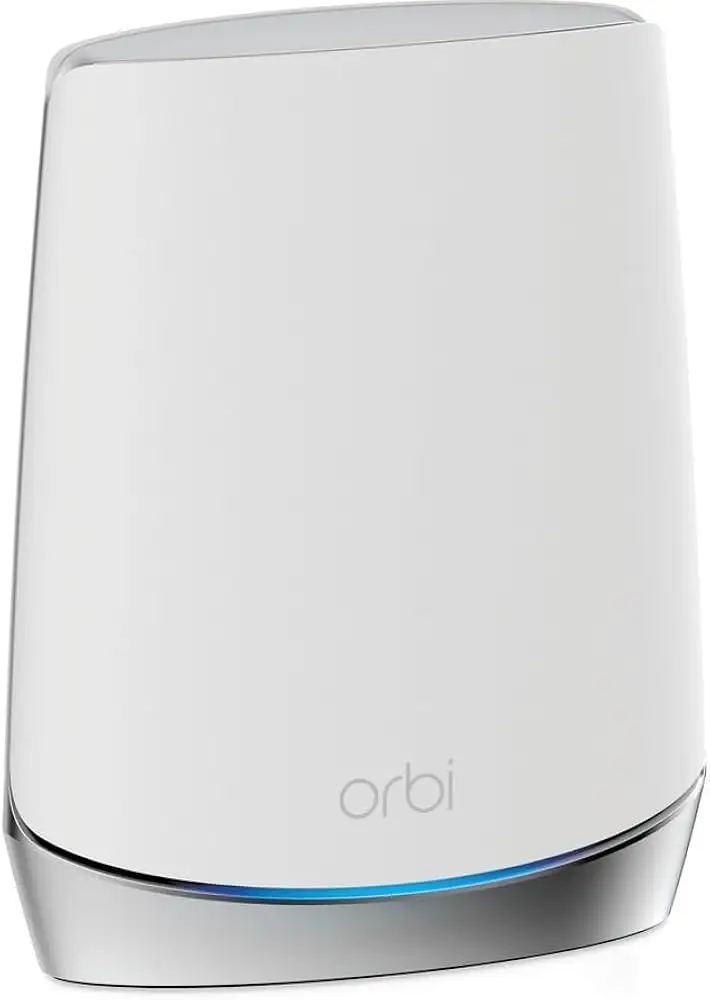
NETGEAR Orbi CBK752 Review: Fast, But Setup Can Hurt
“Get the speeds you pay for” is the promise that keeps showing up around the NETGEAR Orbi Modem Router Combo (CBK752) WiFi 6 Mesh—and it’s also where the sharpest disagreements start. Verdict: a high-performance, cable-only all-in-one that can solve coverage and speed complaints fast, but can punish you during setup and lock you into a modem you may outgrow. Score: 8.4/10 based on cross-platform buyer feedback (Amazon rating 4.2/5; Best Buy rating 4.3/5).
Quick Verdict
Conditional Yes — best for cable internet households tired of ISP gear, especially larger or multi-story homes; less attractive if you need ISP phone/voice or want flexibility to swap modems later.
| What people agree on | Evidence from user feedback | Who it’s best/worst for |
|---|---|---|
| Big jump in real-world speeds | Best Buy reviewer Corbin said: “literally right away after getting this set up my speeds were exactly what they should be.” | Best for gig-speed cable users |
| Strong whole-home coverage | Best Buy reviewer KwameC said: “wi-fi coverage is through the intire house and outside as well!” | Best for larger homes / lots of walls |
| App-based setup can be easy | Best Buy reviewer batt1eratt1e said: “very easy to set it up through the orbi app” | Best for users willing to follow the wizard exactly |
| Setup can also be a “nightmare” | Best Buy reviewer Corsair Fan said: “set up was a nightmare but it’s been doing a good job.” | Worst for users who hate troubleshooting |
| Integrated modem is convenient—but limiting | NETGEAR Community poster said: “i am reluctant to invest in a wifi solution with an integrated cable modem. what happens when fiber comes to the neighborhood?” | Worst if you expect to switch to fiber/voice bundles |
| Price feels premium | Best Buy reviewer batt1eratt1e said: “yes, it’s expensive. but… you get what you pay for.” | Best when bought on sale |
Claims vs Reality
NETGEAR and retailers frame the NETGEAR Orbi Modem Router Combo (CBK752) WiFi 6 Mesh as a “covers up to 5,000 sq. ft.”, “40+ devices,” and “AX4200 (up to 4.2Gbps)” solution (Amazon product listing). Digging deeper into user feedback, the day-to-day story is less about headline throughput and more about whether it finally fixes persistent dead zones, lag, and ISP equipment frustration.
The “5,000 sq. ft.” claim generally aligns with the tone of buyer stories, but users tend to describe it as coverage that finally reaches the places their old router never did, not a guarantee of identical speed everywhere. Best Buy reviewer cdigby described a dramatic range improvement: “i’ve also never had wifi reach the end of my road… i don’t lose my signal til then.” Yet even the editorial-style Reviews Inside write-up cautioned that “performance does drop a bit as you approach the edge of the coverage area” (Reviews Inside), echoing the real-world idea that edges are still edges.
The “easy set up” messaging also lands unevenly. Some people describe the Orbi app process as quick, while others report confusing activation sequences—especially when coordinating with the ISP. Best Buy reviewer Corbin said, “the set up was easy enough i had to call my isp to register it,” while Best Buy reviewer el 305 described the opposite path: “i had a really rough experience setting up the orbi, the app would fail to connect… i had to do it on the computer.” The gap here isn’t that setup never works; it’s that the setup experience can swing wildly depending on ISP activation order and patience with the wizard.
Finally, the integrated DOCSIS 3.1 modem is both the flagship convenience and the biggest strategic drawback. NETGEAR’s own materials emphasize it as a two-in-one “industry-first” (NETGEAR product page), but community feedback highlights what you give up: flexibility and certain ISP features. A NETGEAR Community participant warned: “does spectrum provide phone service? if so, only a spectrum cable modem will do that. the orbi… will not.”

Cross-Platform Consensus
Universally Praised
A recurring pattern emerged: people who bought the NETGEAR Orbi Modem Router Combo (CBK752) WiFi 6 Mesh because they were not getting the speeds they pay for often describe an immediate turnaround. For gig-speed cable customers, the emotional relief is palpable. Best Buy reviewer Corbin compared it to other mesh systems and said: “i pay for gig speeds and could only get 100 mbs down… right away… my speeds were exactly what they should be.” For remote workers and streamers, that “finally fixed it” moment shows up as stability, not just raw numbers—Best Buy reviewer Nicol said they saw “full speeds for our internet plan” and “no issues with random reboots and signal drops.”
Coverage is the other big win, especially for multi-story homes or buildings with lots of walls. Best Buy reviewer mikek framed the payoff simply: “great benefits wifi coverage for our entire house. two floors 2000 sq feet.” And for people who game or rely on consistent latency, the same coverage benefit becomes a “no lag” story rather than a square-foot claim. Best Buy reviewer paradoxfoxv9 said: “i haven’t experienced lag on my ps portal since i set up this router system.” That’s a very different kind of performance metric than “AX4200,” but it’s the one buyers keep returning to.
The mesh satellite concept also gets validated by community explanations that emphasize how it differs from a basic extender. In the NETGEAR Communities thread, one poster explained: “the satellite is an improvement over traditional wifi extenders… it uses a separate 5 g wifi channel to connect with the router… [and] allow mobile devices to roam seamlessly.” For households moving around the home on phones and laptops, the benefit isn’t manual switching—it’s continuity.
After the speed/coverage story, “control from the phone” becomes the third pillar. Best Buy reviewer KwameC described the app-centric management value: “can control, monitor, and test internet all through mobile device.” Another long Best Buy review (batt1eratt1e) praised the visibility: “you can tell what devices are connected… you can cut internet access off to any device.” Even when reviewers gripe elsewhere, the idea of centralized management comes through as a reason people stick with Orbi.
Common Complaints
The biggest complaint isn’t subtle: setup can be painful. Best Buy reviewer Corsair Fan called it out bluntly: “set up was a nightmare but it’s been doing a good job.” Best Buy reviewer el 305 also described a multi-step slog, saying the app “would fail to connect,” forcing a move to a computer workflow where “the orbi web interface would not recognize my input… took me many tries.” These stories matter because the CBK752 combines modem activation and mesh setup—if either part goes sideways, buyers can feel stuck troubleshooting two systems at once.
A second complaint is strategic: integrated modem equals less flexibility, especially for people thinking ahead to fiber or ISP voice services. In the NETGEAR Communities thread, one commenter questioned the long-term wisdom: “what happens when fiber comes to the neighborhood?” Another practical constraint appeared for Spectrum customers with phone service: “only a spectrum cable modem will do that. the orbi… will not.” For households where ISP bundles dictate hardware, the “all-in-one” advantage turns into a compatibility trap.
There’s also a thread of uncertainty around device support and firmware cadence—an issue that hits more technical buyers who follow model-line updates. A NETGEAR Communities participant advised: “personally would avoid the cbr series… it’s not seen the new v7 fw update that the cousin rbk series has,” recommending instead “a separate isp cable modem and separate rbk752 series system.” Even without a pile of identical complaints, it signals that some community members perceive the modem-router line as a slower-moving branch.
Finally, cost pressure shows up repeatedly. People don’t always regret paying, but they notice paying. Best Buy reviewer batt1eratt1e admitted: “yes, it’s expensive.” Best Buy reviewer KwameC framed it as “worth the money, if you can find it on sale the better.” This tends to be less about sticker shock alone and more about whether the improvement over ISP equipment feels dramatic enough to justify the premium.
Divisive Features
The Orbi app experience is the most polarizing detail. Some owners describe a clean, “dummy proof” flow, while others report buggy or finicky behavior. Best Buy reviewer batt1eratt1e said setup was “very easy… through the orbi app,” but Best Buy reviewer tek mo noted an ongoing annoyance: “whenever i add new devices i’ve found the need to reboot the system sometimes in order for new devices to show up in app properly.” That difference suggests that even happy long-term users can have recurring software friction.
The “modem + mesh in one box” concept itself splits buyers. Convenience-seekers celebrate reduced clutter and fewer devices, while planners worry about being locked into a single point of failure. In the NETGEAR Communities thread, one user said, “i love my orbi,” while another pushed the opposite direction: “i would recommend getting into a separate isp cable modem and separate rbk752 series system to connect to it.” It’s not a debate about Wi‑Fi speed so much as how much control you want over the plumbing.
Trust & Reliability
Digging deeper into “reliability,” the most detailed durability-style stories in this dataset come from Best Buy owners who mention months of ownership and consistent performance. Best Buy reviewer tek mo said after “9 months” they had “no technical issues… (knock on wood),” emphasizing “strong and reliable (doesn’t drop off, no dead zones).” Best Buy reviewer JessM, after “1 year,” said it “helped us get range in our two story house… managing from the phone is easy.”
On the community side, the NETGEAR thread shifts reliability into troubleshooting realism: when people complain about intermittent internet, responders point toward ISP line quality and modem logs rather than blaming Wi‑Fi outright. One NETGEAR Communities response advises that “any criticals, errors or warnings seen in the event logs needs to be reviewed and resolved by the isp… indicates a signal issue on the isp line up to the modem.” That’s less a testimonial and more a pattern: some problems buyers try to solve with new hardware may live upstream.
Alternatives
Only a few competing products are explicitly referenced by buyers in the provided data, but the mentions are revealing because they’re tied to switching decisions.
For mesh-router shoppers comparing ecosystems, Best Buy reviewer dhyatt920 described leaving Deco due to “so many connectivity issues” and said replacing it with Orbi meant “i haven’t had any issues since.” That frames TP-Link Deco (mentioned as “deco”) as an alternative some buyers tried first, but abandoned when stability didn’t meet expectations.
For users already invested in another mesh brand, Best Buy reviewer Armandoc said they still use “eero wifi extenders” and that “the orbi works seamless with the eero extenders also.” This isn’t a head-to-head verdict on Eero, but it shows some owners treat Orbi CBK752 as the modem/router core while reusing Eero nodes for extra reach.
Finally, within Netgear’s own lineup, the NETGEAR Communities discussion points to separating modem and mesh as an “alternative architecture,” recommending “a separate isp cable modem and separate rbk752 series system.” That’s not a different brand, but it is a meaningful alternative path for buyers who want Orbi mesh without the integrated modem risk.
Price & Value
Pricing signals in the dataset are scattered but stark: Amazon lists the 2-pack at $649.99 (Amazon product listing), while Best Buy shows $299.99 at the time captured and marked “sold out” (Best Buy). On the resale side, eBay listings range widely—from a “certified refurbished” unit at $156.39 (eBay) to used around $199.99 + shipping, and even a new listing at $744.48 (eBay). The market story reads like this: buyers chase deals, and availability/condition can swing the “worth it” verdict.
A recurring value argument is offsetting ISP rental fees. Reviews Inside cites “savings on equipment rental fees (up to $168 per year)” (Reviews Inside), echoing the same figure used in Amazon’s feature copy. But community feedback complicates that math when ISPs provide modems free for phone customers. In the NETGEAR Communities thread, one Spectrum customer explained: “because i have phone service… they have to provide me with a modem at no charge,” arguing that using an ISP modem can keep responsibility on the provider: “no claiming, ‘it’s your netgear modem…’” For those users, value isn’t rental savings; it’s whether Orbi fixes Wi‑Fi and routing without taking over the modem role.
Buying tips from the crowd skew practical: watch for sales, and be clear on ISP compatibility and bundled voice needs. Best Buy reviewer KwameC advised: “if you can find it on sale the better,” while NETGEAR community responders urged checking supported modem lists and considering “a modem only option” from the ISP before committing to an integrated gateway.
FAQ
Q: Does the satellite act like an extender?
A: Yes, but owners describe it as “better” than a typical extender. A NETGEAR Community poster said: “the satellite is an improvement over traditional wifi extenders… [and] allow mobile devices to roam seamlessly between the router and the satellite” (NETGEAR Communities).
Q: Will it help me actually get gig speeds I pay for?
A: Many buyers say it can, especially when replacing weak routers. Best Buy reviewer Corbin said: “i pay for gig speeds and could only get 100 mbs down… right away… my speeds were exactly what they should be.” Results still depend on ISP provisioning and line quality.
Q: Is setup easy or difficult?
A: Feedback splits. Best Buy reviewer batt1eratt1e called it “very easy to set it up through the orbi app,” but Best Buy reviewer Corsair Fan said “set up was a nightmare.” Best Buy reviewer el 305 also reported the app “would fail to connect,” requiring a computer setup.
Q: Can I use it if I have Spectrum phone/voice service?
A: Community feedback warns you may be restricted. A NETGEAR Communities participant said: “does spectrum provide phone service? if so, only a spectrum cable modem will do that. the orbi… will not.” If voice is mandatory, you may need the ISP modem and use Orbi for routing/mesh instead.
Q: Is it worth paying the premium price?
A: Buyers who see big speed/coverage gains often say yes. Best Buy reviewer batt1eratt1e wrote: “yes, it’s expensive… you get what you pay for,” and Best Buy reviewer KwameC said it’s “worth the money, if you can find it on sale.” Others focus on avoiding lock-in from an integrated modem.
Final Verdict
Buy the NETGEAR Orbi Modem Router Combo (CBK752) WiFi 6 Mesh if you’re a cable-internet household with gig speeds, dead zones, and too many devices for ISP gear—especially in a two-story home or wall-heavy layout. Best Buy reviewer Ho Zin captured that gamer-minded payoff: “wifi now covers my whole house and i’m getting all the speed i’ve been paying.”
Avoid it if you rely on cable bundled voice/phone hardware requirements or want to keep modem responsibility with the ISP. A NETGEAR Communities poster’s caution sums up the long-term worry: “i am reluctant to invest in a wifi solution with an integrated cable modem. what happens when fiber comes to the neighborhood?”
Pro tip from the community: follow ISP activation and signal-quality troubleshooting before blaming the mesh. NETGEAR Communities guidance emphasizes checking modem logs because “errors… indicates a signal issue on the isp line up to the modem,” and verifying cabling like “cat6” for the modem-router link.