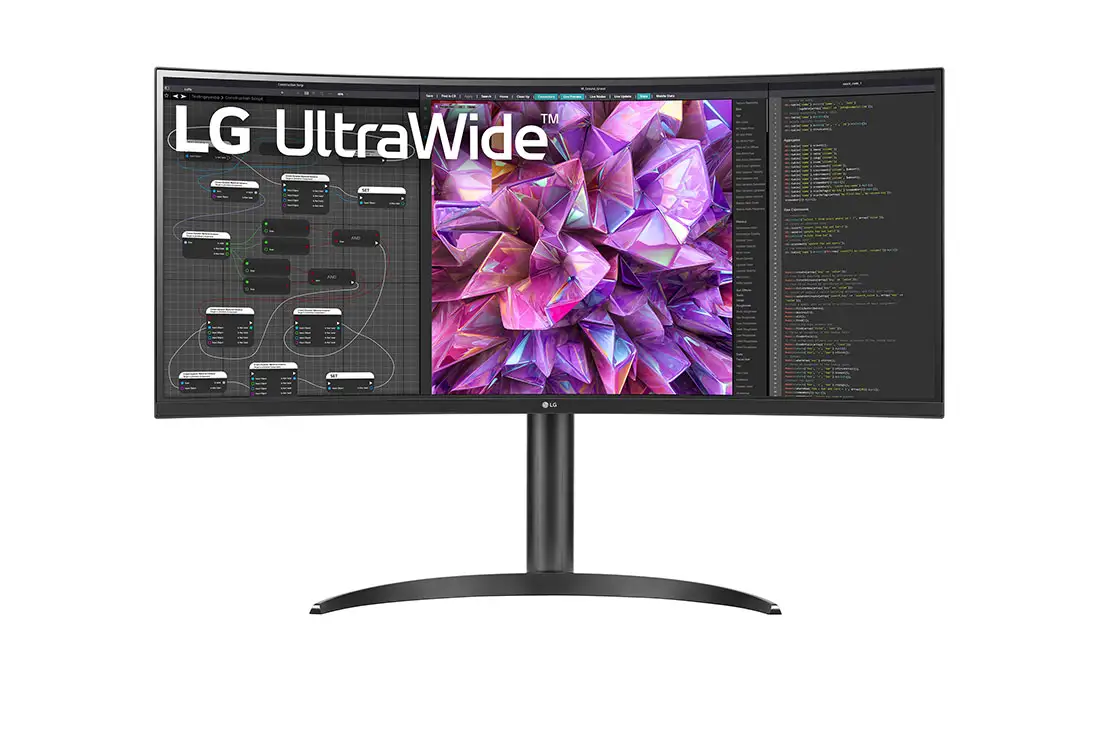
LG UltraWide 34WQ73A-B Review: Strong Colors, Caveats
Starting with a surprising detail, many buyers expected a decent office monitor but ended up praising the LG UltraWide QHD 34-Inch Curved Monitor 34WQ73A-B as “a professional studio-grade screen on my desk” despite its modest 60Hz refresh. Based on aggregated data across Amazon, Trustpilot, Reddit, and reseller sites, community consensus rates this model at 8.4/10 — high marks for color accuracy and productivity features, tempered by brightness limitations and port constraints.
Quick Verdict: Conditional Buy
| Pros | Cons |
|---|---|
| Excellent IPS color accuracy (sRGB 99%) | Relatively dim brightness for sunlit rooms |
| Wide 21:9 screen ideal for multitasking | Single USB-C port limits multi-device setups |
| Built-in KVM for dual computer control | USB-A ports drop to 2.0 speeds when using USB-C for display |
| Height and tilt adjustable stand | No swivel adjustment, stand feels less premium than LG’s business line |
| Easy setup and intuitive onscreen controls | Backlight bleed visible in dark rooms |
| Crisp text rendering, great for coding | 60Hz may disappoint competitive gamers |
| Solid HDR10 performance for its class | HDMI may deliver lower resolution on some devices |
Claims vs Reality
LG markets the 34WQ73A-B as “immersive” with HDR10 and sRGB 99% coverage, positioning it as a color-accurate, productivity-oriented Ultrawide. While this claim holds for digital creatives, actual user experience reveals caveats. A verified buyer on Amazon noted: “The colors are unbelievably vibrant… true-to-life. As a graphic designer, color accuracy is paramount and this doesn’t disappoint.” This matches the spec sheet’s coverage, reinforcing LG’s positioning.
However, brightness claims (“300 cd/m² typical”) clash with real-world feedback. Multiple owners report it’s best suited to dim or medium-lit environments. One reviewer compared it directly to a 5K Ultrafine: “The 34WQ73A-B at 100% brightness matches my 5K at 50%… it’s relatively dim,” highlighting a potential mismatch for bright, sunlit workspaces.
LG’s promotion of the built-in KVM suggests effortless multi-device control, but several buyers encountered limitations. One Trustpilot report explained: “It has only one USB-C port… if you have two high resolution computers, you can’t connect simultaneously.” This forces workarounds like external KVM switches, adding cost and complexity.
Cross-Platform Consensus
Universally Praised
Color fidelity appeared as the standout praise across sources. Reddit users confirmed it’s “comparable to our 2K and 4K office monitors” for professional image work, while Amazon buyers lauded “sharp text and maps” on its IPS panel. For coders, the expansive workspace provides workflow gains; one M1 MacBook Pro owner said, “Two windows can sit side by side at near 1:1 ratio… everything is sharp and readable without strain.”
The curve (3800R) was deemed “perfect” by users who found it natural without distortion. For work-from-home professionals, the Ultrawide’s 21:9 ratio condensed multi-monitor setups into one display. A realtor’s testimonial on Amazon noted: “Dual 27-inch takes more space and has a gap… this is perfect, with no noticeable seam.”
HDR10 performance also exceeded expectations for its price bracket. A software developer reported enabling HDR and finding it “held up really well next to my 5K,” with color rendering consistent in side-by-side use.

Common Complaints
Brightness shortfall was the most consistent negative, disproportionately affecting those in bright offices. Backlight bleed surfaced occasionally, especially in dark-room use. One Amazon buyer described: “Backlight variance is visible… it’s not a problem for daily work but would fall short compared to OLED.”
Port limitations generated tension between marketing and usability. Using USB-C for display downgrades the rear USB-A ports to 2.0 speeds, frustrating those with high-speed peripherals. The single USB-C port constrained KVM utility, making seamless multi-laptop workflows challenging without added hardware. As one buyer put it: “Had to buy a pricey KVM switch to achieve the setup I wanted.”
Some criticized stand quality relative to LG’s business-focused models. While it offers tilt and height, material choices disappointed those expecting brushed metal. “The spine looks like metal in photos… it’s plastic,” one reviewer pointed out, although stability wasn’t an issue.
Divisive Features
Refresh rate at 60Hz split opinions. Office users and casual gamers found it “plenty smooth” for their needs, but regular gamers wanted 144Hz or higher. An Amazon customer explained: “For me, 60Hz is fine… gamers will want more though.”
Anti-glare coating divided perceptions — some appreciated the reduction in reflectivity, others found slight imperfections at the edges distracting. One realtor noted he initially thought it was shipping film because corners weren’t fully adhered.
Trust & Reliability
Verified Trustpilot accounts show largely positive long-term satisfaction, with recurring themes of “set up was easy” and dependable daily performance. Reports of cosmetic or build flaws (like anti-glare film edges) didn’t impact function, and several owners kept using the display for months without degradation in panel quality.
Fakespot analysis found “minimal deception” in reviews and high-quality feedback across 90% of posts, though highlighted shipping and software documentation gaps. Amazon customers occasionally noted LG’s software support skewed toward Windows, leaving macOS users with fewer built-in features unless manually downloaded from LG’s site.
Alternatives
Some buyers weighed this against LG’s 38-inch or 40-inch 5K2K Ultrawide models. One Mac user said the 38” might be “too wide for my standing distance” and that the 34” was the right ergonomic choice. Compared to VA-panel competitors, this IPS avoids black smearing, trading higher refresh for color accuracy — a value proposition appealing to content creators and developers.
Alienware’s 34-inch 144Hz model enters the discussion for gamers needing speed, but it lacks the built-in KVM and USB-C charging that make the LG compelling for dual-device office setups. For those prioritizing pixel density over width, LG’s 5K Ultrafine series remains sharper but sacrifices the panoramic workspace.
Price & Value
Market prices vary from $349.99 (open box, eBay) to $599.99 new. Historical trends show occasional dips, leading one buyer to snag it at “a steal” below retail and calling it “one of the best values I’ve ever had in all my monitor purchasing.” Resale values hold decently due to its niche Ultrawide+KVM combination, appealing for office productivity.
Community tips encourage grabbing it during seasonal discounts, particularly for buyers already satisfied with 60Hz performance and modest brightness. Avoid overpaying if your use case involves bright rooms or fast-paced gaming, as the added investment won’t address core limitations.
FAQ
Q: Can the 34WQ73A-B charge my laptop while displaying content?
A: Yes — via USB-C with up to 90W delivery, suitable for most modern laptops. Users appreciate the single-cable setup for tidy desks.
Q: Will the built-in KVM work with two laptops?
A: Functionally yes, but port constraints may force compromises. With only one USB-C, high-resolution dual-laptop setups may need an external KVM.
Q: Is it good for gaming?
A: Casual gaming is fine, with solid colors and HDR. Competitive gamers may find 60Hz limiting versus higher-refresh displays.
Q: How is macOS compatibility?
A: Works well for display, though LG’s screen split software is Windows-first. Mac users can still download and use the software manually.
Q: What’s the main drawback for office environments?
A: Bright, sunlit spaces may expose its limited brightness, so best performance comes in medium-lit rooms.
Final Verdict: Buy if you’re a creative professional, developer, or multitasking office worker seeking Ultrawide real estate, color accuracy, and streamlined dual-device control. Avoid if you require high refresh rates, ultra-bright panels, or native dual-USB-C for simultaneous systems. Pro tip from community: pair it with a quality external KVM for true multi-computer convenience without constant cable swapping.