Kensington Expert Wireless Trackball Review: 7.2/10
A Best Buy reviewer didn’t mince words: “these track balls are the cat’s meeow”—but that enthusiasm sits right next to complaints about “glitchy bluetooth connection” and software frustration. Kensington Expert Wireless Trackball Mouse feels like a productivity staple for the right desk setup and user habits, yet it can punish anyone who expects painless wireless reliability on day one. Verdict: Conditional buy — 7.2/10.
Quick Verdict
Yes/No/Conditional: Conditional (great ergonomics + control if you’re OK with setup/software quirks and occasional wireless headaches)
| What users praise/complain about | Evidence from users | Who it impacts most |
|---|---|---|
| Ergonomics + wrist relief | A Best Buy reviewer said: “this thing has saved my wrists… sore wrists… not anymore!!” | Office workers, tendonitis/RSI-prone users |
| Precision + multi-monitor control | Kensington press quote (Luke Duran) called it “solid performance” with “control and access”; Best Buy reviewer said “accurate… crisp… no lag time!” | Designers, audio editors, multi-monitor users |
| Wireless freedom (when it works) | Kensington press quote (Greg Damm) said “zero connectivity issues”; Best Buy reviewer liked “wifi no cords to fight on desk!” | Cable-haters, cleaner desks, laptop users |
| Bluetooth can be flaky | Looria highlights “glitchy bluetooth connection”; Fakespot snippet: “blue tooth model did not want to stay connected” | Mac/laptop users relying on BT |
| Software/setup frustration | Best Buy reviewer: “installing and using the software… incomprehensible”; Fakespot snippet: “the new kensingtonworks has issues” | New trackball users, anyone who needs remaps |
| Comfort/size divisiveness | Best Buy reviewer returned it: “wasn't as comfortable… due to the larger ball size” | Small-hand users, those preferring compact mice |
Claims vs Reality
Kensington sells the idea that wireless should “clean up your desktop,” and that you’ll get “smooth, precise cursor control” plus the benefits of TrackballWorks customization. Digging deeper into user reports, the hardware concept lands—comfort, control, and a distinct workflow advantage—but the “wireless simplicity” claim runs into real-world friction for a subset of buyers.
Claim: “Wireless freedom” with reliable connectivity. In Kensington’s own press quotes, Greg Damm said: “the wireless feature really cleans up your desktop… i had zero connectivity issues.” Best Buy feedback echoes the upside when things go right: one reviewer celebrated, “wifi no cords to fight on desk!” Yet user-aggregated notes from Looria repeatedly flag “glitchy bluetooth connection,” and Fakespot’s excerpts include: “the blue tooth model did not want to stay connected regardless of extensive troubleshooting so i decided i would go with the wired.” The gap is less about whether wireless is possible and more about whether it’s effortless for every setup.
Claim: Customization makes it “personalized” and productive. Kensington’s messaging leans on TrackballWorks and programmable buttons, and Luke Duran (Kensington press quote) described “four programmable, application-specific buttons” enabling workflows that “effortlessly shifts” across design apps. But some everyday buyers report the opposite experience during onboarding. A Best Buy reviewer admitted: “installing and using the software… seemed to be incomprehensible,” while another said, “software to customize was difficult to pair with device.” The reality seems to be: power users love what customization unlocks, while first-timers can bounce off the setup.
Claim: “Smooth, precise cursor control.” This is one area where marketing and many user stories align. A Best Buy reviewer wrote: “accurate and its control is crisp… responsive and no lag time!” Kensington’s press quotes also stress “speed” and “precision.” Still, the broader user chatter introduces edge cases—wireless latency for some, and occasional wake/sleep annoyance on Macs noted in Fakespot excerpts: “wireless version on a mac needs a left click to wake up… i wish the movement of the ball would wake the screen cursor but it doesnt.”
Cross-Platform Consensus
Universally Praised
The clearest thread across platforms is comfort over long sessions. While marketing talks about productivity, user stories keep circling back to pain relief and endurance. On Best Buy, one reviewer framed it as a turning point: “this thing has saved my wrists… had been getting early pangs of tendonitis… not anymore!!” In Fakespot excerpts, another user echoed the long-haul benefit: “helped with the pain in my wrist when working over 10 hrs.” For desk-bound professionals—coders, editors, analysts—these aren’t minor perks; they’re the reason to switch input devices at all.
Precision and fine control are the second major pillar. This shows up both in enthusiast praise and pro-use narratives. A Best Buy reviewer said, “accurate… crisp,” and tied it to fit: “perfect for larger hands.” Kensington’s press quote from Luke Duran, an art director, emphasized “solid performance” and a “trusted feel,” describing how button access and the scroll ring support app workflows in graphic design. For users living on large displays or multiple monitors, that “trusted feel” reads like consistency—muscle memory that doesn’t collapse during detailed work.
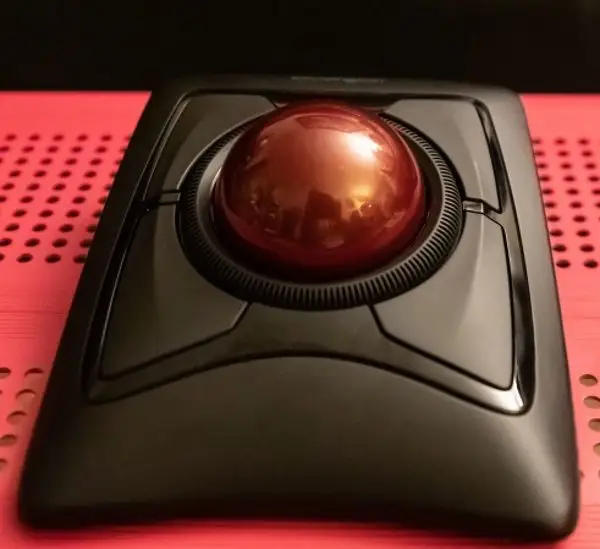
The scroll ring itself is repeatedly treated as a signature feature—sometimes even the reason people stick with this model. Luke Duran called the ring “a great navigation tool… one of the best innovations to kensington trackball products ever,” adding it’s “a wonderful feature that i really miss when i’m not using a trackball.” Best Buy buyers also describe the dual-control appeal: “ring and track ball both work I love it!” For document-heavy jobs—audio timelines, spreadsheets, long web pages—the ring becomes a distinct workflow compared with a standard mouse wheel.
After those pillars, brand loyalty becomes its own form of consensus. Several Best Buy reviews read like renewals rather than first purchases. One said: “i’ve been a kensington trackball user for years… i’m really happy with my new trackball.” Another put it bluntly: “this is our fourth trackball… kensington is our preferred brand.” That matters because it suggests the product’s best audience isn’t “anyone curious,” but people already sold on trackballs as a category.
Key positives users repeat (with sources):
- Ergonomic relief: Best Buy — “saved my wrists”; Fakespot — “helped with the pain… over 10 hrs”
- Precision/control: Best Buy — “accurate… crisp”; Kensington press quote — “solid performance”
- Scroll ring value: Kensington press quote — “best innovations”; Best Buy — “ring and track ball both work”
Common Complaints
A recurring pattern emerged around Bluetooth reliability and the “wireless tax” you pay in troubleshooting. Looria’s summaries explicitly list “glitchy bluetooth connection,” and Fakespot excerpts reinforce the lived experience: “blue tooth model did not want to stay connected regardless of extensive troubleshooting so i decided i would go with the wired.” For laptop users who bought this specifically to avoid cables, that kind of instability flips the benefit on its head: wireless freedom turns into wireless babysitting.
Setup and software comprehension show up as another friction point, especially for new trackball users. One Best Buy reviewer described a double learning curve: “i’m not familiar with trackball usage… frustrating,” and added that the software felt “incomprehensible.” Another said, “software to customize was difficult to pair with device.” Fakespot’s excerpts are harsher, blaming “the new kensingtonworks” and calling it “junk.” The common thread isn’t that customization is bad; it’s that the path to customization can feel unfriendly, and that matters most to first-time buyers who need remapping to make the device feel “normal.”
There are also mechanical/behavioral annoyances that surface once you’re past the honeymoon phase. Fakespot excerpts mention intermittent issues like: “trackball does lock up… only resolution… unplug / replug,” and complaints about noise/feel: “trackball is loud and scratchy.” Even in aggregator commentary, Looria lists “design flaws” and mentions being “prone to drifting.” For users who need absolute reliability in production work—live audio sessions, deadline design—these interruptions can be disproportionally maddening, even if they’re not universal.
Finally, not everyone adapts to the physical format. One Best Buy buyer returned it for comfort reasons: “wasn't as comfortable… due to the larger ball size.” Another admitted they reverted to a normal mouse because trackball use itself was “frustrating.” The Expert Wireless is not a neutral replacement; it’s a different interaction model, and the complaints often read like a mismatch of expectations rather than a defective unit.
Most-cited pain points (with sources):
- Bluetooth instability: Looria — “glitchy bluetooth connection”; Fakespot — “did not want to stay connected”
- Software frustration: Best Buy — “software… incomprehensible”; Fakespot — “kensingtonworks has issues”
- Lockups/noise for some: Fakespot — “lock up… unplug / replug”; “loud and scratchy”
- Comfort mismatch: Best Buy — “larger ball size… returned it”
Divisive Features
Wireless itself is divisive: it’s either liberating or an ongoing compromise. Kensington’s press quote from Greg Damm stressed “zero connectivity issues,” and Best Buy includes happy stories like “no problems with the bluetooth connection… i’ll never go back to a regular mouse.” But against that, the same dataset contains repeated warnings about Bluetooth behavior and even suggestions to abandon wireless for wired, like the Fakespot excerpt: “i decided i would go with the wired.” The split often hinges on environment—device, OS, and tolerance for occasional wake/pair quirks.
The learning curve is similarly polarizing. For experienced trackball users, the device is immediately productive, and reviews turn into loyalty statements (“excellent trackball / mouse… replaces a cabled version”). For newcomers, it can feel like relearning basic navigation. One Best Buy reviewer admitted they “reverted back to my old mouse,” hoping to “give it another try.” The same product characteristic—being different—can be a competitive advantage or a deal-breaker.
Even the large form factor and ball size land differently by user. Some praise it as “perfect for larger hands,” while others call it uncomfortable and “overpriced,” returning it. The common takeaway is that ergonomics aren’t universal—this model seems to reward average-to-large hands and users who want a stable desk device rather than a compact travel pointer.
Trust & Reliability
Digging deeper into trust signals, Fakespot’s page for the Expert Trackball surfaces a cluster of complaints that aren’t about “feel,” but about failure modes: “trackball does lock up… unplug / replug,” and frustration at software quality: “the new kensingtonworks has issues.” Even when praise is strong—“this monsterous gadget is amazing… used the heck out of it… sad when it died”—it still points to an eventual end-of-life that power users remember vividly.
Long-term durability narratives also show up outside Amazon-style ratings. On Newegg (wired model listing, but relevant to the Expert line’s build perceptions), one critical reviewer complained that after “about 7 or 8 months” a support piece “fell off,” and later reported a replacement with random disconnects. While that’s the wired K64325 review, it creates a broader reliability shadow over the Expert family: some owners expect these devices to be long-lived work tools, and get especially angry when parts wear early.
At the same time, there’s evidence of multi-unit, multi-decade usage habits that imply many owners do trust the design. A Best Buy reviewer said: “i’ve worn out three of them,” and another noted having a prior one for “10 years.” Those comments don’t prove the wireless model is immortal, but they do show the Expert trackball is often treated like a “default input device” people replace repeatedly rather than abandon.
Alternatives
Only a few competitors are explicitly named in the provided data, and they frame the Expert Wireless as a particular style of trackball rather than the category’s final answer. The most direct alternative is the Kensington SlimBlade line, which Looria positions as a comparable trackball option with an “easy-to-clean design” and a different scrolling mechanism (“twisting motion for scrolling”). That same dataset also includes harsh critiques of scroll behavior from a frustrated commenter: “the slim blade is amazing, but the scrolling method is awful, resulting in rsi issues.”
In other words, the choice isn’t simply “Expert vs SlimBlade,” but “scroll ring vs twist scrolling,” plus how your hands tolerate each. One Fakespot excerpt even pushes a strong opinion: “just skip the expert completely, and pay a few more dollars for the slimblade,” showing that some users see SlimBlade as the fix for Expert’s wireless or feel issues. Yet other comments praise the Expert’s ring as something they “really miss” when it’s not there (Kensington press quote from Luke Duran).
Looria also compares the Expert Wireless to the Microsoft Trackball Explorer, describing it as beloved by some but “harder to find and more expensive,” and noting mixed views on reliability and usability. This positions Microsoft’s model less as a clean alternative and more as a nostalgia-driven favorite with availability drawbacks.
Price & Value
Pricing signals in the dataset show the Expert Wireless living in a premium-ish band, with Best Buy listing it at $99.99. On eBay, market listings suggest ongoing resale liquidity: the “kensington k72359ww expert wireless trackball mouse” appears around $84 new and $59.49 used in one snapshot. That spread implies owners can recoup some cost, but also that buyers can reduce risk by going used—especially if they’re unsure about the trackball learning curve.
Value perception swings with the user’s fit. One Best Buy reviewer returned it as “overpriced,” tied to comfort: “wasn't as comfortable… due to the larger ball size.” Meanwhile other buyers sound like they’re amortizing the cost across years of wrist relief and daily use—“saved my wrists,” “excellent… replaces a cabled version,” and “our fourth trackball.” For those users, the price reads less like a gadget purchase and more like paying for a primary work tool.
Buying tips implied by the community feedback: if Bluetooth instability is your fear, consider treating the USB receiver option as your “best experience” route. A Fakespot excerpt advises exactly that tradeoff: “use the included usb nano receiver if you want the best experience but that means… giving up a usb port.” The value equation can hinge on whether you can spare that port.
FAQ
Q: Does the Kensington Expert Wireless Trackball have Bluetooth lag or connection problems?
A: Some users report smooth, reliable wireless, while others complain about instability. Kensington’s press quote (Greg Damm) said he had “zero connectivity issues,” but Looria flags “glitchy bluetooth connection,” and a Fakespot excerpt says the “blue tooth model did not want to stay connected.”
Q: Is it good for wrist pain or RSI?
A: Many buyers describe noticeable relief during long workdays. A Best Buy reviewer wrote, “this thing has saved my wrists,” and a Fakespot excerpt says it “helped with the pain in my wrist when working over 10 hrs.” Individual comfort varies with hand size and grip habits.
Q: Is the software required, and is it easy to use?
A: You can use the trackball without deep customization, but many people want the software for button mapping. Experiences vary: one Best Buy reviewer found the software “incomprehensible,” while another called it “super helpful.” Fakespot excerpts also criticize “kensingtonworks” as having “issues.”
Q: Is the scroll ring actually useful?
A: Many users consider it a standout feature for document and timeline navigation. In a Kensington press quote, Luke Duran called it “one of the best innovations” and said he “really miss[es]” it when it’s not available. Some other reports criticize scroll behavior or feel.
Q: Is it comfortable for small hands?
A: Comfort is divisive and often tied to size. A Best Buy reviewer praised it as “perfect for larger hands,” but another returned it, saying it “wasn't as comfortable… due to the larger ball size.” If you prefer compact mice, this may feel bulky.
Final Verdict
Buy if you’re a desk-bound pro (design, audio, office) who wants scroll-ring navigation and trackball ergonomics, and you’re willing to tinker a bit—Best Buy reviewers describe it as “saved my wrists” and “accurate… crisp.”
Avoid if you need flawless Bluetooth with zero fuss or you dislike large devices; multiple sources mention “glitchy bluetooth connection,” and one Best Buy buyer returned it for comfort and price.
Pro tip from the community: if Bluetooth acts up, a Fakespot excerpt suggests the “best experience” may come from using “the included usb nano receiver,” even if it costs you a USB port.