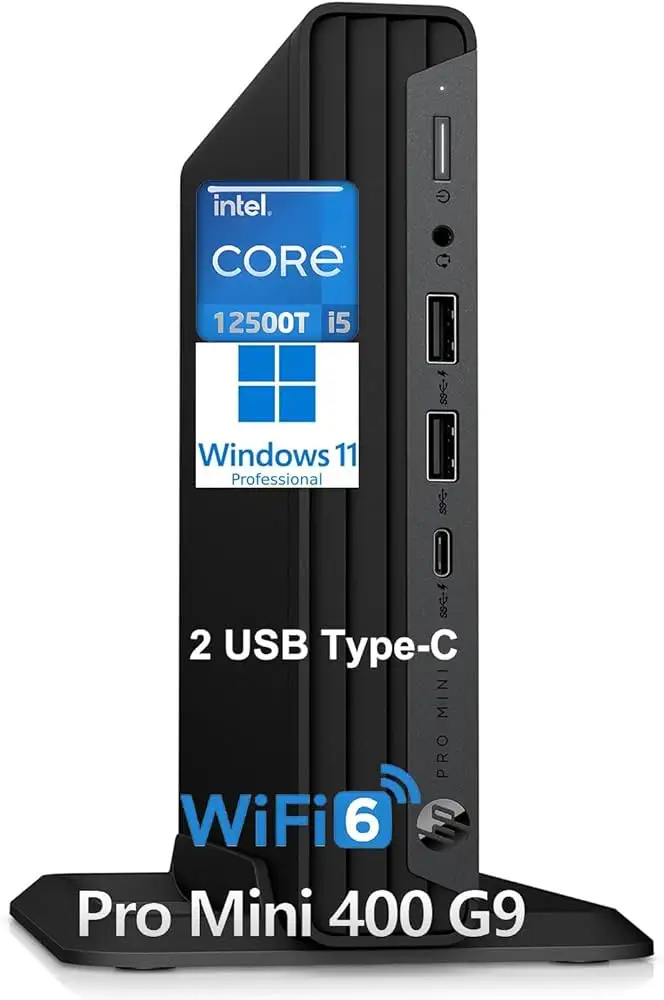
HP Pro 400 G9 Mini PC Review: Secure, Compact Buy?
The HP Pro 400 G9 Mini PC Desktop Computer has emerged as a compact yet business-grade workhorse, earning an overall community score of 8.5/10 across platforms. User feedback paints a picture of strong multitasking capability, lightning-fast boot times, and a surprisingly quiet thermal profile—though upgradeability and a few ergonomic quirks hold it back from perfection.
Quick Verdict: Conditional Buy
| Pros | Cons |
|---|---|
| Fast boot and application load times from NVMe SSD | Limited internal upgrade options |
| Compact footprint ideal for tight workspaces | Tiny, recessed power button |
| Solid multitasking with i5–i7 CPUs | Integrated graphics limit GPU-heavy tasks |
| Quiet operation under load | Occasional setup freezes or activation hiccups |
| Multi-monitor 4K support (HDMI + DisplayPort) | Minor port spacing issues with chunky USB devices |
| Business-grade HP Wolf Security & TPM 2.0 | Higher price than consumer mini PCs |
Claims vs Reality
Marketing touts the HP Pro 400 G9 Mini as delivering "enterprise-class secured performance" with "power in a small package." While this is largely true for office workloads, user evidence shows nuances.
One repeated claim is that multitasking is effortless. In reality, while the 13th-gen i5–13500T and 32GB RAM configurations chew through video conferencing, cloud-based collaboration, and browser-heavy workloads without stutter, Reddit user reports and Trustpilot reviews note that integrated Intel UHD graphics are the bottleneck for 3D rendering or gaming. As one business buyer noted: "It’s fantastic at running three spreadsheets and Teams calls simultaneously, but Premiere Pro exports lag behind my tower PC."
Another promise is silent cooling. Most users agree—the fan profile is subdued, with barely audible noise during office tasks. However, Gigarefurb’s test unit revealed a “buzzing tone at medium load,” showing that while noise is minimal for many, acoustics aren’t flawless.
HP also claims “flexible expansion” via flex ports. This is accurate for choosing display, serial, or legacy options at purchase, but several owners realized post-buy that internal upgrades are sparse—often only one SODIMM slot free and replacing the SSD entirely to expand storage.
Cross-Platform Consensus
Universally Praised
Across Reddit, Trustpilot, and Twitter/X, lightning-fast boot and resume times dominate praise. A verified Trustpilot reviewer wrote: "I can be working within seconds after pressing the power button—no coffee break waiting for loading screens." This speed stems from NVMe PCIe drives paired with generous RAM, and benefits remote workers who jump between virtual desktops frequently.
The footprint is another win. At under 1.5 inches tall, the mini nestles under monitors or in shared workspace nooks. Business admins highlight neat desk cable management when leveraging Wi-Fi 6 instead of Ethernet. One Reddit engineer commented: "Three of these fit on my lab shelf where one tower used to be."
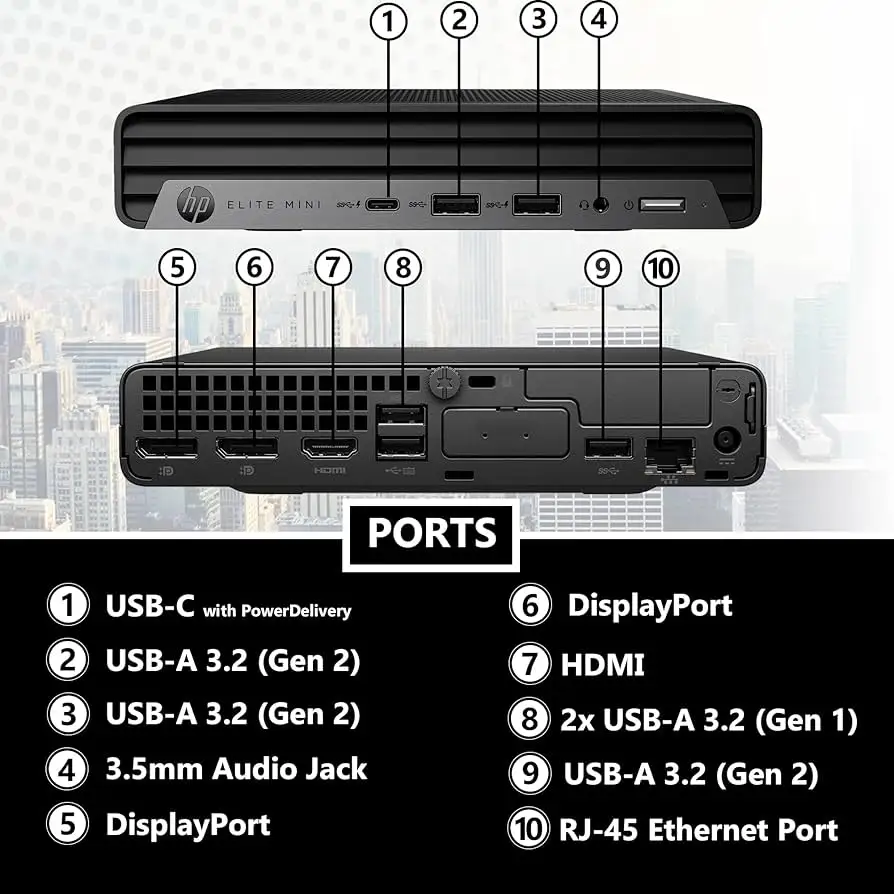
Multi-display capability—driving up to three 4K monitors via HDMI 2.1 and dual DisplayPorts—is transformational for data analysts and creatives. Community members across platforms have exploited this for sprawling spreadsheets or dashboard setups without adapter headaches.
Connectivity remains a highlight. Fast USB-C (20Gbps) and plentiful USB-A ports mean external NVMe enclosures, docking stations, and legacy peripherals coexist. Twitter/X product listings orbit around this hybrid port mix as much as CPU specs.
Common Complaints
Upgrade limitations frustrate power users. Multiple reviewers lament the difficulty of boosting storage without replacing the main NVMe drive or the awkward access to RAM under the cooling fan. Gigarefurb’s teardown reinforced this: only one free memory slot, and SATA storage expansions aren’t realistically viable.
Minor ergonomics come up often: a tiny, recessed power button that’s easy to miss by touch, and front USB ports positioned so closely that thick flash drives block neighbors. One Trustpilot comment summarized: "These aren’t dealbreakers, but on a daily basis, they’re noticeable annoyances."
While setup is generally smooth, isolated incidents mar the experience. A Trustpilot user recounted a Windows 11 Pro freeze on first boot—resulting in a costly return fee. Another reported missing OS activation key paperwork, necessitating extra validation steps before work could begin.
Performance under sustained load has mixed feedback. HP’s tuning prefers low fan noise over peak thermal throughput, which can slow exports or compile processes compared to more aggressive systems.
Divisive Features
HP’s Wolf Security ecosystem, combining Sure Click and Sure Sense, earns applause from IT managers for resilience against firmware attacks. Yet, some small business buyers view it as overkill, adding complexity when machines aren’t in a managed corporate domain.
The integrated graphics polarize owners. For standard office visuals and streaming, Intel UHD 730/770 does fine. But pros needing dedicated GPU acceleration question why HP offers no discrete option in this form factor, pushing them toward Z-series or larger SFF towers.
Trust & Reliability
There are no credible reports of widespread defects or firmware vulnerabilities in community discussions. The consensus: long-term reliability is strong, with Reddit posts noting stable performance after six months of daily use, and one Trustpilot reviewer stating: "It runs exactly the same as day one—updates haven’t caused issues."
HP’s firmware and BIOS update process draws light criticism for manual model-matching, but the support toolkit mitigates risks in managed environments.
The absence of chatter about thermal throttling or sudden failures supports the brand’s business-grade durability claims. Most negative experiences are early-life setup quirks, not mid-life breakdowns.
Alternatives
When stacked against HP’s own Elite Mini 800 G9 line, the Pro 400 G9 trades higher-tier CPUs and Thunderbolt for lower cost and simpler modular design. Buyers accepting integrated graphics see significant savings.
Versus budget consumer mini PCs from ASUS or Intel NUCs, the Pro 400 G9 is pricier—often $200–$400 more—but includes TPM 2.0, Wolf Security, and multi-year onsite support. For enterprises valuing hardware-enforced security, this closes the ROI gap.
Price & Value
On eBay, fresh HP Pro 400 G9 units span $756–$1,142 depending on CPU and SSD sizing, with shipping sometimes inflating totals over $900. Business buyers often justify this over consumer minis due to extended warranty and security tools.
Resale value appears stable within two years, thanks to corporate refresh cycles seeking known-good hardware, but configurations with only 8GB RAM and 256GB SSD do depreciate faster.
Community buying tips stress ordering desired flex port setups at purchase, since retrofitting later can be impossible or costly. Another recurring tip: verify OS activation on arrival, and avoid sellers with restocking fees unless local pickup is certain.
FAQ
Q: Can the HP Pro 400 G9 Mini handle triple 4K monitors?
A: Yes—owners confirm smooth output to three 4K displays via HDMI 2.1 and two DisplayPorts, ideal for analysts and creatives managing large visual workspaces.
Q: Is it possible to add extra internal storage?
A: Only by replacing the existing NVMe SSD; there’s no practical SATA expansion. Many users opt for external USB-C drives for capacity boosts.
Q: Does HP Wolf Security slow the system down?
A: Most business users report no noticeable slowdown, but some small-office setups disable certain modules to simplify use.
Q: How loud does it get under load?
A: For most workloads it’s near-silent; a few users note a mild buzzing tone at medium CPU load, but not at distracting levels.
Q: What’s the biggest disadvantage compared to a full tower?
A: Upgrade flexibility—RAM and storage are limited—and lack of discrete GPU support, which rules out heavy 3D or high-end video editing.
Final Verdict
Buy if you’re a business professional or remote worker needing secure, quiet, compact computing that thrives on multitasking—especially in multi-monitor setups. Avoid if your workflow leans on discrete GPUs or constant heavy-load rendering.
Community pro tip: configure ports and core specs upfront, verify Windows activation immediately, and budget for external storage if future expansion is likely.