Logitech MX Ergo Plus Review: Pricey Comfort Win
“Just buy it… your mouse search will be over.” That kind of language shows up more than once in the feedback trail for the Logitech MX Ergo Plus Wireless Trackball, and it frames the overall mood: strong enthusiasm from trackball converts, with a few recurring caveats. Verdict from compiled user feedback: a high‑comfort, high‑precision thumb trackball that’s pricey and not ideal for everyone. Score: 8.6/10 based on cross‑platform sentiment.
Quick Verdict
Conditional Yes. It lands as a near‑endgame ergonomic trackball for medium‑to‑large hands or anyone trying to reduce wrist movement, but small‑handed users and people sensitive to thumb strain report mixed results.
| What users agree on | Evidence from feedback | Who it matters to |
|---|---|---|
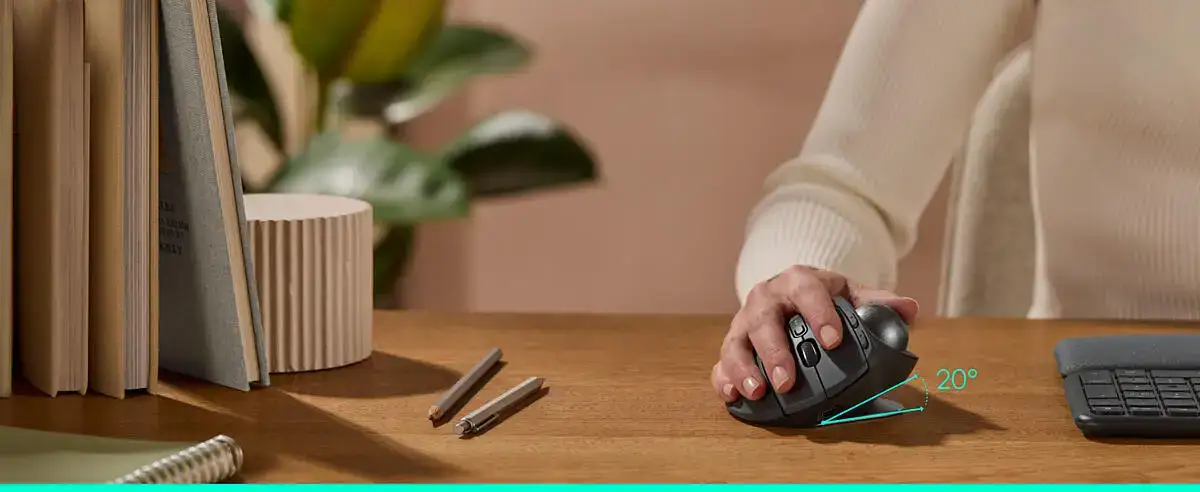
| Ergonomic tilt really helps | A verified buyer on Best Buy said: “the 20 degree tilt function… is a game changer in terms of comfort.” | RSI/carpal tunnel users, desk workers |
| Trackball is smooth and precise | A verified buyer on Best Buy noted: “smooth trackball and scrolling.” | CAD, designers, detail work |
| Multi‑device switching is valuable | A verified buyer on Best Buy said: “works two computers, and switches between them with a simple button.” | Dual‑PC/Mac setups |
| Battery life is long | A verified buyer on Best Buy wrote: “this thing lasts at least a month and half.” | All‑day office users |
| Price feels steep | A verified buyer on Best Buy said: “makes you think twice to pay $100 on a mouse.” | Budget buyers |
| Size/weight divides people | Reddit user Track me said: “I have very small hands and it’s a little on the big side for me.” | Small hands, travel use |
Claims vs Reality
Logitech’s marketing leans on reduced muscle strain and customizable tilt. Official listings say the trackball “delivers 20% less muscular strain” and offers angles up to 30° with the Plus wedge. Digging deeper into user reports, many echo that claim in real life. A verified buyer on Best Buy described the wedge as decisive: “Get the plus version… the pad included in the plus version really does make a difference.” Another Best Buy reviewer framed it as pain relief: “my wrist pain has stopped after a few days of using it.”
But there’s an important contradiction: while the tilt reduces wrist pronation for most, some users still develop discomfort from thumb‑driven tracking. Reddit user hcp said: “I still developed tendonitis and forearm pain / nerve damage over time due to using the thumb ball so much.” The pattern suggests that the device shifts strain away from the wrist, but can concentrate it in the thumb/forearm for heavy CAD‑style workloads.
Another core claim is smooth tracking and precision mode. Official specs highlight 2048 DPI and a precision toggle. Users generally confirm the experience. A verified buyer on Best Buy said: “the precision button is helpful for moments when high accuracy is required.” Trustpilot feedback adds that it’s “incredibly smooth and precise” for “selecting text, editing images, or managing multiple open windows.” Still, a few reports point to ball friction or sticking over time; one Best Buy reviewer noted: “the trackball would stick… after replacing it, the mouse worked great.”
Finally, Logitech positions Flow and Easy‑Switch as a seamless multi‑computer workflow. Multiple users validate the convenience. A verified buyer on Best Buy said: “switch between either of the devices without switching between mice.” Yet a minority complain about accidental presses or connectivity decay. One Best Buy reviewer warned: “constantly accidentally hitting the device 1 / device 2 button,” and another called it a “disappointing mouse” after a year due to connection failures.
Cross-Platform Consensus
Universally Praised
A recurring pattern emerged around comfort for long sessions. Many buyers come to the Logitech MX Ergo Plus Wireless Trackball because of wrist pain or carpal tunnel, and the tilt/wedge setup is framed as a genuine relief tool rather than a gimmick. A verified buyer on Best Buy said: “no more pre‑carpertunal pain.” Another wrote, “this takes my wrist pain away! learning curve but it’s worth it.” Trustpilot feedback reinforces it with a longer‑day angle: “my wrist feels better at the end of the day.” For office workers or designers glued to a mouse, these stories portray the Ergo Plus as an ergonomic reset.
Users also consistently praise the trackball’s control and smoothness once acclimated. The switch from a moving mouse to a stationary thumb ball comes up as a small hurdle, but not a dealbreaker for most. A verified buyer on Best Buy said: “it took my about two days to get use to it. Once I used the software to customize it, I fell in love with it more.” Reddit user Track me, using it for MMOs, described hundreds of hours of gaming on it and still called it “very good.” For CAD and design users, precision mode is singled out: a Best Buy reviewer said it “slows down the mouse speed… useful for photo editing, graphic design.”
Battery life and “set it and forget it” charging show up repeatedly. Logitech claims about four months, and while not every user measures that precisely, their lived experiences align. A Best Buy buyer said they went “2 straight months, 8 hours a day” before charging. Another said, “I haven’t need to recharge it after several weeks of use.” For people tired of swapping AA cells in older trackballs, the rechargeable setup is treated as a quality‑of‑life upgrade.
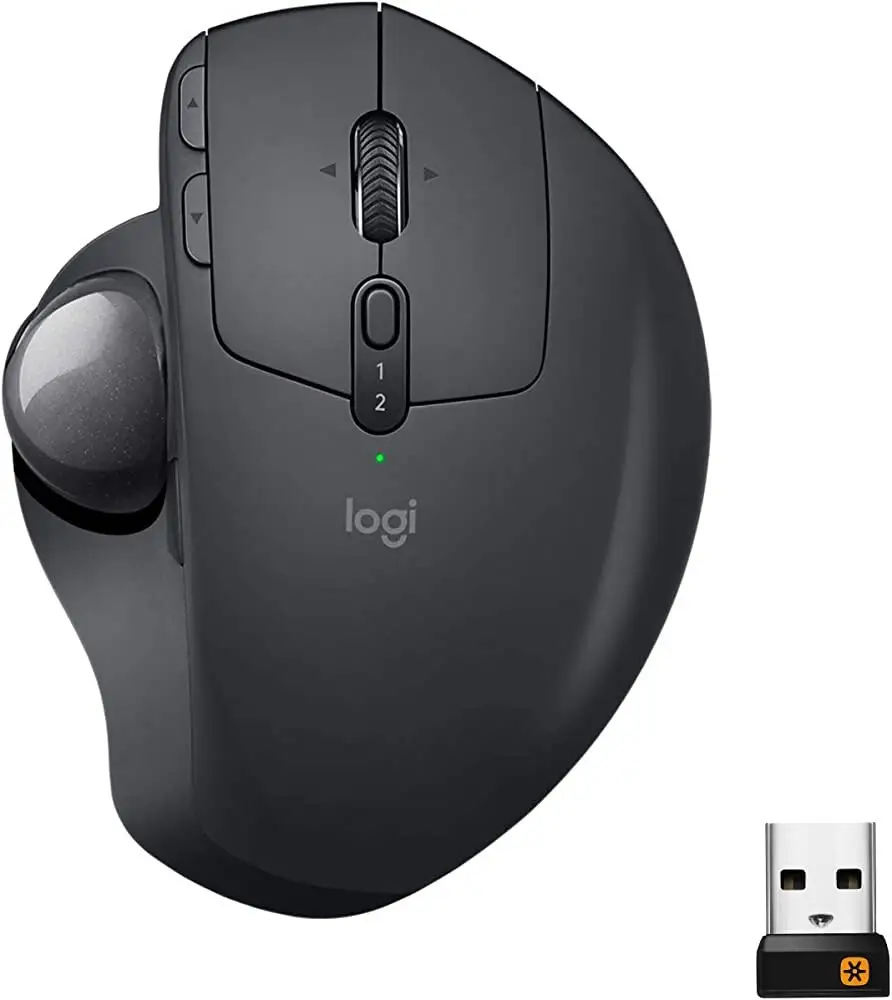
Finally, multi‑device pairing is a quiet but strong win. Several reports mention couch use, laptops, or dual‑computer desks. A Best Buy reviewer explained using Bluetooth for one device and the dongle for another, switching “with just a click of the button on top.” Another said: “portable… works two computers.” The story here is less about a flashy feature and more about reducing friction in everyday setups.
- Most praised features: tilt comfort, smooth ball, long battery, multi‑device switching.
- Typical learning curve: hours to a couple days, then “natural.”
Common Complaints
Price is the most consistent negative. Even satisfied owners repeatedly call it expensive. A Best Buy reviewer admitted: “price tag… makes you think twice to pay $100 on a mouse.” Trustpilot echoes: “expensive for a non‑gaming mouse? yes.” The same users often justify the cost as an ergonomic necessity rather than luxury, but the sticker shock is real, especially compared with cheaper Logitech trackballs.
Size and heft form the second complaint cluster. For small hands, the body can feel oversized. Reddit user Track me said it’s “a little on the big side” for very small hands; another Reddit commenter simply said, “the ergo feels too big for me.” Even fans warn it’s not travel‑friendly; a Best Buy buyer called it “heavy… not the kind of thing you want to carry everywhere.”
Scroll wheel durability comes up across Reddit and Best Buy. One Reddit user noted: “the scroll wheel is the only downfall… starting to have the same scroll issues my 570s did.” A Best Buy reviewer replaced theirs after a drop that “broke spin wheel,” suggesting it can be a weak point under impact.
There are also sporadic reports of trackball sticking, dust buildup, or inconsistent feel. Trustpilot described “dust… causing the cursor to jump” but called it easy to fix by popping the ball out. Another Best Buy reviewer said their unit’s ball “would stick” until they swapped in a spare ball. These aren’t majority experiences, but they recur enough to be part of the ownership story.
- Common downsides: high price, bulky feel, occasional scroll/ball issues.
- Maintenance note: some users clean or replace the ball to restore smoothness.
Divisive Features
The thumb‑ball ergonomics are polarizing. Many RSI sufferers celebrate wrist relief, but others report thumb fatigue or longer‑term tendon stress. Reddit user hcp’s experience is the starkest: “developed tendonitis… due to using the thumb ball so much.” Another Best Buy reviewer joked, “carpal tunnel saviour… now I only have carpal thumball.” For moderate office use, the thumb workload seems fine; for heavy CAD or constant clicking, a subset finds the strain simply relocates.
Software customization also splits opinion. Some buyers love mapping shortcuts. A Best Buy reviewer said, “customizable buttons allow me to set shortcuts for my most‑used tools.” Yet another complained: “I haven’t seen any kind of app for it to reset the buttons,” suggesting confusion or limited access on some machines. A third‑party review site included in the data called Logitech Options “clunky,” noting reduced fine‑grain control versus older SetPoint. The effect depends on whether you rely on deep customization or just want plug‑and‑play.
Trust & Reliability
Trustpilot sentiment mirrors Best Buy: mostly positive, but with a few long‑term worries. The most serious trust concern is connectivity degradation over time. One Best Buy user said after six months it “can only connect to one of the two connect options,” and after a year neither worked. Logitech reps in replies point to the one‑year warranty, and there isn’t evidence of widespread fraud or scam patterns—more like isolated hardware failures.
Long‑term durability stories trend favorable. A Trustpilot reviewer wrote theirs was “still in service after two years… great quality roller.” Reddit users describe multi‑year daily driving: one said they’ve used it “for a couple years and I love it,” while another keeps multiple units for different locations. The weak spot in longevity discussions remains the scroll wheel, which several users expect to degrade like older M570/M575 models.
Alternatives
Only competitors mentioned in user data are fair game, and that list is basically Logitech’s own M570/M575 plus some Elecom models. The M575 is regularly framed as the cheaper, smaller, Bluetooth‑ready cousin. Reddit users with smaller hands lean that way; one said, “personally I like the m575. the ergo feels too big for me.” Another liked it for travel and AA battery simplicity: “I prefer the replaceable AA battery rather than a permanent rechargeable battery.”
The M570 is treated as the beloved old standard, but with durability complaints that push people upward. A Reddit user upgraded because they “got tired of swapping switches,” and another Best Buy reviewer compared them: “comfort wise it is even better than the old m570 it replaced.” For users who want tilt and premium materials, the Ergo Plus is the step‑up. Elecom alternatives appear only as a comparison point for software or size, not as a widely endorsed swap in this dataset.
Price & Value
Current retail pricing in the data sits around $99–$127 depending on store and availability, while eBay resale clusters much lower, often $60–$70 for used units. That spread aligns with the “pricey but worth it” theme. A Best Buy reviewer said, “it’s not a $70 track ball when the m570 is easily had for $20,” even though they liked the upgrade. Another Trustpilot reviewer flatly called it “well worth the price if you are using all day.”
Community buying tips are mostly about picking the Plus specifically for the wedge. Reddit user hcp advised: “if you’re getting the mx ergo, get the ‘+’ sku that includes a rubber wedge.” Several Best Buy buyers echo that with “definitely get this” or “get the plus version.” The wedge is described as a meaningful comfort boost, not a trivial add‑on.
FAQ
Q: Is the Logitech MX Ergo Plus good for carpal tunnel or RSI?
A: Many users say yes, especially because of the tilt and wedge. A verified buyer on Best Buy wrote: “my wrist pain has stopped after a few days.” Trustpilot feedback says it “noticeably eased this strain.” However, some heavy users report thumb or forearm fatigue instead.
Q: How big is it for small hands?
A: Several small‑handed users find it large. Reddit user Track me said: “very small hands and it’s a little on the big side.” Another Reddit commenter preferred the M575 because “the ergo feels too big.” Medium‑to‑large hands generally report a great fit.
Q: Does the battery really last months?
A: Most reports support long battery life. A Best Buy buyer used it “2 straight months, 8 hours a day” before charging, and others say they recharge every 4–8 weeks. One Trustpilot user had a defective unit with only “2 hours max,” but treated it as a rare issue.
Q: Is the Plus wedge worth paying extra for?
A: Feedback strongly favors the wedge. A Best Buy reviewer said: “the pad included in the plus version really does make a difference.” Reddit users repeatedly say you’ll “definitely want” the Plus model for the extra tilt toward 30°.
Q: Is there a learning curve switching from a normal mouse?
A: Yes, but usually short. A Best Buy buyer said it took “about two days to get use to it.” Another wrote it feels “funky for folks to get used to, but… natural once you give it a few minutes.” Most say smoothness follows after retraining.
Final Verdict
Buy if you’re a desk‑bound worker, designer, or trackball fan who wants real wrist relief, likes a stationary mouse for tight spaces, and can handle a brief learning curve. Avoid if you have very small hands, travel often with your mouse, or already struggle with thumb/forearm strain from thumb trackballs. Pro tip from the community: multiple users say to “get the plus version” because the magnetic wedge makes the 30° tilt the comfort sweet spot.