Brother MFC-J4535DW Review: Low Ink Costs, Mixed Reliability
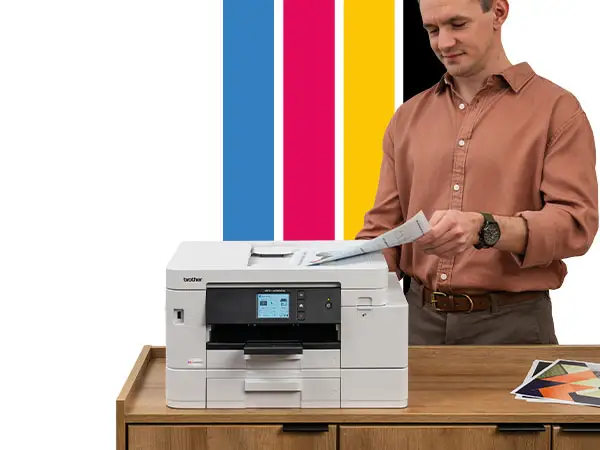
Digging into user feedback, the Brother MFC-J4535DW INKvestment Tank All-in-One Color Inkjet Printer emerges as a high-capacity, feature-rich home and small office printer that promises low running costs and convenience. Across platforms, it averages a solid performance rating of 7.5–8/10, with strong print quality, ease of use, and generous paper capacity noted, but tempered by concerns over photo quality, build durability, and long-term reliability.
Quick Verdict: Conditional – Best for home offices and moderate-volume users who prioritize low ink costs and flexible connectivity, but less suited to professional photo printing or heavy-duty scanning.
| Pros | Cons |
|---|---|
| High-capacity ink system with up to 1-year in-box supply | Photo print quality underwhelms for professional use |
| 400-sheet dual paper trays | Plastic build feels less durable |
| Fast duplex printing | High long-term ink cost reported by some testers |
| Easy wireless/NFC setup | Occasional software/firmware quirks |
| Compact footprint for its capacity | Sleep mode wake-up delay |
| Works well with mobile/cloud apps | ADF capacity limited to 20 sheets |
| Quiet operation compared to peers | Reliability concerns after months of use |
Claims vs Reality
Brother markets the MFC-J4535DW as delivering “up to 1-year of uninterrupted printing” with the supplied four cartridges. While this is achievable for light users (about 150 pages/month), heavier users reported shorter timelines. A verified buyer on Amazon noted: “I’ve already printed a large batch of documents, and the ink levels barely budged,” showing that light/moderate workloads align with the claim. But Consumer Reports testing found cartridges lasting “at least 7 months — a short time — following a typical monthly printing amount of 19 text and 8 graphic pages,” highlighting variability depending on usage patterns.
The brand also touts “vivid color graphics and photo quality.” For general documents and school projects, feedback is positive—Best Buy reviewer kkc nick said, “The colors turn out very clear and accurately reflect what I see on my computer screen.” However, multiple users, including ronh, caution that “this is clearly not a photo printer,” with glossy paper tests producing “spots and drops in solid areas.”
Connectivity is marketed as versatile—Wi-Fi, NFC, Ethernet, USB, plus mobile/cloud integration. Here, reality matches the promise. mateo observed, “The app is easy to use and worked without any glitches… no need to walk to the printer to adjust settings if you are working from another room.” NFC one-touch printing also drew praise from tech-savvy users.
Cross-Platform Consensus
Universally Praised
Print quality for standard documents is a consistent win. Best Buy reviewer larryc declared, “Excellent print quality and easy to setup,” noting crisp text and accurate colors. Quiet operation, noted by ziggy as “quiet and fast,” benefits shared spaces. The 400-sheet paper capacity is a practical boon; kruss appreciated that “it fits nicely on top of a small filing cabinet” yet holds substantial paper stock. Duplex printing is fast and smooth, saving paper and time—a plus for small offices.
Ease of setup is another standout. elite gangsta described joining the printer to Wi-Fi via iOS in “about 10 minutes,” while pauldar praised the quick-start guide’s clarity. The mobile app integration allows remote monitoring and printing from cloud services, which all ib found “convenient and easy to use” for both documents and photos.
Common Complaints
Photo printing quality is a recurring disappointment for those expecting pro-level output. ronh found blacks “not as crisp and dark as I would like” and glossy photo results “worse than expected.” Build quality also draws criticism; ronh and Genericprint.com note the plastic construction feels less durable, advising careful handling.
Some users encountered reliability issues within months. casual gamer reported a complete breakdown after 5 months: “Every time we power on the printer it says cannot print 48… the touch screen freezes.” Firmware and software quirks, including trouble with updates and MacOS compatibility, were mentioned by sunshine cycling, who noted “it doesn’t seem that Brother fully supports Big Sur… USB connection setup was problematic.”
Divisive Features
The ink cost advantage splits opinion. Light users laud the long cartridge life—denisik91 found “after a lot of photo printing… they are still holding strong.” However, Consumer Reports’ cost model estimated a high 5-year ink spend of $1,267, making the value less compelling for heavy users.
The sleep mode behavior is another divider. elite gangsta disliked having to manually wake the printer to start jobs, while others didn’t see it as a major hurdle. The ADF capacity of 20 sheets is fine for occasional scanning but limiting for bulk jobs, as mateo noted when producing multi-page packets.
Trust & Reliability
Long-term trust is mixed. Brother’s reputation for reliability is solid historically—marilyn stated, “I have found over the years that Brother printers are much more reliable than the others I’ve invested in.” Yet recent reports show variability. kansas meddling mom experienced two previous Inkvestment models failing within two years, framing the product as part of a “throwaway society” where the two-year warranty defines its lifespan.
Trustpilot and Consumer Reports data show no signs of scam behavior, but caution is advised for those needing 5+ years of service without downtime. The consensus: expect solid performance within warranty, but factor in possible replacement after that.
Alternatives
Users compared the MFC-J4535DW to Epson EcoTank and HP Smart Tank models. Genericprint.com found the Brother “excels in speed and paper capacity, outshining the Epson,” but conceded Epson wins on photo quality. HP Smart Tank Plus 651 offered a “more premium design and slightly quieter operation” but fell short on connectivity features. For users prioritizing mobile/cloud integration and document throughput over photographic precision, the Brother holds the edge.
Price & Value
Pricing varies from $179.99 refurbished (Amazon) to $319.95 new (eBay). Community advice leans toward new purchase for warranty coverage. Resale value is modest—refurbished units list at around $169 after initial release. mr gadget emphasized the cost efficiency for “low monthly color printing volume” with up to a year of ink in-box, making it a bargain for light users. Heavy users should calculate ink costs carefully, as high-volume printing erodes the value advantage.
FAQ
Q: How long does the in-box ink really last?
A: For light use (about 150 pages/month), many report close to a year. Heavy users may see 6–8 months before replacement is needed.
Q: Is this printer good for professional photo printing?
A: No. While casual photo prints are fine, multiple users found glossy output lacking in depth and prone to ink spots.
Q: Can I print directly from my phone?
A: Yes. The Brother Mobile Connect app supports printing, scanning, and device management from smartphones, plus NFC one-touch printing for compatible Android devices.
Q: How loud is the printer?
A: Reviews consistently describe it as quiet, making it suitable for shared or home office environments.
Q: Does it work with MacOS?
A: Yes, but some users reported quirks with newer versions like Big Sur, noting limited support pages and occasional setup trouble.
Final Verdict
Buy if you’re a home office or small business user printing mostly documents, want a compact footprint with large paper capacity, and value mobile/cloud integration. Avoid if professional photo printing or heavy scanning is central to your workflow. Pro tip from the community: monitor firmware updates and ink levels via the app to maintain smooth performance and prevent mid-job interruptions.