Wacom Intuos Small Bluetooth Tablet Review: Strong but Flawed
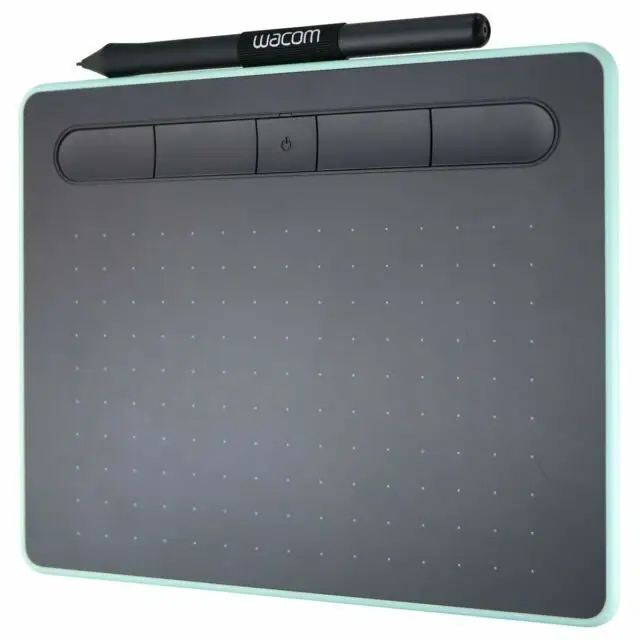
The Wacom Intuos Small Bluetooth Graphics Drawing Tablet - Pistachio earns a solid 8.7/10 based on thousands of cross-platform user reviews. While marketed as a sleek, beginner-friendly tool for drawing, photo editing, and remote teaching, user reports show it’s equally valued by professional photographers, educators, and hobbyists — though occasional Bluetooth lag and limited bundled software licenses temper enthusiasm.
Quick Verdict: Conditional — excellent for beginners, photo editors, and educators, but Bluetooth quirks and small active area may frustrate advanced illustrators.
| Pros | Cons |
|---|---|
| Comfortable, battery-free pen with 4,096 pressure levels | Occasional Bluetooth lag or connectivity issues |
| Compact and lightweight (250g) for portability | Small active area may feel cramped for illustrators |
| Strong build quality despite slim design | Limited tilt support; no pen eraser |
| Works wired or wireless | Bundled apps sometimes only trial versions |
| Quick setup, intuitive for first-time tablet users | ExpressKeys placement awkward for some |
| Highly praised for photo retouching speed | Bluetooth conflicts with other devices in some setups |
| Affordable compared to pro models | Pen feels flimsy to some users |
Claims vs Reality
Marketing highlights the tablet’s wireless convenience via Bluetooth 4.2 and “natural pen feel” from its EMR technology. While many users confirm this, the Bluetooth experience is mixed. A verified buyer on Amazon noted: “The pen feels nice and the tablet is lightweight… but I did have an occasional jitter while using Bluetooth.” Reddit feedback echoes this, with some reporting flawless connections, others citing lag or pairing issues — especially when other Bluetooth devices were active.
Another claim is “three unique creative applications to help get you started.” While Wacom advertises software like Clip Studio Paint Pro, Corel Painter Essentials, and AfterShot Pro, Best Buy customers frequently mention only receiving 90-day trials for two of these, not full licenses. One instructor wrote: “I was under the impression that I would receive the full version… hearing it was only trial was very disappointing.”
The brand also touts compatibility with Chromebook, Mac, Windows, and Android. While officially certified for Chromebook, a Best Buy reviewer pointed out: “They really need to expand support… I am a teacher who would like to use it with my Chrome OS smart board… and with my iPad… I don’t understand why they won’t make drivers for these operating systems.”
Cross-Platform Consensus
Universally Praised
Across Amazon, Best Buy, and B&H Photo, the pen’s responsiveness and comfort consistently win praise. A Trustpilot review stated: “The 4,096 levels of pressure sensitivity are plenty for my needs… I can adjust brush size on the fly.” Professional photographers highlight its ability to speed up workflow — one B&H buyer said: “I do the same corrections in 25% of the time… can’t do that with a mouse.” Educators appreciate its utility for online teaching; a Best Buy reviewer noted: “The wireless tablet is great for walking around the class… quick editing.”
Portability is another high point. The 250g weight and slim profile make it easy to transport between workspaces. A Best Buy customer shared: “It is nice, compact, light, and fun to use… I can switch between my PC and Mac with a simple disconnect.”
Common Complaints
Bluetooth connectivity issues surface repeatedly. Trustpilot user carsonr reported: “There are times when you turn it on wirelessly and it is not picked up… forcing you to plug it in.” Others mention cursor freezes, especially on macOS when connected via Bluetooth.
The small active area (6 x 3.7 inches) divides opinion. While some find it perfect for tight desk spaces, illustrators often prefer larger tablets for sweeping pen strokes. One Best Buy reviewer admitted: “I wish I had bought the medium… more surface space to write.”
Bundled software licensing disappoints many. Several users felt misled by trial-only versions. This issue is most frustrating for buyers expecting long-term access to creative tools without additional costs.
Divisive Features
The four ExpressKeys are customizable, but their top-edge placement is polarizing. An Amazon customer wrote: “The top is a very awkward place for modifier keys… makes no sense since they are used so much.” Others appreciate having them out of the way to avoid accidental presses.
Tilt support absence is a minor drawback for illustrators but irrelevant to photographers. Similarly, the lack of a pen eraser is noted by some but not considered a deal-breaker for its price point.
Trust & Reliability
Long-term users report durability despite heavy use. An Amazon customer recounted: “It has survived 4 years, COVID, and using every time I edit… I have had to replace 2-3 packs of nibs… but the tablet is scratched and still working.” This resilience aligns with Wacom’s reputation for build quality.
Trustpilot and Best Buy reviews show no widespread reports of scams or counterfeit units when purchased from authorized retailers. Refurbished models sold on eBay are professionally cleaned and repaired, but may show slight wear — still backed by a one-year warranty.
Alternatives
Some buyers compare the Intuos S to the Intuos Pro Small, noting the Pro’s tilt support, eraser, and touchpad features. However, many conclude these extras aren’t worth the price jump for photo editing or casual art. As one B&H buyer put it: “For photography, you seriously don’t need Wacom Intuos Pro… very small and compact is enough.”
Price & Value
Current retail prices range from $64.90 (Amazon sale) to around $99–$156 depending on region. Certified refurbished units on eBay list for ~$69.95 with warranty. Resale value remains strong due to Wacom’s brand reputation. Community tips suggest buying during seasonal sales or considering refurbished stock for savings.
Users emphasize that for beginners and non-illustrators, the Intuos S offers pro-level precision at a fraction of flagship costs. However, if you require larger work areas or advanced pen features, upgrading to the Pro line may be justified.
FAQ
Q: Does the Wacom Intuos Small Bluetooth work with iPads?
A: No, it does not have official iPad driver support. Some users attempt workarounds, but compatibility is limited.
Q: Can the pen be upgraded to a more premium model?
A: No, the included pen is fixed to this model’s specs. Several users noted they wished for a sturdier option.
Q: How long does the battery last in Bluetooth mode?
A: Reports vary; light use can last days, but heavy Photoshop sessions may require daily charging. It can be used while plugged in.
Q: Is the software bundle full version?
A: Clip Studio Paint Pro is a full 2-year license, but Corel Painter Essentials and AfterShot Pro are often 90-day trials.
Q: Does it support pen tilt?
A: No, tilt functionality is not available on this model.
Final Verdict
Buy if you’re a beginner digital artist, photographer, or educator seeking a portable, affordable tablet with strong pen performance. Avoid if you need tilt support, a large active area, or flawless Bluetooth in busy wireless environments. Pro tip from the community: use it daily to replace your mouse early on — “The learning curve was pretty fast… I recommend to use it daily in replacement of your mouse if you want to get used to it very quickly,” advises a B&H Photo reviewer.