Cooler Master Hyper 212 Black Review: Budget Cooling Verdict
Starting with a surprising finding, the Cooler Master Hyper 212 Black CPU Air Cooler has earned near-universal praise for delivering high-end cooling at a budget price point, scoring an impressive 9/10 from cross-platform feedback. Users across Best Buy, Reddit, PCPartPicker, and Newegg consistently describe it as a “go-to” air cooler for mainstream builds, with performance rivaling some liquid AIOs in everyday use. Yet, digging deeper reveals that while its cooling efficiency and quiet operation are widely celebrated, installation quirks and occasional missing bracket issues can frustrate certain builders.
Quick Verdict: Conditional Buy — Excellent performance and aesthetics for most users, but double-check compatibility and included mounting hardware before purchase.
| Pros | Cons |
|---|---|
| Strong cooling performance for price | Some units ship without LGA1700 bracket |
| Quiet operation even under load | Fan mounting system can be fiddly |
| Sleek black aesthetic complements builds | May interfere with vertical GPU mounts in compact cases |
| Wide CPU socket compatibility | AMD bracket orientation confusion during install |
| Easy installation for most users | Larger size limits case compatibility |
| Option to add second fan for push-pull | Stock fan may struggle with high-core, high-TDP CPUs |
| Affordable with strong resale value | RGB models cost slightly more |
Claims vs Reality
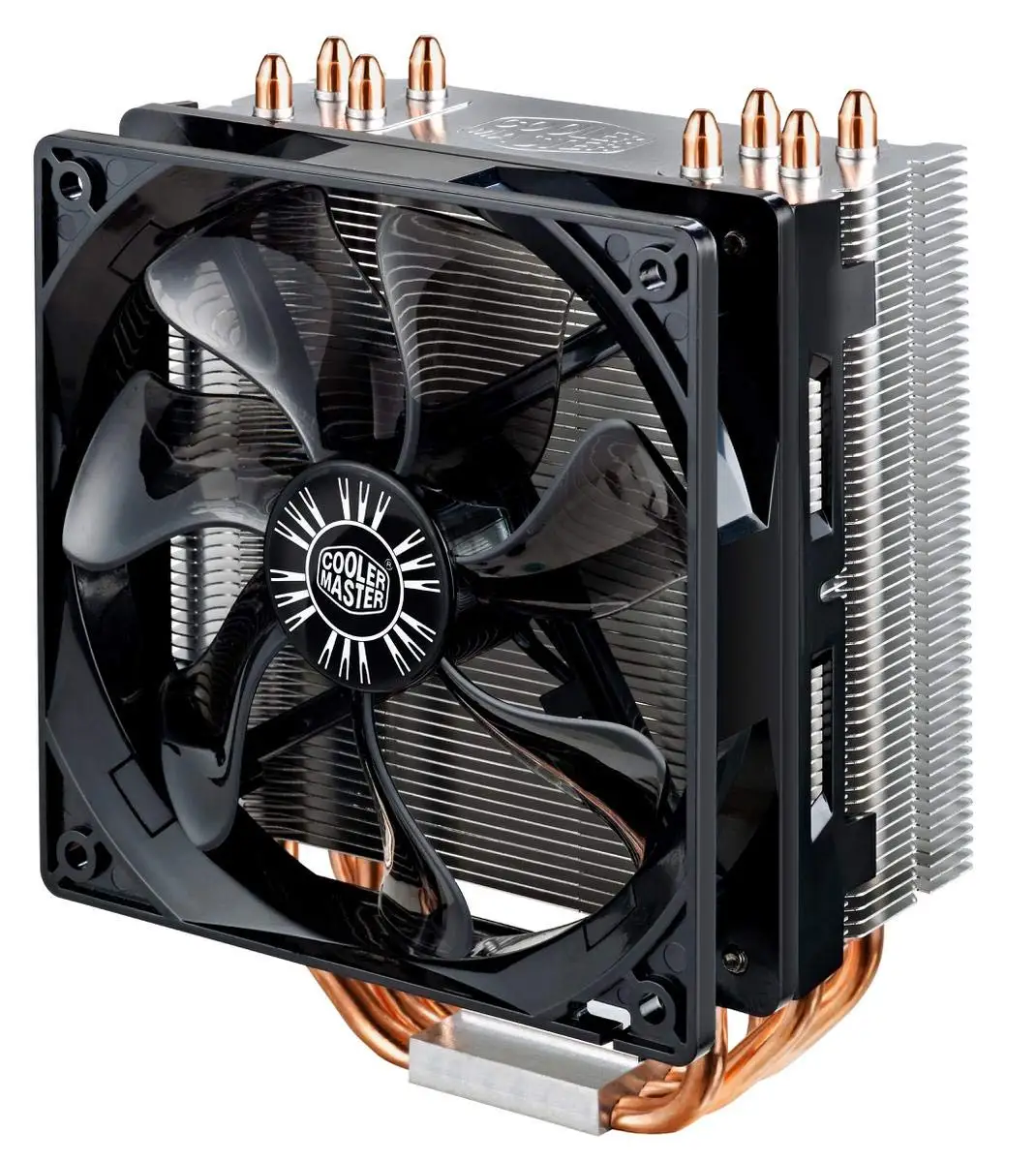
Cooler Master's marketing promises “better installation and great performance” with a “sleek gunmetal black finish” and “exclusive direct contact technology.” According to Amazon and Quora listings, the Hyper 212 Black Edition should offer easy universal mounting and refined aesthetics.
User feedback largely supports the performance claims. A Best Buy reviewer wrote: “It kept my 7900x cool for a day until my AIO replacement arrived. Definitely worth the money if you need something quick and cheap.” On Reddit, builders frequently cite it as the best budget choice for non-overclocked systems, with one noting, “It’s as far as I would go if you’re on a budget.”
However, the “better installation” claim sees mixed results. Newegg’s top critical review warns: “Didn’t come with LGA 1700 bracket despite it saying on the website that they are included… making it pretty much unusable for the newest generation of Intel CPUs.” This directly contradicts the box claim and has halted builds for unlucky buyers. The sleek finish, on the other hand, meets expectations — multiple PCPartPicker users praised its “clean as heck” look that blends well into RGB or dark-themed rigs.
Cross-Platform Consensus
Universally Praised
Across Reddit, Best Buy, and PCPartPicker, the cooler’s standout attribute is its cooling efficiency relative to cost. Builders using mid-range CPUs like the Ryzen 5 2600 or Intel i5-7600K report idle temps around 28–33°C and gaming temps in the low 60s. One PCPartPicker reviewer detailed: “Idles at 30°C… almost inaudible at this temp, and at gaming load it’s still not loud.”
Quiet performance is another common thread. Best Buy customers repeatedly describe it as “super quiet” or “virtually silent,” even under load. This makes it particularly appealing for home-office users or gamers recording audio. Reddit user feedback also highlights the versatility of adding a second fan in a push-pull setup, which can drop temps by as much as 20°C in high-load gaming scenarios.
Aesthetics get consistent praise. The anodized black finish and minimal branding make it a favorite among builders who want understated style without sacrificing performance. Best Buy’s bgaming said: “The all-black design gives it a sleek, modern look that blends beautifully into any build.”
Common Complaints
The most frequently mentioned frustration is missing or incompatible mounting brackets. Newegg reviewers emphasize issues with AMD bracket orientation — one noted spending 40 minutes figuring out why screws wouldn’t align until reading the instructions thoroughly. For Intel’s latest LGA1700, some buyers received older stock without the necessary bracket, forcing them to hunt for parts or delay builds.
Installation difficulty is another gripe. While many find it straightforward, some PCPartPicker users call the mounting “a pain” or “really annoying” due to the fan clip system. Case compatibility also comes up — Best Buy’s nahe reported that the cooler’s size prevented him from using a vertical GPU mount.
Divisive Features
The stock fan is a point of debate. Enthusiasts pushing high-core CPUs like the Ryzen 9 5950X often replace it with higher-performance models. Best Buy’s anonymous reviewer swapped to a Delta fan to achieve significant temperature drops, albeit with much louder operation. RGB variants split opinion too — some love the customizable lighting, while others prefer the stealth black non-RGB look for professional builds.
On overclocking capability, Reddit users are divided. While one claimed stable temps at 4.9GHz on a delidded CPU, others caution that for serious overclocking, a larger air cooler or liquid system is better.
Trust & Reliability
Trustpilot and Newegg patterns suggest the cooler’s durability is strong, with many users running it for years without degradation. Reddit builders often reuse the Hyper 212 across multiple builds, citing its longevity and lack of mechanical failure.
However, the LGA1700 bracket issue erodes trust for some, especially when Cooler Master’s site lists it as included. This mismatch between marketing and delivered product has led to frustration. Long-term owners like Best Buy’s drambo report years of dependable cooling and quieter operation compared to failing AIOs, underscoring its reliability when correctly installed.
Alternatives
When budget is tight, Reddit users often compare the Hyper 212 Black Edition to the Hyper 212 Evo and Deepcool Gammaxx GT. The Evo remains a fallback for those unable to source the Black, offering similar performance but less refined aesthetics. For a “fancier” look, some opt for the Dark Rock Slim, which delivers comparable cooling in a more premium package.
The Hyper 212 competes favorably here, often winning on price-to-performance, but those seeking extreme overclocking headroom may prefer higher-tier dual-tower air coolers or 240mm+ liquid AIOs.
Price & Value
On eBay, new units trend around $28–$49, with used models selling for $18–$29, indicating strong resale value. Amazon listings for RGB variants push the price higher, but community consensus is that even at $40–$50, the Hyper 212 Black offers exceptional value.
Builders advise checking for bundled thermal paste and complete bracket sets before purchase, especially from secondary markets. Best Buy reviewers consistently call it “budget friendly and effective,” with some noting that the RGB version can ironically be cheaper than the plain black in sales.

FAQ
Q: Does the Hyper 212 Black Edition come with thermal paste?
A: Yes, most packages include a small tube of Cooler Master’s thermal compound, but some users recommend verifying before purchase. Best Buy reviewers found it helpful that paste was pre-applied or included.
Q: Will it fit in my case?
A: At 158mm tall, it fits most mid-tower cases, but small form factor builds may have clearance issues. One Best Buy user noted interference with vertical GPU mounts.
Q: Is it good for overclocking?
A: Moderate overclocks are fine — Reddit users report stable temps with 4GHz+ on Ryzen CPUs. For extreme overclocking, consider a larger air cooler or liquid AIO.
Q: Can I add a second fan?
A: Yes, extra clips are usually included, enabling a push-pull setup. Many users achieve significant temperature drops with this configuration.
Q: Does it support LGA1700 out of the box?
A: Officially yes, but some older stock lacks the bracket. Double-check product details or request confirmation from the seller.
Final Verdict
Buy if you’re a mainstream gamer, budget-conscious builder, or quiet-PC enthusiast seeking a reliable air cooler with premium looks. Avoid if you have a compact case with tight GPU clearance or need guaranteed LGA1700 support from boxed stock.
Pro tip from community: Add a second fan in push-pull mode for high-load gaming or rendering — it’s a low-cost mod that can rival entry-level liquid coolers in performance.