Razer Seiren V3 Chroma Review: Stylish but Flawed Mic
Digging into real-world feedback, the Razer Seiren V3 Chroma USB Microphone (Quartz Pink) emerges as a striking piece of gear that scores a conditional 7.8/10. Users are captivated by its futuristic RGB lighting and ease of setup, yet recurring complaints about noise suppression, Synapse software issues, and limited audio controls reveal that it’s not flawless—especially for professional-grade recording.
Quick Verdict: Conditional
| Pros | Cons |
|---|---|
| Stunning customizable RGB lighting | Noticeable background noise without suppression |
| Simple plug-and-play setup | Razer Synapse can freeze or lag with this mic connected |
| Warm, pleasant sound for casual streaming | Limited audio customization options |
| Tap-to-mute with programmable multi-tap | Sensitive to handling noise |
| Stream mixer feature for easy source control | RGB can be distracting during streaming |
| Compatible with boom arms | Performance not on par with some similarly priced competitors |
Claims vs Reality
Razer markets the Seiren V3 Chroma as a “pro-grade USB mic” with stream reactive lighting and a supercardioid condenser capsule that “suppresses room noise like typing or mouse clicks.” While this sounds ideal for streamers, multiple reviewers found the noise suppression overstated. GamesRadar+ noted that “it really struggled at lower volumes to block out… typing,” and Trustpilot feedback confirmed that mechanical keyboard clicks still came through.
Another key claim is “advanced customization via Razer Synapse”, touted as a one-stop hub for lighting, gain, and stream mix control. In reality, Reddit and Razer Insider users report that the mic can cause Synapse to “freeze/hang for at least 15-30 seconds at a time,” making adjustments frustrating. While the lighting customization works well, audio control options are “pretty basic” according to Cryovex’s review—missing EQ profiles and noise gates.
Razer also promotes tap-to-mute with multi-tap programmable actions as “instant and intuitive control.” This feature is indeed praised: Trustpilot noted, “it’s nice and easy for when you need to mute quickly,” and users enjoy the visual cue when the mic mutes (RGB turns red). However, some streamers find that multi-tap actions are too easy to trigger accidentally mid-session.
Cross-Platform Consensus
Universally Praised
One standout across platforms is the RGB lighting. Reddit threads describe it as “immersive” and “a perfect match for the Razer ecosystem,” syncing with over 200 Chroma-enabled games. Streamers benefit from lighting cues tied to alerts or gain peaks—GamesRadar+ found the gain-monitor lighting “particularly helpful when recording voice-over.”
Ease of setup is another high point. Trustpilot feedback highlights “just plug it in and it’s ready to go,” making it attractive for casual users who don’t want a steep learning curve. This plug-and-play nature, combined with a stream mixer feature in Synapse, allows content creators to quickly balance game, chat, and mic audio without juggling multiple apps.
The tap-to-mute sensor earns consistent praise. Verified buyers appreciate the ability to mute instantly without hunting for software controls, especially in live scenarios. The programming flexibility—mapping double or triple taps to lighting or gain limiter toggles—is a unique selling point.

Common Complaints
Noise suppression—or lack thereof—is the most frequent frustration. Cryovex’s review warns that “even at lower gain settings, you’ll hear a slight buzz or hiss” and that background fan noise is noticeable. Clubic’s testing found it “sensitive to handling noise and vibrations,” especially when using the desktop stand. For podcasters, this means extra work in post-processing or investment in a boom arm.
Synapse software instability is another sore spot. On Razer Insider, one user explained: “Synapse completely freezes up… I can’t even close the application unless I kill it from task manager.” These freezes vanish when the mic is disconnected, indicating a compatibility or driver issue specific to the Seiren V3.
Customization limitations also disappoint. While lighting options are extensive, audio settings are minimal. There’s no built-in EQ or noise gate, leaving serious streamers to rely on third-party tools. This gap contrasts sharply with competitors like HyperX QuadCast, which offer more onboard controls.
Divisive Features
The RGB lighting, while visually stunning, divides opinion. GamesRadar+ admitted, “I often find it a little distracting,” and some streamers turn it off entirely during broadcasts. Others embrace it as part of their brand aesthetic, especially when synced with other Razer gear.
Sound quality is another mixed area. Trustpilot reviewers call it a “substantial upgrade” over older USB mics, with warm, pleasant tones for casual use. However, GamesRadar+ felt it “lacks a certain ‘oomf’ or presence” compared to similarly priced rivals, making it less appealing for professional voice-over work.
Trust & Reliability
Trustpilot accounts suggest the mic feels “weighty” and well-built, giving a sense of durability. Reddit discussions mention that after several months of use, there’s no sign of material wear, and mounting on boom arms remains secure. However, software reliability is questioned. The Synapse freezing issue appears in multiple reports, hinting at a persistent bug rather than isolated incidents.
Long-term owners note that physical components—tap sensor, knob, ports—hold up well under daily use. This hardware reliability contrasts with the software experience, which can sour the overall perception for users who rely heavily on in-session adjustments.
Alternatives
The HyperX QuadCast is the most cited competitor. Cryovex’s comparison states that while the Seiren V3 “shines in its RGB lighting,” the QuadCast “includes more advanced audio controls” and better noise handling. SteelSeries Alias also offers superior sound presence but at a higher price, making the Seiren V3 more appealing to budget-conscious streamers who value aesthetics.
Price & Value
Current listings show steep discounts, with eBay pricing as low as $64.04 from the original $139.99 MSRP. At this lower price, community sentiment is more favorable—users feel the visual appeal and plug-and-play convenience justify the cost. At full MSRP, reviews lean toward caution due to the audio control limitations and background noise.
Resale value appears moderate; used units retain appeal among Razer ecosystem fans, especially in Quartz Pink, which is less commonly stocked.
FAQ
Q: Does the Razer Seiren V3 Chroma have built-in noise suppression?
A: No. It relies on a digital gain limiter and high-pass filter, but background noise like fan hum or keyboard clicks remains audible. Many users recommend pairing with third-party noise reduction software.
Q: Can the RGB lighting be turned off?
A: Yes. You can disable or adjust it via Synapse or by tapping the touch sensor multiple times. Streamers often choose muted effects to reduce distraction.
Q: Is it compatible with boom arms?
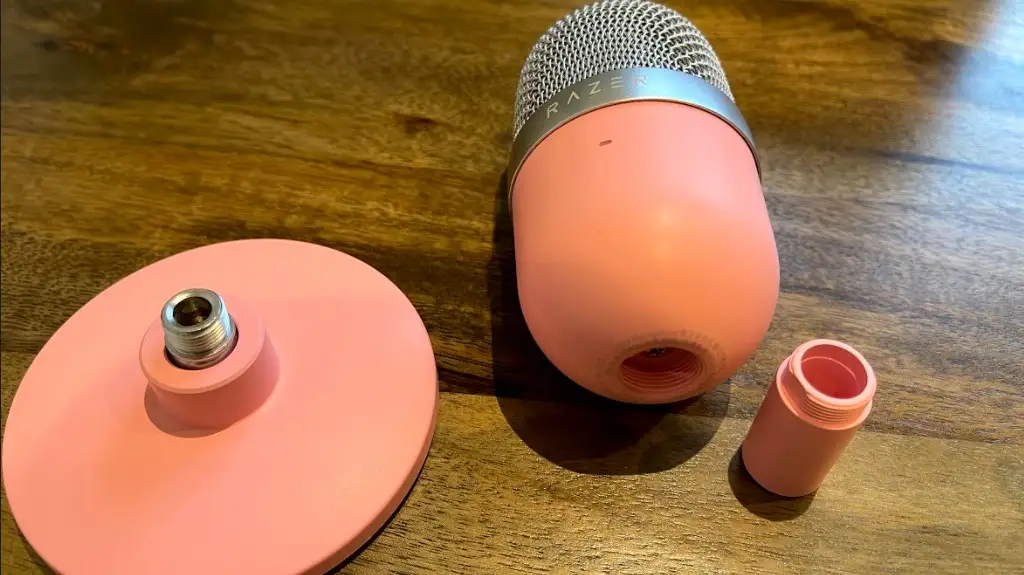
A: Yes. The mic detaches from its desk stand and mounts via standard adapter threads, which can help reduce handling noise and improve sound clarity.
Q: How well does the tap-to-mute work in practice?
A: Very well for instant muting, with clear visual feedback. Some users caution about accidental multi-taps during active streaming.
Q: Does Synapse instability affect all users?
A: Not all, but multiple reports document freezes when the mic is connected, suggesting a known but intermittent issue.
Final Verdict
Buy if you’re a casual streamer or gamer who values RGB aesthetics, quick setup, and simple audio control within the Razer ecosystem.
Avoid if you need professional-grade audio without background noise, or rely heavily on stable in-session software adjustments.
Pro tip from community: Mount it on a boom arm and keep gain lower to minimize noise pickup; use third-party software for better suppression.