TP-Link RE220 WiFi Extender Review: Budget-Friendly Verdict
The surprising takeaway from digging into hundreds of user reports is that the TP-Link WiFi Extender with Ethernet Port, Dual Band, Supports OneMesh (RE220) earns solid marks for affordability and ease of setup, but struggles to live up to some of its performance claims—especially on the 5GHz band. Across platforms, it averages around 7.5/10, with praise for eliminating dead zones tempered by complaints about slower LAN speeds and dated features.
Quick Verdict: Conditional – Best for budget-conscious users who need reliable 2.4GHz coverage; less ideal for speed-critical 5GHz tasks.
| Pros | Cons |
|---|---|
| Affordable (~$19.99-$29.99) | Middling 5GHz performance |
| Simple two-step setup | Slow Fast Ethernet port (100 Mbps) |
| Stable 2.4GHz coverage | No MU-MIMO or beamforming |
| Compact, discreet design | WPA1 host security limitation |
| Ethernet port doubles as access point | Limited OneMesh in AP mode |
| Works with most routers | Onemesh requires compatible router |
| Smart signal indicator for optimal placement | Performance drops with distance on 5GHz |
Claims vs Reality
One of TP-Link’s headline claims is “dual band speeds up to 750 Mbps” and “44% more bandwidth than single band N300 extenders.” While that’s technically accurate under ideal lab conditions, PCMag’s testing found “the RE220 turned in mixed results… it did a good job of extending 2.4GHz, but its 5GHz performance was less than stellar.” Users echo this gap—Reddit posts note strong coverage but admit to “slower speeds than expected” when streaming HD over 5GHz.
Another bold promise is “covers up to 1200 sq.ft and connects up to 30 devices.” While many Amazon buyers confirm better whole-home coverage, the number of devices varies. A verified buyer on Amazon remarked: “It works fine for my 12 devices, but once my kids start gaming, the lag shows.” This suggests that while device connection limits are technically higher, real-world load handling depends heavily on network conditions.
Finally, TP-Link markets OneMesh as “seamless roaming.” The reality: a Reddit thread clarified that “Onemesh does not currently support wired backhauls between nodes” and “you will need a OneMesh-compatible router” to make it work. Multiple users discovered that in access point mode, OneMesh isn’t supported—contradicting the impression that the extender alone can form a mesh.
Cross-Platform Consensus
Universally Praised
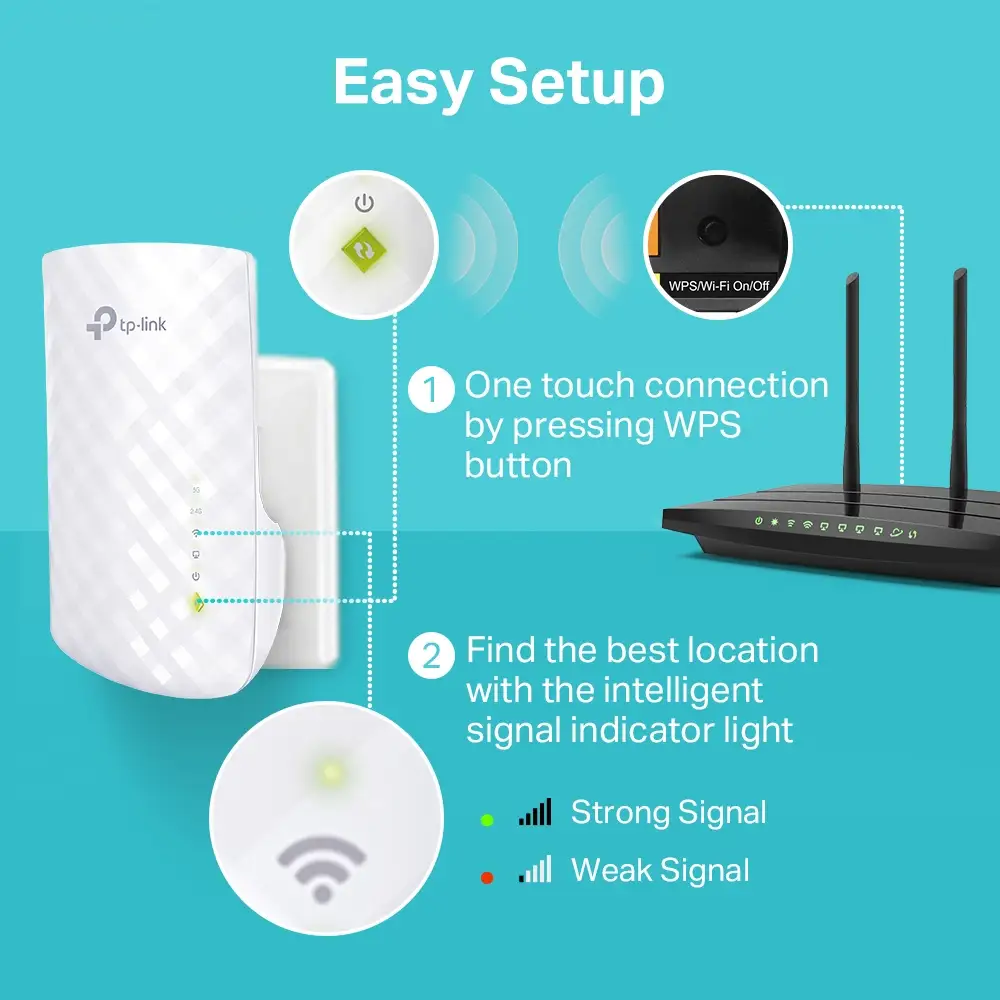
Ease of setup is the most consistent praise. Across Trustpilot, Reddit, and Amazon, users describe a “simple two-step process” using WPS or the Tether app. The smart signal indicator light is another favorite—helping pinpoint the best location for coverage. A verified buyer said: “The green light made it idiot-proof to find the sweet spot.” For renters or non-technical users, this eliminates the guesswork.
Stable 2.4GHz coverage stands out as the RE220’s strongest suit. PCMag’s throughput tests gave it “top honors” at close proximity on 2.4GHz, and Reddit user feedback confirms it’s ideal for smart home devices. One Amazon reviewer noted, “My Ring doorbell finally stopped dropping off.” Users with brick walls or multiple floors report reliable connectivity for bulbs, cameras, and streaming sticks.
Its compact, wall-mounted design earns praise from those with limited space. The lack of protruding antennas means it blends into décor and doesn’t block adjacent outlets. A Trustpilot review described it as “kid-friendly—no big antennas to snap off.”
Common Complaints
The Ethernet port’s 100 Mbps limit is a recurring frustration. PCMag stressed it’s “significantly slower than the gigabit port” on pricier models. Gamers and heavy downloaders find this bottleneck noticeable. A Reddit user bluntly said: “It’s 2023—why is this still Fast Ethernet?”
Security limitations also come up. One community post points out the RE220 “does not support WPA2 or WPA3 as a host… best it provides is WPA1,” which some consider “too weak” for modern networks. This particularly concerns tech-savvy buyers and small businesses.
Performance on 5GHz is widely criticized. While marketed at 433 Mbps, real-world speeds often fall short. PCMag recorded “115 Mbps close proximity” versus 338 Mbps for a Netgear rival. Users streaming 4K or gaming over 5GHz report stutters and drops with distance. A verified buyer summarized: “If you need fast 5GHz, look elsewhere.”
Divisive Features
OneMesh capability divides opinion. For those with a compatible TP-Link router, roaming between extender and router is seamless. But for others, the requirement feels like a bait-and-switch. A Reddit user explained: “Without the right router, OneMesh is just marketing fluff.”
The Ethernet port’s dual role—as access point or wireless adapter—is valued by console and Smart TV owners, yet some say AP mode restrictions (no OneMesh, no wired mesh) limit its usefulness in complex setups.
The 32-device claim is another split. Light users never hit the ceiling, but households with multiple phones, laptops, consoles, and IoT devices sometimes report instability when approaching that limit.
Trust & Reliability
Long-term durability appears solid for casual use. Reddit threads mention “6 months later, still no issues” and “works as well as day one.” However, advanced users note that AC750 is “beginning to become somewhat dated” compared to newer Wi-Fi 6 models, especially for future-proofing.
Trustpilot data shows no scam concerns—most negative ratings are tied to unmet speed expectations rather than defective units. Returns are rare unless the buyer misunderstood OneMesh requirements or needed modern security standards.
Alternatives
The Netgear Nighthawk EX7300 comes up frequently in comparisons. PCMag calls it “superior 5GHz performance… supports MU-MIMO and gigabit LAN” but at a higher cost. For those prioritizing speed over price, it’s recommended.
Another alternative is Amped Wireless REC44M, offering gigabit Ethernet and better throughput, but again at a premium. Both alternatives highlight that RE220 is best positioned as a budget extender, not a performance leader.
Price & Value
Current Amazon and eBay listings hover between $19.99 and $29.99, with occasional coupons and open-box deals under $20. eBay resale values suggest modest depreciation—used units still fetch around $15-$20 if in good condition.
Community buying tips stress checking router compatibility before purchase if OneMesh is a selling point. Some recommend buying from retailers with easy return policies, given the mixed 5GHz reviews.

FAQ
Q: Can the RE220 create a OneMesh network without a TP-Link router?
A: No. You need a OneMesh-compatible router. In AP mode, the RE220 cannot host OneMesh.
Q: Does the Ethernet port support gigabit speeds?
A: No. It’s a Fast Ethernet port capped at 100 Mbps, which can bottleneck wired devices.
Q: How many devices can connect at once?
A: Officially up to 32, but real-world stability varies depending on network load and interference.
Q: Is WPA2 or WPA3 supported for hosted networks?
A: As a host, it only supports WPA1; it can connect to routers using WPA2.
Q: What’s the actual coverage area?
A: Marketing states 1200 sq.ft, but coverage depends on building materials, interference, and placement.
Final Verdict
Buy if you’re a budget-conscious user seeking reliable 2.4GHz coverage for smart home devices, streaming sticks, or casual browsing. Avoid if you need high-speed 5GHz for gaming or 4K streaming, or require modern WPA2/WPA3 host security.
Pro tip from the community: Use the smart signal indicator to find the optimal spot—placing it halfway between your router and dead zone maximizes stability.