TP-Link EAP110-Outdoor V3 Review: Conditional Buy (7.2/10)
“On AP2 I have even 41 (!) connection drops within the last 11 hours.” That single line captures the core split around the TP-Link EAP110-Outdoor V3 Omada N300 Wireless Outdoor Access Point: when it behaves, owners call it “works, like clockwork”—and when it doesn’t, the failures are loud. Verdict: Conditional buy for simple, 2.4 GHz outdoor coverage; riskier for controller-managed setups. Score: 7.2/10.
Quick Verdict
Yes/No/Conditional: Conditional
| What people agree on | Evidence from user feedback | Who it’s best (or worst) for |
|---|---|---|
| Easy setup is a major win | Yandex buyer Roman S. said: “even with my clumsy hands… setup took 10 min” | DIY homeowners who want fast deployment |
| Real outdoor coverage can be strong | Yandex buyer Vadim K. said: “works stable… in a radius of 200 m” | Rural properties, yards, dachas |
| Some see serious instability (drops/no SSID) | A TP-Link Community poster wrote: “a few times a day… I don’t see any networks for quite some time” | Anyone needing “always-on” reliability |
| Speed expectations get corrected by hardware limits | A TP-Link Community reply noted: “ethernet port is 100 mbps only” | Buyers expecting >100 Mbps throughput |
| Value is repeatedly cited | Yandex buyer Maksim G. said: “cheapness, simplicity… wide coverage” | Budget outdoor Wi‑Fi expansions |
Claims vs Reality
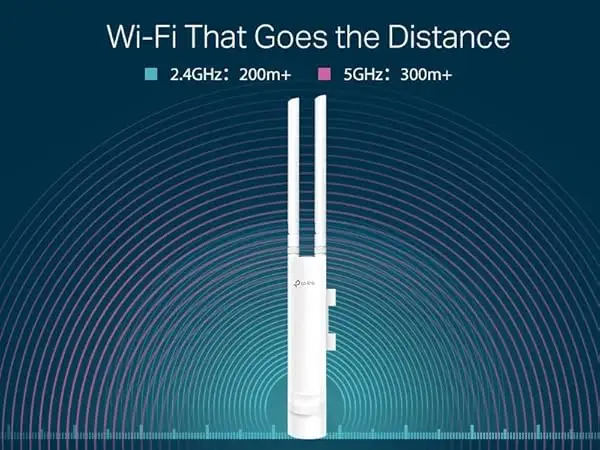
“WiFi Coverage up to 200 meters” is one of the most repeated marketing promises around TP-Link EAP110-Outdoor V3 Omada N300 Wireless Outdoor Access Point, and digging deeper into user reports shows it can be true—but not universally. On Yandex Market, Vadim K. describes a clean rural environment where “there is no dense reinforced concrete development” and says the AP runs “stable on 5–7 devices in a radius of 200 m.” That’s a scenario where the product story aligns neatly with the spec.
But another pattern emerged in community troubleshooting threads: range and speed can disappoint even in rural settings. A TP-Link Community poster in a “bad range and speed” thread said: “we’re very rural… the signal pretty much drops after 250 ft,” and added that even standing next to the unit they saw “around 40 mbps” while their router delivered “140 mbps.” While the product is marketed as N300 (up to 300 Mbps PHY rate), that user experience highlights the difference between link rates and real throughput.
The second promise is management simplicity via Omada SDN and app control. In practice, users describe two very different outcomes. Yandex buyer Roman S. framed the experience as plug-and-go: “everything worked without problems.” Meanwhile, a TP-Link Community poster running four units with an Omada controller said “it seems the eap hangs for a few seconds,” describing moments when SSIDs disappear and phones show no networks at all. The same poster later concluded: “it seems there is some kind of problem how omada controller configures the eap110 outdoor,” especially as “the more ssids and the more clients… the more often the connection problems occur.”
Finally, “Passive PoE… effortless outdoor deployment” largely matches what buyers praise—just with small caveats. Roman S. reported running cable “under the roof of the house” and following the instructions, noting the box includes “everything except two cables,” and calling out that one included cable could be “very short.” The core setup story still reads as streamlined, but it’s not a full “no extra purchases” kit for everyone.
Cross-Platform Consensus
Universally Praised
One recurring theme across buyer comments is how quickly the TP-Link EAP110-Outdoor V3 Omada N300 Wireless Outdoor Access Point goes from box to working network—especially for homeowners who don’t want a weekend-long networking project. On Yandex Market, Roman S. described a straightforward installation to expand coverage at a country property and said: “setup took 10 min (network name and password).” For the “I just need Wi‑Fi outside” crowd, this kind of story signals that the barrier to entry is low, even if you’re “far from such devices.”
A second point of agreement is that, in the right environment, coverage can be the main reason people keep buying more. Vladimir Glinnikov on Yandex Market said: “I’m already taking the sixth,” adding it “works together with the Omada controller” and calling the system “reliable and stable.” Even shorter feedback echoes the same benefit: Valeriy Ts. said it was “powerful” and “strengthened the signal well,” and Denis called out “excellent range and speed.” These comments tend to come from users solving a specific, practical problem—yard, garden, production area—where strong 2.4 GHz propagation matters more than peak throughput.
A third pattern is the value proposition. Several Yandex reviewers explicitly connect low cost with acceptable performance. Maksim G. called out “cheapness, simplicity in installation, wide coverage and convenience of setup,” while Vadim K. summarized it as “affordable price, sufficient functionality.” For budget-conscious rural deployments, those statements read like a consistent “good enough, cheap enough” approval—especially when paired with “works ‘out of the box’” and included power/installation accessories.
After the narrative patterns, the praise clusters into a few repeatable points:
- Fast setup and low friction installation (“setup took 10 min” — Yandex buyer Roman S.)
- Strong outdoor coverage when interference and obstructions are modest (“radius of 200 m” — Yandex buyer Vadim K.)
- Good value for money (“cheapness… wide coverage” — Yandex buyer Maksim G.)
Common Complaints
The most serious complaint thread isn’t about speed—it’s about reliability, specifically intermittent hangs that look like SSID broadcast failure and connection drops. A TP-Link Community poster described a daily pattern: “a few times a day my smartphone suddenly has either no connection anymore… when opening wifi result page… I don’t see any networks for quite some time.” This is the kind of failure that hits families and small sites hardest because it feels random: two phones “right beside” each other see the same outage, which makes it hard to blame a single client device.
Digging deeper into that same report, frustration grows when troubleshooting doesn’t help. The poster wrote: “I’ve tried a lot… changing beacon interval… enabling fast roaming… but nothing helped,” and contrasted it with older devices: “before I had eap110 outdoor v1 and eap115 and both worked flawlessly.” For users upgrading within the same brand, that “v1 was fine, v3 is trouble” story lands as a warning sign, not a one-off annoyance.
Another recurring complaint is that “speed” expectations can collide with the product’s constraints. In the “bad range and speed” TP-Link Community thread, the buyer measured “around 40 mbps” next to the AP and asked if they were missing a setting. A reply reframed the situation bluntly: “eap110-outdoor ethernet port is 100 mbps only,” and explained that real internet speed depends on link speed plus Ethernet backhaul limits. For people hoping to extend a fast internet plan to the yard, this gap between “N300” and real throughput becomes a common source of disappointment.
After the narrative, complaints consolidate into a few recurring issues:
- Intermittent drops/brief hangs (“it seems the eap hangs for a few seconds” — TP-Link Community)
- Performance dissatisfaction in some rural scenarios (“signal… drops after 250 ft” — TP-Link Community)
- Confusion around achievable speeds due to 100 Mbps Ethernet (“ethernet port is 100 mbps only” — TP-Link Community reply)
Divisive Features
Omada controller management is where the TP-Link EAP110-Outdoor V3 Omada N300 Wireless Outdoor Access Point becomes polarizing. On one hand, Yandex buyer Vladimir Glinnikov reported buying multiple units and said it “works together with the Omada controller,” calling the system “reliable and stable.” That’s the best-case narrative for multi‑AP owners: central control, repeatable deployments, and confidence buying “the sixth.”
On the other hand, a TP-Link Community poster investigating frequent drops ended up isolating a difference between standalone and controller-managed behavior. After testing, they wrote: “there are no connection drops with this manually configured ap,” but “the first connection drops already occurred again” once configurations were applied through the Omada controller. They also observed scaling pain: “the more ssids and the more clients… the more often the connection problems occur.” That contrast—stable in manual setup, unstable under controller config—makes Omada either a strength or a risk depending on your exact network complexity.
Trust & Reliability
A recurring trust signal is long-term repeat purchasing: Yandex buyer Vladimir Glinnikov said, “I’m already taking the sixth,” which implies durability and confidence across multiple installs. Other Yandex reviewers reinforce day-to-day stability with phrases like “works, like clockwork” (Aleksey L.) and “works flawlessly” style sentiments, even when the feedback is brief.
But the most detailed reliability concerns come from TP-Link’s own community forum, where one poster documented “more than 14 connection drops per day” and even shared kernel log patterns: “ack timeout… reset,” and “stuck beacon; resetting.” The same poster later warned: “until finally solved I recommend not buying eap-110 outdoor v3,” while also noting TP-Link provided “a beta firmware… far better than the latest firmware.” For buyers who can’t tolerate intermittent outages—home offices, security cameras, guest Wi‑Fi—these reports represent the strongest reliability red flags in the dataset.
Alternatives
Only a few direct alternatives were mentioned by users discussing the TP-Link EAP110-Outdoor V3 Omada N300 Wireless Outdoor Access Point, and they mostly point toward moving upmarket for speed and dual-band stability. In the “bad range and speed” community thread, the buyer asked, “shall I try the eap225?” and another community member replied by steering toward 5 GHz capable models: “i have eap225-outdoor and eap245 both of them have better speed performance on 5 ghz.”
That alternative narrative is less about brand switching and more about matching expectations. If your frustration is “standing next to the AP I get around 40 mbps,” the suggested path from the community is to choose hardware that can deliver higher throughput and use less-congested bands. But if your goal is basic outdoor coverage for phones and smart devices, the repeated Yandex stories about “sufficient functionality” and “wide coverage” suggest the EAP110-Outdoor V3 can still be the budget pick—assuming reliability is acceptable in your environment.
Price & Value
The value story around the TP-Link EAP110-Outdoor V3 Omada N300 Wireless Outdoor Access Point is reinforced by both retail pricing and secondhand/refurb listings. Amazon’s listing shows a common purchase price around $39.99 (with a listed $49.99 reference price) and a large review base (4.2/5 from 1,492 reviews), which signals mainstream adoption at budget pricing.
On the resale side, eBay shows certified-refurbished units sold in volume (“198 sold”) and priced around $36.99, while another eBay listing shows $34.49 plus shipping. That pattern suggests the market treats it as a low-cost, replaceable building block rather than a premium long-term asset—good for stretching coverage cheaply, but also consistent with the idea that some users may swap models if performance or stability doesn’t meet needs.
Community “buying tips” appear implicitly in troubleshooting: in the speed thread, users recommend practical adjustments like picking channels “1,6 or 11” and narrowing channel width “down to 20m” to reduce interference (TP-Link Community replies). The deeper value takeaway is that expectations should be set around 2.4 GHz constraints and the 100 Mbps Ethernet port.
FAQ
Q: Does the TP-Link EAP110-Outdoor V3 really reach 200 meters?
A: It can in the right conditions. Yandex buyer Vadim K. said it ran “stable on 5–7 devices in a radius of 200 m” in a quiet rural 2.4 GHz environment, but a TP-Link Community poster reported the “signal… drops after 250 ft” in their setup.
Q: Why am I only getting about 40 Mbps even near the access point?
A: A TP-Link Community reply explained the EAP110-Outdoor’s Ethernet port is “100 mbps only,” and real throughput depends on both Wi‑Fi link speed and Ethernet backhaul. One user reported “around 40 mbps” next to the AP, while their router delivered “140 mbps.”
Q: Are connection drops a known issue on the EAP110-Outdoor V3?
A: Some users report frequent drops. A TP-Link Community poster wrote their phone sometimes shows “no networks for quite some time,” and later documented “more than 14 connection drops per day.” They also said TP-Link provided “a beta firmware” that was “far better” than the latest.
Q: Is Omada controller management reliable with this model?
A: Experiences conflict. Yandex buyer Vladimir Glinnikov said it “works together with the Omada controller” and called it “reliable and stable,” but a TP-Link Community poster found a manually configured AP had “no connection drops,” while controller-managed units saw repeated drops.
Q: What alternatives do people recommend if I need better speed?
A: In TP-Link Community discussions, users pointed to models with 5 GHz support. One reply said: “i have eap225-outdoor and eap245 both of them have better speed performance on 5 ghz,” framing the upgrade as a way to escape 2.4 GHz limitations.
Final Verdict
Buy the TP-Link EAP110-Outdoor V3 Omada N300 Wireless Outdoor Access Point if you’re a budget-focused homeowner or rural property owner who wants simple 2.4 GHz outdoor coverage and appreciates “works ‘out of the box’” setup stories like Yandex buyer Vadim K.’s “stable… in a radius of 200 m.”
Avoid it if your scenario can’t tolerate intermittent outages or you plan a complex Omada controller setup with multiple SSIDs and heavier client loads; one TP-Link Community poster warned: “until finally solved I recommend not buying eap-110 outdoor v3.”
Pro tip from the community: start simple and isolate variables—one TP-Link Community helper suggested resetting and testing before adding features back “one by one,” and others recommended selecting channels “1,6 or 11” and reducing channel width to “20m” to reduce 2.4 GHz interference.