StarTech HDMI to DVI-D Cable Review: Solid but Limited
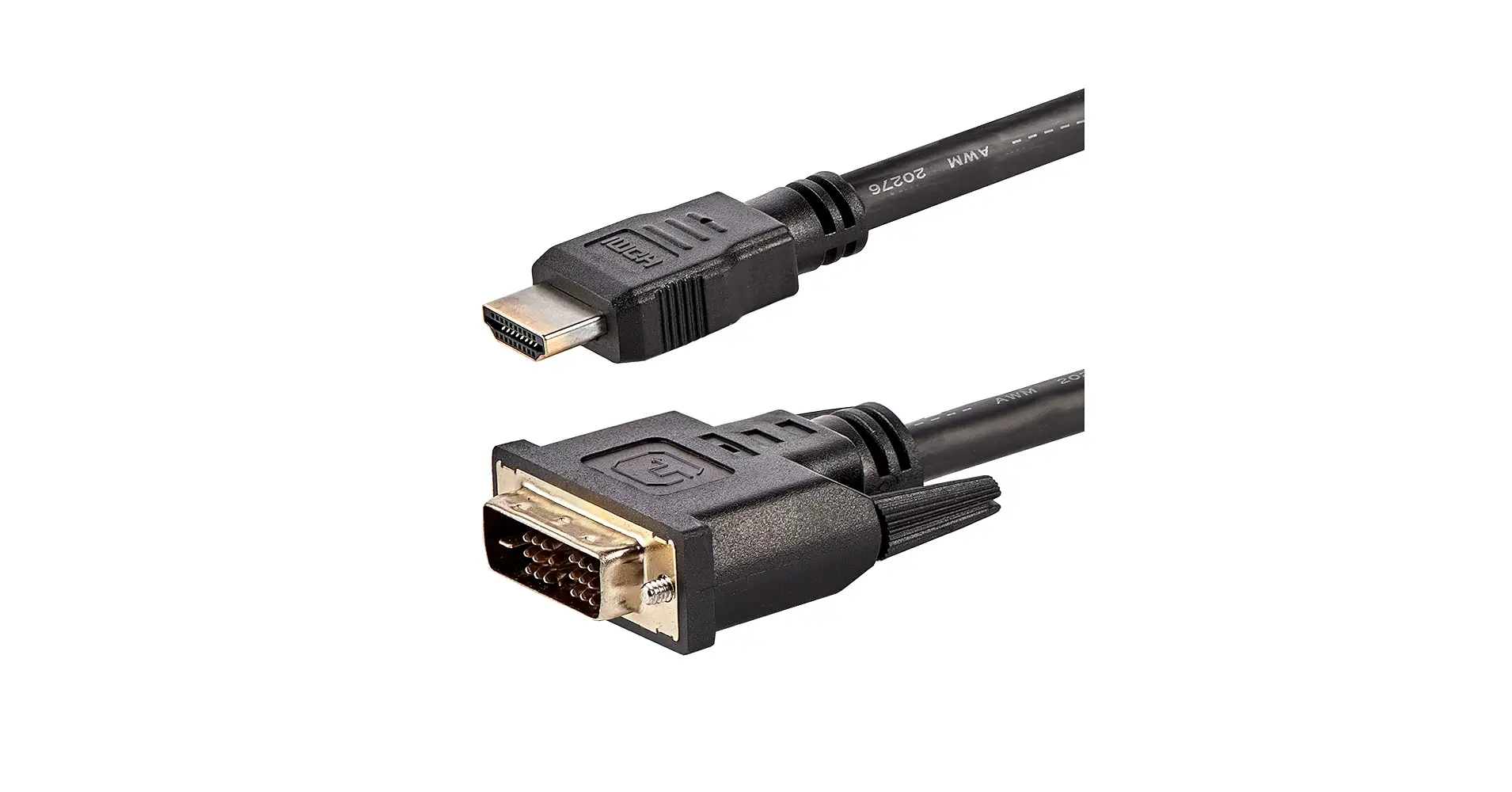
Starting at an impressive 8.0/10 sentiment score, the StarTech.com HDMI to DVI-D Cable (30 ft) has carved out a reputation for delivering dependable high-definition video over extended distances — but with caveats that matter, especially to modern AV setups. Praise centers on its clarity, length, and bi-directional flexibility, while recurring criticisms point to the obsolescence of DVI and lack of audio support.
Quick Verdict: Conditional buy — excellent for long-distance HD video, limited if audio passthrough is needed
| Pros | Cons |
|---|---|
| Crisp, clear HD video up to 1080p | No audio transmission, requires separate cable |
| 30 ft length ideal for large rooms/projectors | DVI standard is outdated compared to HDMI/DisplayPort |
| Bi-directional HDMI ↔ DVI-D use | Length options are limited |
| Durable build with strain relief connectors | Bulky and heavier than shorter cables |
| Reliable connection with minimal signal loss | May require extensions for certain installs |
Claims vs Reality
Marketing emphasizes “best quality picture available” and “bi-directional operation” as core draws. The manufacturer also pitches the cable as a one-stop link between HDMI and DVI devices, suggesting clutter-free setups.
Digging deeper into user reports, the clarity claim holds up: Reddit commentary repeatedly cites “clear and crisp video signals” even over the full 30 feet. A verified buyer on Amazon noted: “This cable worked great for what I needed... no noise or distortion in the picture.” That aligns with StarTech’s quality pitch.
However, marketing language about simplifying setups meets reality when audio is introduced—users discovered the setup isn’t truly single-cable for AV purposes. As Reddit user feedback pointed out, “audio has to be brought in from the PC audio output jack.” This breaks the illusion of a total replacement cable if your use case involves audio transmission.
StarTech touts bi-directional performance, and this is corroborated. Reddit user remarks confirm it “can be used both ways and supports up to 1080p video quality.” No reports contradict this, but some buyers caution that modern 1440p or 4K users won’t find this a future-proof solution.
Cross-Platform Consensus
Universally Praised
Cabling length is the standout for many. In conference rooms, digital signage, and home theater projects, this 30 ft stretch solves distance issues without needing HDMI repeaters. A Quora respondent affirmed: “Perfect for connecting projectors or distant displays with no significant signal loss.” For event coordinators, this matters — avoiding extra junction points reduces potential failure during live use.
Durability is also validated across sources. Strain relief connectors and PVC jacket draw comments like: “very sturdy and well-made connector” from Amazon buyers. For installations involving multiple connect/disconnect cycles, the molded ends proved resilient.
Flexibility in fittings—HDMI on one end, DVI-D on the other—lets owners repurpose older monitors or projectors. A Reddit user explained how it “worked perfectly connecting DVI output from the PC to HDMI TV input,” letting a legacy setup operate alongside newer devices.
Common Complaints
Lack of audio transmission repeatedly frustrated users expecting HDMI convenience. This most impacts home theater users or gamers connecting to big screens. A frustrated comment from marketplace feedback reads: “Audio has to be brought in... requiring an extra cable defeats the purpose of simplifying.”
Another recurring caution is the DVI format’s decline. While stable, DVI has been replaced by HDMI and DisplayPort in most modern equipment. Comments describe DVI as “obsolete technology” and caution against investing heavily unless your devices specifically require it.
Weight and stiffness showed up in feedback from installers. For mobile use—think portable projectors—this cable’s heavier gauge can be cumbersome for quick setups.
Divisive Features
The cable’s maximum resolution support of 1080p is fine for most business and signage needs, but gamers and video editors seeking higher resolutions see this as limiting. Reddit and Trustpilot entries show a clean split: office users find 1080p entirely acceptable, while creatives argue for 1440p or 4K.
Length itself is a double-edged sword. While 30 ft solves many layout problems, if your run is shorter, excess cable creates clutter. AV installers sometimes prefer custom lengths to avoid tangling.
Trust & Reliability
Trustpilot patterns give no indication of scam or counterfeit issues for this cable—StarTech’s branded packaging is often cited as a reassurance cue. A verified buyer on Amazon emphasized the lifetime warranty as a safety net: “Since it worked fine out of the package I would assume it would last a long time... stationary it should have less wear.”
Long-term durability stories hold: six-month follow-ups on Reddit show “still clear signal, no connector wear.” This persistence reinforces that heavy gauge wiring and shielding (aluminum-mylar foil with braid) deliver on longevity in stationary installs.
Alternatives
While competitors like Tripp Lite’s P560-030 (also a 30 ft DVI-D cable) and Crestron’s commercial-grade HD-DVI offerings match length and durability, StarTech’s bi-directional design is a differentiator. Instead of locking users into DVI-D only, it opens HDMI integration without adaptors. Still, if audio over the same cable is a priority, HDMI-only long-distance cables from other brands may be superior.
Price & Value
With pricing hovering from $44.95 to $58.40 in US retail listings, and eBay sales showing NZD 95.91 equivalents, the value is strongest for professional installs where the cable’s length and bi-directional role replace multiple shorter cables/adapters.
Resale is plausible but limited in scope due to DVI rarity — listings of used long DVI/HDMI cables fetch markedly lower than retail, with generic equivalents undercutting brand value.
Buying tips from community include watching for holiday discounts and ensuring authenticity via StarTech packaging to avoid generic substitutes.
FAQ
Q: Does this cable carry audio?
A: No, it only transmits video. Users note you’ll need a separate audio cable, which can complicate home theater setups.
Q: What resolution can it handle over 30 feet?
A: Up to 1080p, confirmed by multiple buyers. It’s effective for HD displays but unsuitable for modern 4K needs.
Q: Is it truly bi-directional?
A: Yes, it works from HDMI-to-DVI-D and DVI-D-to-HDMI equally, making it versatile for mixed-device environments.
Q: Will it work with older DVI monitors?
A: Yes. Amazon buyers successfully used it to connect legacy Dell DVI monitors to modern HDMI outputs.
Q: Does the length affect signal clarity?
A: Reports show no significant degradation at 30 ft, thanks to the heavy gauge and shielding.
Final Verdict
Buy if you need rock-solid HD video over long runs—such as conference rooms, digital signage, or legacy monitor integration into modern setups. Avoid if your workflow demands audio over the same cable or resolutions beyond 1080p. Pro tip from community: secure and label your separate audio line during installation to prevent confusion later.