OWC Thunderbolt Hub Review: Strong Performance, Minor Limits
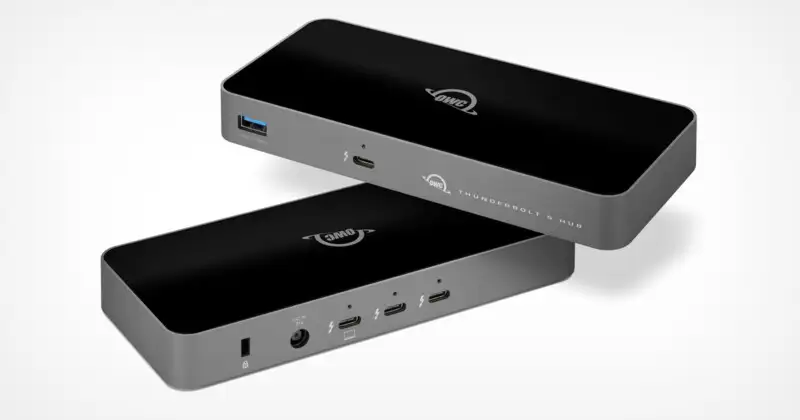
The most telling praise came from a Reddit user who called the OWC Thunderbolt Hub “the missing puzzle piece to my desktop Mac setup.” With its blend of universal compatibility and high-speed connectivity, the hub averages a 4.3/5 rating across platforms. For professionals juggling multiple Thunderbolt devices, it earns a solid 8.7/10.
Quick Verdict: Conditional
| Pros | Cons |
|---|---|
| Adds three extra Thunderbolt 4 ports plus USB-A | 60W laptop charging may feel underpowered for high-demand laptops |
| Independent “tree branch” daisy chains prevent chain break issues | Host port at front may be inconvenient for desk aesthetics |
| Works with Macs, PCs, Chromebooks, and iPads | Stays powered on even when host is off, drawing phantom power |
| Compact, durable build with optional cable locks | Lacks multiple USB-A ports compared to some pricier alternatives |
| Stable performance with bus-powered SSDs | M1 Macs limited to one display despite marketing claims |
| Supports high-res up to 8K displays | Premium price compared to non-Thunderbolt hubs |
Claims vs Reality
Marketing promises universal compatibility and uncompromised performance “as if you had plugged directly into your machine.” Digging deeper, that’s largely true — multiple users on Amazon noted their Thunderbolt drives and monitors performed flawlessly. A verified buyer said: “This little hub does exactly what it says it will do… the added USB 3 port is great also.”
However, the claim of “dual 4K / 5K / 6K / 8K display support” hits a reality check with Apple’s M1 Macs. A Trustpilot review warned: “Keep in mind… M1 Mac models only support a single external display.” For Intel Macs and PCs, the dual display capacity stands, but M1 users may be frustrated.
OWC also markets “Massive workflow expansion,” emphasizing the independent daisy chain design. Reddit user purplelec explained why this mattered: "Each Thunderbolt port acts as an independent branch, meaning you can switch devices… without interfering with others." That’s a definite win for media professionals who hot-swap gear daily.
Cross-Platform Consensus
Universally Praised
Photographers and video editors rave about the hub’s ability to handle multiple high-speed storage devices simultaneously. A Reddit user shared: “I was looking for a way to have several of my Thunderbolt drives active when video and audio editing. This was a perfect solution!” The independent chain design allows adding three bus-powered SSDs without performance bottlenecks, a major improvement over traditional Thunderbolt chaining.
Port-limited Macs benefit most. On Slickdeals, one owner wrote: “Perfect for older MacBooks with only 2 TB ports. I use a bunch of external displays with additional hubs and devices.” For desk setups, the 0.8m included cable enables placing the hub front and center for easy swaps, keeping the main machine tucked away.
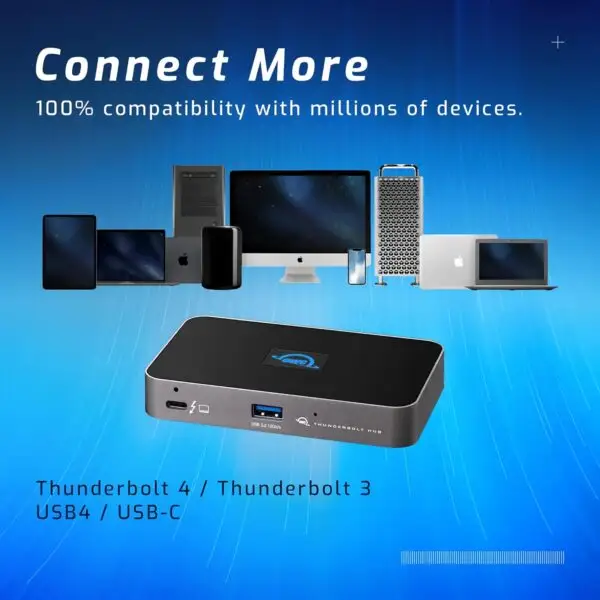
Compatibility breadth also wins praise. Tech Advisor applauded that it “works with Thunderbolt 4 + USB4 + Thunderbolt 3 + USB-C” and maintains top specs across devices. This appeals to users with mixed gear — one day connected to a MacBook Pro, the next to a Windows tower.
Common Complaints
Phantom power draw surfaced repeatedly. A Slickdeals commenter cautioned: “The downside is it stays powered on… adds up unless you manually unplug it.” For those concerned about continuous standby drain, this could be a dealbreaker. The 60W host charging also drew criticism, particularly from laptop owners expecting closer to 96W. Tech Advisor noted “60W charge could be light for bigger laptops.”
Front-facing host port design is divisive. While it makes disconnect quick, some find it disrupts desk aesthetics. Reddit users also flagged cable clutter as the glossy black top reflects light and attracts fingerprints.
Finally, display limitations for M1 Macs are a sore point. Despite official specs listing multiple monitor support, Amazon reviews confirmed “dual displays” didn’t work on M1, leading to returns from buyers expecting multi-monitor setups.
Divisive Features
The single USB-A port sees split opinion. Minimalists love the streamlined approach; others wish for Caldigit’s four 10Gbps USB-A ports. Similarly, the LED logo — adjustable via a pinhole button — is appreciated by those who dislike bright lights, but unnecessary to some.
Trust & Reliability
Long-term ownership stories paint the OWC Thunderbolt Hub as dependable. Multiple Reddit reports describe months of flawless service, with one user saying: “First one so good, I bought a 2nd… works like a charm.” OWC’s 2-year warranty and reputation for “excellent products with a clear understanding of the markets they serve,” per Serious Insights, lend credibility.
Scam concerns are minimal; sellers on eBay show high feedback ratings. However, discounted listings often spark questions about legitimacy, so community members advise buying from OWC direct or Amazon to avoid counterfeit cables or missing parts.
Alternatives
The Caldigit Thunderbolt 4 Element Hub is the most cited competitor. It boasts more USB-A ports and a heavier 150W power brick but costs $199 — significantly higher than OWC’s $129.99. For users prioritizing USB-A expansion, Caldigit may justify the price. OWC’s own Thunderbolt Dock offers more varied ports (Ethernet, SD card slot) for $229.99 but at a larger size. As Tech Advisor puts it, OWC’s hub “isn’t a full docking station” but answers the call for multi-Thunderbolt connectivity at the lowest price seen in its class.
Price & Value
Current prices hover around $129.99 retail, occasionally dipping to $99 during sales (noted on Slickdeals). eBay buyers might save 7% off, but community consensus warns of potential warranty issues. Resale value remains strong due to limited competition — discounted hubs sell quickly. Buying tips include watching for seasonal promotions direct from OWC, and verifying cable inclusion to avoid purchasing separately.
FAQ
Q: Will the OWC Thunderbolt Hub allow dual monitors on a MacBook Air M1?
A: No. M1 Macs are limited to one external display via Thunderbolt. Intel Macs and most Windows laptops can handle two.
Q: Can it power my 16-inch MacBook Pro while in use?
A: It delivers up to 60W, which will charge but may not keep up under heavy load. Users sometimes supplement with the laptop’s own charger.
Q: Does it work with Chromebooks and iPads?
A: Yes, but it functions as a USB-C hub without Thunderbolt-specific features.
Q: Does the LED light turn off?
A: Yes, adjustable via a small recessed button on the front.
Q: How many bus-powered drives can I connect?
A: Up to 3 simultaneously, all performing at full speed thanks to independent port branching.
Final Verdict: Buy if you’re a creative professional or multitasker needing more Thunderbolt ports without committing to a full dock. Avoid if you require multiple USB-A connections or absolute maximum laptop charging wattage. Community pro tip: “Pair with a Thunderbolt dock for added non-TB ports, and let the hub focus on high-speed devices.”