NVIDIA Shield TV Pro Review: Powerful But Pricey Verdict
The NVIDIA SHIELD Android TV Pro Streaming Media Player has earned a reputation as one of the most powerful and versatile streaming devices on the market, with an average cross-platform sentiment score around 8.8/10. Across Amazon, Reddit, Trustpilot, and tech-focused forums, a recurring theme emerges: when it works as intended, it delivers unmatched streaming quality, gaming capability, and local media playback. However, a subset of users report frustrations with its high price, occasional remote issues, and UI changes driven by Google that some find intrusive.
Quick Verdict: Conditional — best for power users, gamers, and home theater enthusiasts. Overkill for casual streamers.
| Pros | Cons |
|---|---|
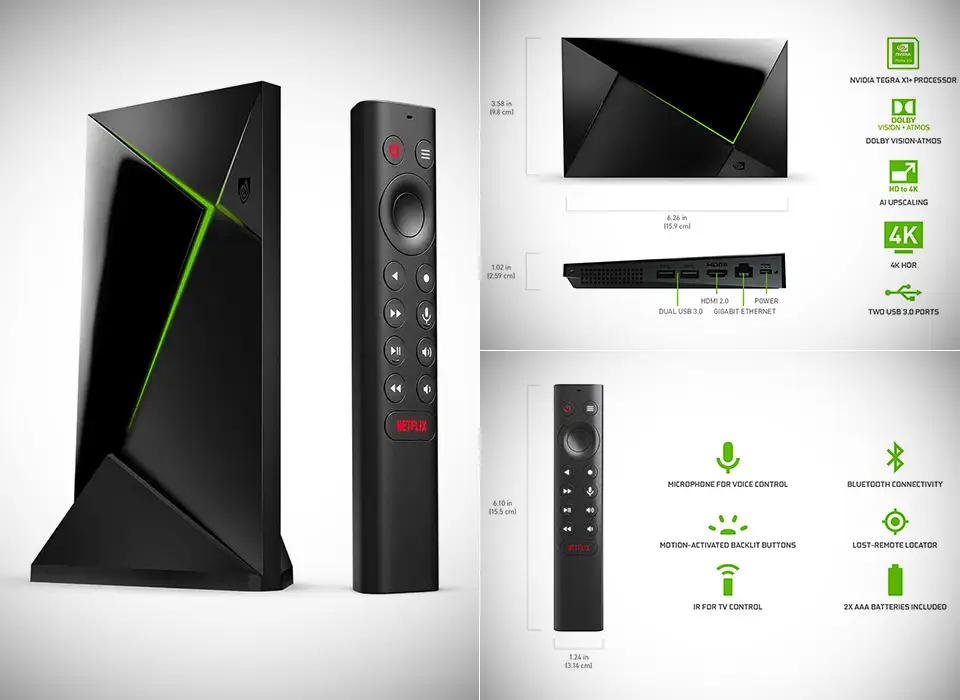
| Exceptional 4K HDR quality with Dolby Vision & Dolby Atmos | Higher price than most competitors |
| AI upscaling makes HD content look sharper | Google-imposed ads on home screen frustrate some |
| Powerful Tegra X1+ chip ensures fast navigation | Remote design and reliability criticized |
| Works as a Plex server with USB storage expansion | No HDR on YouTube |
| Excellent for cloud gaming and PC game streaming | Some features require manual setup or sideloading |
| Wide format support for local playback | Limited improvement in raw performance over older models |
| Strong build quality and long-term support | Certain audio codec compatibility issues (e.g., Sonos 5.1) |
Claims vs Reality
NVIDIA markets the Shield TV Pro as “the world’s most powerful Android TV streaming media player” with AI-enhanced upscaling, Dolby Vision/Atmos, and unmatched 4K content support. While power users often agree, everyday feedback reveals a more nuanced picture.
One key selling point is AI upscaling. NVIDIA promises “clearer, crisper visuals in real-time,” and many users confirm it works impressively for HD-to-4K content. However, Reddit reports show it can deliver “mixed results” depending on the source material, with some preferring to keep it off for certain shows.
The company also emphasizes gaming capabilities, from GeForce NOW to local GameStream. This is an area where claims and reality align — Reddit user experiences describe “overall latency of 4 to 5 ms at 1080p 60” and successful streaming of “twitch FPS” titles, something competitors struggle with. Still, Newegg reviewers caution that not all games are natively supported, requiring “setup and/or workaround” for some UWP titles.
Finally, NVIDIA positions the Shield as a premium, ad-free experience. This changed in mid-2021 when Google added sponsored content rows to Android TV, prompting backlash. One Amazon reviewer noted: “As of yesterday… content ads directly at the top of the home screen… definitely not age-appropriate for young children.” For some, this was a dealbreaker unless bypassed with a custom launcher.
Cross-Platform Consensus
Universally Praised
Across platforms, the Shield Pro’s raw performance and versatility stand out. For home theater enthusiasts, the combination of Dolby Vision, Dolby Atmos, and wide file format support means local media playback “direct plays everything” without transcoding. A Best Buy customer highlighted that it’s “the only streaming box known to me that will output bitstream Atmos code” outside of Blu-ray players.
Gamers are another core audience. Multiple Reddit threads describe it as the gold standard for PC game streaming, with one user reporting “HW decoding time is one millisecond… still under 7 ms at 1080p 120 fps.” The ability to pair Xbox or PlayStation controllers, run emulators, or use GeForce NOW gives it an edge over Roku or Fire TV.
Power users praise its expandability. With 2 USB 3.0 ports, it can become a Plex server, support external storage, or host peripherals. One Trustpilot reviewer called it “a luxury Android box” that “offers so much more than your average smart device.”
Common Complaints
Price is the most frequent sticking point. While many concede it’s worth it for demanding setups, casual viewers may find it excessive. A Newegg reviewer bluntly called it “just an expensive streaming device” if not using GameStream or local playback.
The remote is a recurring frustration. Owners mention “buggy” behavior persisting across firmware updates, non-ergonomic design, and limited TV model compatibility for volume control. While the locator feature is appreciated, it doesn’t offset these issues for all.
Some software limitations also irk users. HDR is not supported on YouTube despite the hardware’s capabilities, and certain audio setups — notably Sonos — can’t get Netflix 5.1 due to codec mismatches. Advanced features like sideloading apps require “many complicated steps” per Consumer Reports testing.
Divisive Features
AI upscaling has a split reception. Enthusiasts with large HD libraries love the sharper look, while purists sometimes find it introduces artifacts. The home screen ads introduced by Google are another flashpoint — some ignore them, others install alternative launchers to avoid them entirely.
GameStream and GeForce NOW performance is generally lauded, but casual gamers may not value it enough to justify cost. As one Reddit user put it, “For my particular usage the Shield is more than worth it… but if you’re just watching Netflix, it’s overkill.”
Trust & Reliability
Long-term owners report strong durability. Reddit threads from users with older 2017 models praise NVIDIA’s ongoing software updates, with “excellent support and upgrades” still arriving years later. Hardware reliability is high, with few reports of failures.
However, Trustpilot and Best Buy reviews show occasional gripes with peripheral quality — mainly the remote. NVIDIA’s community team actively responds to these complaints, offering troubleshooting links and replacement guidance.
There’s little concern about counterfeit units, but some buyers note fluctuating availability and price spikes, leading them to purchase from reputable retailers or direct from NVIDIA.
Alternatives
Fire TV Cube and Apple TV 4K are the closest mainstream rivals. Redditors often note the Fire TV Cube and Apple TV support YouTube HDR, which the Shield lacks, but neither matches its local playback flexibility or lossless audio output. Roku Ultra is popular for simplicity but lacks the Shield’s gaming and codec breadth.
For budget-conscious users, devices like the Mecool KM2 or Walmart’s onn. Android TV box are mentioned — far cheaper, but with weaker hardware and limited format support.
Price & Value
The Shield Pro’s MSRP is $199.99, though sales can drop it to $170–$180. eBay resale data shows used 2019 models fetching £149–£169 in the UK and $179–$199 in the US, indicating strong retention. Rare or bundled versions (with stands or upgraded storage) can exceed $250.
Community advice leans toward buying during sales, as the hardware sees infrequent generational updates. For those leveraging Plex server capabilities, AI upscaling, or advanced gaming, owners widely agree the cost is justified.

FAQ
Q: Does the NVIDIA Shield TV Pro support Dolby Vision and Dolby Atmos together?
A: Yes. Multiple users confirm simultaneous Dolby Vision HDR and Dolby Atmos audio work for supported content and hardware, making it a strong choice for home theaters.
Q: Can it replace a Plex server?
A: For many, yes. With 2 USB 3.0 ports and 16GB internal storage, it can run Plex Media Server and stream high-bitrate files without transcoding, provided your network is up to the task.
Q: Is the AI upscaling worth it?
A: It depends on your library. Users with a lot of HD content see noticeable improvement, while others find the effect inconsistent and prefer to toggle it off.
Q: How is it for PC game streaming?
A: Exceptional when hardwired. Reddit reports latencies as low as 4–5 ms at 1080p 60. Wi-Fi performance is solid but can introduce minor lag.
Q: Does it support HDR on YouTube?
A: No. This limitation frustrates some, especially given that competitors like Fire TV Cube and Apple TV 4K do.
Final Verdict: Buy if you’re a power user, gamer, or cinephile who needs broad format support, lossless audio, and AI upscaling. Avoid if you primarily watch mainstream streaming apps and don’t require advanced features. Pro tip from the community: wait for sales and consider pairing with a good NAS or external drive to unlock its full potential.