NETGEAR Nighthawk M6 Review: Great Travel, Flawed Home Use
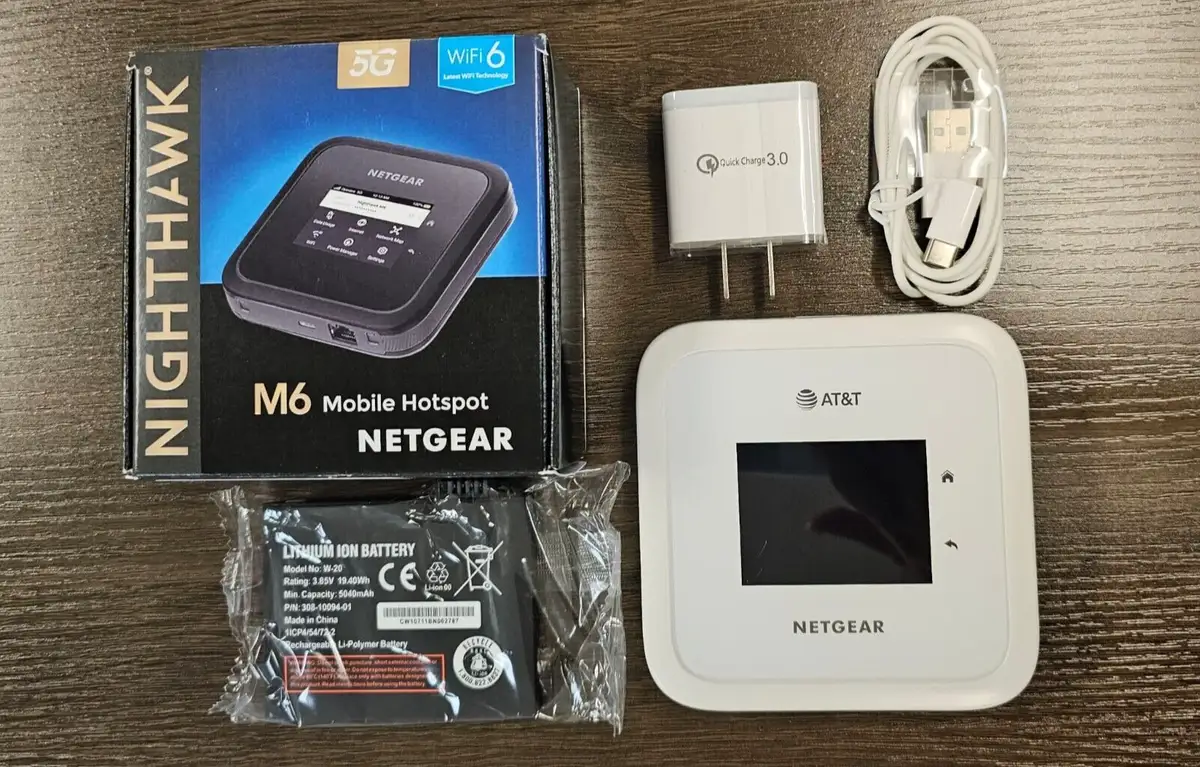
A jaw-dropping 200 Mbps download speed that suddenly plummets to 5 Mbps isn’t what buyers expect from the NETGEAR Nighthawk M6 5G Mobile Hotspot Router (MR6110)—yet it’s a reality many users faced. Across platforms, the M6 earns a conditional score of 6.5/10: its hardware can deliver fast, stable Wi‑Fi 6 and 5G connections under the right conditions, but recurring stability, heat, and firmware issues erode trust.
Quick Verdict: Conditional – Excellent on-the-go modem, unreliable as a primary home router without tweaks
| Pros | Cons |
|---|---|
| Fast Wi‑Fi 6 speeds up to 3.6 Gbps | Common speed drops requiring reboots |
| Connects up to 32 devices | Ethernet port instability at 1 Gbps |
| Supports external antennas | Overheating reported, especially in 5G mode |
| Long battery life (up to 13 hours) | AT&T/Netgear support blame-shifting |
| Easy touchscreen setup & management | Pricey compared to alternatives |
| Works with multiple carriers (unlocked versions) | Band-switching causes erratic performance |
| Portable and travel-friendly design | Wi‑Fi offloading halves speed |
Claims vs Reality
Netgear markets the M6 as capable of “blazing fast wireless up to 3.6 Gbps” with rock-solid 5G reliability. In ideal conditions, several owners back that up. A verified Amazon buyer noted: “Connected to AT&T, I’m getting 150‑200 Mbps down, enough to stream and work without hiccups.”
However, Reddit user reports reveal a sustained pattern of sudden drops. One wrote: “Our M6 goes from 200 Mbps down to around 5 within a week—only a reboot fixes it.” While the spec sheet highlights advanced Wi‑Fi 6 capacity for “32 simultaneous devices,” users hooking the LAN port at full 1 Gbps found it unusable. “At 1000base‑T I keep losing connection every few minutes, at 100base‑T it’s fine,” explained one.
Netgear’s claim of “secure private connectivity anywhere” also struggles in practice with Wi‑Fi offloading—a feature intended to extend bandwidth via existing networks. Reddit user u/***/ shared: “As soon as we turned Wi‑Fi offloading on, speeds instantly cut in half compared to our Pi repeater setup.” This suggests that in mixed network modes, performance degrades beyond expected overhead.
Cross-Platform Consensus
Universally Praised
One standout benefit is portability combined with solid single‑session performance. Remote workers and travelers routinely praise it as a “powerful alternative to tethering your phone.” A Trustpilot reviewer detailed: “I used it on a road trip across three states—never dropped below usable speeds and kept my laptop and tablet connected all day.”
The external antenna ports earn applause among rural users. “With a stationary outdoor MIMO antenna, I can get over 120 Mbps down,” reported a forum member, highlighting the M6’s adaptability where tower distance impacts signal.
Battery longevity is another strong point. Even heavy users report endurance close to the advertised 13‑hour mark, allowing all‑day connectivity without a power bank. For travel vloggers, this means editing uploads during flights without sacrificing coverage upon arrival.
Common Complaints
Overheating emerges as a major friction point, especially on 5G. One AT&T customer explained: “My 6 Pro loses 5G connection every two hours, says it’s searching for a network. Suspect it’s heat—it’s hot to the touch.” Reboots often solve the problem temporarily, but prolonged stability remains elusive.
Ethernet users frequently cite instability at full gigabit speeds. A SonicWall TZ370W setup saw “disconnects and reconnects 4–5 times daily,” forcing operators to cap at 100 Mbps for reliability. Band-switching by AT&T appears to cause erratic uploads below 1 Mbps for some, undermining use in video conferencing or cloud backup roles.
Support frustrations exacerbate technical ones. Business users documented being bounced between AT&T and Netgear, each denying responsibility for troubleshooting. A Reddit participant vented: “AT&T says it’s a Netgear issue, Netgear sends me back to AT&T—it’s a loop.”
Divisive Features
Performance varies dramatically depending on use case. In-car mobile work often fares well: “In the car, it works great as a 5G modem. I can handle Zoom calls while moving,” said one Redditor. But as a home router replacement, complaints spike—speed drops, Wi‑Fi halts, and unexplained reboots frustrate families relying on it 24/7.
Wi‑Fi offloading splits opinion. For some, it’s a handy way to merge ISP and cellular backup, but for others it’s a bottleneck. Similarly, the touchscreen interface wins fans among non-technical users while advanced users find the web portal more efficient for deeper configuration.
Trust & Reliability
Trustpilot posts skew positive around initial purchase and portability but lack depth on long-term reliability. Extended Reddit threads show that after months, speed degradation cycles and firmware dependency issues emerge. Firmware upgrades from carriers, not Netgear directly, delay fixes—one user noted waiting weeks for an AT&T rollout after learning of an upstream patch.
Durability concerns center less on physical wear—most praise the build—and more on thermal management under heavy load. Community solutions range from rigging USB fans over the chassis to removing the battery for sustained AC operation, reflecting a DIY approach to reliability.
Alternatives
Tom’s Guide compares the M6 to the Inseego MiFi M2100 5G UW, noting that while the M2100 can access Verizon’s faster mmWave bands, it costs about half as much. For users in coverage areas with mmWave towers, the choice could yield consistently higher throughput. However, for those prioritizing multi-carrier compatibility and antenna ports, the M6 retains an edge.
Price & Value
Open-box units on eBay list as low as $106, with renewed models typically between $86–$196 depending on lock status and condition. This contrasts sharply with Netgear’s $800 official MSRP. Bargain hunters in community threads advise: “If you’re using it mainly as a travel modem, grab a renewed unlocked unit—don’t pay full price.”
Resale value holds for unlocked versions, while AT&T-locked units tend to depreciate faster. Early depreciation may be due to the persistent speed drop issues emerging in long-term reports.
FAQ
Q: Does the M6 work with all carriers?
A: Unlocked models support most GSM and CDMA carriers including AT&T, T‑Mobile, Verizon, and MetroPCS. Locked units are restricted to AT&T.
Q: How can I prevent Ethernet disconnects?
A: Multiple users found setting the LAN port to 100base‑T stabilizes connections compared to auto‑negotiating or forcing 1 Gbps.
Q: Is overheating really that bad?
A: It’s situational—heavy sustained 5G use can trigger heat-related drops. Removing the battery and using AC power or cooling fans can help.
Q: What’s the practical battery life under load?
A: In balanced power mode, most report 8–13 hours depending on signal strength, device count, and network activity.
Q: Can firmware updates fix the speed drop issue?
A: Some users saw stability improve after updates, but rollouts depend on carrier schedules, not direct Netgear control.
Final Verdict: Buy if you’re a mobile professional or traveler needing secure Wi‑Fi 6 and 5G with antenna options. Avoid if you need uninterrupted primary home service without tech tweaks—heat and firmware quirks may frustrate. Pro tip from the community: cap LAN speed at 100 Mbps for stability and consider external antennas for rural use.





