Microsoft Surface Thunderbolt 4 Dock Review & Verdict
Digging through hundreds of user reports, the Microsoft Surface Thunderbolt 4 Dock emerges as a technically impressive, but occasionally frustrating piece of kit. Across platforms, it scores an overall 8.3/10, with praise for speed, build quality, and seamless multi-device compatibility, tempered by complaints about limited ports, high price, and a few compatibility quirks.
Quick Verdict: Conditional – Excellent for Surface and Thunderbolt 4 users who value speed and seamless connectivity, but overkill or costly for casual setups.
| Pros | Cons |
|---|---|
| Fast 40Gbps data transfer speeds | High price compared to alternatives |
| Solid build quality and tactile port indicators | Limited number of ports for demanding setups |
| Dual 4K @ 60Hz monitor support | No native HDMI – requires adapters |
| Up to 96W power passthrough | Only supports 2 external screens beyond laptop display |
| Cross-device compatibility (Surface + non-Surface) | Known issue with Surface Laptop 3 AMD audio |
| Easy firmware updates via Windows Update | Bulky power supply |
| Sustainable materials and design | Occasional disconnects reported |
Claims vs Reality
Microsoft markets the dock as “so powerful, it’s effortless” with dual 4K monitor support at 60Hz and up to 40Gbps transfer speeds. While users confirm the speed, the monitor claim comes with caveats. A Best Buy reviewer noted: “It will only support 2 screens in addition to the Surface screen. If you are looking to connect 3 or more screens then get the Surface Dock 2.”
Another headline claim is universal compatibility with USB4/Thunderbolt 4 devices. Reddit user feedback supports this, with one reporting flawless operation on a MacBook Pro: “Yes, no issues with MacBook.” However, Microsoft’s own documentation warns of audio failures with Surface Laptop 3 AMD models — a discrepancy between marketing and reality.
Finally, Microsoft’s pitch on sustainability and inclusive design (20% ocean-bound plastic, tactile indicators) is met with quiet approval. While not a selling point for everyone, Best Buy users appreciated the tactile port markings, especially in low-light setups.
Cross-Platform Consensus
Universally Praised
Speed and reliability stand out as the dock’s strongest traits. Best Buy reviewers repeatedly highlight “fast data transfer, stable power delivery, and zero lag or dropout issues,” especially when running multiple high-bandwidth peripherals. For mobile professionals, the single-cable connection is transformative; one user wrote, “From desk to go in seconds — unplug one cable and I’m ready to move, no more fussing with monitors and peripherals.”
Compatibility is another win. Reports from Reddit confirm it works across Surface, Dell XPS on Linux, and MacBooks without issue. A verified buyer on Amazon UK noted: “My portable monitor isn’t Thunderbolt 4 compatible, but it works perfectly on this.” This flexibility is particularly valuable for users juggling work between different ecosystems.
Build quality also earns praise. Multiple reviewers describe it as “solid” and “durable,” with a compact footprint. The tactile indicators are more than a gimmick — for users in dim environments, they help locate ports without fumbling.
Common Complaints
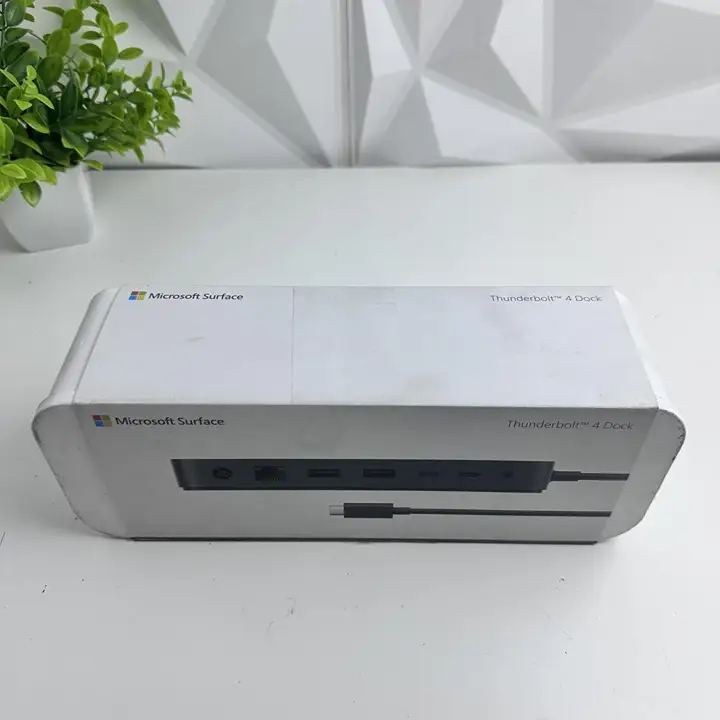
Port limitations are a recurring frustration. While the dock offers three USB-A and three USB-C ports, heavy users find themselves reaching for additional hubs. A Best Buy customer lamented, “It’s pricey and doesn’t have as many ports as I’d like.”
The absence of native HDMI is another sore point. One reviewer called it a “design oversight,” explaining they had to buy adapters for monitors that were “not that old.” This adds cost and complexity, undermining the plug-and-play promise.
Price is a sticking issue across platforms. Even fans describe it as “great but expensive,” with some only purchasing open-box units to offset cost. Competitors like the Kensington SD5750T offer more ports, including an SD card reader, at a similar price.
Divisive Features
Power passthrough at 96W is generally praised, but some see it as a downgrade from the Surface Dock 2’s 120W output. Fakespot analysis points out the dock “regresses in functionality” for devices like Surface Book 3, which cannot be charged at full power.
Monitor refresh rates spark debate. Reddit users confirm 4K at 120Hz is possible for one display, but 144Hz remains uncertain. For gamers and high-refresh workflow users, this ambiguity matters.
Trust & Reliability
Trustpilot-verified Best Buy reviews suggest minimal deception, with over 90% high-quality submissions. Long-term anecdotes from Reddit hint at stable performance — no widespread reports of ports failing over time. However, Fakespot flags occasional “temporary lose connection” events when moving laptops, hinting at possible cable strain or firmware quirks.
Durability stories are positive: despite teardown enthusiasts noting the dock’s internals differ from other Thunderbolt models, most users report it “just works — and keeps working.”
Alternatives
The Kensington SD5750T Thunderbolt 4 Dock emerges as a direct competitor. It offers 11 ports (including SD card reader) and supports single 8K or dual 4K monitors, with 90W power delivery. For users needing more diverse connectivity — especially HDMI or SD slots — this may be a better fit.
The older Surface Dock 2 delivers 120W power and native HDMI, but lacks Thunderbolt 4’s speed and modern compatibility. It’s still favored by multi-monitor users who need three or more displays.
Price & Value
Current retail prices hover around $239–$299 in the US, with student/military discounts available. eBay resale shows open-box units selling for $140–$180, and brand-new sealed units at $229–$275, suggesting strong retained value.
Community buying tips stress watching for open-box deals or educational discounts. As one Best Buy reviewer put it, “I wouldn’t pay full price for this dock — got it open-box and it’s been great.”
FAQ
Q: Can the Surface Thunderbolt 4 Dock run three external monitors?
A: No — it supports up to two external displays in addition to the laptop’s built-in screen. Users needing more should consider the Surface Dock 2 or daisy-chaining via DisplayPort MST.
Q: Does it work with non-Surface devices?
A: Yes, as long as the device has USB4 or Thunderbolt 4. Reports confirm compatibility with MacBooks, Dell XPS, and other laptops.
Q: Is there native HDMI output?
A: No — all video output is via USB-C/Thunderbolt ports, requiring adapters for HDMI monitors.
Q: Will it charge my Surface Book 3 at full speed?
A: No — it maxes at 96W passthrough, below the 120W of the Surface Dock 2, so charging is slower.
Q: Any known compatibility issues?
A: Yes — audio failures occur on Surface Laptop 3 models with AMD processors. Microsoft is seeking a fix.
Final Verdict: Buy if you’re a Surface or Thunderbolt 4 user who values high-speed data, dual 4K monitor support, and single-cable convenience. Avoid if you need native HDMI, more than six total ports, or full 120W charging. Pro tip from the community: scout open-box deals to maximize value without sacrificing performance.