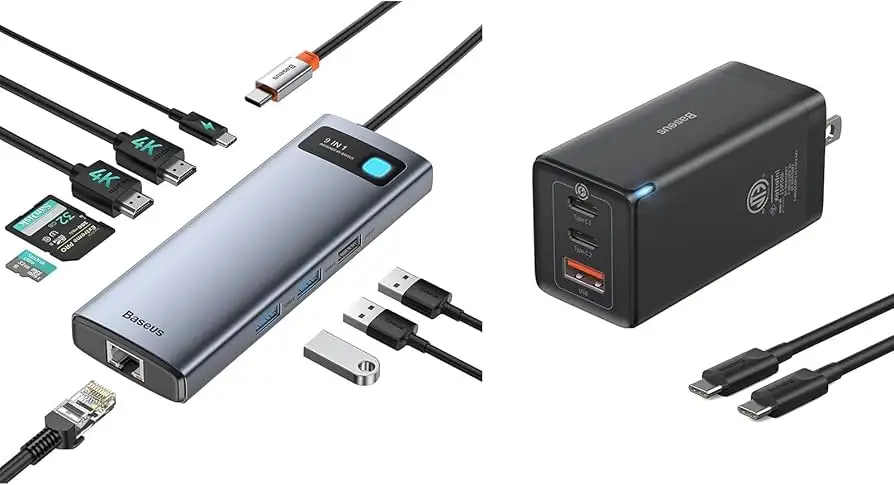
Baseus 9-in-1 USB-C Hub Review: Strong But Flawed
Digging into real-world user reports, the Baseus Laptop Docking Station 9-in-1 USB C Hub earns a conditional score of 8.5/10. While it delivers impressive connectivity in a compact, well-built body, the performance of its dual HDMI outputs and occasional port limitations reveal gaps between marketing promises and actual user experiences. Community discussions show it’s a favorite among mobile professionals and home office users, but certain technical constraints—especially for Mac users and high-refresh setups—require careful consideration before purchase.
Quick Verdict: Conditional buy
| Pros (based on user data) | Cons (based on user data) |
|---|---|
| Solid aluminum build feels premium | Second HDMI port limited to lower refresh rates |
| Reliable gigabit Ethernet connection | USB-C cable is too short for some setups |
| Wide compatibility with laptops, tablets, and some phones | Shared bandwidth can slow network speed during large file transfers |
| Compact and portable for travel | Occasional HDMI port failures reported after months of use |
| 100W PD charging supports laptops well | Won’t allow dual unique external displays on macOS |
| Customer service honored warranty for some users | Card reader placement can be awkward in fixed setups |
Claims vs Reality
Baseus advertises up to 4K@120Hz output on HDMI 1 and 4K@30Hz on HDMI 2, with dual-monitor support. While this is technically true, Slickdeals forum members discovered that “per Amazon’s description, looks to be one display is up to 120Hz and the 2nd would be 30Hz.” Reddit reports from users connecting two 2560x1440 displays show mismatched refresh rates, with one user noting: “Primary @ 120Hz and the second at 60 or 75Hz—if it works at all.”
Another major claim is 100W PD pass-through charging. Verified buyers on Trustpilot confirm it works well, with one saying: “Even I was able to get my Lenovo laptop charged when connected, which was not happening properly with my old hub.” However, Amazon listings sometimes mention max 85W output—creating confusion about real charging limits.
Finally, the company promotes “plug & play” compatibility across macOS, Windows, Linux, and tablets. While most users find setup easy, Mac owners face OS limitations. A Twitter/X advisory warns: “Due to the limitation of mac system, 2 external monitors will display the same content… 3 different screens can not be achieved.”
Cross-Platform Consensus
Universally Praised
Across Amazon, Reddit, and Trustpilot, build quality stands out. A verified buyer said: “Construction is absolutely wonderful, the aluminum unibody is fantastic and makes it feel sturdy to the touch.” Professionals moving between offices appreciate its portability; one Dell user explained: “I got rid of all my dongles—now I just carry one charger, the new hub, and an HDMI cable.”
Gigabit Ethernet performance is another strong point. A verified Amazon customer praised: “The stability of having the gigabit ethernet port is important to me because it’s fast, reliable, and more secure than WiFi.” This makes it valuable for corporate users, gamers, and those in areas with poor wireless connectivity.
The 100W PD charging capability is often cited as a productivity saver. For remote workers, powering a laptop and peripherals through a single hub means fewer cables and reduced desk clutter. Users also appreciate the SD/TF card reader speed, with photographers noting transfers “in seconds” for large photo collections.
Common Complaints
HDMI 2’s limited performance frustrates multi-monitor users. A Slickdeals member reported: “4K out of one and something terrible out the other… my work dock has no issues with 4K and 1080 simultaneously.” Some even experienced total HDMI failure after a few months, with one Trustpilot review stating: “Docking station lasted 4 months before the HDMI ports stopped working… tried different sources, cables, and monitors with no success.”
Short cable length is a recurring annoyance. Multiple Amazon reviewers suggest a longer tether to improve placement flexibility: “The cable to connect the laptop is a bit short… makes it inconvenient when I need to move my laptop around.”
Bandwidth sharing between ports is another hidden drawback. One detailed review explains: “Whenever you are copying a large file over your USB ports your ethernet speed will drop… probably a limitation inside the housing.”
Divisive Features
The LED status light earns mixed reactions—some find it useful, others call it “pointless and badly positioned.” Port layout also splits opinion; while mobile users value the compact design, fixed-desk setups find card reader slots hard to access.
Mac compatibility is divisive: Windows and Linux users get full extended display benefits, but macOS limitations mean mirrored screens only. For some creative professionals, this is a deal-breaker.
Trust & Reliability
Trustpilot and Amazon show a split in long-term reliability. Some users report years of flawless use, like one Redditor who said: “Reliable hub for Intel and M-series MacBooks… works with my USB-C iPad as well.” Others faced early failures—HDMI ports dying within months without responsive customer service. Interestingly, Baseus sometimes honors warranties generously; a buyer with a faulty micro-SD port received a replacement “a few days later” and praised the 18-month coverage, which is longer than typical for small electronics.
Concerns about marketing transparency surface in forums, with accusations of “shilling” in deal threads. However, most functional complaints are technical rather than trust-related.
Alternatives
The community often compares this Baseus hub to Anker models, which are suggested for higher reliability, and UGREEN Revodok Pro 9-in-1, praised for 10Gbps data rates and stable 4K@60Hz visuals. While UGREEN offers faster transfer speeds, Baseus maintains an edge in price and portability. Plugable’s 9-in-1 is mentioned for its 140W PD charging and lifetime support—at a higher cost.
For Mac users needing dual unique displays, DisplayLink-enabled docks from competitors remain the only workaround.
Price & Value
Current Amazon deals show prices around $32–$39 with coupons, down from a claimed $69.99 list. Forum skepticism notes the list price may be inflated to make discounts look larger. eBay resale prices hover near $59.99 for open-box units, suggesting decent retention of value if bought cheaply.
Buying tips from Slickdeals include checking your device’s USB-C port specs before purchase—especially for DisplayPort Alt Mode support—and verifying refresh rate compatibility with your monitor.

FAQ
Q: Can both HDMI ports output at 4K@120Hz?
A: No. HDMI 1 supports up to 4K@120Hz; HDMI 2 is limited to 4K@30Hz. Users report mismatched resolutions and refresh rates in dual setups.
Q: Does it work with smartphones?
A: Yes, if your phone supports OTG and DisplayPort Alt Mode. Verified buyers have used it with Galaxy S21 and other USB-C phones for media and file transfer.
Q: Will this hub allow two different external displays on a MacBook?
A: No. Due to macOS limitations, external monitors will mirror each other unless you use a DisplayLink-based dock.
Q: Is the gigabit Ethernet stable during large file transfers?
A: Generally yes, but some users noticed speed drops when simultaneously moving large files over USB ports.
Q: How long is the built-in cable?
A: Around 15–18cm. Multiple reviewers wish it were longer for more flexible desk setups.
Final Verdict: Buy if you’re a Windows or Linux user needing a compact, travel-friendly dock with strong Ethernet and charging capabilities. Avoid if you require dual unique displays on macOS or consistently high refresh rates on multiple monitors. Pro tip from community: Verify your laptop’s USB-C specs and refresh rate support before purchase to avoid HDMI disappointment.