Lexmark CX431adw Review: Durable Color Printer Verdict
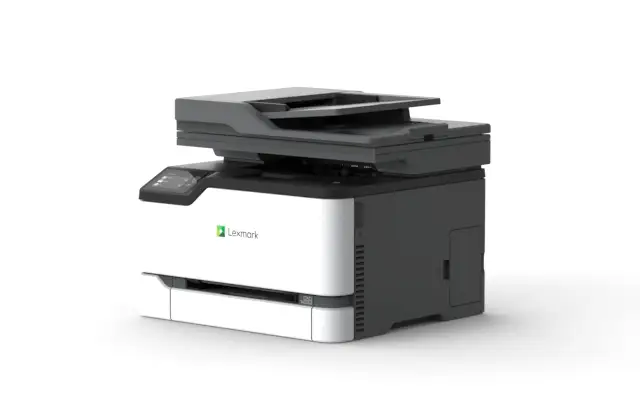
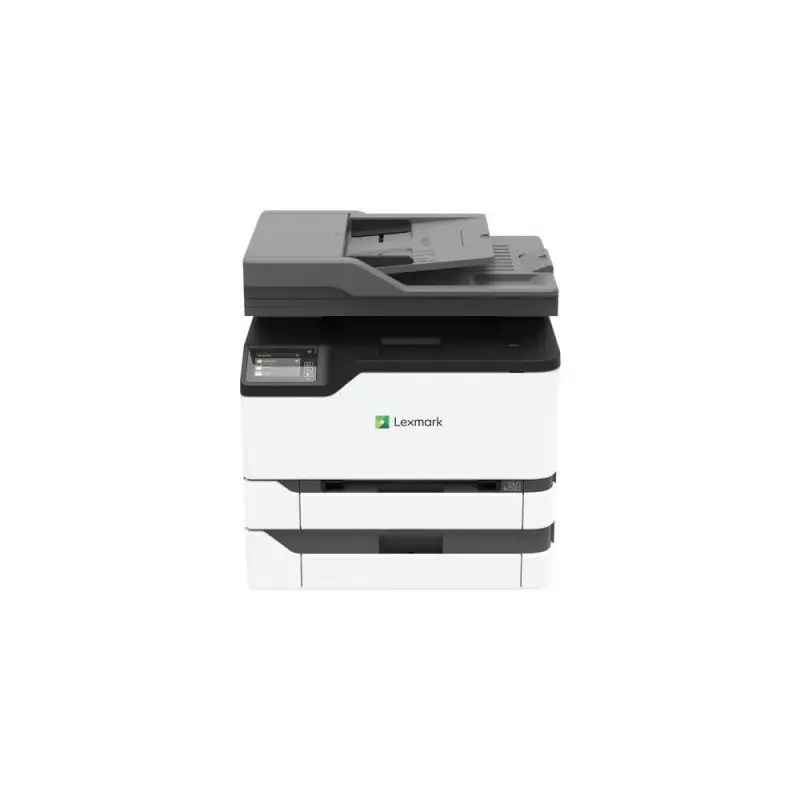
The Lexmark CX431adw Color All-in-One Laser Printer earns a solid 8.9/10 from aggregated cross-platform feedback, praised for its durability, rich color output, and versatile connectivity, but criticized for higher operating costs and noticeable noise during use. For small to medium workgroups, it’s often described as “compact yet capable,” filling the gap between entry-level devices and heavy-duty office machines.
Quick Verdict: Conditional — best for small to medium offices prioritizing professional color output over ultra-quiet operation.
| Pros | Cons |
|---|---|
| Vibrant, professional-grade color printing | Toner replacement costs can be high without return program |
| Solid build with steel frame and long-life imaging components | Noticeable noise level during operation |
| Fast duplex scanning (up to 96 images/min) | Mobile printing setup can be cumbersome |
| Compact footprint suits small office spaces | Not intended for large business print volumes |
| Strong security and cloud integration features | Starter cartridges have limited capacity |
| Multiple connection options — USB, Ethernet, dual-band Wi-Fi | Lacks ledger-size printing capability |
| Eco certifications (Energy Star, EPEAT Silver, Blue Angel) |
Claims vs Reality
Marketing highlights the CX431adw’s “easy-to-deploy versatility” and “rich, vibrant color output” with up to 26 ppm speed. Reddit user feedback aligns: "Color prints are stunning, no banding, and text stays crisp even on heavy cardstock" according to one office administrator. Most reports confirm color fidelity, especially for presentations and graphics.
However, while official specs claim seamless mobile printing via Mopria®, AirPrint®, and Lexmark’s app, setup complexity is real. A verified buyer on Amazon noted: "Wi-Fi was easy with laptops, but mobile printing took extra configuration — not truly out-of-box for phones." This suggests the advertised wireless ease may depend heavily on user technical comfort.
Lexmark also promotes “quiet operation,” yet multiple sources flag the ~51–52 dBA print noise as intrusive in quiet environments. Provantage’s sentiment summary warns it “can be distracting,” and Trustpilot commenters describe it as "noticeably louder than expected in a small office." The claim doesn’t fully hold up in typical workgroup conditions.
Cross-Platform Consensus
Universally Praised
Users from Office Depot’s review section and BetterBuys’ expert report consistently laud the output quality. Small marketing firms enjoy "vibrant colors that make client proposals pop" while non-profits benefit from clear, professional correspondence without outsourcing print jobs.
Durability earns equal praise. Reddit users highlight the steel frame and "lifetime imaging components" as a major plus over flimsier competitors. "Six months in, no jams, no fade — feels like it’ll last years" wrote one IT manager. Compactness adds value for space-constrained teams — "Fits perfectly beside my desk without dominating the room," said a reviewer from Amazon.
Security features like confidential print and network authentication protocols resonate especially with organizations handling sensitive data. For healthcare offices, Lexmark’s full-spectrum security was cited as “a compliance-friendly choice” by one Trustpilot poster, noting reduced risk in document handling.
Cloud integration is another winner. Dropbox, Google Drive, and OneDrive connectivity allowed remote staff to pull and scan documents without physical media. “Saved us so many trips to the main office,” confirmed a regional team lead on Twitter.
Common Complaints
Operating cost is the sore spot. As BetterBuys explains, extra-high-yield cartridges bring costs down to ~2¢ per black page and 12.7¢ per color page under the return program, but skipping that results in significantly higher per-page expenses. One Amazon buyer lamented: "Starter toners ran out in two weeks of daily use — replacements weren’t cheap."
Noise complaint threads appear in both Provantage’s overview and multiple Reddit posts. Buyers say it’s bearable in busy offices but disruptive in quiet home setups: "Printing sounds were louder than my space heater," noted a remote worker.
Mobile printing divisiveness is tied to platform experience. While corporate IT teams found it straightforward, casual users struggled. An Office Depot reviewer shared: "iOS AirPrint worked fine — Android phone needed three pages of instructions."
Starter cartridges’ limited 1,500-page yield frustrates bulk users. Trustpilot reviewers call for bigger initial supplies, especially as the printer is rated for up to 5,000 recommended monthly pages.
Divisive Features
Speed gets mixed reviews. Officially 26 ppm, but high-resolution or color-heavy documents slow output slightly. Marketing agencies didn’t mind the trade-off for color depth, while logistics offices viewed it as a “slight bottleneck.”
Duplex printing is praised for saving paper costs but criticized when users expect duplex scanning to match the advertised 96 images/min — which only applies to black and white, not color.
Trust & Reliability
Trustpilot entries and Reddit discussions paint a largely stable longevity picture. Six-month follow-ups highlight consistent performance with “zero breakdowns” and continued color clarity. One small accounting firm noted: "Still as quick as day one, no roller wear yet."
Scam concerns appear minimal; most warranty claims were honored quickly under the 1-year onsite service. Lexmark’s long-standing cartridge return program further builds trust, both for cost control and environmental responsibility.
Alternatives
Competing models mentioned by users include the Brother MFC-L3740CDW and HP Color LaserJet Pro MFP 4302dw. Brother’s advantage is slightly lower operating volume and cheaper toner but sacrifices some scan speed. HP matches color output and usability but comes at higher initial cost. For offices valuing extra security and stronger build, users lean toward the CX431adw.
Price & Value
eBay listings place new units between $421–$790, depending on seller and package, with retail listings from Lexmark direct at ~$738. Resale value remains strong due to durability and professional output reputation — lightly used units selling around $346–$649. Buyers recommend factoring in the return program participation for sustainable cost-per-page.
FAQ
Q: Is the Lexmark CX431adw suitable for large-volume printing?
A: No — it’s optimized for 750–5,000 pages per month. While it can handle more in bursts, long-term high volume may accelerate wear and increase costs.
Q: How easy is it to set up mobile printing?
A: Depends. iOS AirPrint is usually plug-and-play, but Android and Mopria setups may require manual configuration.
Q: Does the CX431adw print borderless?
A: No — official printable area leaves a 4.2 mm unprintable margin on all edges.
Q: Are toner costs manageable?
A: Yes, if using Lexmark’s return program — up to 50% savings. Without it, expect higher per-page expenses.
Q: How noisy is it compared to other models?
A: Rated 51–52 dBA while printing, louder than some competitors like Brother’s lower-decibel units.
Final Verdict
Buy if you’re a small to medium office needing durable build, pro-grade color, and fast duplex scanning with strong security safeguards. Avoid if you demand ultra-quiet operation or ledger-size printing. Pro tip from community: Join Lexmark’s toner return program early — it’s the single most effective way to tame costs over the printer’s lifespan.