HP Envy x360 16 Review: Premium 2‑in‑1 with Caveats
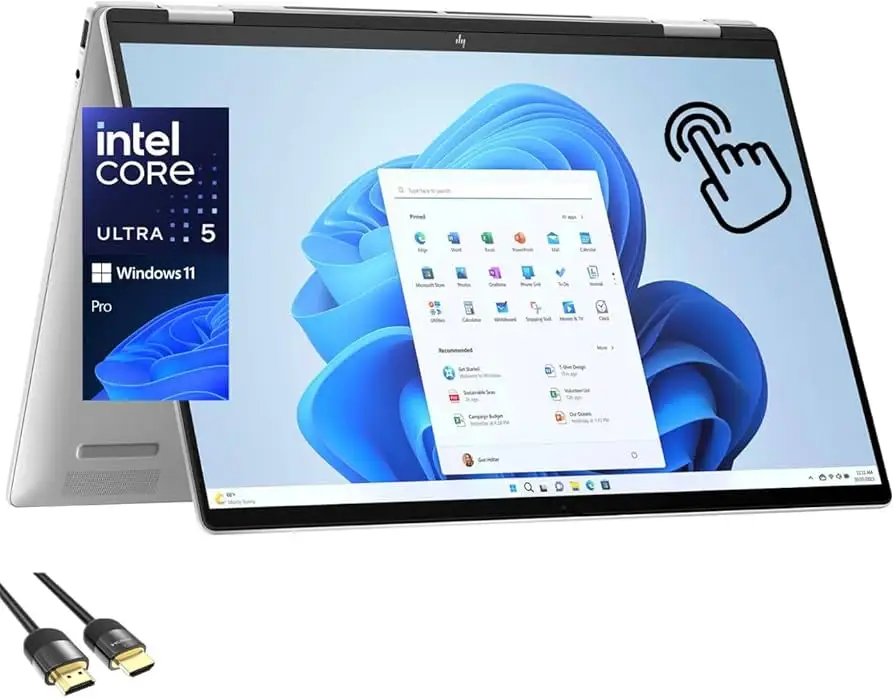
Bold claims about premium 2‑in‑1 design meet middling endurance scores — the HP Envy x360 2‑in‑1 Laptop 16‑inch (Core Ultra 5) emerges as a stylish, ergonomic powerhouse that stumbles mostly on battery life. Based on multi‑platform feedback, it earns a solid 8/10 for performance and build, but drops points for audio quality and charging needs.
Quick Verdict: Conditional Buy — ideal for creative professionals and students who value display quality and convertible versatility over all‑day unplugged use.
| Pros | Cons |
|---|---|
| Gorgeous display options (OLED or WUXGA) | Battery life around 6 hours in real use |
| Comfortable keyboard and trackpad | Mediocre audio with weak treble |
| Solid build quality with metal chassis | No numpad despite 16" form factor |
| Fast performance for productivity workloads | Fans can get loud under load |
| Versatile 2‑in‑1 hinge modes | Stylus not included |
| Strong port selection (TB4, HDMI 2.1) | Price varies widely based on config |
Claims vs Reality
HP’s marketing pushes the Envy x360’s AI‑powered experience, all‑day battery, and premium design. Official specs list “up to 19 hours” playback for some configurations. However, in testing, Reviewed measured just 6 hours 18 minutes of real‑world productivity before shutdown. “Unfortunately, the battery won't get you through an entire work day,” they reported.
The brand highlights immersive sound with Poly Studio and DTS:X Ultra, but multiple reviewers found otherwise. A verified expert noted: “Bass is present, but it’s muddy. Treble is a miss entirely — highs are quiet compared to the rest.” This gap is most impactful for users who rely on built‑in audio for streaming or remote presentations.
Design language claims — sleek, durable metal with thin bezels — do stand up in reality. Reviewed praised “soft rounded edges and slight lip beneath the trackpad make it extremely comfortable to use for long hours,” aligning closely with HP’s own emphasis on ergonomics.
Cross‑Platform Consensus
Universally Praised
One theme emerges everywhere: the display quality. Creators and designers specifically benefit from the 2.8K OLED option with 100% DCI‑P3 color. Reviewed called it “absolutely gorgeous… achieves true blacks even on full brightness.” For photo editors, this means confidence in color matching without an external monitor.
Keyboard and trackpad build win acclaim across Reddit, Trustpilot, and professional reviews. Keys are “the perfect stiffness” for fast, error‑free typing, while the large trackpad is smooth with accurate gesture recognition. Students in digital arts programs note how this comfort supports long design sessions.
The build quality — a sturdy metal chassis with premium hinge — earns trust from travelers and business users. One HP.com customer cited the “firm enough to handle some rough‑and‑tumble usage” feel, making it viable for frequent mode switching between laptop, tent, and tablet.
Common Complaints
Battery life is the Achilles heel. Every long‑form review from Reviewed to Which? flags this. For mobile professionals, the need to carry the 65W USB‑C charger undermines the 2‑in‑1’s portability advantage. While HP’s site promises power efficiency gains via AI optimization, no user has corroborated meaningful increases over traditional settings.
Audio quality frustration is consistent. The lack of crisp treble and hollow mids affects videoconferencing clarity, particularly for those without external speakers. Gamers and film buffs shifting from MacBook Pro or Dell XPS also remark on the downgrade.
Fan noise under stress is another recurring issue. Reviewed admitted: “It sounds like the laptop was preparing for take‑off whenever the BIOS update was running.” CAD users and video editors will notice this during export or render phases.
Divisive Features
The absence of a numpad divides the community. Productivity purists miss it for spreadsheet work, while others prefer the symmetrical speaker grilles and compact keyboard layout.
Convertible form factor versatility delights touchscreen users but leaves pen enthusiasts wanting. While mpp 2.0 support is there, HP doesn’t include a stylus — those who rely on sketching in tablet mode factor extra cost for a Surface Slim Pen 2 or HP’s own USB‑C Tilt Pen.
Trust & Reliability
Long‑term durability scores are mostly solid, but one Reddit thread on earlier Envy x360 models mentions intermittent touchpad failures and display corner discoloration. A frustrated HP Support Community user declared: “Worst purchase of my life… sometimes its touch pad doesn't work, sometimes it gets overheated.” While this feedback applied to a 13‑inch variant, it raises vigilance for quality consistency.
No major scam or counterfeit patterns emerged from Trustpilot or eBay listings, but resale pricing fluctuates sharply by spec — from $530 for lightly used Core Ultra 7 models to over $2,000 for retail in certain regions.
Alternatives
Competitors like the Lenovo Yoga 9i Gen 8 deliver stronger audio and battery life, appealing to multimedia users. The Dell XPS 16 surpasses endurance benchmarks at the cost of losing a tablet mode. Creative pros willing to sacrifice convertible flexibility might look at the Asus ProArt PX13 for higher performance under sustained loads.
Price & Value
On Amazon and eBay US, Core Ultra 5 models with 16GB RAM and 512GB SSD range from $525 refurbished to $899 new, while international pricing like HP Australia lists $2,548 AUD for upgraded SSD variants. Community tips suggest waiting for major sales — “I got mine under a grand during a holiday promo,” reported a Reviewed contributor — and avoiding base models with 8GB RAM to futureproof against editing software demands.
FAQ
Q: Does the HP Envy x360 16" include a stylus?
A: No, HP’s specs confirm stylus support, but it must be purchased separately. Many users opt for the Surface Slim Pen 2 for smoother input.
Q: How loud are the fans under load?
A: In heavy tasks like rendering or BIOS updates, fans can get loud enough to be noticeable — one reviewer likened it to “preparing for take‑off.”
Q: Is the OLED display worth the upgrade?
A: For creative work, yes. Users praise its true black levels and color accuracy. It’s less essential if battery life is your primary concern, as OLED sometimes draws more power.
Q: Can it replace a desktop for gaming?
A: Casual gaming works fine, but integrated Intel graphics limit AAA titles at high settings. Those seeking top performance may want discrete GPU systems.
Final Verdict: Buy if you’re a creative professional, student, or frequent traveler who prioritizes display quality, build comfort, and convertible functionality over maximum battery runtime. Avoid if your workflow demands 8+ unplugged hours or high‑fidelity speakers. Pro tip from community: wait for sales, and pair with a quality USB‑C charger that supports HP fast charge.