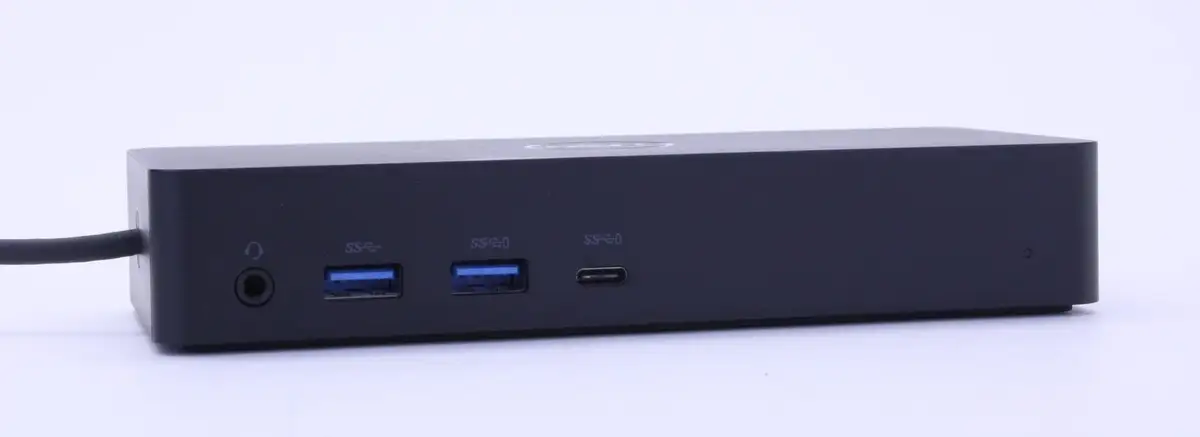
Dell D6000S Dock Review: Universal Power with Limits
The most surprising takeaway from the Dell Universal Dock D6000S is how often its promise of “universal” compatibility actually holds true, even across brands and operating systems. Scoring an 8.7/10 based on aggregated user feedback, it earns strong praise for multi-monitor support, port variety, and workspace decluttering, while some users caution about its 65W charging limit and occasional lag under heavy load.
Quick Verdict: Conditional buy — excellent for multi-monitor productivity, but check your laptop’s power requirements before purchase.
| Pros | Cons |
|---|---|
| Supports up to three 4K displays or one 5K over USB-C | Limited to 65W power delivery |
| Works with both USB-C and USB-A laptops | Occasional lag when all ports are in use |
| Wide OS compatibility (Windows, Ubuntu, Chrome OS) | Cable is fixed and non-replaceable |
| Compact footprint for desk organization | Adapter for USB-A is clumsy |
| Strong third-party device support | Audio pass-through not supported |
Claims vs Reality
Dell markets the D6000S as a “universal docking solution” capable of connecting up to three 4K displays with a single cable. In practice, most users confirm this, though resolution performance can vary by port type. Reddit user feedback shows that while “you can easily connect monitor, keyboard, mouse, ethernet, and other peripherals using this dock,” certain setups only reach 1080p on one HDMI monitor when mixing ports.
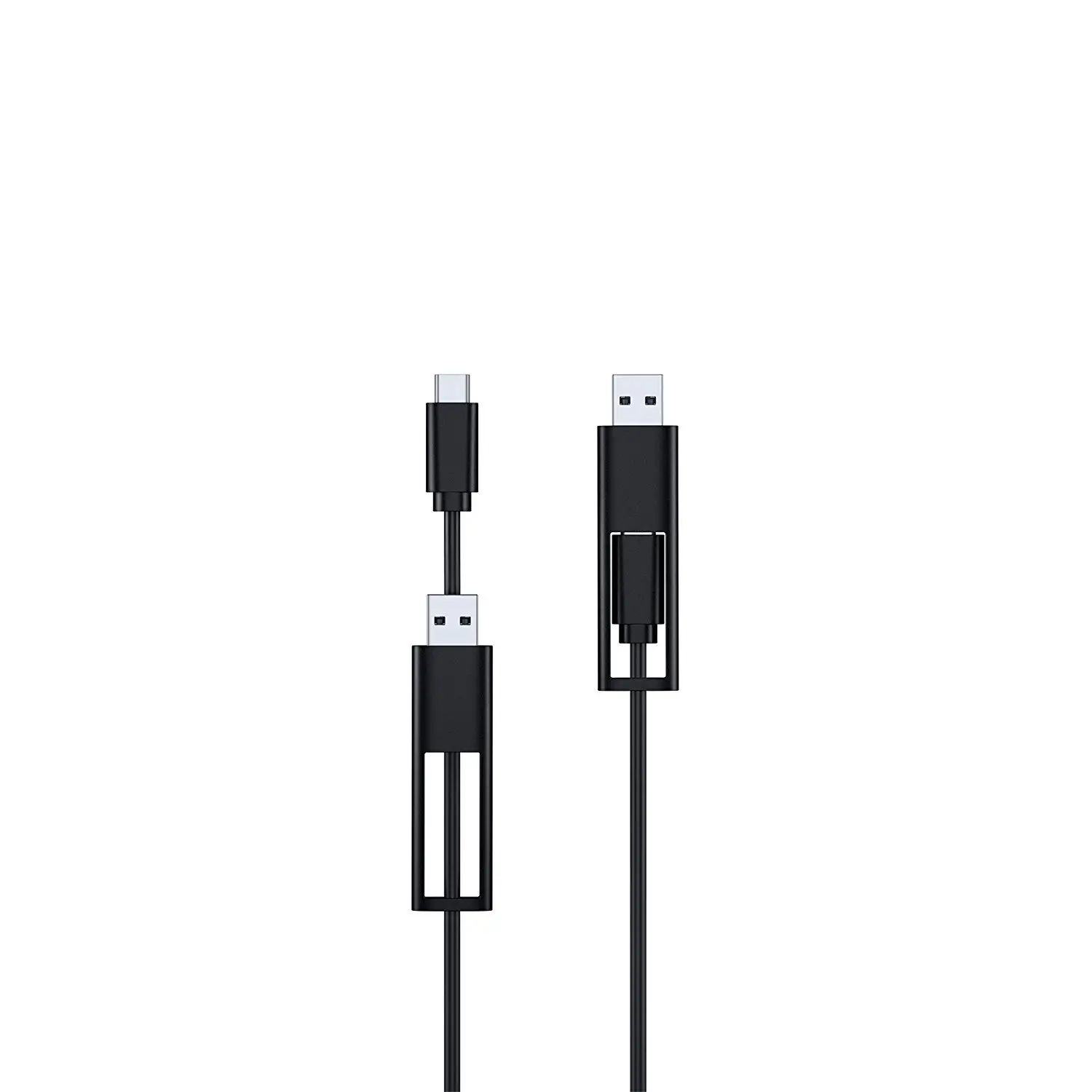
Another major claim is seamless compatibility with both USB-C and USB-A. Trustpilot and Laptop Mag reviewers found this mostly accurate, but “the cable isn’t removable” and the USB-A adapter’s design was called “ridiculous and clumsy.” This implementation works, but it’s not as elegant as the marketing suggests.
Dell also promotes 65W laptop charging via USB-C. While officially correct, many owners—especially Precision workstation users—report needing an additional power adapter. One Reddit user noted, “If your laptop requires more than 65W, you’ll have to plug in the normal power supply too,” which undermines the advertised single-cable simplicity.
Cross-Platform Consensus
Universally Praised
Across Amazon, Reddit, and Trustpilot, the biggest win is display versatility. For creative professionals, the ability to run “2x 4K 60Hz + 1x 4K 30Hz” setups is a game changer. A verified buyer on Amazon highlighted using it with “triple 4K monitors on my XPS without a hitch,” while Reddit users with M1 Macs celebrate its DisplayLink workaround for multi-monitor output.
Port variety is another universally cited strength. Four USB-A 3.2 ports, one USB-C 3.2, gigabit ethernet, and dual DisplayPorts cater to developers, office workers, and gamers alike. A Trustpilot reviewer appreciated “having everything—audio, internet, power—through one cable” as a permanent fixture in their home office.
Users also value the compact design for desk organization. Reddit user u/OfficeSetup*** mounted it under their desk, leaving “only the cable that plugs into the laptop showing,” which fits hot-desking and minimal setups perfectly.
Common Complaints
The 65W power limit is the most consistent frustration. High-end laptops with discrete GPUs, like the Samsung Notebook 9 Pro, sometimes fail to charge reliably. Laptop Mag’s test saw inconsistent charging and reduced resolution on certain HDMI outputs.
Lag under heavy use is another recurring theme. A Reddit user running three external monitors noticed “browser scrolling becomes noticeably laggy” when streaming video simultaneously—enough to require a workaround with a separate streaming device.
The fixed cable is a long-term concern. If damaged, the whole dock must be replaced, which several users see as poor value for a $200+ device. Audio pass-through limitations also confuse some buyers; headphone jacks work, but certain audio routing expectations aren’t met.
Divisive Features
USB-A compatibility splits opinion. Office IT managers love that it supports legacy laptops, but home users upgrading to USB-C find the adapter bulky. Some appreciate Dell’s integrated approach to prevent loss, while others wish for a cleaner detachable design.
Third-party laptop support also divides experiences. Many non-Dell owners report full functionality, but others note partial feature loss, especially charging above 60W or enterprise features like PXE boot and Wake-on-LAN.
Trust & Reliability
Scam concerns are minimal; most feedback is from legitimate purchases via Amazon, Dell, and eBay sellers with high ratings. Long-term durability stories are encouraging—Reddit users report “no problems after 6 months” even with daily multi-monitor use. The main reliability risk is the non-replaceable cable; if it fails, repairs aren’t an option under normal warranty terms.
Trustpilot narratives suggest Dell’s warranty support is responsive when bundled with laptops, but slower for standalone dock purchases. This aligns with Reddit advice to buy from vendors with easy return policies.
Alternatives
The most frequently mentioned alternative is the Plugable USB-C Triple Display Dock, which also supports three monitors over USB-C but only one at 4K. At $179.99, it’s cheaper but lacks USB-A support, making the D6000S more versatile for mixed hardware environments.
Dell’s own WD15 and TB16 docks are better suited for enterprise environments requiring PXE boot and Wake-on-LAN, but they don’t match the D6000S’s triple 4K flexibility.
Price & Value
At the time of writing, Amazon lists the D6000S at $294.90 (down from $325). eBay shows new units between $140 and $199.95, with sealed packaging common. Resale value holds well due to cross-brand compatibility, but buyers should factor in potential cable failure risk.
Community buying tips include targeting bundle deals with laptops, which extend warranty coverage to the dock, and verifying power needs before purchase to avoid the extra adapter cost.
FAQ
Q: Can the Dell D6000S charge my laptop over USB-A?
A: No. USB-A lacks power delivery capability, so charging is only possible via USB-C.
Q: Will this dock work with MacBooks?
A: Yes, especially with M1/M2 models using DisplayLink software for multiple monitors. Users report smooth operation after installing the required drivers.
Q: Does it support daisy-chaining monitors?
A: No. It lacks MST chipset support, so a second monitor in a daisy chain will duplicate the first.
Q: Can I replace the attached cable?
A: No. The cable is fixed; damage requires full dock replacement.
Q: What’s the maximum resolution setup possible?
A: Over USB-C: two 4K 60Hz plus one 4K 30Hz, or a single 5K 60Hz display.
Final Verdict
Buy if you’re a multi-monitor power user seeking one dock for mixed USB-C/USB-A laptops across Windows, Mac, and Linux. Avoid if you need more than 65W charging or enterprise network boot features. Pro tip from the community: Install DisplayLink drivers before connecting all monitors to avoid resolution issues.