Brother PT-D610BT Label Maker Review: Strong but Complex
The Brother P-touch PT-D610BT Bluetooth Label Maker consistently earns high marks from users, with aggregated ratings hovering around 4.7–4.8/10 across Amazon, Best Buy, and Staples. Praised for its professional-quality output and versatile connectivity, it’s positioned as a business-grade tool that also appeals to organized homeowners. Yet digging into user data reveals a more nuanced reality — while many love its feature-rich design, others struggle with Bluetooth pairing, bulkiness, and complex menus.
Quick Verdict: Conditional buy — excellent for business and advanced home users who need high customization, but casual users may find setup and UI daunting.
| Pros | Cons |
|---|---|
| Crisp, professional print quality | Bluetooth issues on Windows 11 reported |
| Versatile tape widths up to 24mm | Bulky compared to portable models |
| Full-color backlit LCD with preview | Buttons can be hard to press |
| Stores up to 99 templates | Complex interface for newcomers |
| Auto-cutter for high-volume jobs | Limited half-cut feature |
| Works with PC, Mac, and mobile | Poor instruction manuals |
Claims vs Reality
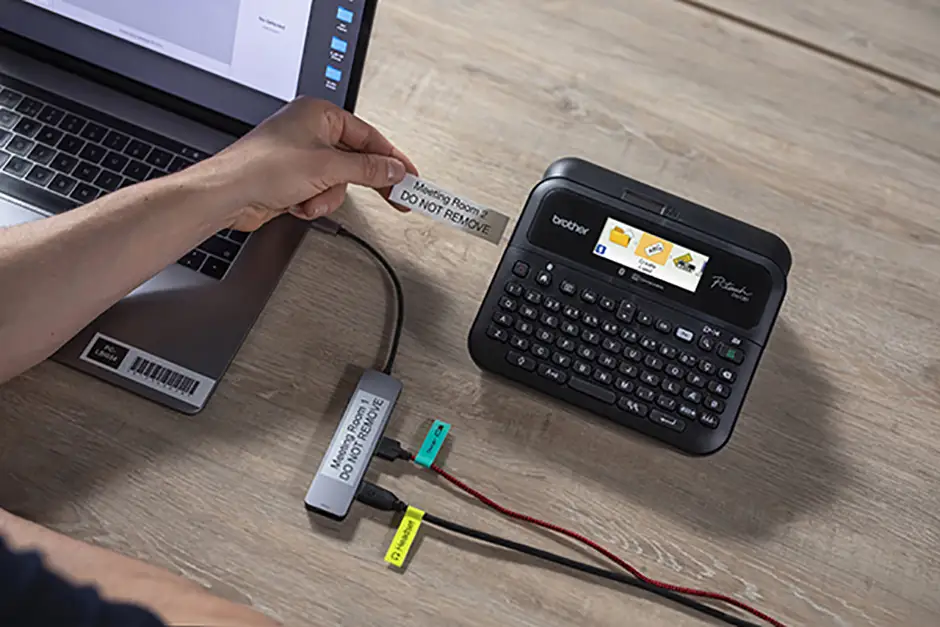
One of Brother’s core marketing claims is that the PT-D610BT offers “full-color, high-resolution printing” for sharper barcodes, logos, and graphics. A verified Best Buy buyer confirmed: “Prints clearly, easy to operate, fun to label my prescription small bags for the three months I will spend in Europe.” The screen’s preview function was repeatedly cited as helping avoid errors before cutting.
Brother also promotes “Bluetooth connectivity for mobile and PC.” While Mac and mobile users often had flawless connections, reports from Staples customers highlight a disconnect: “Bluetooth with Windows laptops is almost impossible to connect. My Android phone connected really easy… but Windows 11 never worked.” This gap suggests platform-dependent reliability.
A third claim centers on “user-friendly design with QWERTY keyboard and one-touch formatting keys.” While the hardware layout gets praise, usability is mixed. One Best Buy reviewer noted: “Buttons are hard to press (slows down input)… UI overall not simple.” This indicates the physical design is solid, but menu navigation could be more intuitive.
Cross-Platform Consensus
Universally Praised
Across Amazon, Best Buy, and Staples, output quality is the standout strength. Users in professional settings — from retail to labs — value its ability to produce durable, laminated labels that withstand water, abrasion, and chemicals. A Staples reviewer in a lab environment said: “Flexibility with several label tape sizes is necessary for us. We can even print shrink tube — a real bonus.” High-volume business users benefit from the auto-cutter; one Amazon customer lauded: “Really good bright and clear screen… auto cut feature as well.”
The versatility in tape sizes (3.5mm to 24mm) and customization options (17 fonts, 900 symbols) makes it appealing for creative projects. A Best Buy buyer used it for daycare labeling: “Nice selections of label templates for all kinds of usage, and they’re all customizable.” Mobile integration via the iPrint&Label app was frequently praised for speed and convenience.
Common Complaints
Connectivity issues dominate complaints, particularly with Windows Bluetooth drivers. A Staples user reported: “Spent about 15+ hours with Brother tech support… Bluetooth printer driver will not install.” Physical size and heft also deter portable use; one buyer remarked: “Allows portability (albeit in a bigger/bulkier form factor).”
Instruction quality is another sore point. A Best Buy reviewer criticized: “Instructions/directions are awful… eliminate the wasted tape at the beginning of the tape.” For casual users, the abundance of features can overwhelm — one customer rated it 3/5, calling it “very complex and hard to figure out.”
Divisive Features
The QWERTY keyboard and color LCD split opinion. Some find it a game-changer for speed and clarity, while others feel the buttons require too much pressure. Memory for 99 templates is touted as a productivity boost; however, several users struggled to transfer templates from PC to the device. As one reviewer put it: “Templates transferred from computer work ok… but can’t figure out how to make templates directly.”
Trust & Reliability
Durability is a strong point. Brother’s laminated TZe tapes have been “tested to the extreme” for fade resistance, and multiple long-term owners confirm labels remain intact. One lab-based Staples user emphasized: “We can even print shrink tube — a real bonus.”
On the trust side, there’s minimal evidence of widespread scams. The main frustration stems from support limitations for older OS versions, forcing hardware upgrades: “Brother decided to stop supporting the older OS thus requiring throwing out the printer and purchasing new.” This planned obsolescence is a concern for tech longevity.
Alternatives
Some buyers have compared the PT-D610BT to Epson’s offerings. A Best Buy reviewer bluntly stated: “Far superior to any other brand out there… I just returned an Epson.” Others mention older Brother models like the PT-65, wishing for a simpler variant with core features, backlight, and TZe tape compatibility. This suggests the PT-D610BT’s complexity makes it less ideal for basic, infrequent labeling needs.
Price & Value
On eBay, new units list around $99–$156, with occasional deep discounts. Best Buy and Amazon hold steady near $114–$199 depending on bundle (carry case, sample tape). Given its durability and professional output, many see it as a worthwhile investment for businesses. However, resale value may be impacted by OS compatibility over time — older units unsupported by Brother tend to be replaced rather than resold.
Buying tips from community: look for bundles with the AC adapter and USB cable included, as these accessories can add $20–$30 if purchased separately. For heavy users, stock up on varied TZe tapes during sales to reduce ongoing costs.
FAQ
Q: Does the PT-D610BT work with Windows 11 Bluetooth?
A: While some users report success, multiple Staples buyers struggled with driver installation, suggesting wired USB may be more reliable for Windows 11 connections.
Q: Can it print custom logos or barcodes?
A: Yes. Using Brother’s P-touch Editor software, users can import logos, create barcodes, and preview designs before printing. This is frequently praised by business users for inventory and branding.
Q: How portable is the PT-D610BT?
A: It’s bulkier than handheld models, making it better suited for a fixed workstation. Some users carry it with a case, but it’s not ideal for on-the-go labeling.
Q: Are the labels waterproof?
A: Brother’s genuine laminated TZe tapes are water, abrasion, and chemical resistant. Multiple reports confirm they withstand washing and outdoor exposure.
Q: Is it beginner-friendly?
A: The physical keyboard is easy to type on, but menu navigation can be complex for first-time users. The mobile app offers a simpler entry point.
Final Verdict
Buy if you’re a business owner, lab technician, or serious home organizer who values high customization, durable labels, and cross-platform connectivity. Avoid if you need a lightweight, plug-and-play device or rely heavily on Windows Bluetooth. Pro tip from the community: leverage the mobile app for faster design and printing, and keep the AC adapter handy for high-volume sessions.