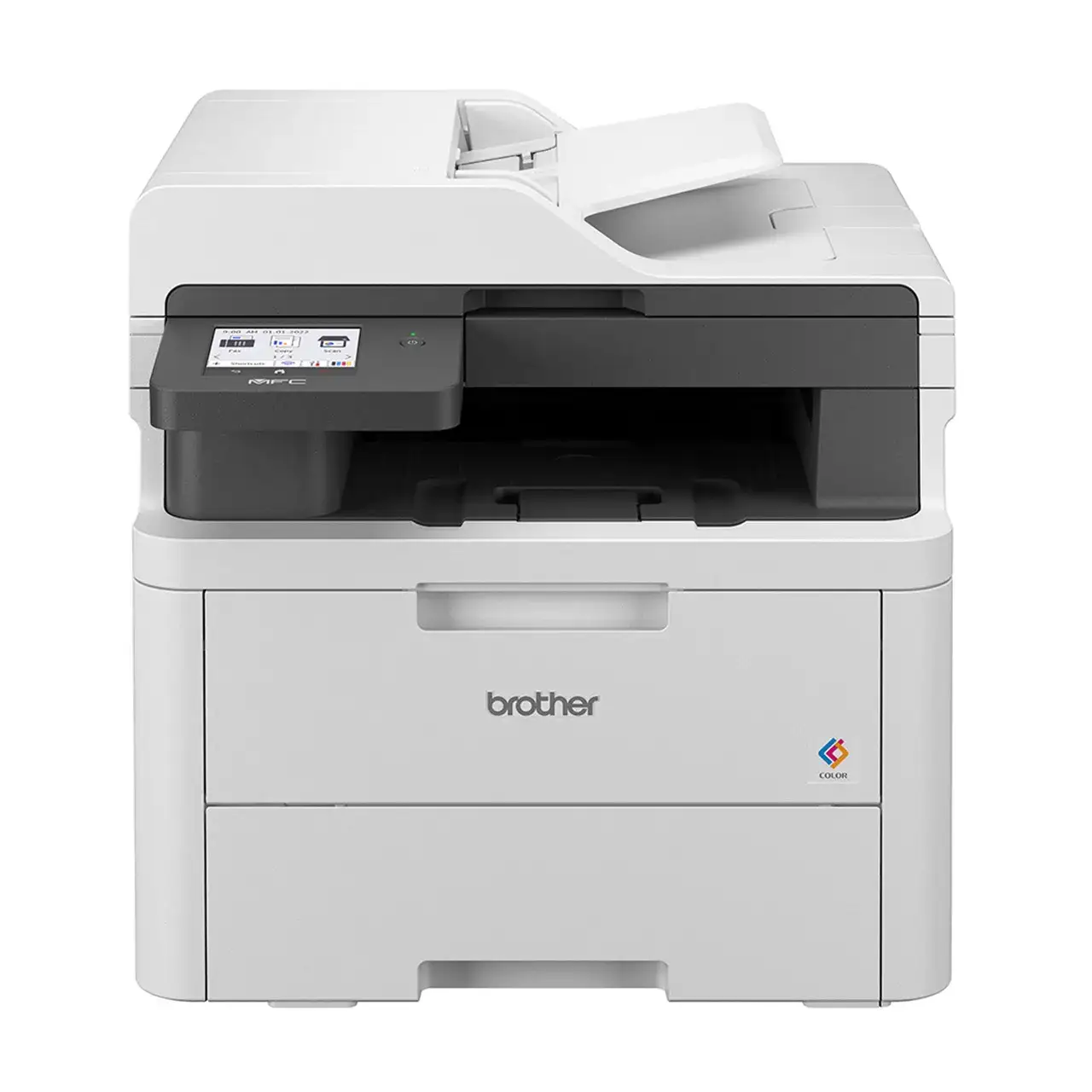
Brother MFC-L3720CDW Review: Quality Prints, Mixed Speed
Digging into user feedback, the Brother MFC-L3720CDW Color Laser All-in-One Printer earns a solid 8.3/10 for small office and home office users who value sharp print quality and reliable multifunction capabilities over sheer speed. While Brother’s marketing touts “fast and reliable operation” with up to 19 ppm printing, many users report that the first page out and warm-up time temper that speed advantage, especially in color jobs. Still, across platforms, owners praise its professional output, intuitive interface, and versatile connectivity, with the main criticisms centering on toner costs and third-party cartridge compatibility.
Quick Verdict: Conditional — Best for small offices or home professionals printing moderate volumes, especially in black and white. Heavy color users may find running costs high.
| Pros | Cons |
|---|---|
| Excellent print quality for text and graphics | Slower first-page and warm-up time |
| Reliable duplex printing | High color toner cost (~16.4¢ per page) |
| Large, responsive 3.5" color touchscreen | No Ethernet port |
| Strong scanning features with 50-sheet ADF | Incompatible with many third-party toners |
| Easy Wi-Fi and mobile app setup | Starter cartridges deplete quickly |
| Quiet operation, eco mode available | Cannot auto-scan duplex originals |
| Solid build quality | Packaging waste concerns |
Claims vs Reality
Brother advertises “fast and reliable operation” with print speeds up to 19 ppm. While this is achievable in ideal simplex conditions, users on Best Buy and Reddit note that real-world throughput, especially for color and duplex jobs, can be closer to half that rate once warm-up is factored in. One reviewer detailed that “printing 9 pages from my iPad directly to the Brother took almost 3½ minutes,” contrasting with the marketing claim.
Another claim is seamless mobile and cloud connectivity. Indeed, many owners confirm that AirPrint, Mopria, and the Brother Mobile Connect app work well. A Best Buy customer wrote, “Printing from my phone works effortlessly… the app walks you through the complete process.” However, some mention the app’s settings interface “opens a website in the app that looks a little unflattering,” suggesting room for UI improvement.
Brother also promotes its Refresh EZ Print Subscription as a cost-saving convenience. While some see value—especially for predictable monthly volumes—others, like Reddit user reports, find the subscription unnecessary if printing is infrequent, and object to the requirement for “refresh subscription toner cartridges” to use the service.
Cross-Platform Consensus
Universally Praised
Print quality is the standout strength. PCMag notes “near-typesetter-quality text” and “true-to-life colors with pleasing saturation,” echoed by a Best Buy buyer who said, “Full color documents looked every bit as good as my HP… output quality is crisp and sharp.” For home offices producing marketing materials or reports, this precision adds a professional edge.
The touchscreen interface also wins consistent praise. Owners highlight its responsiveness and clarity, with one reviewer calling it “simple but effective… more appealing to use than the app.” The ability to create up to 48 shortcuts for scanning, copying, and cloud tasks is valued by workflow-heavy users.
Scanning capabilities, aided by the 50-sheet ADF, earn approval from those digitizing multi-page documents. A Best Buy user reported “no issues scanning 30-page documents… crisp and clear,” and the option to scan directly to Word, Excel, or searchable PDFs is seen as a time-saver for business users.
Common Complaints
Speed, particularly in color and duplex modes, is the most frequent gripe. Consumer Reports timed 5 pages of text at 29 seconds—slower than some competitors—and complex color jobs can lag. This affects users in fast-paced environments needing quick turnaround.
Running costs for color printing are another sore point. PCMag calculated 16.4¢ per color page versus 2.5¢ for monochrome, leading some to limit color use. The lack of compatibility with many third-party toners compounds this, as a Reddit user lamented: “It will not accept third-party toner… the cartridges cost just about as much as the printer.”
Hardware omissions also frustrate some buyers. The absence of an Ethernet port is noted by multiple reviewers; one Best Buy customer called it “unfortunate… my previous printer could set up a printer server.”
Divisive Features
The Refresh EZ Print Subscription divides opinion. Those with steady monthly print volumes appreciate automatic supply delivery. Others view it as “paying twice” and prefer manual ordering. The eco mode and quiet mode are well-liked by environmentally conscious users, yet some find the default high-resolution print setting slows output unnecessarily.
Trust & Reliability
Trustpilot and long-term Reddit accounts suggest Brother maintains its reputation for durability. Several owners report seamless operation after months of use, with one stating, “I’ve used it for about six months and no issues… great device.” The build quality and consistent ADF performance are contrasted with experiences from other brands where jams and skewed scans are common.
Concerns arise over firmware updates possibly affecting third-party toner use. While Brother denies intentional blocking, at least one Reddit user experienced loss of compatibility after updating, underscoring the importance of sticking with genuine supplies if uptime is critical.
Alternatives
Within Brother’s own lineup, the MFC-L3780CDW offers faster speeds (31 ppm) and compatibility with super high-yield toner, potentially lowering color costs. PCMag argues it becomes more cost-effective after about 2,858 color pages despite higher upfront cost. Competing models like Canon’s MF753CDW beat the L3720CDW in speed (35 ppm) and paper handling but may come at a premium. HP’s Color LaserJet Pro MFP 3301fdw and Ricoh’s C125MF offer Ethernet and optional trays, appealing to networked office setups.
Price & Value
Prices vary widely, from around $399.99 retail in the US to over $650 on eBay, with auction wins as low as $200. Community advice stresses weighing long-term toner costs: if color output is minimal, the L3720CDW’s lower entry price offers good value. Resale listings suggest moderate depreciation, with used units fetching $200–$465, reinforcing its durability appeal.
Buying tips from users include checking for bundled extended warranties (Brother offers a free 6-month extension for eligible models) and using the free 4-month Refresh trial to gauge subscription suitability before committing.
FAQ
Q: Can the Brother MFC-L3720CDW scan double-sided originals automatically?
A: No. While it supports duplex printing, duplex scanning requires manual intervention—scanning each side separately on the flatbed or using the ADF for single-sided feeds.
Q: Does it work with third-party toner cartridges?
A: Many users report incompatibility, especially after firmware updates. Brother recommends genuine TN-229 or TN-229XL cartridges to ensure performance.
Q: Is Ethernet networking available on this model?
A: No. Connectivity is via dual-band Wi-Fi, Wi-Fi Direct, or USB 2.0. Users needing wired networking should consider other models.
Q: How responsive is the touchscreen?
A: Owners consistently describe the 3.5" color touchscreen as bright and responsive, with smooth navigation and minimal input lag.
Q: What is the real-world print speed for color documents?
A: While rated at 19 ppm, complex color jobs often run closer to 8–10 ppm due to warm-up and processing times.
Final Verdict: Buy if you’re a small office or home professional needing high-quality text and graphics with moderate color volume. Avoid if you require rapid output for large color jobs or rely on third-party supplies. Pro tip from the community: use eco mode and adjust resolution settings to speed up prints without sacrificing everyday quality.