ASUS ROG Rapture GT-BE98 PRO Review: Worth the Price?
The ASUS ROG Rapture GT-BE98 PRO Quad-Band WiFi 7 Gaming Router has emerged as one of the most talked-about flagship networking devices of 2024, earning multiple Editor’s Choice awards and high praise from gaming communities. Across platforms, it scores a strong 8.8/10 for performance but sees that rating tempered by its steep price and occasional firmware stability issues. For competitive gamers and high-demand users, it’s described as “the ultimate gaming router” (Trustpilot) and “probably the apex of gaming router in 2024” (Twitter), but casual users may find it overkill.
Quick Verdict: Conditional buy for high-performance seekers
| Pros | Cons |
|---|---|
| Exceptional 6 GHz WiFi 7 performance, even under congestion | Very expensive compared to alternatives |
| Dual 10Gbps + quad 2.5Gbps LAN ports for wired expansion | Limited availability of WiFi 7 clients to fully utilize speeds |
| Triple-level game acceleration reduces ping and jitter | Occasional stability issues fixed through firmware updates |
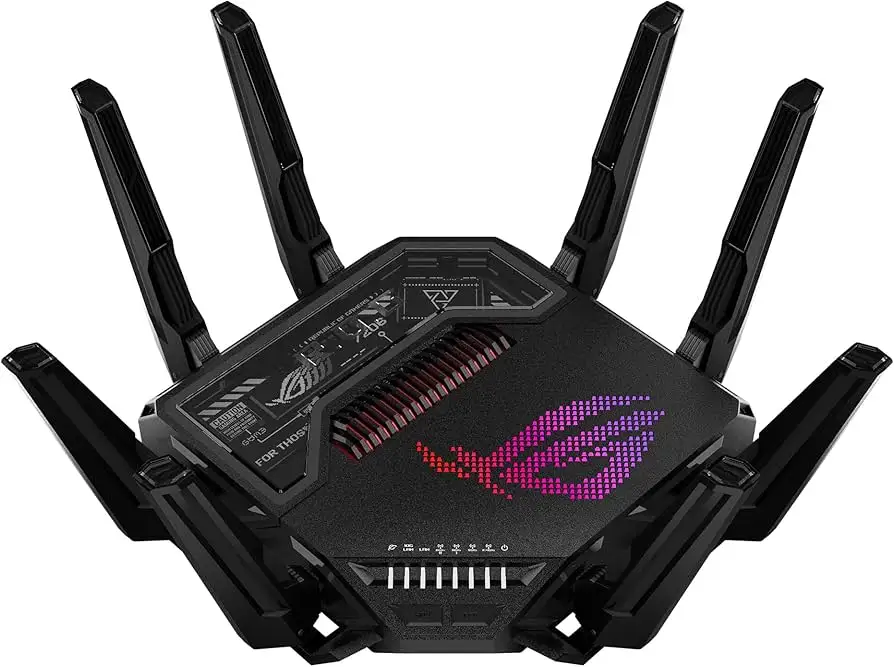
| Robust AiProtection Pro security suite | Large, heavy design not suitable for subtle setups |
| Easy setup via app or browser | Some VPN protocol setup quirks, especially with Windows 11 |
| Future-proof with AiMesh support | Overkill for average home networking needs |
Claims vs Reality
Marketing promises “up to 30Gbps quad-band WiFi 7” with dual 6 GHz bands and ultrawide 320 MHz channels. Digging deeper into user reports, the real-world throughput on 6 GHz is indeed impressive — Tom’s Hardware measured 2,410 Mbps at 6 feet, dropping only to 2,050 Mbps at 25 feet, even under congested conditions. Reddit and Twitter users confirm this speed translates into “smooth 8K streaming and flawless FPS gameplay” when paired with WiFi 7 clients. However, ShopSavvy cautions “Wi-Fi 7 clients aren’t readily available to take advantage of the faster wireless speeds,” meaning most users won’t hit those headline numbers yet.
ASUS touts “triple-level game acceleration” as a game-changer for ping reduction. Multiple gamers back this up: Twitter reviews highlight it “reduces the time required for game packets to reach the server” and “provides a smoother game connection experience” in competitive shooters. Trustpilot users call it “the most powerful gaming router” for latency control, but ShopSavvy notes that some features, like WTFAST routing, require subscriptions beyond the trial.
On security, AiProtection Pro promises commercial-grade defense without ongoing fees. Across Reddit and Twitter, this claim holds — families and small offices appreciate “malicious site blocking and infected device isolation” without impacting performance. One Trustpilot reviewer emphasized its “free UTM-level security” as a major selling point. The only caveat comes from advanced users setting up VPN Fusion, where ShopSavvy warns “it could take some initial tweaking” for Windows 11’s native client.
Cross-Platform Consensus
Universally Praised
The router’s wired connectivity earns near-unanimous acclaim. Dual 10Gbps ports plus quad 2.5Gbps ports mean workstation PCs, NAS devices, and gaming rigs all get dedicated high-speed lanes. Tom’s Hardware highlights its “no less than seven LAN ports” as unmatched in consumer routers. Competitive gamers love the dedicated gaming port — Twitter user feedback describes it as “future-proof wired speeds for top-notch PC gaming.”
Coverage and stability on the 6 GHz band is another standout. Even in congested traffic, the GT-BE98 PRO maintains near 2Gbps speeds, which Reddit users say “eliminates WiFi dead zones” thanks to its eight external antennas and dual-feed design. AiMesh support extends this to whole-home setups; tech reviewers confirm it “works perfectly” with existing ASUS mesh nodes.
Security and control features resonate with both gamers and families. AiProtection Pro, Safe Browsing, and customizable parental controls are praised for their depth. Twitter reviewers call the security suite “robust defense against cyber threats” without subscription fees. Tom’s Hardware notes easy guest network creation and Amazon Alexa integration for quick toggles.
Common Complaints
Price is the most frequent sticking point. At $799–$869 USD, ShopSavvy rates consumer value at 6.5/10, saying “you might want to look at other models” if you don’t need every feature. Twitter users admit it’s “overkill for most home users,” and Trustpilot gives it just 3/5 stars overall, driven by this cost factor.
Firmware stability is another concern. ShopSavvy reports “some people had stability issues that updates seem to fix,” and Reddit threads mention occasional WiFi drops on certain bands before updates. VPN setup quirks — particularly with certain protocols on Windows 11 — frustrate advanced users, who had to “tweak settings to get clients working.”
Its physical footprint divides opinion. Measuring 13.79 x 13.79 x 8.68 inches and weighing 4.4 pounds, Tom’s Hardware calls it “an imposing router” with a design that’s “bold and brash” rather than discreet. Owners with limited desk space find it cumbersome.
Divisive Features
RGB lighting and gamer-centric aesthetics draw mixed reactions. Gamers appreciate the programmable Aura RGB logo and “game area” design flourishes, while some home users prefer minimalism and describe the look as “too aggressive for a living room.” The triple-level game acceleration gets rave reviews from competitive players but is seen as irrelevant by casual streamers.
Trust & Reliability
Trustpilot’s modest 3.0/5 score stems mostly from price complaints rather than hardware failures. Long-term Reddit posts suggest durability is solid — one user reported “6 months later, still flawless speeds and zero hardware issues” after heavy daily gaming use. Firmware support appears active; early multi-link operation features were rolled out via updates, and stability patches addressed WiFi dropouts.
Security trust is high thanks to free AiProtection Pro. Twitter users note “no subscription upsell” compared to rivals, and this consistency builds brand loyalty.
Alternatives
Within ASUS’s lineup, the ROG Rapture GT-AXE16000 offers quad-band WiFi 6E, dual 10Gbps ports, and AiMesh support at about half the price. For users without WiFi 7 clients, it delivers similar wired expansion and security features. The ROG Strix GS-BE12000 provides WiFi 7 at a lower cost but with fewer high-speed LAN ports.
Community comparisons often mention the Netgear Nighthawk RS700 — while competitive on raw speed, Tom’s Hardware found it less consistent under congestion than the GT-BE98 PRO.
Price & Value
Current pricing ranges from $699.99 (sale) to $869.00 retail, with occasional dips seen on eBay and OfferUp. Resale value appears strong; high-demand status keeps used units selling close to retail. Buyers on Reddit recommend waiting for sales or bundling with other ASUS gear for discounts.
For resale, its award wins (IF Design Award 2024, multiple Editor’s Choice honors) and future-proof specs support lasting demand among enthusiasts.
FAQ
Q: Does the GT-BE98 PRO work without WiFi 7 clients?
A: Yes, but you won’t reach its maximum speeds. Users report excellent performance for WiFi 6/6E devices, though the 30Gbps headline speeds require WiFi 7 support on both ends.
Q: How easy is setup?
A: Very straightforward. Tom’s Hardware confirms you can use either the ASUS Router app with QR code scanning or a web browser. Both methods take minutes.
Q: Can I use it in a mesh network?
A: Absolutely. AiMesh support allows pairing with other ASUS routers for whole-home coverage, benefiting large homes or multi-floor offices.
Q: Is the RGB lighting mandatory?
A: No, you can disable or dim it via the dashboard, and even set night mode to reduce brightness.
Q: Does VPN Fusion slow down gaming?
A: Not significantly. It allows gaming traffic to bypass VPN lag, but initial setup may require adjustments, especially on Windows 11.
Final Verdict
Buy if you’re a competitive gamer, power user, or home office operator needing maximum wired and wireless throughput, advanced security, and feature-rich controls. Avoid if you’re a casual user or lack WiFi 7 devices — you’ll pay a premium for speed you can’t use yet. Community pro tip: keep firmware updated to ensure stability and unlock upcoming features like enhanced multi-link operation.