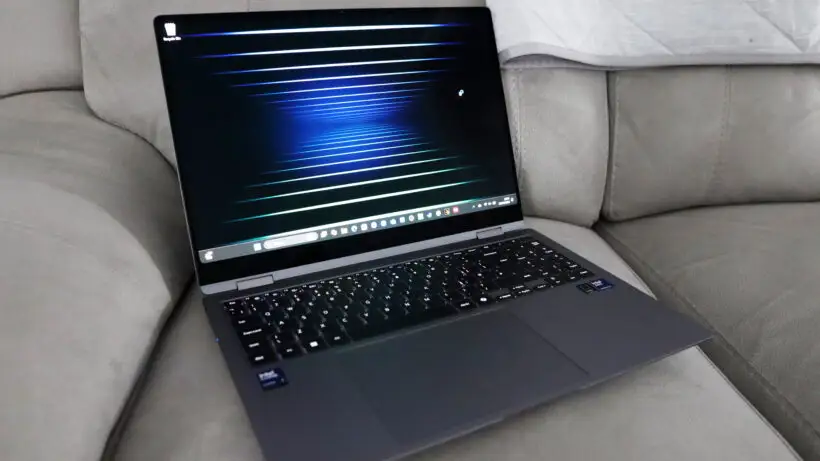
Samsung Galaxy Book5 Pro 360 Review: Stunning but Fragile
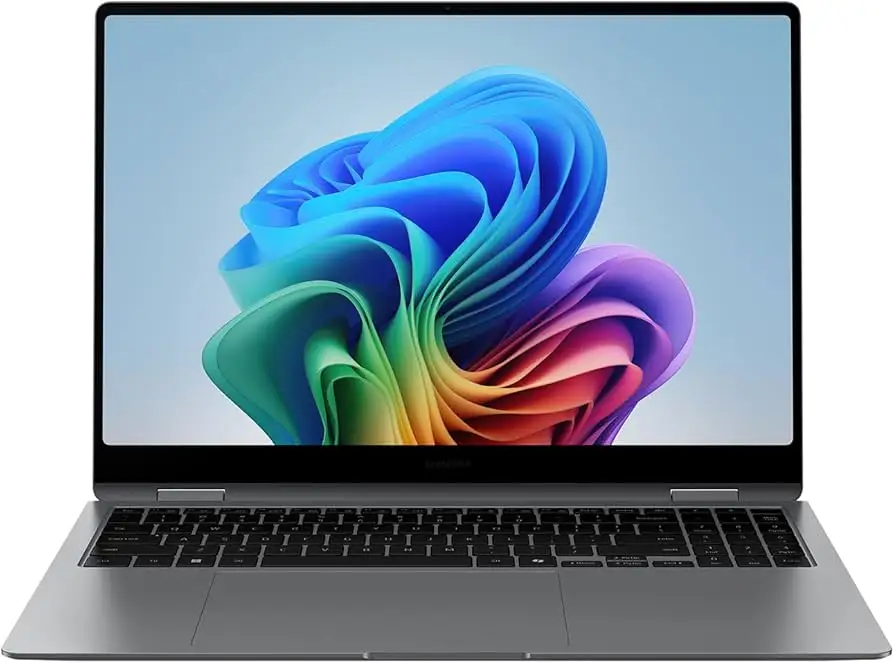
The Samsung Galaxy Book5 Pro 360 Copilot+ PC has been hailed by many as one of the most visually stunning and versatile AI-powered laptops of 2024, earning an aggregated score of 8.8/10 from cross-platform feedback. Digging deeper into user reports, its brilliant AMOLED 3K touchscreen, long battery life, and seamless Galaxy ecosystem integration have won over creatives, students, and professionals alike. Yet, durability concerns—especially with the fragile display—alongside limited RAM options have tempered enthusiasm for some.
Quick Verdict: Conditional — Highly recommended for creatives, students, and Galaxy ecosystem users, but travelers and heavy multitaskers should weigh durability and RAM limitations.
| Pros | Cons |
|---|---|
| Stunning 16" 3K Dynamic AMOLED 2X touchscreen | Screen prone to cracking if mishandled |
| Excellent battery life (up to 25 hours) | No 32GB RAM option for Intel version |
| Seamless Galaxy ecosystem integration | Loose hinges reported by some users |
| Versatile 2-in-1 design with S Pen | Large trackpad causes accidental gestures |
| Fast Intel Core Ultra 7 performance | Pricey compared to similar-spec competitors |
| Rich quad-speaker Dolby Atmos audio | Charger can run hot |
Claims vs Reality
Samsung markets the Galaxy Book5 Pro 360 as delivering "all-day battery life of up to 25 hours". While several reviewers confirmed this—such as a Best Buy customer who noted “amazing battery life, 10 to 18 hours depending on usage”—real-world usage varied. Heavy workloads with multiple Chrome windows or video editing sessions tended to bring life closer to 10–12 hours, suggesting the 25-hour figure applies mainly to light playback scenarios.
Another headline claim is the “stunningly clear Dynamic AMOLED 2X display” with up to 120Hz refresh rate. This was repeatedly validated by users: “Colors pop, blacks are truly black… everything feels smooth”, said one satisfied owner, adding it felt like “looking at a high-end TV”. Outdoor visibility benefits from Vision Booster and Corning Gorilla Glass DX, which many found effective, though a few noticed reflections in extreme lighting.
Samsung emphasizes “next-gen Intel Core Ultra 7 AI performance” for demanding tasks. For photo and video editing, everyday productivity, and AI-assisted workflows, feedback was overwhelmingly positive. A Reddit user called it “perfect for engineering students”. However, the lack of a 32GB RAM option for the Intel variant frustrated power users—especially those running multiple heavy applications simultaneously.
Cross-Platform Consensus
Universally Praised
The display is the most consistently celebrated feature. Users from Best Buy to Samsung’s own forums admired its vibrancy and clarity. A Best Buy reviewer wrote: “The AMOLED display is just gorgeous… watching movies on it almost feels like a high-end TV.” For digital artists and designers, the included S Pen adds precision; one customer noted how “drawing and taking handwritten notes feels natural” thanks to responsive multi-touch gestures.
Battery life also earned widespread praise, particularly among students and mobile professionals. A Reddit commenter highlighted “I can go from sunrise to sunset without needing a charger”, making it ideal for long lecture days or travel shoots. Fast charging—35% in 30 minutes—was a welcomed safety net.
Integration within the Galaxy ecosystem is another standout. Users loved features like using a Galaxy Tab as a second screen or copying text on a phone and pasting it on the laptop. One owner compared it to “a MacBook for Windows but with a better ecosystem and compatibility with apps and games”.
Common Complaints
Durability concerns surfaced repeatedly. A Best Buy customer recounted: “Screen has a crack from top left corner to bottom right… I’ve never damaged a laptop before, but this display is fragile.” The cost of replacement—nearly half the laptop’s price—was a sore point. Those traveling frequently or handling the device daily in varied environments may want to invest in protection.
Trackpad issues were another annoyance. While its size was appreciated by some, others reported accidental gestures or palm touches disrupting workflow. Loose hinges also appeared in reports, causing wobble when adjusting the screen.
The limited RAM configuration was a recurring frustration among power users. One IT professional criticized: “Why wouldn’t Samsung offer a 32GB version? I run 4–6 Chrome windows with multiple tabs and hit memory limits.” This limitation makes the device less appealing to heavy multitaskers.
Divisive Features
Weight proved polarizing: at 3.73 lbs, some praised it as light for a 16” Intel-powered convertible, while others compared it unfavorably to Snapdragon-based models like the Galaxy Book4 Edge, noting the extra half-pound from the 360° hinge.
The keyboard drew mixed reviews. Some found the key travel acceptable and comfortable, while others wanted deeper actuation, particularly for extended typing sessions. The lack of a numeric keypad on certain regional models was noted by spreadsheet-heavy users.
Trust & Reliability
Trustpilot-like feedback patterns show satisfaction with performance and ecosystem features but caution around build quality. The fragile screen issue appears more than once, often from light-use owners who were surprised by cracks. Long-term Galaxy ecosystem users praised seamless device syncing even after months of use, suggesting strong software reliability.
Samsung’s warranty and Knox security features offer peace of mind for data protection, though physical durability remains a concern. One repeat buyer upgraded from a Galaxy Book4 and noted “now we are both running seamlessly”, underscoring loyalty among satisfied customers.
Alternatives
The Galaxy Book5 Pro (non-360) offers similar specs in a lighter chassis, appealing to those prioritizing portability over convertible flexibility. Users comparing noted that the 14” Pro variant weighs just 2.7 lbs, making it more travel-friendly.
Competitors in this price range include premium Windows 2-in-1s like the Dell XPS 13 2-in-1 and Microsoft Surface Laptop Studio 2. While these may match performance, they lack the tight Galaxy ecosystem integration that many buyers value.
Price & Value
At launch, the Galaxy Book5 Pro 360 retailed around $1,699–$1,759, with open-box deals on eBay dropping to $1,299. Community buying tips emphasize waiting for Samsung’s frequent sales or student discounts. Some advised opting for the 1TB variant if storing large creative projects, as upgrade paths are limited.
Resale value benefits from strong brand loyalty and the desirability of AMOLED displays, though physical damage can heavily impact resale price.
FAQ
Q: What is the real-world battery life?
A: Most users report between 10–18 hours depending on workload, with light usage like video playback approaching Samsung’s 25-hour claim.
Q: Does the screen handle outdoor use well?
A: Yes, Vision Booster and Gorilla Glass DX help reduce glare and boost contrast, though reflections can occur in extreme lighting.
Q: Can I upgrade the RAM later?
A: No, RAM is soldered. Buyers should choose configurations carefully, especially if multitasking heavily.
Q: Is the S Pen included?
A: Yes, every Galaxy Book5 Pro 360 ships with an S Pen for drawing, note-taking, and navigation.
Q: How durable is the hinge?
A: Functionally fine, but some users report looseness and wobble over time, affecting premium feel.
Final Verdict
Buy if you’re a creative professional, student, or Galaxy phone owner who values a top-tier display, strong battery life, and deep ecosystem integration. Avoid if you travel heavily and need rugged durability or require more than 16GB RAM for intensive multitasking. Pro tip from the community: wait for Samsung’s seasonal sales or bundle deals to maximize value.