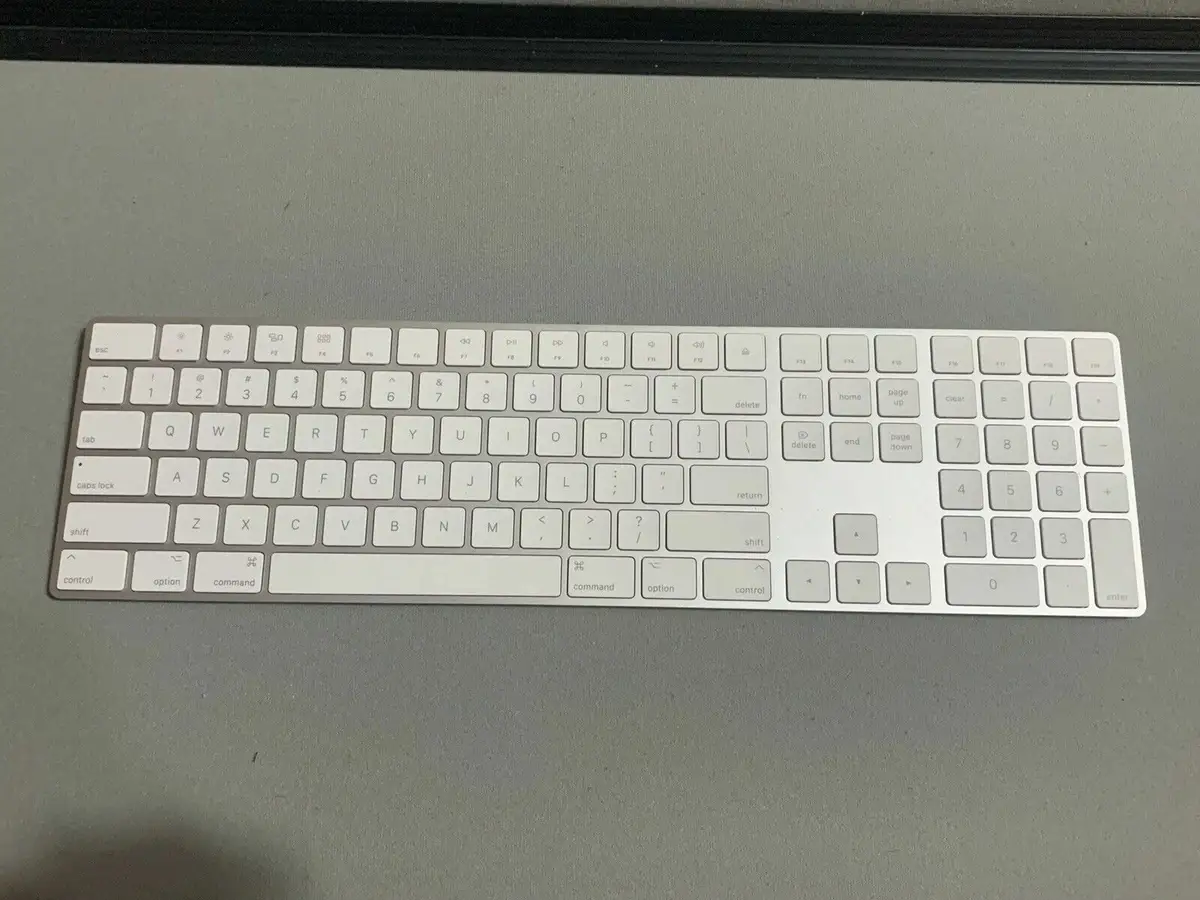
Apple Magic Keyboard Review: Strong Battery, Mixed Ergonomics
The surprising finding from aggregated user feedback is that while the Apple Magic Keyboard with Numeric Keypad (US English, White) consistently earns praise for its battery life and seamless integration with Apple devices, a recurring complaint about ergonomics and occasional hardware warping tempers the enthusiasm. Based on cross-platform reports, this keyboard scores 8.7/10 for Apple ecosystem users, but drops below 7 for those seeking adjustable angles or backlit keys.
Quick Verdict: Conditional Buy
| Pros | Cons |
|---|---|
| Long battery life — often a month+ between charges | High price compared to competitors |
| Seamless pairing with Apple devices | No backlight for keys |
| Numeric keypad boosts productivity | Flat, non-adjustable design may cause discomfort |
| Slim, sleek aesthetic | Occasional quality control issues like bowing/warping |
| Quiet, responsive keys | White model prone to discoloration |
| Wireless convenience via Bluetooth | Limited compatibility with older macOS/iOS versions |
Claims vs Reality
Apple markets the Magic Keyboard with Numeric Keypad as delivering a “remarkably comfortable and precise typing experience” with “a month or more between charges.” While many users confirm this, the comfort claim is more nuanced. A verified buyer on Best Buy wrote: “It’s a little long so you'll need a larger case if you carry it on the go. Also, the battery seems to last a very long time. I highly recommend it!” However, multiple users reported wishing for adjustable feet or a more ergonomic tilt, with Trustpilot reviewer stephaniea noting, “I do wish it had feet on it to kind of lift it up.”
The battery life claim stands up well under scrutiny. Several users reported going weeks without charging, even with daily use. Reddit user odh3 shared: “It lasts so long (seems like months) that I sometimes completely forget I have to recharge it.” This aligns closely with Apple’s stated performance, with minimal deviation.
Apple also touts the numeric keypad as ideal for spreadsheets and finance applications. This feature is universally validated in user feedback. A verified buyer on Amazon noted: “I didn't realize how much I use the numeric keypad, or how much time it would somehow save while inputting data.” For data-entry-heavy roles, the claim holds true, and the productivity impact is repeatedly cited.
Cross-Platform Consensus
Universally Praised
Across Amazon, Best Buy, and Reddit, battery longevity emerges as the single most celebrated feature. For remote workers, not having to worry about charging for weeks is a tangible productivity benefit. Best Buy reviewer banjer wrote: “After three or four weeks, it’s only used 16% of the power. I do switch it off at night.” Graphic designers also value the battery life when juggling multiple devices; aliciab described it as “streamlined excellence” for multi-monitor setups.
Integration with Apple’s ecosystem is another unanimous win. Users report instant pairing and flawless connectivity with Macs, iPads, and iPhones. jrecinos on Trustpilot noted: “It is wireless and I can move around freely around my desk area… this is one of the most important pieces in my home office.” For those embedded in Apple’s hardware line-up, this plug-and-play reliability is a major selling point.
The numeric keypad’s role in boosting productivity is cited repeatedly. Equipment girl on Trustpilot said switching from the smaller standard keyboard was “like night and day” for efficiency. Accountants, programmers, and spreadsheet-heavy users benefit most from this extended layout.
Common Complaints
Price sensitivity is a recurring theme. Even satisfied owners frequently describe the keyboard as “a little pricey” or “expensive but solid.” Best Buy reviewer nitendra compared it to cheaper alternatives, noting that while they had issues with lag, the Apple Magic Keyboard’s premium is still “great for office work.”
Ergonomics are another sore spot. Multiple reviewers mention the flat profile causing wrist strain over long sessions. jimmy on Trustpilot modified his with “angled velcro wall brackets” to create a tilt. For heavy typists, the lack of adjustable angles is a drawback.
Hardware warping, while not universal, appears in Apple Community discussions, where users describe the keyboard “starting to bow in the middle” after months of use. One user reported it “will even spin away from me at times” due to the uneven base. Apple Store exchanges have been granted in these cases, but it’s a notable quality concern.
Divisive Features
The absence of backlighting splits opinion. Some users don’t miss it, especially in well-lit workspaces, but others find it a glaring omission. Trustpilot user 43679 commented: “It’s almost unforgivable that this board has no backlight… a perfect keyboard in function and aesthetic design, but simply should have light.”
The white colorway’s tendency to show discoloration is another point of contention. While some love the clean aesthetic, others, like a Best Buy reviewer, regretted not choosing a darker variant due to visible wear.
Trust & Reliability
On Trustpilot and Reddit, there are few scam concerns, largely because this is a direct-from-Apple or authorized reseller product. However, long-term durability reports are mixed. Many praise years of flawless use, such as odh3’s 1.5-year-old unit still performing like new. Yet the warping issue on Apple Community shows that physical integrity can be compromised over time, especially for earlier models without reinforced backing.
For buyers concerned about longevity, community advice leans toward purchasing from Apple or a major retailer to ensure warranty coverage in case of bowing or key malfunctions.
Alternatives
The only directly mentioned competitor in user discussions is Logitech, with one Best Buy reviewer noting: “It works better than the Logitech keyboard I had.” Logitech models often offer backlighting and adjustable tilt at a lower price, but integration with macOS is less seamless, and battery life may be shorter.
Price & Value
At retail, the Magic Keyboard with Numeric Keypad sits around $129–$179 depending on region and configuration. eBay resale data shows new units selling from $75 to $105, with refurbished models dipping to $45. This relatively strong resale value reflects demand among Apple device owners. For budget-conscious buyers, lightly used models from reputable sellers can offer significant savings without sacrificing quality.
Community tips include waiting for seasonal Apple promotions or buying bundled with new Macs to reduce effective cost. Several users advise against third-party sellers without clear warranty terms, given the isolated warping complaints.
FAQ
Q: How long does the battery last between charges?
A: Most users report a month or more of use between charges, even with daily typing. Battery life depends on usage but aligns closely with Apple’s official claims.
Q: Does it work with older Macs or iPads?
A: Compatibility requires macOS 10.12.4 or later, iPadOS 13.4 or later, and iOS 10.3 or later. Older devices may need software updates to pair successfully.
Q: Is the keyboard backlit?
A: No, the Magic Keyboard with Numeric Keypad does not have backlit keys, which some users miss for low-light work.
Q: Can the angle be adjusted for ergonomics?
A: No built-in tilt adjustment exists. Some users add external risers or pads to create a more comfortable typing angle.
Q: How does it compare to non-Apple keyboards?
A: Integration and battery life are typically better than third-party options, but features like backlighting and adjustable tilt may be lacking compared to competitors.
Final Verdict
Buy if you’re an Apple ecosystem user who values battery longevity, seamless device pairing, and productivity gains from a numeric keypad. Avoid if you need backlighting, adjustable angles, or are sensitive to high prices. A pro tip from the community: pair purchase with a new Mac or hunt for gently used units on eBay to maximize value while minimizing risk of defects.