ZEBRA ZT411 Review: Conditional Buy (6.6/10)
A 2.9-star Amazon score for an industrial workhorse is a loud warning sign—and it frames the story of the ZEBRA ZT411 Thermal Transfer Industrial Printer as something closer to “capable but risky” than universally dependable. Verdict: Conditional buy, especially if you’re selecting the right configuration and you’re prepared to manage media handling. Score: 6.6/10.
Digging deeper into the available feedback, the ZT411’s reputation splits along a familiar industrial line: when it’s configured correctly and maintained, it’s praised for output clarity and connectivity; when it’s mismatched to a workflow (especially around peel/liner handling and cutting), frustrations spike. The most consistent applause clusters around “high-resolution printing,” “advanced connectivity,” and “easy operation,” while recurring gripes center on “no cutter option” and “potential for liner jams” in peel setups.
The complicated part is that much of the chatter reads like a product family conversation, not a single SKU experience. Some listings emphasize 203 dpi or 300 dpi, while Amazon also highlights a 600 dpi variant. That matters because barcode density and small text are where buyer expectations rise fastest—and where disappointment tends to be least forgiving.
Quick Verdict
Yes/No/Conditional: Conditional (best for high-volume industrial labeling when you pick the right dpi and media-handling options)
For operations teams in warehousing, manufacturing, healthcare, or logistics, the ZT411 is repeatedly positioned as a durable, network-ready, high-throughput label printer. PROVANTAGE’s listing summary presents it as a device users “appreciate” for “connectivity options and ease of use,” while also flagging workflow bottlenecks like “lack of a built-in cutter” and “potential for liner jams.” That’s a telling combination: it’s not that the printer can’t print—it’s that the surrounding workflow can get messy fast if your process depends on cutting or peel liner reliability.
Amazon’s own star rating snapshot is blunt: “2.9 out of 5 stars” from “2 reviews” for the 600 dpi listing. With so few reviews, that number is more of a flare than a final verdict, but it’s still notable given the ZT411’s “industrial” positioning and price tier.
| Signal | What the data says | Who it impacts |
|---|---|---|
| Print quality | “High-resolution… clear labels” (PROVANTAGE) | Compliance, healthcare, small-text labels |
| Speed | Up to “14 inches per second” (Amazon specs) | High-volume shipping/warehouse lines |
| Connectivity | USB, serial, Ethernet, Bluetooth (Amazon specs; PROVANTAGE) | IT-managed fleets, mixed-device shops |
| Cutter | “No cutter option” (PROVANTAGE sentiment notes) | Anyone needing cut labels off-roll |
| Peel/liner handling | “Potential for liner jams” (PROVANTAGE sentiment notes) | Peel-and-present workflows |
| Price pressure | Used/refurb listings under ~$900 on eBay | Buyers comparing new vs refurbished |
Claims vs Reality
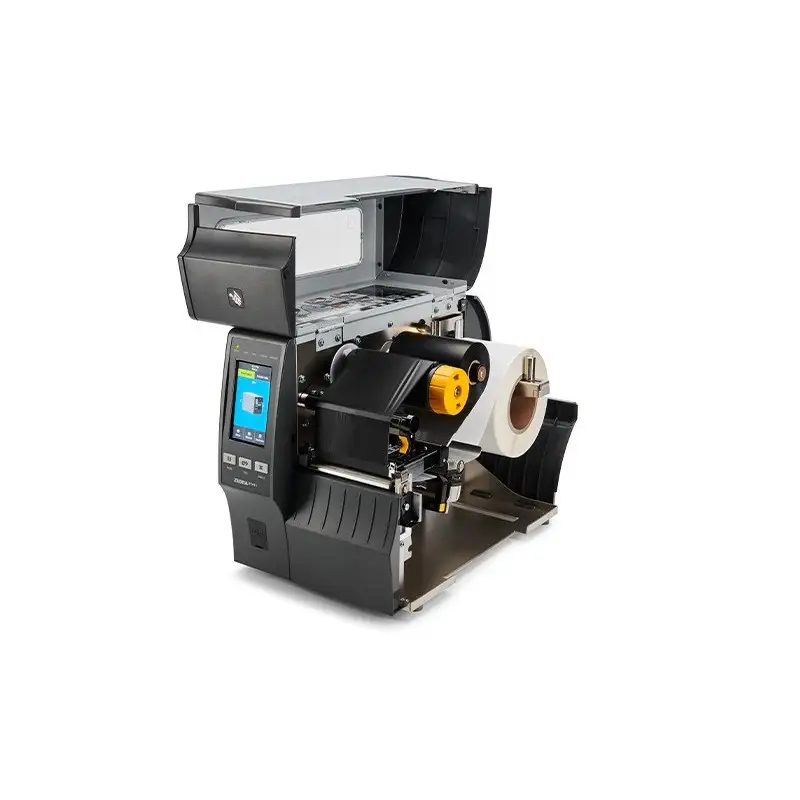
Zebra’s ecosystem messaging paints the ZT411 as durable and easy to manage: Amazon’s product description calls it “durable, reliable printing in tough environments” with “an all-metal frame,” “easy access,” and a “4.3-inch full-color touch display.” PROVANTAGE’s narrative echoes the same idea with “ease of use” and “intuitive settings management.” On paper, that’s the kind of pitch that appeals to a warehouse manager trying to reduce downtime and training time.
But the gap appears when workflow requirements include cutting or peel liner handling. PROVANTAGE’s summarized feedback explicitly calls out: “the lack of a built-in cutter” and “potential for liner jams.” If your labeling process expects a cutter as standard, the real-world experience becomes less about print engine performance and more about operational friction—stopping to tear labels or buying extra hardware.
Another marketing-adjacent claim is speed and performance consistency. Amazon specs list a “maximum print speed 14 ips / 356 mm per second” (for the 600 dpi model), while PROVANTAGE’s 300 dpi peel-with-liner configuration lists “maximum mono print speed: 10 in/s.” That’s not necessarily a contradiction—different dpi and configurations can change throughput—but it’s a reality check: advertised top speed can vary by resolution and media handling setup. For a shipping station expecting the “14 ips” headline, ending up with a configuration rated at “10 in/s” can feel like underperformance even if the printer is behaving as designed.
Finally, there’s a recurring confusion around resolution options. Amazon prominently features a “ZT411 600 dpi” configuration, while other listings focus on 203 dpi and 300 dpi models (including Amazon Renewed). Multiple sources also describe the ZT411 line as “available in 203 dpi, 300 dpi and 600 dpi.” The lived reality for buyers is that “ZT411” is not one experience—it’s a family of configurations. When a shop orders “ZT411” expecting 600 dpi crispness but receives or selects a 203 dpi unit, dissatisfaction can be immediate for small text and dense barcodes.
Cross-Platform Consensus
Universally Praised
A recurring pattern emerged around print clarity and professional output—especially in the 300 dpi and 600 dpi contexts where label detail matters. PROVANTAGE’s summary states the peel-with-liner ZT411 configuration is “praised for its high-resolution printing,” specifically emphasizing “clear labels.” For compliance labeling or product identification where scanning reliability is non-negotiable, that theme matters: clear barcodes reduce rescans, mis-picks, and manual overrides.
Connectivity is another consistent “yes” across sources, and it’s framed as an IT-friendly benefit rather than a consumer convenience. Amazon specs list “USB 2.0,” “RS-232 serial,” “10/100 Ethernet,” “Bluetooth 4.1,” and “dual USB host.” PROVANTAGE similarly highlights “advanced connectivity options” and says users “appreciate its connectivity options.” For an operations team standardizing printers across stations—some hardwired on Ethernet, others using USB—this flexibility is positioned as a practical advantage.
Ease-of-operation shows up repeatedly in descriptions of the interface. PROVANTAGE credits “easy operation” and points to a “4.3-inch color touch display for intuitive settings management.” Amazon reinforces the same interface angle: a “4.3-inch full-color touch display to see status at a glance.” For shops rotating staff between tasks, the implication is fewer training hours and fewer “how do I load this?” interruptions—though the data doesn’t include direct first-person stories beyond these summarized notes.
- Praised theme: “high-resolution printing… clear labels” (PROVANTAGE)
- Praised theme: “advanced connectivity options… USB, Ethernet, and Bluetooth” (PROVANTAGE; Amazon specs)
- Praised theme: “4.3-inch… touch display” for status/settings (Amazon specs; PROVANTAGE)
Common Complaints
The most pointed recurring limitation is cutting. PROVANTAGE’s feedback summary is direct: “lack of a built-in cutter.” That complaint is less about feature envy and more about workflow reality. If your operation prints batches that need to be separated quickly—inventory tags, pick labels, lab labels—manual tearing can become the slowest step in the line, and adding a cutter becomes an extra procurement and maintenance decision.
Peel workflows introduce another pain point: liner management. PROVANTAGE flags “potential for liner jams,” specifically tied to “peel-off mechanism with liner.” That’s a complaint with an operational cost: jams mean downtime, reprints, and occasionally wasted label stock and ribbon. For high-volume shipping environments, even intermittent jams are enough to turn a “fast printer” into a bottleneck.
Space and industrial footprint appear in the broader listing narratives, especially when buyers compare industrial units to desktop label printers. The PROVANTAGE 203 dpi summary calls out that it “requires more space due to its industrial design” and is “not portable like mobile printers.” For a small business trying to fit labeling into a tight packing bench, that physical reality can matter as much as dpi or throughput.
- Complaint theme: “no cutter option” (PROVANTAGE sentiment notes)
- Complaint theme: “potential for liner jams” (PROVANTAGE sentiment notes)
- Complaint theme: industrial size/space needs (PROVANTAGE 203 dpi notes)
Divisive Features
Resolution and speed tradeoffs are where opinions can split—especially when buyers are choosing between 203 dpi, 300 dpi, and 600 dpi configurations. Some sources position 203 dpi as “commonly used for shipping labels… where ultra-high resolution is not required,” with the advantage of “faster printing speed.” Meanwhile, 300 dpi is framed as better for “logos” and “small text,” but “slower printing speed.” That divide isn’t a simple good/bad; it depends on whether your pain point is throughput or readability.
RFID readiness is also divisive because it’s often described as “capable” but not necessarily included. Amazon highlights “rfid capabilities,” while other summaries warn of “no built-in rfid capabilities—requires additional hardware.” For asset tracking teams evaluating RFID as a near-term upgrade, the ZT411 reads like a flexible platform; for buyers assuming RFID is included by default, the add-on nature can feel like a surprise cost.
Trust & Reliability
The trust signals here are uneven because the dataset includes lots of retailer/spec language and relatively little direct, first-person, long-term ownership testimony. Amazon’s “2.9 out of 5 stars” on the 600 dpi listing stands out as the clearest “buyer dissatisfaction” indicator—but it’s also based on only “2 reviews,” making it directionally meaningful rather than statistically stable.
On the reliability front, PROVANTAGE’s synthesized feedback frames the ZT411 as a durable, industrial device while still warning about specific failure modes in certain configurations: “potential for liner jams” in peel-with-liner setups. That’s the kind of reliability issue that doesn’t contradict “all-metal frame” durability—it highlights that mechanical media paths can still be sensitive to maintenance and setup. While marketing emphasizes toughness, the data suggests the more realistic reliability question is: how often does your workflow trigger media handling interruptions?
Alternatives
Only competitors explicitly mentioned in the provided data appear in the eBay market listings—most notably the Zebra ZT410, ZT230, and ZD-series models (e.g., ZD410, ZD620). These alternatives show up as adjacent purchase options in the same marketplace context, suggesting buyers commonly cross-shop within the Zebra lineup rather than switching brands.
For buyers who don’t need the ZT411’s expandability and are primarily printing standard shipping labels, the presence of ZT410 and ZT230 units in the same eBay browsing ecosystem hints at a common decision: pay for the “newer, more configurable” ZT411 platform, or choose an older/cheaper workhorse that still fits the core label job. Meanwhile, ZD410 and ZD620 listings reflect a different priority—smaller, desktop-focused printers that may suit lower volume or space-constrained stations better than an industrial chassis.
Price & Value
The price picture is wide and depends heavily on condition and configuration. On eBay, one used listing for a ZT411 appears at “$888.25” plus shipping, while another “very good - refurbished” unit is listed at “$764.75” (plus shipping), both emphasizing interfaces like “Bluetooth, USB, serial, Ethernet” and industrial capabilities. For budget-conscious buyers, those numbers create pressure on new pricing—especially when the hardware looks similar at a glance.
At the same time, new retail/spec listings position the ZT411 as a premium industrial platform. That gap creates a clear value question: is warranty coverage, guaranteed configuration (dpi, peeler/cutter/rewinder), and known history worth paying a large premium over refurbished? For businesses where downtime costs more than the printer, the answer often leans toward new. For smaller operations or secondary stations, eBay pricing suggests a viable refurbished route—particularly when listings mention inspection, cleaning, and included power cords.
Buying tips implied by the data are straightforward: confirm resolution (203/300/600 dpi), confirm whether you need a cutter, and be cautious with peel-with-liner setups if jams would be costly. The market also suggests resale liquidity—multiple ZT411 listings and sold counts indicate ongoing demand for used units, which can soften total cost of ownership if you upgrade later.
FAQ
Q: Is the Zebra ZT411 a 203 dpi, 300 dpi, or 600 dpi printer?
A: It depends on the configuration. The data shows ZT411 models sold in 203 dpi, 300 dpi, and 600 dpi versions. Amazon features a “ZT411 600 dpi” listing, while other listings highlight 203 dpi and 300 dpi models, including Amazon Renewed.
Q: Does the ZT411 include a cutter?
A: Not always. PROVANTAGE’s summarized feedback specifically notes “lack of a built-in cutter” as a limitation for certain configurations. If your workflow requires cut labels, plan for a cutter-equipped model or an add-on accessory rather than assuming it’s standard.
Q: What connectivity options do users highlight most?
A: Ethernet, USB, serial, and Bluetooth show up repeatedly. Amazon specs list “USB 2.0,” “RS-232 serial,” “10/100 Ethernet,” and “Bluetooth 4.1,” and PROVANTAGE’s feedback summary says users “appreciate its connectivity options,” framing it as flexible for enterprise environments.
Q: What are the most common operational headaches?
A: Media handling and workflow extras. PROVANTAGE flags “potential for liner jams” in peel-with-liner setups and also points to “no cutter option.” These issues matter most for high-volume stations where stops and manual intervention slow the entire line.
Q: Is buying used/refurbished worth it?
A: The market suggests it can be. eBay listings show used/refurbished ZT411 units in the ~$765–$888 range (plus shipping), often with warranties listed by sellers. The tradeoff is ensuring you’re getting the right dpi and media-handling options for your labels and workflow.
Final Verdict
Buy the ZEBRA ZT411 Thermal Transfer Industrial Printer if you’re a warehouse, manufacturing, healthcare, or logistics operation that needs an industrial Zebra label printer with flexible connectivity and you’re careful about selecting the right resolution and options for your labels. Avoid it if your process depends on a built-in cutter by default or if peel-with-liner downtime would cripple your station, since feedback flags “no cutter option” and “potential for liner jams.”
Pro tip from the community-style summaries: match the configuration to the job—high-density barcodes and small text point you toward higher dpi models, while pure throughput shipping labels may not need more than 203 dpi, especially if speed is the priority.