VIVO Ultrawide Monitor Arm Review: Conditional Buy 7.8/10
The “tilt” is where this arm’s reputation gets made—or broken. VIVO Premium Aluminum Monitor Arm for Ultrawide Screens, Heavy Duty Single Desk Mount, Black earns a conditional verdict because a lot of owners call it “sturdy” and “very robust,” yet a vocal minority say the forward/side tilt can’t cope with certain heavy, off-balance displays without being effectively locked down. Verdict: Conditional buy — 7.8/10
Quick Verdict
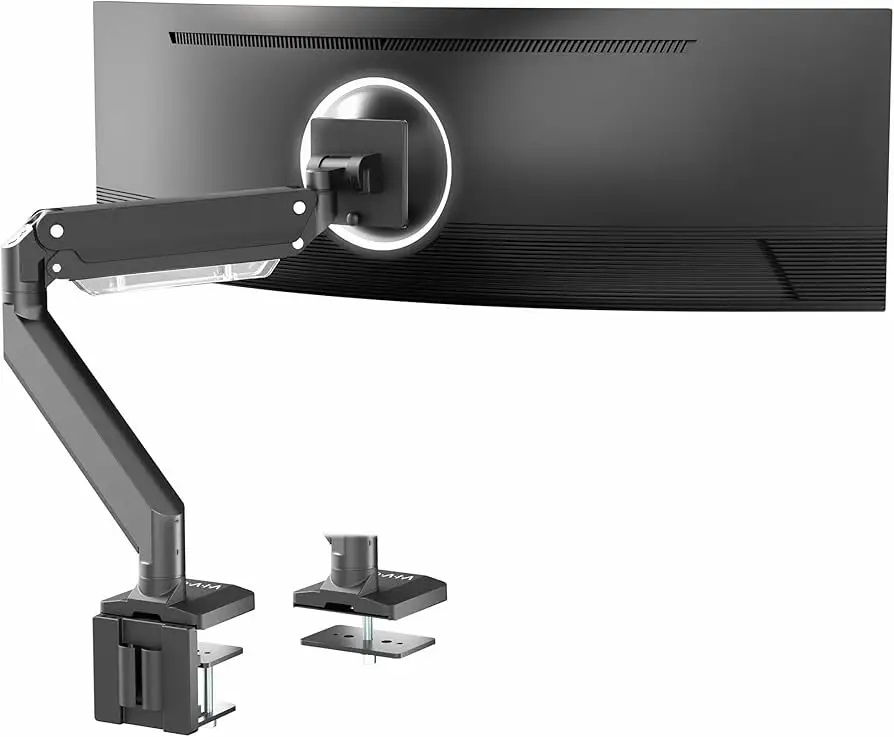
Definition (what it is, in plain terms): VIVO Premium Aluminum Monitor Arm for Ultrawide Screens, Heavy Duty Single Desk Mount, Black is a pneumatic single-monitor desk arm that clamps (or grommet-mounts) to your desk and uses adjustable tension to raise/lower, swivel, rotate, and tilt an ultrawide monitor—aimed at freeing desk space and positioning large screens more ergonomically.
Yes/No/Conditional: Conditional
| What buyers cared about | What they liked (with sources) | What they didn’t (with sources) |
|---|---|---|
| Stability with big screens | “fully supports my 49" samsung g9 oled…with no issues.” (Amazon.com reviews) | “weakness is the tilt… it basically has to be locked in or it flops” (Amazon.com reviews) |
| Desk space & ergonomics | “beautifully this declutters my work surface” (Amazon.com reviews) | “tendency to crash to the desk if set too low” (Amazon.com reviews) |
| Price vs premium brands | “much cheaper than ergotron” and “works…much cheaper than the others” (Reddit; Fakespot) | Some wished they’d bought “the more expensive herman miller arm” (Amazon.com reviews) |
| Install/adjustment time | “easy to assemble” and “straight forward to put together” (Amazon.com reviews) | Multiple call it a “2-person job” for heavy monitors (Amazon.com reviews; Reddit) |
| Clamp flexibility | “clamp that can fit on thicker desks than most” (Reddit) | Clamp can feel “pushing the limit with that monitor” (Reddit) |
Claims vs Reality
VIVO markets the arm as a heavy-duty, pneumatic, highly adjustable solution for ultrawides—including very large displays—and official listings emphasize strength, smooth height adjustment, and broad compatibility. Digging deeper into user reports, a recurring pattern emerged: the lift mechanism often gets praise, while tilt performance becomes the make-or-break detail for heavier or oddly balanced monitors.
The first claim is effectively “heavy duty for ultrawide monitors up to 49 inches / high weight capacity.” Several owners back that up with real-world loads. A verified buyer on Amazon wrote, “i have a 43 inch 4k monitor that weighs 31 lbs… this product delivers,” adding that “tilt works equally well” after tightening the tension (Amazon.com reviews). Another verified buyer said it “fully supports my 49" samsung g9 oled…including tilt, with no issues” (Amazon.com reviews). On Reddit, one poster summarized long-term confidence: “i’ve been using this arm with my crg9 for about a year and a half. no issues and much cheaper than ergotron.” (Reddit)
But the same “heavy duty” promise collides with tilt complaints from other owners. A verified buyer on Amazon flatly disagreed: “this is not a heavy duty arm (if your monitor is over 32 inches)… the weakness is the tilt,” describing how it “basically has to be locked in or it flops like a fish” (Amazon.com reviews). Another verified buyer liked it “overall” but warned it “has a tendency to crash to the desk if set too low” (Amazon.com reviews). While officially positioned as a smooth-adjust arm, multiple users describe “cranking” tension hard enough that tilt becomes semi-permanent.
The second claim centers on easy adjustment and ergonomic positioning. Many buyers do describe a clean setup with broad movement. A verified buyer on Amazon praised the “range and ease of motion” as “outstanding” and celebrated reclaiming space from an oversized base (Amazon.com reviews). On Reddit, an owner framed the appeal in day-to-day workflow terms: a monitor arm “takes up almost 0 space on your desk… gained adjustment and customization,” and can push the screen back to “free up tons of work space.” (Reddit)
Yet the “easy” part is conditional: users repeatedly describe an adjustment learning curve, especially for ultrawide center-of-gravity quirks. Reddit user reports include, “it took my wife and i a good 15 mins of adjusting the mount to get it to move nicely” and “you’ll have to tighten the tilt mechanism very hard for the monitor not to droop forward” (Reddit). Even satisfied Amazon reviewers often warn that “all of the tension points need to be adjusted,” and that forward tilt requires being cranked down aggressively (Amazon.com reviews).
Cross-Platform Consensus
Universally Praised
“Desk decluttering” isn’t just a throwaway benefit in these reports—it’s the emotional payoff people keep returning to. For home-office users trying to reclaim space from giant factory stands, the arm feels like a reset button. A verified buyer on Amazon called the build “very robust… worth every penny!” and described how it “declutters my work surface,” turning a desk from “being a pc workstation” into a more flexible work area (Amazon.com reviews). That same theme appears in another Amazon story from an Odyssey G9 OLED owner who said the monitor’s original base was “entirely too big,” while the arm “allows it to sit closer to the wall… further from my face” (Amazon.com reviews). For people on shallow desks, that distance-from-face detail is a practical ergonomic win, not just aesthetics.
Stability—once dialed in—gets strong praise from both Amazon buyers and Reddit posters. A verified buyer on Amazon wrote: “the monitor is easy to adjust the position, but doesn’t shake or vibrate” (Amazon.com reviews). Another verified buyer said it “holds its position” and that after tensioning, “everything was fine” (Amazon.com reviews). Reddit’s community chatter echoes that, often framed as “cheaper than Ergotron” but still trustworthy: one Reddit user said they’ve used it with a CRG9 “for about a year and a half. no issues and much cheaper than ergotron.” (Reddit)
The clamp and mounting flexibility is another recurring positive, especially for people with thicker desks or standing desks. Reddit user feedback highlights that “the vivo on amazon is the only one that seemed to work - and it also has a clamp that can fit on thicker desks than most” (Reddit). Another Reddit user emphasized clamp versatility: “no trouble clamping it… supports larger, and thinner desks,” while noting they positioned it over a desk’s solid leg-support area for peace of mind (Reddit). For standing desk owners, that “find the solid part of the desktop” detail reads like hard-earned advice.
- Most-cited wins: “declutters my work surface” (Amazon.com reviews), “no wobble” (Reddit), “much cheaper than ergotron” (Reddit), clamp works on “thicker desks” (Reddit)
- Who benefits most: ultrawide owners escaping huge stock stands; standing-desk users who need secure clamping; desk-space minimalists
Common Complaints
The most consistent complaint across Amazon and Reddit is that tilt tension can be the Achilles’ heel—especially forward tilt on heavy or curved monitors. A verified buyer on Amazon said the arm’s lift wasn’t the issue: “where it fails is not the lift… the weakness is the tilt,” adding they had to tighten until it “wasn’t adjustable” and it would otherwise “flop like a fish” (Amazon.com reviews). That same reviewer described side-to-side leveling as “the absolute worst,” requiring the monitor to be lowered and physically propped (Amazon.com reviews). For buyers who frequently change viewing angles (switching posture, sharing screen, re-aiming for gaming vs work), that “tilt becomes locked” outcome is a practical deal-breaker.
Even satisfied owners often describe the tilt adjustment as brute-force rather than elegant. A verified buyer on Amazon who ultimately recommended it still admitted: “when it came to the forward tilt… you have to… crank that little tensioner till it cries… so i’m not able to change the forward tilt… without messing with the tension” (Amazon.com reviews). On Reddit, a similar sentiment appears in plain terms: “the tilt / pivot head did require that screw being cranked down but it holds my g9 fine” and “you’ll have to tighten… very hard for the monitor not to droop forward.” (Reddit) The repeated language—crank, very hard, locks—suggests a recurring mechanical reality rather than isolated user error.
Setup difficulty becomes a second complaint cluster, particularly for very large panels. The arm is often described as straightforward, but the act of mounting a 34–49" screen is treated as a safety event. A verified buyer on Amazon warned: “this installation is a two person job… especially when it comes to tightening the tilt tension” (Amazon.com reviews). Another Amazon reviewer recommended “2 people: one holding the monitor and the other tightening bolts” and described initial “moved (downward and tilted)” behavior until tension was corrected (Amazon.com reviews). Reddit mirrors that caution, with users framing big-monitor installs as physically demanding: “it’s definitely a two person job (i did it… by myself and my back regrets it)” (Reddit).
- Most-cited pain points: tilt droop unless over-tightened (Amazon.com reviews; Reddit), heavy installs needing two people (Amazon.com reviews; Reddit), “crash to the desk if set too low” (Amazon.com reviews)
- Who gets hit hardest: owners of heavy curved ultrawides (G9/CRG9 class), users who expect frequent tilt changes, solo installers
Divisive Features
The “heavy duty” label itself is divisive because some users run near the limits successfully while others tap out well below the stated promise. On one side, a verified buyer on Amazon reported success with a near-capacity monitor: “43 inch 4k… weighs 31 lbs… this product delivers” and said the clamp attachment felt “very secure” (Amazon.com reviews). Another verified buyer claimed their 49" G9 OLED was “fully supported… including tilt, with no issues” (Amazon.com reviews). Reddit posters also describe long-term stability: “no issues and much cheaper than ergotron” after “about a year and a half” (Reddit).
On the other side, a verified Amazon reviewer called it categorically not heavy duty for their use case: “my lg 43", which weighs 25 pounds, is too much for this thing,” focusing specifically on tilt and leveling issues (Amazon.com reviews). That contradiction suggests that real-world results depend heavily on a monitor’s center of gravity, curvature, VESA adapter setup, and how comfortable the owner is with aggressive tensioning.
Another divisive aspect is the “feel” of motion: some users describe smooth adjustability; others describe a setup that’s adjustable in theory but practically “set-and-forget” once tightened for tilt. The same Amazon reviewer who recommended it for a G9 described tilt as something you dial in once and then don’t touch (Amazon.com reviews). That makes the arm a better match for users who reposition height/rotation occasionally but don’t constantly tweak forward tilt.
Trust & Reliability
Fakespot’s summary for a closely related VIVO ultrawide arm emphasizes low deception risk and repeatedly highlights stability and value, quoting reviewers who say it “stays in place where you set it no sagging very stable highly adjustable” and “much cheaper than the others but does the job,” while noting “cable management is a bit tight but still ok” (Fakespot). While that’s not a substitute for hands-on verification, it does point to a review ecosystem that appears more credible than products dominated by suspicious patterns.
For durability, Reddit provides the most direct long-term datapoint in the provided sources: a user reported, “i’ve been using this arm with my crg9 for about a year and a half. no issues and much cheaper than ergotron.” (Reddit) Another Reddit user framed confidence more viscerally, saying of the arm: “it’s gonna last me forever… i can basically pull on it to help me stand up,” though that reads more like emphasis than a measured durability test (Reddit). Across platforms, “once everything is adjusted… it does feel very solid” becomes the recurring reliability narrative—suggesting durability is closely tied to correct setup and tensioning (Amazon.com reviews).
Alternatives
Ergotron and Herman Miller come up not as abstract competitors but as the “expensive competitor” benchmark buyers actively weighed.
Ergotron HX is repeatedly used as the reference point for tilt confidence on very large monitors. A verified buyer on Amazon who disliked the VIVO tilt said, “i own a hx as well… the hx is the real deal. no tilt issues at all… for big monitors it’s the only way to go” (Amazon.com reviews). On Reddit, the value argument cuts the other way: one user said they ran the VIVO with a CRG9 for “about a year and a half… much cheaper than ergotron” (Reddit). So the choice gets framed as: pay more to avoid tilt frustration, or save money if you’re okay with heavier tensioning and more setup time.
Herman Miller appears as a regret-tinged aspirational alternative. A verified buyer on Amazon said the arm “works great overall but wish i’d gone for the more expensive herman miller arm,” complaining this one can “crash to the desk if set too low” (Amazon.com reviews). That suggests some buyers are chasing not just capacity, but premium motion behavior across the full height range.
Price & Value
Value is where the VIVO arm consistently wins hearts, even among people who acknowledge compromises. A recurring pattern emerged: buyers compare it directly to “really expensive” arms, then tolerate the tensioning hassle because the savings feel substantial. A verified Amazon buyer said they were “about to finally pull the trigger on getting the really expensive competitor,” but after reviews, tried VIVO and found it “works really well with a samsung g9,” praising “excellent build quality — especially for the price” (Amazon.com reviews). Fakespot echoes that perceived deal: “much cheaper than the others but does the job” (Fakespot).
Resale and market pricing show up via eBay listings: one new listing references about “US $79.99” for a VIVO heavy-duty single arm (eBay). That market signal matches the community’s framing of VIVO as the budget-to-mid alternative when premium arms jump into the $200+ range (Amazon.com reviews; Reddit). The community “buying tip” embedded in multiple Reddit posts is to shop by weight capacity rather than screen size. Reddit user guidance: “ignore the screen size recommendation… focus on the weight they support,” adding that extra capacity provides “peace of mind” (Reddit). Another Reddit voice put it simply: “i’ve just gone by weight supported and not screen size.” (Reddit)
- Buying tips drawn from user experiences: prioritize weight and center-of-gravity; expect a tension-tuning session; plan a two-person mount for 43–49" class screens (Amazon.com reviews; Reddit)
FAQ
Q: Will it actually hold a 49-inch ultrawide like a Samsung Odyssey G9?
A: Conditionally yes. A verified buyer on Amazon said it “fully supports my 49" samsung g9 oled…including tilt, with no issues,” while another said it “works really well with a samsung g9” after adjusting tension (Amazon.com reviews). Reddit also reports CRG9 success “for about a year and a half” (Reddit).
Q: What’s the biggest complaint from real owners?
A: Tilt tension. A verified buyer on Amazon wrote, “the weakness is the tilt… it basically has to be locked in or it flops like a fish,” especially on a large monitor (Amazon.com reviews). Even happy owners describe needing to “crank” the forward tilt tension hard (Amazon.com reviews; Reddit).
Q: Is it a one-person install?
A: For smaller monitors, many call it straightforward, but for heavy ultrawides it’s commonly treated as a two-person job. A verified Amazon reviewer warned: “this installation is a two person job,” especially when tightening tilt tension (Amazon.com reviews). Reddit users similarly describe big installs as physically demanding (Reddit).
Q: Is it better value than Ergotron HX?
A: Many buyers pick it specifically to save money. Reddit user feedback calls it “much cheaper than ergotron” with “no issues” over long use (Reddit). But one Amazon reviewer who returned it said Ergotron HX had “no tilt issues at all” and was “the real deal” for big monitors (Amazon.com reviews).
Q: Does it help with desk space and monitor base clutter?
A: Yes, that’s a major reason people buy it. A verified Amazon buyer said it “declutters my work surface,” freeing the desk for multiple tasks (Amazon.com reviews). Another described an Odyssey G9 OLED base as “entirely too big,” and said the arm reclaimed “too much real estate” (Amazon.com reviews).
Final Verdict
Buy if you’re the kind of ultrawide owner who wants a heavy-duty single desk mount primarily to reclaim desk space and set a big monitor in a stable position—then leave tilt mostly alone once it’s dialed. A verified buyer on Amazon praised how it “declutters my work surface,” and others say it “fully supports” a 49" G9 OLED after proper adjustment (Amazon.com reviews).
Avoid if your setup demands frequent forward-tilt changes on a heavy, front-loaded display, or if you’re already sensitive to droop/leveling issues. One verified buyer warned the “weakness is the tilt” and said it must be tightened until it’s effectively locked (Amazon.com reviews).
Pro tip from the community: shop by weight capacity and be ready to spend time tension-tuning—Reddit user advice: “ignore the screen size recommendation… focus on the weight they support.” (Reddit)