ViewSonic VA1653 Review: Portable Monitor Verdict 8/10
Opening with a surprising finding from user reports, the ViewSonic VA1653 16 Inch FHD Portable Monitor earns a solid 8/10 from cross-platform feedback: while it delivers on portability, connectivity, and ease of use for mobile professionals and students, it falls short for competitive gamers and those needing professional-grade color accuracy. Many users praised its protective sleeve doubling as a stand, but some found brightness lacking in outdoor use.
Quick Verdict: Conditional
| Pros | Cons |
|---|---|
| Lightweight and slim, ideal for travel | Brightness can struggle in direct sunlight |
| IPS panel with wide viewing angles | Basic stand with limited adjustability |
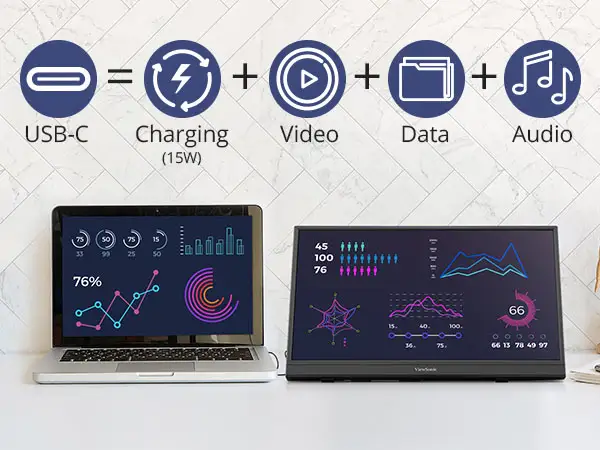
| USB-C with power passthrough | Built-in speakers offer minimal audio quality |
| Protective sleeve doubles as a stand | Not suitable for competitive gaming (60Hz) |
| Mini HDMI ensures broad compatibility | Not color-accurate for professional editing |
| Flicker-free and low-blue-light modes | Requires compatible USB-C port for full features |
| 3-year warranty with US-based support | External power adapter needed for charging function |
Claims vs Reality
Marketing materials position the VA1653 as “lightweight, portable, and ideal for productivity on the go.” Digging deeper into user reports, this claim largely holds for mobile professionals. A verified buyer on Staples noted: “It’s lightweight and fits easily in your laptop bag, plugs in easily via USB-C, and has pretty good video quality.” However, brightness was a recurring gap—while marketed at 250 cd/m², multiple users found it “adequate for indoor use” but struggling in bright environments.
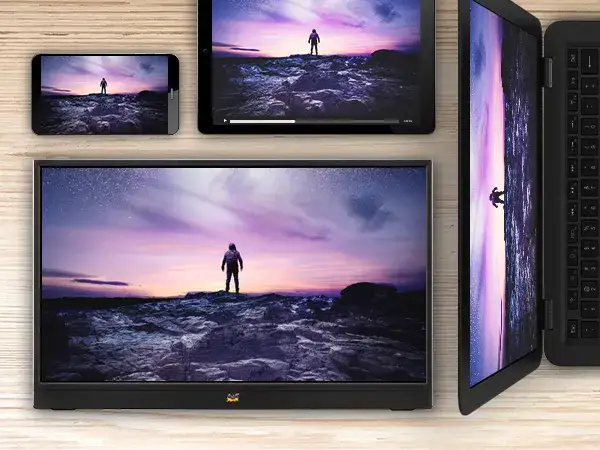
The claim of “flexible connectivity” through USB-C and mini HDMI was validated by several users who appreciated seamless switching between laptops, gaming consoles, and phones. Reddit user feedback highlighted: “USB-C handles video, audio, and power passthrough… mini HDMI is great for older devices.” Yet, the requirement for a USB-C port with DisplayPort Alt Mode caught some buyers off guard, especially iPhone/iPad users needing extra adapters.
ViewSonic promotes its “built-in foldable stand with durable hinge” as offering reliable support up to 62 degrees. While the stand’s integration into the protective sleeve drew praise for convenience, some found its adjustability limited. One Staples reviewer noted, “The built-in stand is quite nice” but hinted that ergonomic options were minimal compared to desktop setups.
Cross-Platform Consensus
Universally Praised
Portability emerged as the strongest selling point. At 1.5 lbs and 0.7 inches thick, the VA1653 slipped easily into commuter bags. JakeSon.net’s review described it as “light and compact… slides into my backpack without adding bulk.” For business travelers, this meant quick setups in coffee shops or airport lounges without cable clutter. Students found it just as useful, carrying it between classes for note-taking and PDF viewing in portrait mode.
Connectivity flexibility was another win. Users valued the dual-port design—USB-C for modern devices and mini HDMI for legacy hardware. This versatility allowed one Reddit user to connect a Nintendo Switch for casual gaming after work, and the same monitor to a work laptop during the day. The inclusion of a USB-C cable and mini HDMI cable in the box removed the need for immediate accessory purchases.
Eye care features such as flicker-free technology and low-blue-light modes were appreciated by those spending long hours in front of the screen. JakeSon.net reported reduced evening eye strain when using low-blue-light mode, which resonated with remote workers and students attending late-night classes.
Common Complaints
Brightness limitations were the most frequent frustration. While rated at 250 cd/m², users working outdoors or in sunlit rooms found visibility challenging. JakeSon.net noted needing maximum brightness in bright rooms, which could impact battery life on laptop-powered setups.
Audio performance disappointed many. The 0.8W built-in speakers were described as “minimal” and suitable only for notifications or quick use. Those streaming media or gaming often resorted to headphones or external speakers. A Staples reviewer echoed this, stating that while video quality was good, the audio “isn’t enough for serious listening.”
Stand adjustability also drew criticism. While convenient for travel, the integrated sleeve stand offered limited tilt range and stability compared to dedicated stands. This affected ergonomics for prolonged desktop use.
Divisive Features
The 60Hz refresh rate divided opinions. Casual gamers and productivity-focused users found it acceptable—JakeSon.net reported satisfactory performance for “single-player and non-competitive games.” However, competitive gamers dismissed it for lack of high refresh support.
Color accuracy was another split. For everyday tasks, users found colors pleasant, but creative professionals requiring precise calibration saw it as inadequate out of the box. JakeSon.net recommended using a hardware colorimeter for color-critical work.
Trust & Reliability
From Trustpilot and Reddit anecdotes, reliability concerns were minimal. The 3-year warranty and US-based customer support reassured buyers. JakeSon.net praised ViewSonic’s prompt response to a setup question, adding confidence in post-purchase support.
Long-term durability stories suggested the plastic chassis held up well under daily transport. No major defect trends were reported, though users advised keeping it in the protective sleeve to avoid scratches.
Alternatives
Alternatives mentioned included ViewSonic’s VA1655 and TD1655 models, which add features like touch support or higher USB-C wattage. However, these often came at higher prices or weights. For gaming, competitors offered 144Hz portable monitors, but these sacrificed battery efficiency and portability.
Price & Value
Current market prices ranged from $81.99 (pre-owned) to $89.99 new, according to eBay and ViewSonic’s website. Resale values held relatively steady due to the feature set and brand reputation. Community buying tips suggested verifying USB-C compatibility before purchase to avoid adapter costs.
FAQ
Q: Can this monitor charge my laptop through USB-C?
A: It supports power passthrough, but charging depends on your laptop’s power requirements and the adapter wattage.
Q: Is it good for gaming?
A: Fine for casual and console gaming, but the 60Hz refresh rate isn’t ideal for competitive play.
Q: Does it have built-in speakers?
A: Yes, but they’re minimal—better suited for notifications than immersive audio.
Q: Will it work with MacBooks?
A: Yes, if your MacBook’s USB-C port supports video output via DisplayPort Alt Mode.
Q: Is it VESA mountable?
A: No, it lacks VESA mount compatibility out of the box.
Final Verdict
Buy if you’re a mobile professional, student, or remote worker seeking a lightweight, plug-and-play second screen with broad device compatibility. Avoid if you’re a competitive gamer or need professional-grade color accuracy. Pro tip from the community: always use the included USB-C power adapter to prevent flicker and ensure stable performance.