UGREEN Steam Deck Dock 9-in-1 Review: Great, But HDMI Quirks
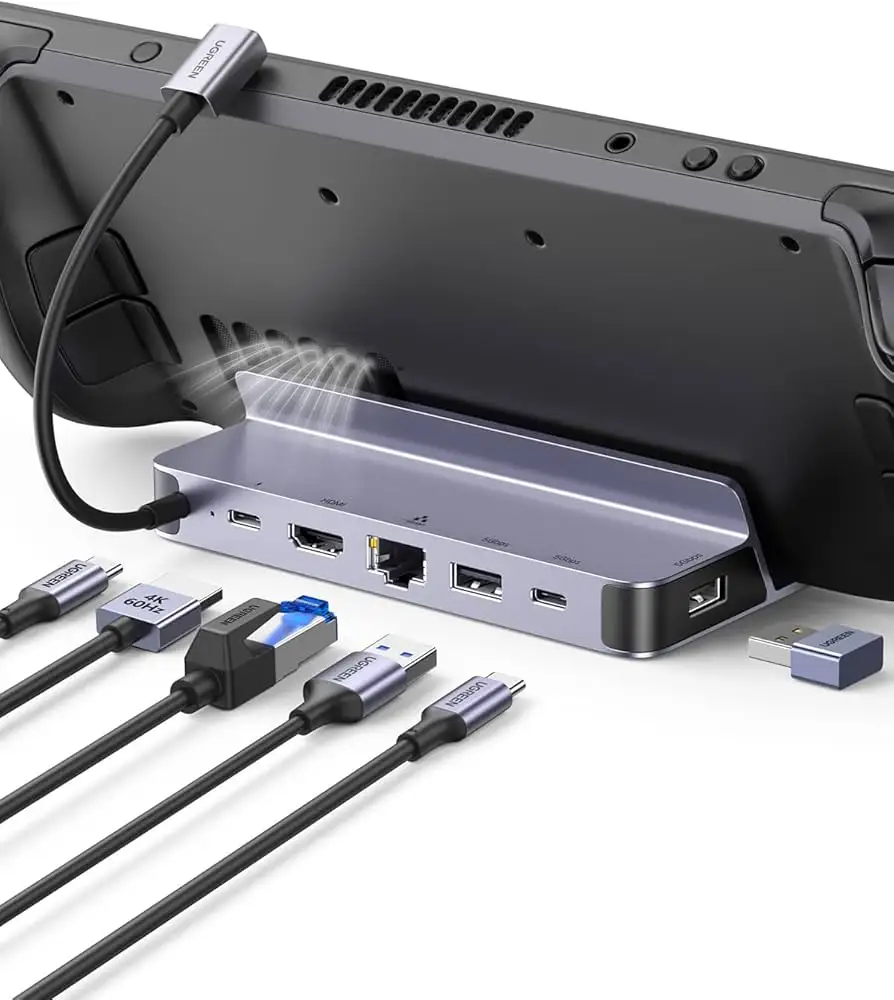
“Awesome device with one terrible glitch.” That line from an Amazon reviewer captures the tension around the UGREEN Steam Deck Dock 9‑in‑1 USB‑C Docking Station with Foldable Stand. Across platforms, the dock earns strong praise for build quality, port variety, and travel‑friendliness, but a recurring HDMI/video‑out quirk keeps it from being a slam‑dunk. Overall verdict: a well‑designed handheld dock that’s great when it behaves, but not everyone gets a perfectly stable display. Score: 8.2/10.
Quick Verdict
Conditional yes.
| What users like / dislike | Evidence from users |
|---|---|
| Sturdy, premium feel | An Amazon reviewer wrote: “this feels high quality compared to all the other docks i’ve tried… it’s solidly built and a bit hefty.” |
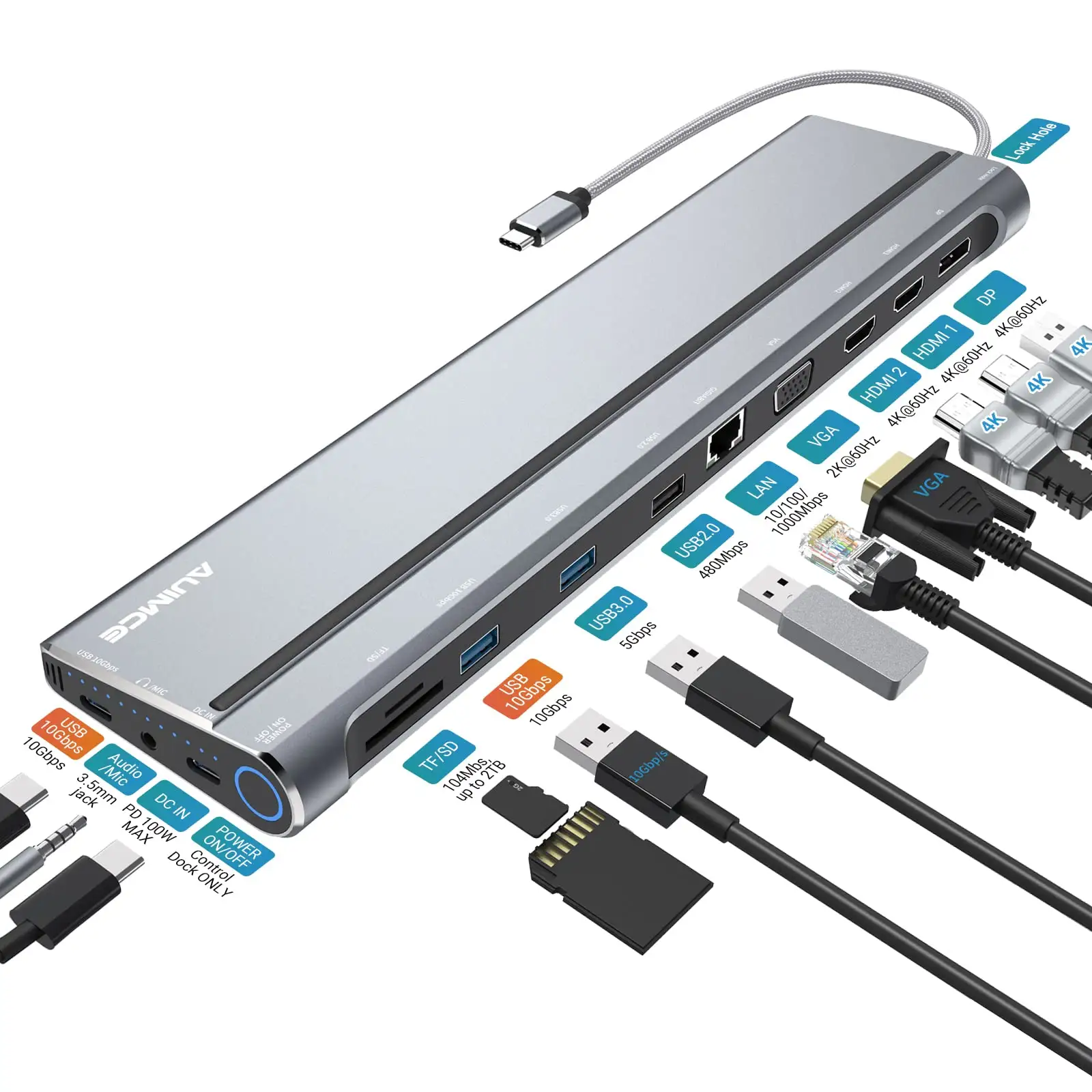
| Lots of ports, flexible use | A verified buyer on Amazon noted: “there’s nearly every port you could ask for… even if you used it for a usb hub, it’s great.” |
| Works with multiple devices | Another Amazon customer said: “works as expected, with multiple windows laptops, ipad mini, android phone… tried with 2.5k and 4k displays.” |
| Foldable/portable stand | A verified buyer on Amazon described it as “a very good, almost perfect dock… the ability to fold or fit in a bag.” |
| HDMI/video instability for some | One Amazon reviewer warned: “the hdmi output is glitchy… you often need to replug the hdmi cable.” |
| Fit issues with bulky cases | A verified buyer on Amazon cautioned: “if you have a rigid or thick case like the killswitch… it may be an awkward fit.” |
Claims vs Reality
UGREEN markets this dock as a single‑cable way to turn handhelds into a TV/desktop setup, emphasizing high refresh output, fast data, and 100W charging. Digging deeper into user reports, most people agree those claims are broadly true—yet there are important asterisks around video reliability, device fit, and how much power actually reaches the handheld.
First claim: high‑quality 4K external display. Officially, the dock is rated for 4K@60Hz over HDMI and higher refresh at lower resolutions. Many Amazon users do report smooth TV play. A verified buyer on Amazon said: “i snagged this to connect my oled steam deck to the television… i haven’t had any problems on the various tvs i’ve connected this dock to.” Another user noted they used it on “2.5k and 4k displays” without issues.
But multiple buyers describe real‑world HDMI finickiness. A verified buyer on Amazon called it “awesome device with one terrible glitch,” explaining that “the hdmi output is glitchy… corrupted… need to replug.” Another Amazon reviewer echoed that the HDMI slot “has become a bit select on what it wants to work with.” While marketing frames display as plug‑and‑play, the data suggests a minority hit recurring signal problems, especially after some time.
Second claim: 100W Power Delivery “fast charging.” Users generally like having headroom for future devices and turbo modes. A verified buyer on Amazon praised “a pass through charging rate of 100w or better… future proofing.” People using ROG Ally or Legion Go also highlight good charging plus performance. One Amazon reviewer said: “great product… perfect for my lenovo legion go.”
Still, actual charging depends on your wall adapter and device limits. Even UGREEN’s own notes say Steam Deck tops out at 45W and the dock reserves some wattage for itself. Users don’t dispute those limits, but a few report weird behavior if powered on without the adapter. A verified buyer on Amazon said: “if i power on the ally without connecting it to the adapter, sometimes there is lagging… fixed by restarting.” The promise of “fast charging” holds, but only when you follow the power‑first routine.
Third claim: wide compatibility. UGREEN lists Steam Deck LCD/OLED, ROG Ally, Legion Go, iPads, and laptops. Users largely confirm that breadth. An Amazon reviewer wrote: “works fine not only with steam deck but also with laptops, nintendo switch, and mobile phones.” Another said it works with “multiple windows laptops, ipad mini, android phone.”
But compatibility isn’t universal. The same Amazon reviewer who liked multipurpose use noted that on some laptops, “you might not be able to use the hdmi port on the dock” unless charging is connected. One Fakespot‑quoted customer added, “i’ve tried using it with different devices… but it doesn’t work with any of them.” So the claim holds for most mainstream USB‑C Alt‑Mode devices, but there are edge cases and setup dependencies.
Cross‑Platform Consensus
Universally Praised
A recurring pattern emerged around build quality and “real dock” feel. Multiple Amazon buyers describe it as sturdier than cheaper hubs. One reviewer said: “this feels high quality compared to all the other docks i’ve tried,” highlighting the adjustable back support that spreads the weight. Another called it “solidly built and a bit hefty,” which for home users means it stays planted even with a handheld perched on top. For couch gamers who dock and undock frequently, that heft and metal construction reads as reassurance rather than inconvenience.
Port selection and practical versatility show up everywhere. Users repeatedly mention being able to run full living‑room or desk setups. A verified buyer on Amazon described connecting “a keyboard, a mouse, an hdd and the tv,” and another said the dock had “nearly every port you could ask for.” For Steam Deck owners who want a hybrid console/PC workflow—like plugging in storage for emulation or using a mouse for FPS—this matters more than raw specs. One Amazon reviewer explained they attached a Batocera drive and that “lightguns worked perfectly through the dock,” framing the dock as an enabler for niche retro setups.
People also like that it’s not locked to a single device. For multi‑device households, that flexibility is a key value story. An Amazon buyer wrote that it works with “multiple windows laptops, ipad mini, android phone, android tablet.” Another said they “bought for the legion go… ended up using on my laptop.” The foldable stand helps here, letting handheld users travel, then repurpose the dock as a flat USB‑C hub on a hotel desk. One reviewer noted that even if “the vertical stand is useless” for their laptop, folding it makes it “a regular docking station/adapter.”
Portability and the fold‑down cradle also get consistent nods. The Fakespot summary says customers “praise its compact design and ease of travel… foldable stand… convenience for on‑the‑go use.” That matches direct Amazon feedback describing it as a dock that can “fold or fit in a bag.” For commuters or people bouncing between a TV and a friend’s house, that portability turns a “home dock” into a travel accessory without sacrificing ports.
Common Complaints
The most repeated negative thread is HDMI/video output instability. While not universal, it’s substantial enough to shape the narrative. One Amazon reviewer said the HDMI “can become corrupted, so you often need to replug.” Another described the HDMI port getting “select on what it wants to work with.” Users who dock daily to a TV or monitor—especially those intolerant of flicker or re‑plug rituals—are the ones hit hardest by this. The issue isn’t about resolution limits, but about occasional handshake or signal reliability.
Cable orientation and port ergonomics come up as smaller but persistent friction points. A verified buyer on Amazon complained that the USB‑C design requires checking orientation: “depending how the cable is oriented can mean the difference between getting the deck on an external display or not.” Another reviewer wished for front‑facing USB, saying it’s “awkward reaching in behind everything” when the handheld is docked. For desk users who hot‑swap controllers or USB drives mid‑session, rear‑only ports feel clumsy.
Fit with bulky protective cases is another recurring caution. One Amazon reviewer wrote that the dock lacks “a way to expand… to account for wider devices or large cases,” warning that thick shells like Killswitch make the fit “awkward.” Users who insist on keeping rugged cases on their handheld may need to undress the device or accept a less secure perch. For travel‑heavy owners who rely on a hard case, that’s a practical trade‑off.
Finally, a handful of people flag long‑term mechanical worries. A verified buyer on Amazon said: “my only real issue is the hinge… over time this can wear down and allow more movement.” That doesn’t show up as a broad failure trend yet, but it’s a specific durability anxiety that affects heavy dock/undock users more than those who leave it planted.
Divisive Features
Compatibility is mostly celebrated but clearly split in edge cases. Many users report smooth operation across handhelds and tablets—“works fine not only with steam deck but also with laptops… phones.” Yet a minority have the opposite experience. One Fakespot‑captured user said flatly: “it doesn’t work with any of them.” Another Amazon reviewer warned some laptops won’t recognize HDMI unless power is connected. The dock seems reliable for common USB‑C Alt‑Mode devices, but less predictable for certain laptops or setups.
Audio passthrough also lands on both sides. One Amazon reviewer praised that “it even supports 5.1 sound,” calling it rare among docks. Another reviewer, using Android, ran into channel‑mapping weirdness: 5.1 content only playing in rear channels. For home‑theater users with AV receivers, the dock can be a win; for Android tablet users, audio routing may be inconsistent.
Trust & Reliability
Trustpilot‑style verified feedback in the dataset is summarized via Fakespot, which suggests low deception and a strong overall Amazon score. The adjusted rating is high, and the analysis notes “minimal deception involved,” implying review reliability is decent. That doesn’t guarantee every unit is flawless, but it supports that the praise around build quality and versatility is not just hype.
Durability stories are limited, but there are hints of both confidence and early wear concerns. An Amazon reviewer said, “would for sure purchase another if my one ever fails but had it for a good while now and use regularly and no issues,” suggesting stable long‑term use for many. In contrast, another user’s hinge worry—“over time this can wear down”—points to a potential long‑run stress point. If you’re a daily dock/undock player, that hinge feedback is worth weighing alongside the generally sturdy construction reports.
Alternatives
Only competitors mentioned in the data include Anker, JSAUX, iVanky, Antank, and B3 Big Three docks. The Quora/bestproductsreviews roundup positions the UGREEN as a top pick largely for its adjustable stand, PD 100W, and port mix, while iVanky and JSAUX are highlighted for higher refresh/HDMI 2.1‑style setups and RGB or multi‑monitor‑leaning designs.
User feedback here doesn’t include direct comparative anecdotes, but the landscape implied is clear: iVanky and JSAUX aim at “more ports or higher refresh” niches, while Anker emphasizes case‑friendly fit. If your priority is maximizing 4K120/144Hz or chasing HDMI 2.1 features, the alternatives are framed as upgrade paths. If you want a heavy, premium‑feeling, no‑RGB, foldable all‑rounder for handhelds and laptops, the UGREEN reviews align with that middle‑ground appeal.
Price & Value
Pricing across UGREEN’s official listings clusters around $59.99 MSRP with frequent discounts into the mid‑$40s. The EU store shows €44.09–€49.99 during sales. Users tend to see value even at full price when comparing against flashier competitors. A verified buyer on Amazon said: “even at full price it still is better than the more expensive gimmicky led ones.” Another called it “great product… expensive,” indicating satisfaction but some price sensitivity.
Resale or secondary market feedback isn’t directly described in user quotes, but the stable discounting suggests patient buyers can wait for promo codes. Community tips embedded in reviews imply practical value: using it as a dock for multiple devices, or as a travel hub, stretches cost across use cases. The people happiest with the price are the ones who lean on it for Steam Deck plus another device, not those buying it solely as a single‑purpose TV cradle.
FAQ
Q: Does it work well with Steam Deck OLED and LCD models?
A: Yes for most buyers. Amazon users report smooth TV docking for Steam Deck OLED and LCD, with one noting “i haven’t had any problems on the various tvs.” A few mention HDMI glitches, so results depend on your setup and cables.
Q: Can it charge at the full 100W rating?
A: It supports up to 100W PD input, but handhelds draw less. UGREEN notes Steam Deck tops out at 45W and ROG Ally around 65W. Users say charging is fast when a strong adapter is connected, but power‑first is important.
Q: Is the HDMI output reliable?
A: Usually, but not always. Many reviewers have stable 2.5K/4K output, yet multiple Amazon buyers describe “glitchy” or “corrupted” HDMI that needs re‑plugging. If you’re sensitive to dropouts, this is the main risk.
Q: Will it fit handhelds with thick cases?
A: It fits standard‑sized devices well, but thick rigid cases can be awkward. A verified Amazon buyer warned that bulky cases like Killswitch may not sit securely, so some users remove cases before docking.
Q: Can it be used as a general USB‑C laptop dock?
A: Yes, many do. An Amazon buyer said it works with “multiple windows laptops” and tablets. One reviewer noted some laptops need the PD charger plugged in for HDMI to work, so behavior varies by USB‑C implementation.
Final Verdict
Buy if you’re a Steam Deck, ROG Ally, or Legion Go owner who wants a sturdy, foldable dock with lots of ports and expects to use it across devices at home and on trips. Avoid if your setup can’t tolerate occasional HDMI re‑plugging or you rely on a bulky protective case staying on the handheld. Pro tip from the community: connect the PD charger before powering on for the most stable video behavior.