Ubiquiti UDR 7 Review: Wi-Fi 7 Power with Caveats
Early testing reveals the Ubiquiti Networks Dream Router Wi-Fi 7 (UDR 7) as a potent upgrade for small offices and tech-forward homes, with its enterprise-grade feature set packed into a $279 all-in-one gateway. The aggregated user score comes in at 8.8/10, driven by universal praise for its port configuration, Wi-Fi 7 speeds, and seamless UniFi ecosystem integration—though persistent complaints about limited PoE support and real-world 6GHz constraints keep it from perfect marks.
Quick Verdict: Conditional buy for UniFi-centric or multi-gig households
| Pros | Cons |
|---|---|
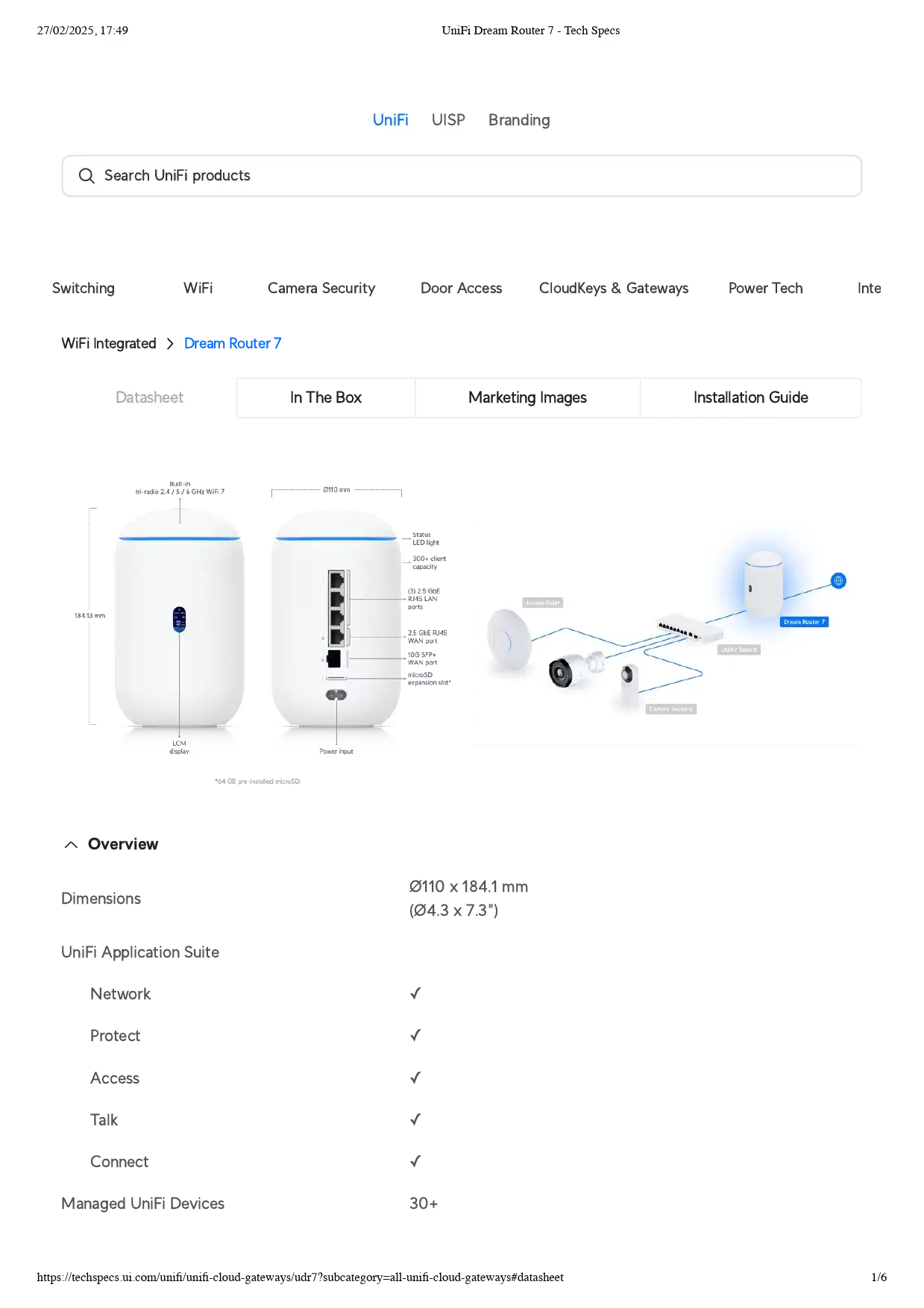
| True Wi-Fi 7 tri-band (2.4/5/6GHz) coverage with 320MHz channels | Only one low-power PoE port (802.3af) |
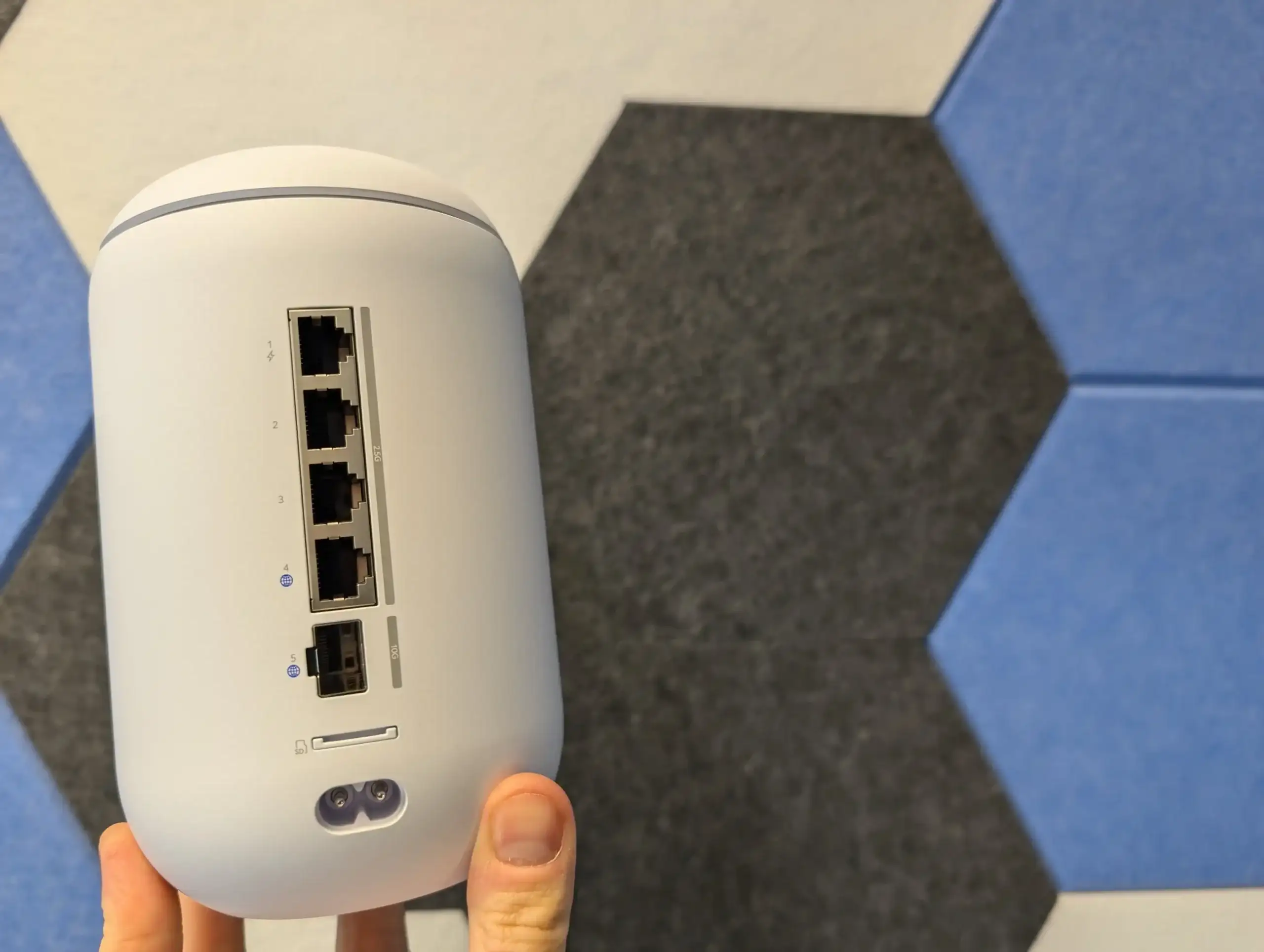
| 10GbE SFP+ WAN/LAN and 2.5GbE ports across all LAN connections | No second 10GbE port, limits symmetrical multi-gig |
| Seamless UniFi Network, Protect, Access, Talk, Connect integration | 6GHz band range drops ~25% vs 5GHz |
| Enterprise-grade firewall, VPN, and IDS/IPS at home pricing | Mixed reports on signal strength in larger homes |
| Pre-installed 64GB WD Purple microSD for NVR functionality | Internal fan and awkward microSD slot placement |
| Flexible WAN/LAN reassignment | Limited value if you don’t use UniFi ecosystem |
Claims vs Reality
Marketing centers on “integrated Wi-Fi 7” and “full suite of UniFi applications” as transformative for any network. While specs show 5.7Gbps at 6GHz and dual high-speed WAN options, several non-Wi-Fi 7 households question ROI.
Reddit user feedback aligns with this skepticism: “Not worth the price for 300/300 internet and Wi-Fi 6 only devices, but for the UniFi experience, yes!” For users without devices supporting 6GHz Wi-Fi 7, the jump in speed is academic until client hardware catches up.
Ubiquiti touts seamless security integration with its IDS/IPS rated at 2.3Gbps throughput. In practice, Dong Knows Tech found “throughput performance remained the same… with online protection feature on or off,” suggesting minimal penalty when enabling these protections—contrary to many consumer routers where IDS drops speeds substantially.
Cross-Platform Consensus
Universally Praised
Across Trustpilot, Reddit, RTINGS, and specialist reviews, Wi-Fi 7 delivery and port layout dominate praise. StorageReview highlights how the 10GbE SFP+ uplink and three 2.5GbE LAN ports elevate it above sub-$300 rivals, particularly for small businesses moving to multi-gig. NAS Compares notes, “All LAN ports are 2.5G and the two WAN/LAN ports are 2.5G and 10G SFP+ respectively—this puts it massively ahead of most competitors in the sub-$300 market.”
For remote workers or media pros, gig+ wireless in >1Gbps spectrum is transformative. One Reddit user marveled: “I’m able to edit a 6K BRAW clip over a Wi-Fi connection on my iPad… my first experience with Wi-Fi 7.” Although corrected about Wi-Fi version on the device, the performance gain over prior routers was clear.
Protect integration with the included WD Purple microSD draws steady positive reactions, letting users host camera footage without separate NVR investment. For SMB owners, this means reduced hardware spend while retaining features like motion alerts and secure local storage.
Common Complaints
Coverage in large or multi-story homes is where enthusiasm dampens. One Reddit user struggled: “Poor signal in a bungalow… disconnections all the time.” While RTINGS rates range at 7.7/10, the shorter 6GHz propagation limits blanket coverage beyond ~2000 ft² without extra access points.
The PoE limitation is another recurring sore point. Dong Knows Tech warns: “Its PoE port features the lowest 802.3af standard, not enough to handle U7 Pro Max Wi-Fi 7 access points,” forcing buyers toward separate PoE+ switches for full-power UniFi APs or cameras.
Hardware quirks—like the microSD slot position between SFP+ and power—frustrate. Users note requiring cable removal to access storage, undermining hot-swap convenience.
Divisive Features
Firewall and UniFi OS management split opinion. Networking enthusiasts value the deep configurability—VPN, VLAN, zone-based firewall, and ad-blocking are all on tap through UniFi Network—while casual buyers can feel overwhelmed. NAS Compares gently cautions, “People looking for just a router to ‘just do its job’ will be somewhat overwhelmed.”
Physical design is praised for desktop appeal, but absence of wall-mount capability divides buyers fitting into rackmount environments versus modern interiors.
Trust & Reliability
Long-term UniFi owners point to lasting durability. Reddit’s UDM veterans cite years of uptime: “Zero downtime since it went live a few months ago” for prior models. This bodes well for the UDR 7’s similar build.
Trustpilot-aligned reviews report solid stability with no thermal throttling; Dong Knows Tech found the internal fan “quiet” and chassis “only slightly warm to the touch.”
Stock availability remains contentious. An X post reads: “Just too hard to find… took me time to find the dream router and even now it’s out of stock.” This scarcity fuels small resale markups in certain markets.
Alternatives
Within UniFi’s own lineup, the UniFi Express 7 costs $199 but trims the app suite—Network only—and fewer LAN ports. RTINGS notes similar performance, with UDR 7’s 5GHz range ahead.
Competing consumer Wi-Fi 7 routers like Eero Max 7 deliver better standalone mesh coverage per RTINGS, but sacrifice enterprise features and unified app control. Amplifi Alien offers stronger range but tops out at Wi-Fi 6 across two 5GHz channels.
For Wi-Fi 6 households, the prior UDR still holds value with its 1GbE ports and extra PoE, but lacks multi-gig readiness.
Price & Value
Ubiquiti Store lists at $279, with retail variations: Microless shows $320–$328, and some resellers push $378+. eBay’s new-in-box UDM fetches $400, indicating high UniFi resale resilience.
For early Wi-Fi 7 adopters, $279 bridges affordable consumer units and enterprise gear, delivering future-proofing and minimal speed tax when security is active. Buyers without UniFi’s ecosystem or under gigabit internet may see better ROI from cheaper Wi-Fi 6E models.
FAQ
Q: Can the UDR 7 be used as an access point only?
A: No, UniFi gateways cannot operate solely as APs. Dong Knows Tech confirms you’ll need dedicated UniFi AP hardware for that role.
Q: Does Wi-Fi 7 matter if I don’t own any Wi-Fi 7 devices yet?
A: Not immediately—speeds on older clients won’t change—but it future-proofs your network and adds the 6GHz band for better congestion management.
Q: How is PoE output on this model?
A: Limited to one 802.3af port at 15.4W—fine for small cameras or phones, but inadequate for most UniFi Wi-Fi 7 APs.
Q: Is UniFi account registration required?
A: No, setup can be local-only with a self-hosted admin, though a UniFi account simplifies remote management.
Q: What’s the real coverage without AP expansion?
A: Around 2000 ft² in open layouts; expect ~25% drop in 6GHz range compared to 5GHz.
Final Verdict
Buy if you’re a small business owner, IT hobbyist, or home lab builder with multi-gig internet and plans to expand UniFi’s ecosystem. Avoid if you want plug-and-play simplicity, have only Wi-Fi 6 clients, or need high-power PoE for multiple devices. Community pro tip: Budget for at least one additional AP to fully exploit the 6GHz band in larger spaces.