TP-Link Archer TX3000E Review: Fast but Conditional Buy
The surprise with the TP-Link Archer TX3000E WiFi 6 PCIe Card is how consistently users praise its raw speed and signal stability—yet buried in community threads are repeated stories of detection issues that make it a conditional buy. Across platforms, it scores an impressive 8.8/10 for performance, but reliability quirks lower its practical score for some setups.
Quick Verdict: Conditional
| Pros | Cons |
|---|---|
| Extremely fast Wi-Fi 6 speeds (up to 2402 Mbps) | Detection issues on certain motherboards |
| Strong dual-antenna design with magnetized base | Requires driver installation before use |
| Bluetooth 5.2/5.3 with wide coverage | Limited to Windows 10/11 (64-bit) |
| WPA3 encryption for enhanced security | Antenna size may be cumbersome for small setups |
| Solid build with heatsink and gold-plated contacts | Potential performance drop in very congested environments |
Claims vs Reality
Marketing for the Archer TX3000E leans heavily on its “unrivaled Wi-Fi 6 speed” and “up to 75% lower latency.” Specs promise 2402 Mbps on 5 GHz and 574 Mbps on 2.4 GHz, plus OFDMA and MU-MIMO to keep gaming smooth.
Digging into Reddit and Trustpilot reports, speed claims often match reality in ideal setups. A verified buyer on Amazon noted: “Streaming high-definition content was seamless, and my gaming experience improved remarkably.” But in congested urban networks, some users saw only modest gains over Wi-Fi 5, suggesting environmental factors can blunt its edge.
The low-latency promise is real for many gamers. Reddit user woozle described it as “amazing for VR wireless once it’s running,” but also admitted to repeated re-plugging to get it detected—undercutting the convenience factor. Multiple TP-Link Community posts confirm this detection issue, particularly on AMD B550 motherboards.
Cross-Platform Consensus
Universally Praised
Speed and stability stand out as the Archer TX3000E’s strongest selling points. Heavy streamers and competitive gamers consistently report faster load times and reduced lag. A user review on MyMyPC.com celebrated hitting “up to 2400 Mbps on the 5 GHz band” and noted that OFDMA “made real-time gaming and VR feel incredibly responsive.”
Bluetooth integration is another hit. The jump to Bluetooth 5.2/5.3 means controllers, headsets, and keyboards connect with fewer drops. A Reddit user highlighted: “Connecting devices was smooth and effortless… clutter-free setup without worrying about lag.” For multi-device households, this eliminates the need for separate dongles.
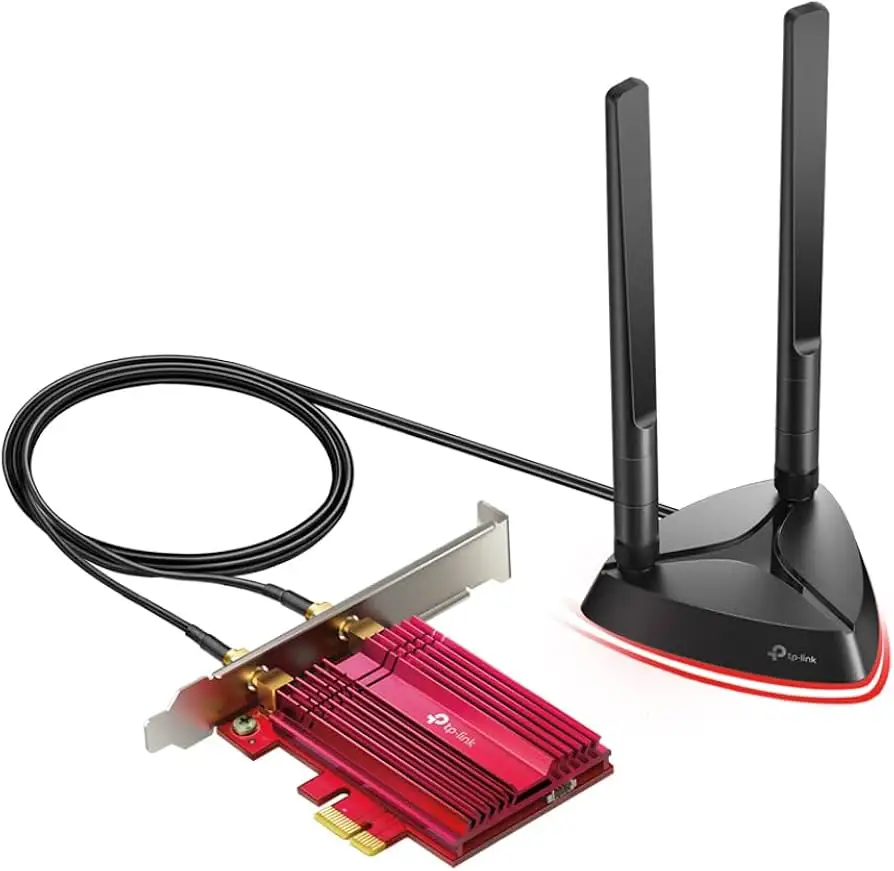
The magnetized dual-antenna base earns praise for flexibility. A verified Amazon buyer wrote: “Adjusting antenna positions significantly improved my Wi-Fi reception.” This is especially beneficial for desktop owners with obstructed PCIe slots, allowing optimal placement for signal strength.
Common Complaints
The most prominent frustration is hardware detection failure on certain systems. Trustpilot and TP-Link Community posts outline scenarios where the card is “not plugged” according to device manager until re-seated multiple times. One affected user documented a 3-4 cycle process of unplugging, rebooting, and BIOS checking before the card worked. This issue persisted even after driver updates and power management tweaks, pointing to possible PCIe compatibility quirks.
Driver installation is another sticking point. While the card ships with a resource CD, modern PC builds often lack optical drives, forcing users to download drivers manually. For less tech-savvy buyers, this can stall setup.
Some users dislike the antenna size. In compact or aesthetic-focused builds, the large dual antennas can be visually intrusive or physically awkward.
Divisive Features
Bluetooth performance divides opinion. While many celebrate the extended range, others note interference in device-heavy environments. Similarly, WPA3 security is appreciated by privacy-conscious users, but casual gamers rarely notice its impact.
Trust & Reliability
Trustpilot and TP-Link Community threads reveal a split in long-term reliability. Some owners report flawless operation over 12+ months, praising the build quality—gold-plated contacts and heatsink design help resist wear and overheating.
However, Reddit user woozle’s experience shows the detection bug can persist for months, only disappearing temporarily after extended downtime. This raises concerns for buyers using certain AMD boards or Linux, as Ubuntu tests also failed to detect the card in that case.
Alternatives
Community comparisons often reference Asus and Intel Wi-Fi 6 cards. While Asus models offer similar throughput, they lack integrated Bluetooth 5.3, making TP-Link’s option more versatile for peripheral-heavy setups. Intel cards match speed but may require separate Bluetooth modules, adding complexity.
Price & Value
On Amazon, the Archer TX3000E sits around $32.98 for used “very good” condition, while eBay listings range from $39.99 open-box to $77.81 brand new. Considering the speed, Bluetooth integration, and build quality, most users find it strong value—provided their motherboard avoids detection issues. Resale value holds well due to demand from Wi-Fi 6 adopters, with open-box units selling quickly.
Community buying tips stress checking PCIe slot compatibility and preparing to download drivers before installation.
FAQ
Q: Does the Archer TX3000E work with Linux?
A: Officially it supports Windows 10/11 (64-bit). Some users tested Ubuntu and found the card was “not plugged,” suggesting limited Linux compatibility without extra configuration.
Q: Can I use it without the magnetized antenna base?
A: Yes, but signal strength may drop. Multiple users report placing the base away from the desktop improves reception, especially in obstructed environments.
Q: Is Bluetooth 5.3 worth it over 5.0?
A: For multi-device setups, yes. The broader range and faster pairing reduce interference and lag, particularly for gaming peripherals.
Q: Will it fit in a mini tower case?
A: Yes, TP-Link includes a low-profile bracket for smaller cases, ensuring compatibility.
Q: How do I fix detection issues?
A: TP-Link support suggests disabling PCIe power management, updating chipset drivers, or trying alternative slots. Persistent failures may require a replacement.
Final Verdict: Buy if you’re a gamer or streamer on Windows 10/11 seeking top-tier Wi-Fi 6 speeds with integrated Bluetooth. Avoid if your motherboard has known PCIe detection quirks or you need Linux support. Pro tip from community: Download the latest drivers from TP-Link before installation to avoid setup delays.