Kasa Smart Plug KP303 Review: Conditional Buy Verdict
Digging into user feedback, the Kasa Smart Plug Power Strip KP303 emerges as a strong contender in the smart home accessory market, earning an average sentiment score of 8.5/10 across platforms. While its marketing promises easy setup, reliable Wi-Fi control, and robust surge protection, real-world reports reveal a blend of convenience and occasional connectivity hiccups. Users widely praise its versatility and space-saving design, but note that Wi-Fi dropouts, sparse documentation, and inconsistent routine execution can undermine the experience for certain setups.
Quick Verdict: Conditional Buy
| Pros | Cons |
|---|---|
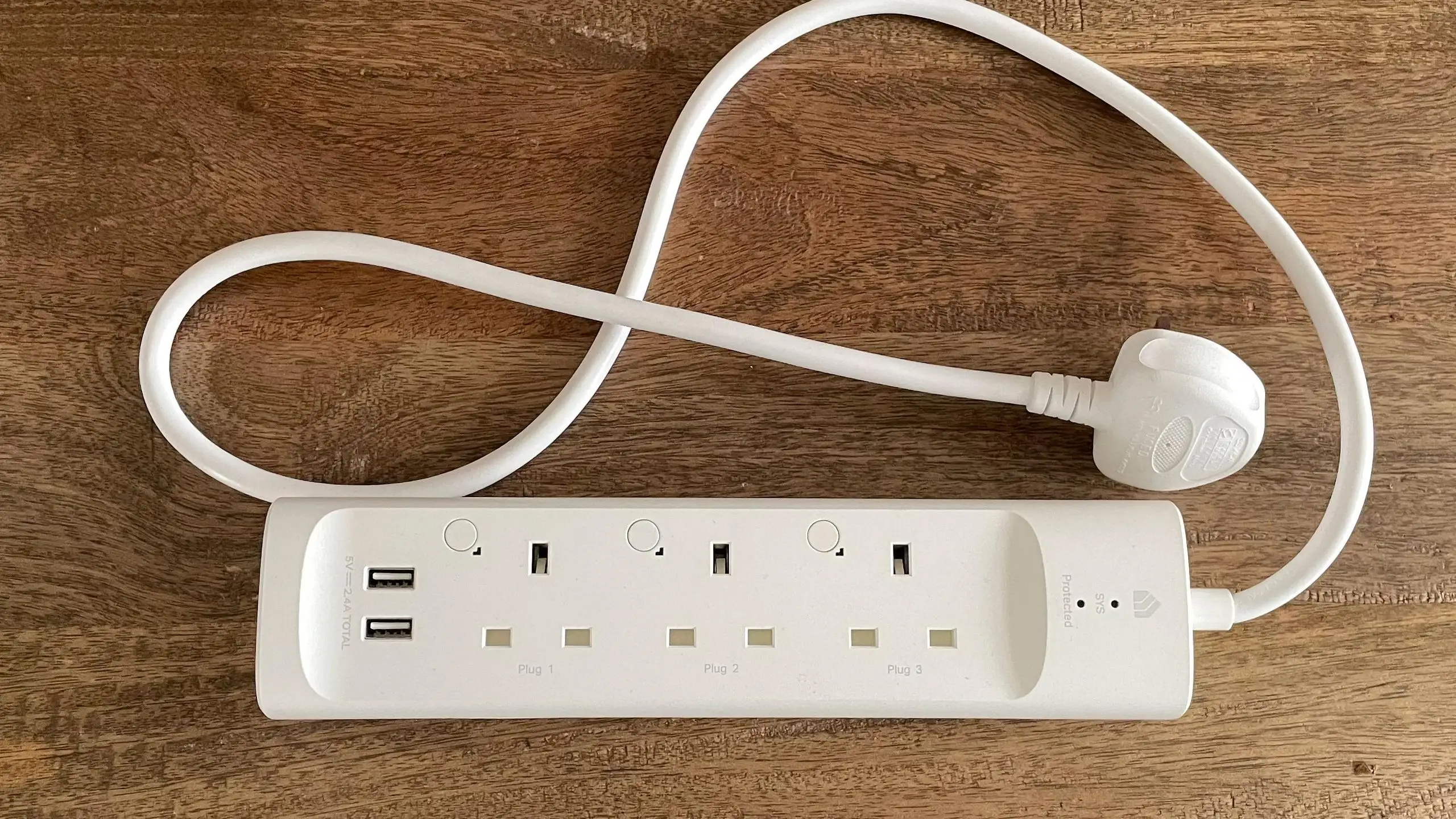
| Independent control of 3 smart outlets + 2 always-on USB ports | Occasional Wi-Fi disconnections |
| Easy setup via Kasa app, no hub required | Sparse and sometimes unclear documentation |
| Works with Alexa & Google Assistant for voice control | Routine execution can be inconsistent |
| ETL-certified surge protection for sensitive electronics | Relies entirely on stable Wi-Fi |
| Compact design with right-angled plug | Limited surge clamping voltage compared to high-end protectors |
| Scheduling and timers save energy | Some users report sporadic compatibility with smart home routines |
Claims vs Reality
Marketing materials highlight “simple setup” as a core selling point, with Kasa promising a plug-in-and-connect process. While many users echo this — a verified buyer on Amazon noted: “Setting it up was a breeze; I just plugged it in and connected it to the Kasa app on my phone” — others ran into hurdles. One Trustpilot reviewer described struggling for over an hour to create a Kasa account, only to learn from TP-Link support that “passwords with special characters may not work.” This gap between perceived simplicity and actual onboarding complexity is a recurring theme.
Another advertised feature is “ETL-certified surge protection.” While this offers peace of mind for everyday electronics, Quora contributors caution that it “may not protect against high-intensity surges,” suggesting that while adequate for most household use, it’s not a substitute for dedicated heavy-duty surge protectors. Users employing the KP303 in high-value setups, such as aquarium control or expensive AV gear, still appreciate the shield but remain aware of its limits.
Finally, “Control from anywhere” is touted as seamless. Reddit user David Thomas*** confirmed: “Within minutes, I had all three outlets and two USB ports up and running… I can control each outlet individually or group them together.” However, both Reddit and Trustpilot reports reveal occasional Wi-Fi dropouts, requiring manual unplug-replug fixes — a minor but persistent reality.
Cross-Platform Consensus
Universally Praised
The KP303’s ability to independently control three outlets while offering two always-on USB ports hits a sweet spot for users juggling multiple devices. Home office workers, aquarium enthusiasts, and even reptile owners found it invaluable for managing lights, heaters, and pumps. A Trustpilot reviewer shared: “I can put my seedlings or plants on a schedule and not have to wake up in the middle of the night… definitely a must-have for a grow room.”
Voice assistant compatibility is another near-universal win. Amazon buyers love the convenience: “I can say, ‘Alexa, turn on the coffee maker,’ while still lying in bed,” said one. This hands-free control resonates especially with users automating morning routines or managing devices in hard-to-reach outlets.
The design earns praise for practicality. The right-angled flat plug fits snugly behind furniture, avoiding obstruction. Reddit user David Thomas*** called it “a thoughtful touch,” while others appreciated the compact footprint in tight spaces. LED indicators per outlet further help users visually confirm on/off status without opening the app.
Common Complaints
Despite overall satisfaction, Wi-Fi reliability emerges as the most common frustration. Multiple Trustpilot and Amazon reviews mention the strip “disconnecting without warning” or failing to rejoin routines. One owner managing bearded dragon habitat equipment lamented that “one is working perfectly… the other is working very sporadically… losing Wi-Fi connection so often.”
Documentation is another pain point. A Trustpilot reviewer criticized “sparse (3-steps) instructions” and the omission of key setup details, such as connecting to the temporary TP-Link network during installation. New smart home users are particularly vulnerable to these oversights, often resorting to tech support calls.
Routine execution inconsistency, especially with Alexa integrations, affects those relying on timed automation. While manual app control remains reliable, some find that scheduled tasks occasionally fail — a dealbreaker for mission-critical uses like pet care or grow lights.
Divisive Features
Scheduling and timers split opinion. For energy-conscious users, such as those automating aquariums, this feature is transformative. Others, however, find the scheduling less dependable when Wi-Fi drops occur, undermining trust in automation. Similarly, surge protection is appreciated by most, but those seeking industrial-grade safeguarding feel the KP303’s clamping voltage could be higher.
Grouping controls in the Kasa app is celebrated by multi-device owners, yet some prefer individual plugs over a strip to avoid single-point failure from disconnection.
Trust & Reliability
Long-term accounts suggest durability in hardware, with strips functioning well after months of use. Amazon buyers report that “after a year, one is working perfectly” while another in the same environment developed sporadic connectivity — hinting at potential variability in Wi-Fi module performance over time.
Trustpilot patterns show no significant scam concerns; complaints are technical rather than transactional. Buyers consistently receive authentic products, but setup friction and occasional connectivity issues temper the reliability narrative.
Alternatives
While direct competitors weren’t heavily discussed, several users compared the KP303 to individual Kasa smart plugs. Those who owned both noted that the mini plugs “never had any issues,” suggesting they might suit users prioritizing rock-solid connectivity over consolidated control. However, the KP303’s appeal lies in managing multiple devices from a single setup, which individual plugs can’t match in convenience.
Price & Value
At the time of writing, community members spotted the KP303 on sale for $17.99 (down from $29.99), with eBay listings around $43.95 new. This spread suggests strong value when purchased on discount but diminished appeal at inflated resale prices. Reddit and Amazon buyers agree that sale pricing makes it “a fantastic investment” for smart home setups, especially considering it replaces multiple single-outlet plugs.
Buying tips from the community focus on purchasing during official promotions to avoid overpaying and ensuring firmware updates are applied immediately after setup to improve stability.

FAQ
Q: Does the KP303 work with both Alexa and Google Assistant?
A: Yes, users confirm seamless integration with both platforms, enabling voice commands for individual outlets or grouped devices.
Q: Can the USB ports be controlled via the app?
A: No, the two USB ports are always-on and cannot be toggled through the app or voice assistants.
Q: How reliable is the surge protection?
A: It’s ETL-certified and effective for standard household electronics, but some experts note it may not withstand extreme surges from severe lightning strikes.
Q: Is setup really as easy as advertised?
A: For many, yes. However, some users encountered account creation and network connection hurdles, often resolved by contacting TP-Link support.
Q: Will it work without a hub?
A: Absolutely. It connects directly to a secured 2.4 GHz Wi-Fi network, with no additional hardware required.
Final Verdict: Buy if you’re a smart home enthusiast managing multiple devices in one area, especially for home offices, aquariums, or grow rooms. Avoid if you require absolute routine reliability in unstable Wi-Fi environments. Pro tip from community: Set up on a stable 2.4 GHz network and update firmware immediately to minimize disconnections.