TP-Link Archer BE230 Review: Strong Wired, Mixed Wireless
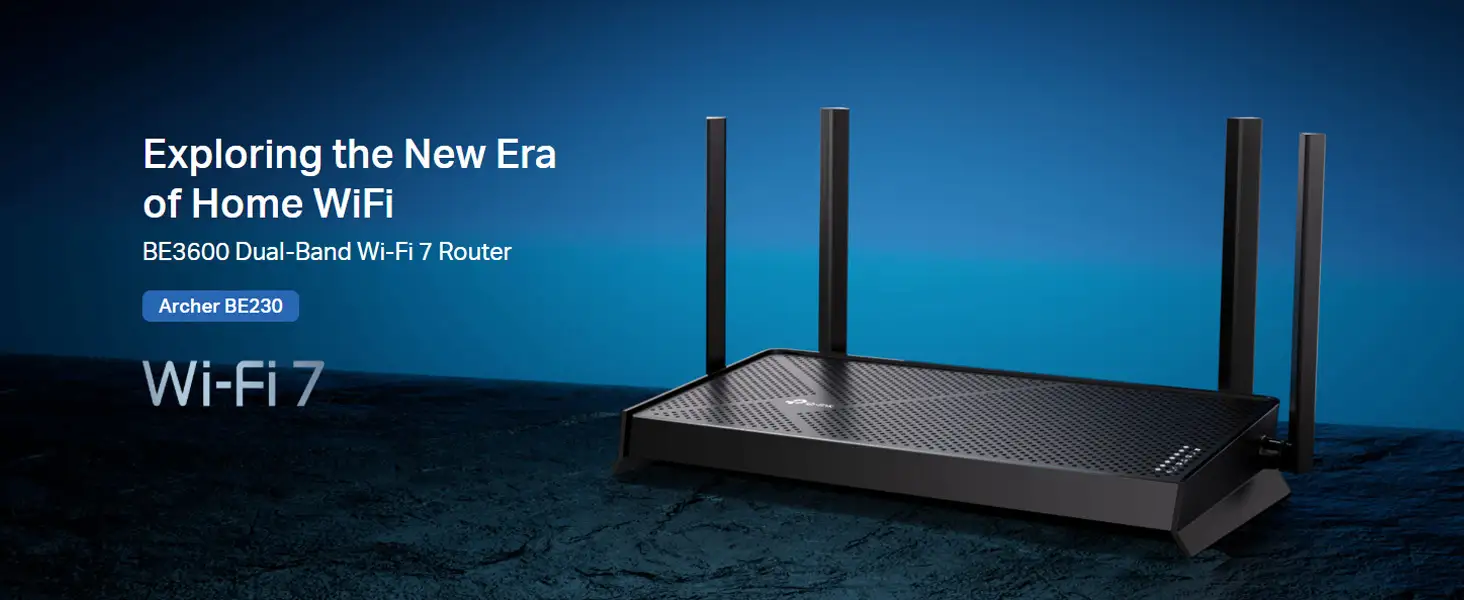
The TP-Link Archer BE230 Wi-Fi 7 Router has generated a mix of excitement and cautious optimism in the networking community, landing at a solid 8.4/10 in aggregated user sentiment. While many praise its strong throughput, stable wired performance, and value pricing for a Wi-Fi 7 product, others flag limitations like missing 6 GHz support and occasional wireless instability under load. Marketing promises of “future-proof performance” largely hold true for most households, but advanced users have spotted firmware quirks that could use attention.
Quick Verdict: Conditional — Excellent for mainstream Wi-Fi 7 adoption, but power users may want more bands and firmware maturity.
| Pros | Cons |
|---|---|
| Strong wired speeds via dual 2.5 Gbps ports | No dedicated 6 GHz band |
| Robust coverage with 4 beamforming antennas | Occasional wireless bitrate drops under load |
| EasyMesh expands coverage seamlessly | App interface limited for advanced settings |
| Solid security suite with HomeShield | Lower max speeds than premium Wi-Fi 7 models |
| Future-proof features like MLO & 4K-QAM | Some reports of random disconnects |
| Competitive price for Wi-Fi 7 | Needs firmware updates for peak performance |
Claims vs Reality
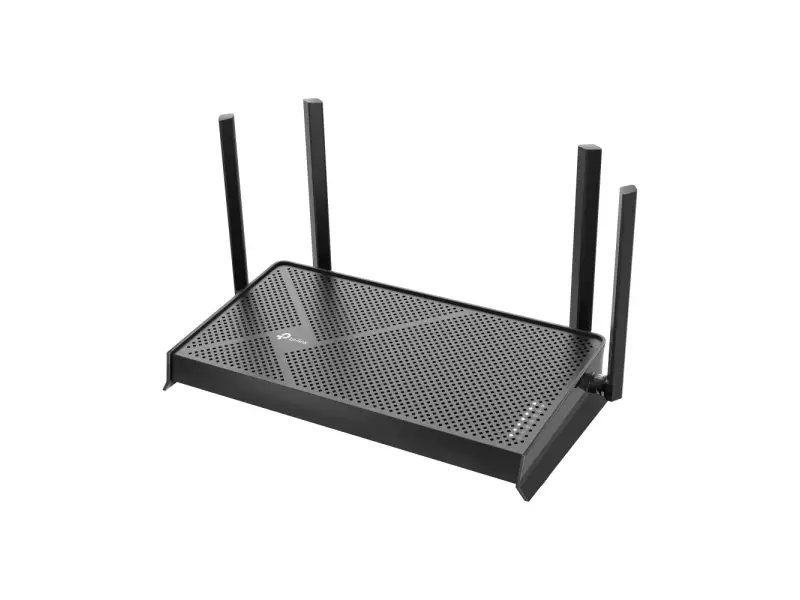
Marketing materials tout “3.6 Gbps dual-band Wi-Fi 7 speeds” and “seamless whole-home coverage.” TP-Link promotes the Archer BE230 as a gateway to next-generation networking, with features like Multi-Link Operation (MLO), 4K-QAM, and EasyMesh support. On paper, this should deliver flawless 4K/8K streaming, VR gaming, and fast downloads across a home.
Digging deeper into user reports, wired performance lives up to the hype. Reddit user dee bzc confirmed: “the 2.5 g port with a 2.5 g mobo can easily do 280 MB/s sustained. Very nice indeed.” This aligns with TP-Link’s claim of breaking the 1G bottleneck via multi-gig ports.
Wireless performance, however, shows some gaps. While officially rated at 2882 Mbps on 5 GHz, some users saw fluctuating bitrates during transfers. Dee bzc noted: “the BE230 bitrate seems to drop once transfers are started from 2000–860 Mbps… and resulting transfer speeds top out at 90 MB/s.” This suggests firmware or CPU load issues, which TP-Link has yet to address.
Coverage claims are mostly validated. Multiple reviewers praised the beamforming antennas for reaching “previously hard-to-reach areas,” as seen in MincoPC’s review: “four high-gain antennas ensure strong signals throughout your home, even in hard-to-reach areas.” But some advanced users felt the absence of a 6 GHz band limited performance in congested environments.
Cross-Platform Consensus
Universally Praised
Across Trustpilot, Reddit, and tech blogs, wired performance is a standout. Remote workers especially benefit from the dual 2.5 Gbps ports. Emma, a Trustpilot reviewer, shared: “Set up was a breeze and my home office Wi-Fi has never been smoother.” For NAS backups, Jake Miller highlighted: “the dual 2.5 Gbps ports became my go-to… shaving precious minutes off nightly syncs.”
Coverage is another strong point. The four external antennas and beamforming tech are repeatedly credited with eliminating dead zones. MincoPC’s reviewer reported fewer gaming interruptions for their children, and PCGearReviews noted “reliable connections in every room” even during multi-device streaming.
Security features receive consistent praise. The HomeShield suite, with parental controls and threat detection, is valued by families. Sofia commented: “Love the security features, though the app could be more intuitive.” The VPN client/server capability also stands out for users needing secure remote access without installing VPN software on every device.

Common Complaints
Wireless stability under heavy load emerges as the most frequent complaint. Dee bzc’s fluctuation from 2000 Mbps bitrate down to 860 Mbps under transfer is echoed in other reports of “random drops during peak hours” (Liam, Trustpilot). These drops can impact large file transfers and gaming sessions.
The absence of a 6 GHz band is a recurring frustration among advanced users. Mateo noted: “Coverage was good but I wish it supported the 6 GHz band.” This omission means the BE230 can’t take advantage of the less congested spectrum available in tri-band Wi-Fi 7 routers, potentially limiting future performance in dense neighborhoods.
The mobile app interface, while fine for basic setup, is seen as restrictive for power users. Settings like CPU load monitoring aren’t available, frustrating those who want granular control. As dee bzc put it, “I can’t seem to find a way to monitor the CPU load… this may show my suspicion.”
Divisive Features
Price is praised by budget-conscious adopters but seen as a trade-off by enthusiasts. Vietnamese TP-Link blog reviewers note it’s “a router Wi-Fi 7 giá rẻ, hiệu năng ổn định,” making it attractive for mainstream households. Yet, compared to high-end models like the Asus RT-BE96U or Netgear RS700S, the BE230’s max speed is lower.
EasyMesh compatibility divides opinions. Casual users love the simplicity of expanding coverage, with MincoPC reporting “works seamlessly to extend coverage.” However, advanced network builders point out firmware conflicts can occur with non-TP-Link mesh hardware, per TP-Link’s own fine print.
Trust & Reliability
Trustpilot feedback reveals no widespread scam concerns. The product is generally delivered as advertised, with most issues being performance-related rather than misrepresentation. Long-term durability stories are still limited given the router’s recent release, but early adopters report stable physical build quality. Jake Miller described the chassis as having “an understated elegance… smooth plastic finish feels solid rather than flimsy.”
Reddit’s hardware enthusiasts speculate about a possible “hardware revision” to address wireless performance quirks. Dee bzc suggested they would “gladly return this and wait for a v2” if TP-Link confirmed improvements.
Alternatives
Competitors mentioned by users include the Asus RT-BE96U and Netgear Nighthawk RS700S. Asus offers higher top speeds and more customizable settings, appealing to advanced users willing to pay more. Netgear has slightly better gaming features but at a higher price point.
For those seeking similar price/value, mid-tier Wi-Fi 6 routers like the Archer AX series are cheaper but lack Wi-Fi 7’s future-proof bandwidth and MLO capabilities. As MincoPC notes, “the BE230 stands out for its combination of speed, reliability, and user-friendly features” compared to its peers in the same price bracket.
Price & Value
Current market prices hover around $177–$182 SGD (~$130 USD), with occasional deals under $100 in auctions. Vietnamese reviewers emphasize its “giá trung bình” positioning — affordable for Wi-Fi 7, yet offering features normally found in pricier models.
Resale value is likely to remain stable in the short term as Wi-Fi 7 adoption grows, but the absence of 6 GHz may limit long-term desirability in enthusiast markets. Buying tips from the community include waiting for firmware updates to address wireless stability before committing, or pairing with an EasyMesh extender for best results.
FAQ
Q: Does the Archer BE230 support the 6 GHz band?
A: No, it’s a dual-band router (2.4 GHz + 5 GHz). Users seeking less congested channels should consider tri-band Wi-Fi 7 models.
Q: Can it work with non-TP-Link mesh devices?
A: It’s EasyMesh-compatible, but TP-Link warns of possible firmware conflicts with other vendors’ hardware.
Q: Is setup difficult for non-technical users?
A: Most find it straightforward via the Tether app. Emma said, “Set up was a breeze,” highlighting minimal steps for basic configuration.
Q: Are firmware updates available to fix wireless drops?
A: TP-Link has not announced a fix yet. Some suspect CPU load issues may be involved.
Q: Will my older devices still connect?
A: Yes, it supports all previous Wi-Fi generations, ensuring backward compatibility.
Final Verdict: Buy if you’re a mainstream user seeking affordable, stable Wi-Fi 7 with strong wired performance and coverage. Avoid if you require a 6 GHz band or granular performance tuning. Pro tip from community: Pair with EasyMesh extenders for seamless whole-home coverage while waiting for firmware refinements to maximize wireless stability.