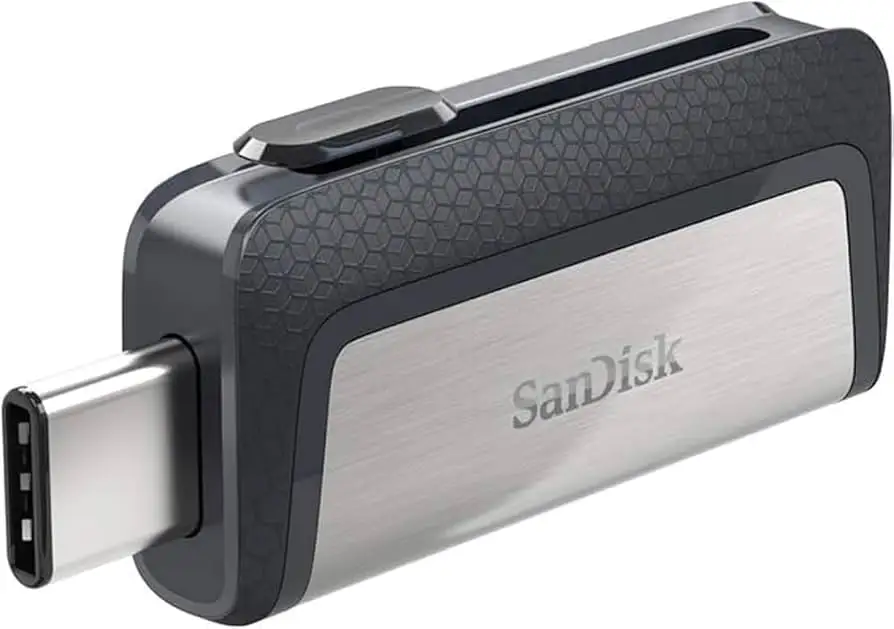
SanDisk Ultra Dual Drive USB-C Review: Mixed Verdict
Starting with a surprising twist, the SanDisk Ultra Dual Drive USB Type-C enjoys high ratings across platforms (averaging 4.6–4.7 stars), yet a recurring theme in user feedback warns of slower-than-expected write speeds and heat buildup during prolonged transfers. Based on aggregated reports, the drive earns a 7.9/10—praised for its portability and dual-port convenience, but held back by inconsistent performance under heavy loads.
Quick Verdict: Conditional—Excellent for light, cross-device file transfers, but not ideal for sustained large data writes.
| Pros | Cons |
|---|---|
| Compact, lightweight design fits on keychains | Write speeds drop significantly during large transfers |
| Dual USB-C and USB-A connectors for wide compatibility | Plastic build on some models feels less durable |
| Affordable pricing across capacities | Tends to heat up quickly under load |
| Easy smartphone-to-PC transfers via OTG support | Connector slide mechanism can loosen over time |
| Broad OS compatibility (Windows, macOS, Android) | Some units report less-than-advertised capacity |
Claims vs Reality
Marketing emphasizes “up to 150MB/s read speeds” and “seamless transfers between Type-C and Type-A devices.” While read speeds generally match claims, write performance tells another story. Reddit user on r/computers noted: “It starts at 69 MB/s and then slowly drops to 22 MB/s on a 10GB file… not exactly luxe.” This drop-off often occurs after the drive’s cache fills, especially with large continuous writes.
The brand also touts “automatic backup” through the SanDisk Memory Zone app. While Best Buy customers appreciate the feature for phone photo backups, some found the process less intuitive. One review stated, “It works… but I need to use its software from the app store. Lack of good documentation makes it harder.”
Durability claims are mixed. Official specs highlight connector protection via swivel design, but LDLC buyers reported the USB-A plastic housing “curves under finger pressure” and questioned longevity. Others, however, praised the metal Luxe variant’s sturdiness and premium feel.
Cross-Platform Consensus
Universally Praised
Portability and dual-connector design receive near-unanimous approval. A verified Best Buy buyer shared: “No need for adapters when using either USB-A or USB-C ports. Best part is being able to use it with my phone.” This flexibility benefits students, traveling photographers, and professionals juggling legacy and modern hardware.
Compatibility is another strong point. From Android OTG connections to macOS and Windows use, it handles “sharing files between phones and laptops” without fuss. Reddit’s r/playstation community noted it works well for moving PS5 captures via Type-C to PC.
Value for money also emerges as a key benefit. With frequent pricing under $20 for 128GB, Trustpilot users called it “not lightning fast, but works reliably” and “probably going to purchase more” for everyday use.
Common Complaints
Performance throttling during large transfers is the most cited issue. LDLC customers measured “only 27MB/s for large files… better for small files thanks to cache.” Heat buildup accompanies these slowdowns, with one Trustpilot reviewer warning: “Overheats easily and transfer speeds drop drastically after like 20 seconds.”
Build quality on non-metal versions divides opinion. Some call it “solid” for the price, while others lament the “all plastic” housing that “might not hold up to living in a pocket everyday.” Connector mechanisms can loosen, causing the port to retract when plugged in—a frustration echoed on Slickdeals.
Capacity discrepancies also frustrate buyers. Reports include 64GB drives showing only 32GB usable, or real capacity being ~57GB due to binary vs decimal measurement differences.
Divisive Features
Speed ratings spark debate. While some measure sustained writes above 60MB/s for moderate transfers, others experience erratic fluctuations “from fast to super slow to pause,” as noted in BestViewsReviews analysis. The Luxe variant’s 400MB/s read claim impresses light users, but heavier workloads reveal similar throttling patterns.
The Memory Zone app earns praise for easy backups but alienates those expecting simple drag-and-drop functionality. Some refuse to install extra software, preferring traditional file managers.
Trust & Reliability
Trustpilot and Reddit discussions reveal occasional quality control concerns. A Trustpilot commenter recounted data loss: “It took forever to transfer and when I tried to download that data later it just wasn’t there.” While not widespread, such incidents prompt caution for mission-critical storage.
Long-term durability stories vary. Some users have “owned this for years… works reliably,” while others note progressive flimsiness in newer releases compared to older SanDisk models. Heating issues over extended sessions raise questions about wear on internal components, though many casual users never encounter failures.
Alternatives
Samsung’s high-speed USB drives surface as a frequent comparison point. A Reddit user suggested, “I got a Samsung flash drive which exceeds 300 MB/s read speed without any drop.” For those needing sustained high-performance writes, these alternatives may justify higher prices.
SanDisk’s own Luxe 400MB/s read model offers a sturdier metal build, but shares similar write bottlenecks under heavy load. Extreme Pro models, while pricier, deliver better sustained speeds and include hardware encryption absent in the Ultra Dual series.
Price & Value
Current market prices show strong affordability: eBay listings for 128GB around $16–$20, with sales dropping to $15.75 as noted on Slickdeals. LDLC’s 128GB variant at €54.95 reflects regional price variance, but frequent discounts make it accessible globally.
Resale value remains low due to rapid price drops and newer model releases. Community buying tips include waiting for Amazon or Best Buy sales, and choosing capacity based on actual needs, given possible speed limitations in larger sizes.
FAQ
Q: Does the SanDisk Ultra Dual Drive USB Type-C support iPhones?
A: Only newer iPhones with USB-C ports are physically compatible, but user reports show software limitations. One buyer noted the Memory Zone app isn't supported on iOS.
Q: How hot does the drive get during use?
A: Many users report noticeable heat after a few minutes of heavy transfers. While usually not damaging, it can trigger speed throttling.
Q: Is the advertised capacity fully usable?
A: No. Due to binary vs decimal storage measurements, usable space is slightly less than stated. Some users also encountered defective units with much lower capacity.
Q: Can I use it as a bootable drive?
A: Yes, multiple Reddit users have successfully created bootable drives for macOS and Linux, though speed may limit OS installation times.
Q: Does it require special software for file transfers?
A: No—drag-and-drop works on most devices, but the SanDisk Memory Zone app offers extra backup features for Android.
Final Verdict: Buy if you need a compact, affordable solution for quick cross-device transfers and occasional backups. Avoid if your primary use involves sustained large file writes or you require rugged durability. Pro tip from the community: opt for the metal Luxe variant for better physical resilience, but temper expectations on write speeds.