SanDisk iXpand Flash Drive Go 128GB Review: Conditional
A Best Buy listing shows 4.5/5 from 1,201 reviews, yet one long forum thread reads like a warning label. Reddit user John Smith 1 said: “Sandisk iXpand is a total scam!” and called the companion software “totally useless.” That split captures the entire story of the SanDisk iXpand Flash Drive Go 128GB: for many people it’s a simple iPhone photo offload tool, but for others it becomes an app-and-compatibility headache.
SanDisk iXpand Flash Drive Go 128GB verdict: a conditional buy for iPhone photo/video backups, with meaningful caveats around apps, file handling, and reliability stories. Score: 7.2/10.
Quick Verdict
SanDisk iXpand Flash Drive Go 128GB: Conditional (Yes for iPhone photo/video offload; No if you expect broad file support or smooth media playback inside the app).
| What the data suggests | Evidence from users (platform) |
|---|---|
| Great for clearing iPhone photo storage | Best Buy user jp 11617 said: “I was able to save photos & videos and remove everything from my phone…” (Best Buy) |
| Often easy “plug in and follow steps” | Best Buy user leann said: “I just plugged it into my phone and followed the easy steps.” (Best Buy) |
| App experience can be a major weak point | Reddit user John Smith 1 said the iXpand Drive app is “totally useless” with “no settings menu at all.” (SanDisk Forums) |
| Document/file workflows may require workarounds | Best Buy user heathers said it “does not work as-is for backing up anything but photos, videos, and contacts” and required an adapter workaround. (Best Buy) |
| Speed claims are disputed in the wild | Reddit user John Smith 1 wrote: Amazon shows “read speed 130” but they saw “only 90 mb/s.” (SanDisk Forums) |
| Reliability complaints include overheating and failures | Reddit user lagar tha nick said it “overheats constantly then fried itself.” (SanDisk Forums) |
Claims vs Reality
SanDisk’s marketing centers on freeing space on iPhone and “automatically back up your photos, videos and contacts,” plus moving files quickly via USB 3.0 and protecting files with passwords (Amazon specs + SanDisk product page). Digging deeper into user reports, that core “free up space” promise is often validated—especially among shoppers who mainly want to offload Camera Roll.
Best Buy user ad warr described the flow as nearly automatic once the app is involved: “after you download the app… it’ll start downloading the photos really fast,” adding they had “over 16,000 photos including videos.” Best Buy user scotts echoed the peace-of-mind angle, saying it “worked easily to download all her pictures,” enabling deletion from the phone “while giving her piece of mind about saving her photos.”
Where reality diverges is when buyers expect broader file handling and in-app media playback. Best Buy user heathers said the device “does not work as-is for backing up anything but photos, videos, and contacts,” and they believed document backup “can no longer do this” due to app changes. On the more extreme end, Reddit user John Smith 1 attacked the advertised video-format support, saying: “there is no support for mkv / avi files whatsoever!” and describing prompts that “ios doesn’t support this video format” inside the companion app (SanDisk Forums).
Cross-Platform Consensus
Universally Praised
The most consistent “win” across mainstream retail feedback is basic iPhone storage relief. For parents and heavy photo takers, the drive is framed as an escape hatch when the phone is full. Best Buy user jp 11617 said: “Amazing! I was able to save photos & videos and remove everything from my phone,” and emphasized it’s “easy to use, quick and convenient.” Best Buy user andrews put it plainly: “works as should and saved me a bunch of space off my iphone.”
A recurring pattern emerged around “low-friction setup” for non-technical users. Best Buy user kevin described a guided flow: “attach it to your device… prompt you with the next steps,” calling the interface “easy and quick to understand and use.” That kind of narrative matters for people buying this as a “no cloud, no laptop” safety net—especially those who don’t want to mess with manual imports.
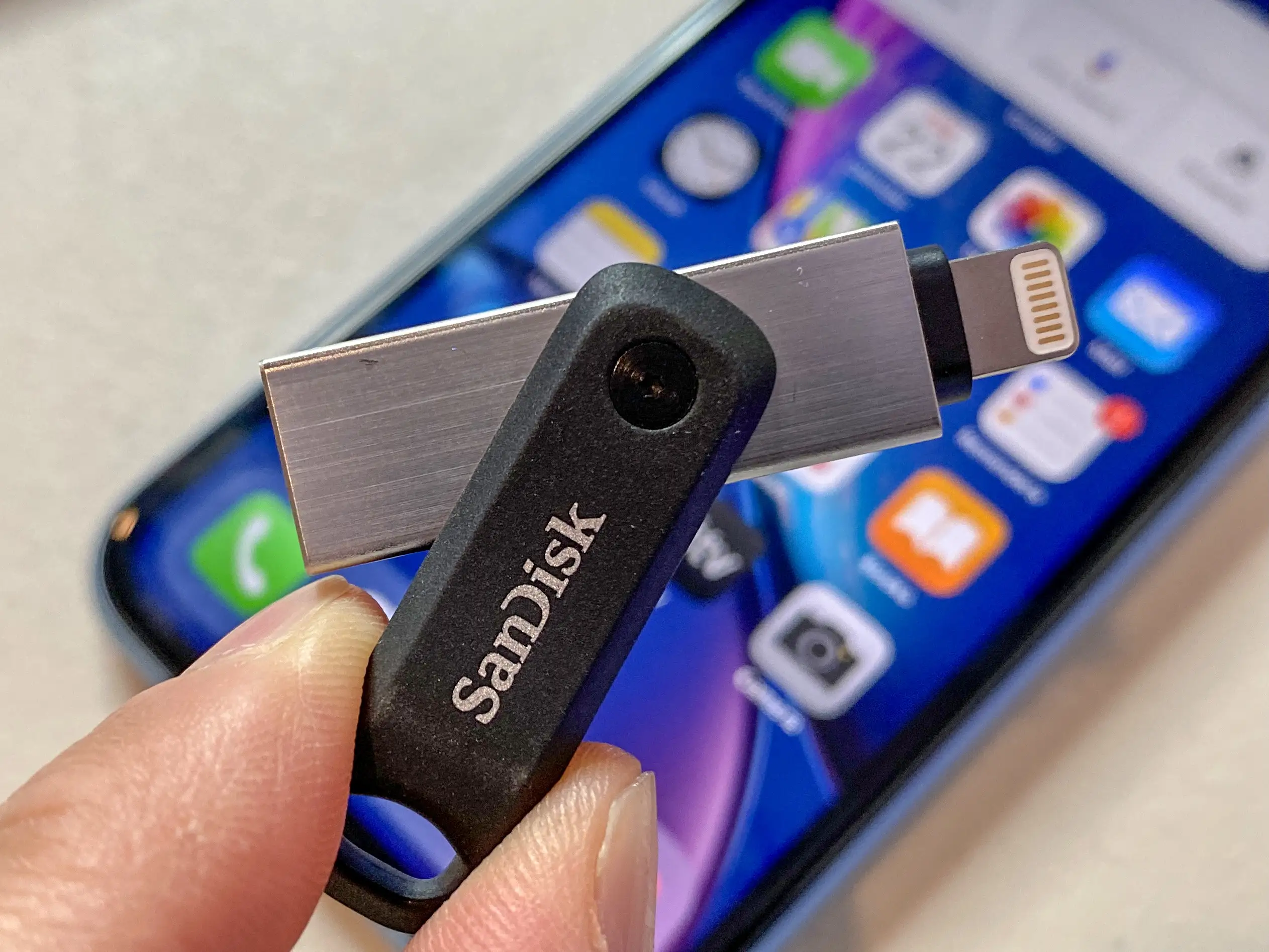
Portability is the other crowd-pleaser, especially for travelers and anyone who wants a “keychain backup.” Best Buy user randy daytona liked having “something on my keychain that has a lightning connector,” and pointed to the “password protected vault.” Best Buy user jp 11617 also highlighted size: “small enough to store in my jean pocket or throw it in my pocketbook.” These comments align with the product’s swivel and keyring-hole design described on Amazon/SanDisk pages.
After those narratives, the retail consensus tends to boil down to:
- Easy iPhone photo/video backup for many buyers (Best Buy)
- Convenient keychain-sized form factor (Best Buy)
- Helpful for freeing space without relying on cloud storage (Best Buy)
Common Complaints
Digging deeper into user reports, the loudest complaints revolve around software dependence and shifting app capabilities. Best Buy user heathers described hours of confusion after expecting document backups, writing the old app “has been discontinued” and replaced with one “that only allows copying of photos, videos, and contacts.” Their workaround—using an adapter so iPadOS Files recognizes the drive—turns a “plug-and-play” product into a more technical flow that some buyers didn’t sign up for.
Another recurring problem is instability and interruptions during transfers. Best Buy user halfamind said the drive often stops with “something went wrong try again,” and criticized that it “loses connection every time I’m trying to use it.” For people doing big one-time migrations—like thousands of photos—random errors can turn a simple backup job into repeated retries.
On the forum side, complaints get more granular and more severe. Reddit user John Smith 1 alleged file renaming during backup: “it changes my file names… which breaks my library and file organization completely,” citing changes like IMG names turning into strings ending with “-photo.jpg” (SanDisk Forums). That’s a specific nightmare scenario for photographers or anyone with a careful archival workflow.
After those narratives, the pain points that surface most often are:
- App dependency and app feature changes (Best Buy; SanDisk Forums)
- Connection/transfer interruptions (Best Buy)
- File naming/file management frustrations (SanDisk Forums)
Divisive Features
Media playback is the most polarizing expectation. Reddit user John Smith 1 believed the marketing implied broad video support and called it deception, describing being pushed toward paid third-party players and saying: “you’ve got built-in web browser… ‘Do More Store’… Infuse costs $30” (SanDisk Forums). That experience frames the product as a “premium price” item that still requires extra purchases for certain formats.
But Reddit user pauli unas pushed back hard on that framing: “It’s a storage device, not a media player,” arguing that needing a compatible player app is normal and not unique to this drive (SanDisk Forums). In other words, if your goal is simply to store files and move them, expectations may be met; if your goal is “play MKV/AVI directly from the drive inside the iXpand app,” some users felt burned.
Speed claims also divide users. While Amazon listings and reviews cite “read speed 130 megabytes per second,” Reddit user John Smith 1 wrote they saw “only 90 mb/s read speed” and “35-40 mb/s” writes (SanDisk Forums). Reddit user pauli unas countered that speeds vary based on file patterns and ports, and that quoted speeds are typically sequential reads under ideal conditions (SanDisk Forums). For buyers moving many small files, the “it’s slower than promised” perception can be real even if the spec is technically defensible.
Trust & Reliability
Scam language shows up repeatedly in the same forum thread that appears across the provided community sources. Reddit user John Smith 1 said: “this unfinished and semi-competent product is advertised as premium,” and Reddit user iro lg followed with: “I agree that this product is substandard and overpriced. I have been scammed.” Reddit user venus descending amplified the distrust, saying: “i agree this app reeks of fraudulent activity,” and called the device “trash” while describing extremely slow photo transfer rates (SanDisk Forums).
Long-term durability stories are uneven in the data. Best Buy includes a user who had it “more than 2 years” (axels), recommending it for travel and projects: “great for traveling with school projects…” (Best Buy). Yet on the opposite end, Reddit user lagar tha nick described catastrophic failure: “it overheats constantly then fried itself” and later “it refuses to copy files from my iphone,” citing errors like “drive is busy” and “iXpand drive not found” (SanDisk Forums). For buyers who need “set it and forget it” backups, these overheating/failure anecdotes weigh heavily.
Alternatives
Only a few competitors are explicitly mentioned in the provided data. In reviewer commentary, UseGadgets compared it to the Samsung Duo Plus and Kingston DataTraveler, positioning the iXpand as stronger for iPhone Lightning compatibility and automatic backup workflows, while noting Samsung’s USB-C advantage and Kingston’s lower price (UseGadgets). Metaversegenome similarly mentioned Samsung Bar Plus and Kingston DataTraveler, praising broader compatibility or more premium build in those options (Metaversegenome).
What the user stories suggest is that alternatives matter most for two user types:
- If you’re moving toward USB-C ecosystems, reviewers point out the iXpand “doesn’t support usb-c natively” (UseGadgets).
- If you want a simpler “standard USB drive” experience without app dependency debates, the Kingston/Samsung mentions highlight that iXpand’s iPhone-specific app workflow can be both its advantage and its liability.
Price & Value
The price picture in the provided data is volatile across marketplaces. Best Buy lists it at $42.99 (Best Buy). eBay shows multiple price points: one new listing at $32.99, another at $56.06, and another seller at $27.99 + $2.99 shipping (eBay). On Amazon (Belgium) it’s shown at €34.36 with a discount (Amazon.com.be).
From a value standpoint, retail reviewers often justify paying more because it “just works” for iPhone photo backups. Best Buy user scotts said they tried a cheaper brand but it stored photos in “completely random order,” concluding the SanDisk “cost a bit more, but is well worth it.” Meanwhile, the forum side frames the product as “overpriced,” with Reddit user iro lg calling it “substandard and overpriced” (SanDisk Forums).
Buying tips embedded in user feedback skew practical: Best Buy user heathers effectively warns that if you want document copying, you may need “the purchase of an adapter” and to use the iPad “Files” app recognition path (Best Buy). That makes total cost (and friction) higher than many shoppers expect.
FAQ
Q: Does it really free up space on an iPhone without using the cloud?
A: Yes for many photo/video-heavy users. Best Buy user jp 11617 said: “I was able to save photos & videos and remove everything from my phone,” and Best Buy user scotts described downloading iPhone photos so they could “delete photos to make room.” (Best Buy)
Q: Can it back up documents like PDFs and Word files from an iPad?
A: It depends on the workflow. Best Buy user heathers said it “does not work as-is” beyond photos/videos/contacts and that document backup “can no longer do this” via the replaced app, but they succeeded using a Lightning-to-USB adapter so the iPad “Files” app could copy documents. (Best Buy)
Q: Will it play MKV/AVI videos directly from the drive?
A: This is disputed. Reddit user John Smith 1 claimed “no support for mkv / avi files whatsoever” in the companion app and said it pushed paid third-party players. Reddit user pauli unas argued it’s “a storage device, not a media player,” so you’ll need a compatible player app regardless. (SanDisk Forums)
Q: Are the transfer speeds really 130 MB/s?
A: Official listings cite “read speed 130 megabytes per second” (Amazon/UseGadgets), but Reddit user John Smith 1 reported seeing “only 90 mb/s” reads and “35-40 mb/s” writes. Reddit user pauli unas said speeds vary by port, file type, and sequential vs small-file reads. (Amazon; SanDisk Forums)
Q: Is the app required?
A: Many buyers describe needing an app for the typical “plug in and follow steps” experience. Best Buy user ad warr explicitly said “after you download the app” it starts downloading photos. But forum users strongly criticize the app experience, with Reddit user John Smith 1 calling it “totally useless.” (Best Buy; SanDisk Forums)
Final Verdict
Buy SanDisk iXpand Flash Drive Go 128GB if you’re an iPhone user who mainly wants a fast, convenient way to offload Camera Roll and keep a keychain-sized backup. Best Buy user leann summed up that experience: “it backs up your phone and clears space on your phone,” and Best Buy user kevin liked that it “prompt you with the next steps.” (Best Buy)
Avoid it if your workflow depends on document backups, strict filename preservation, or you expect the iXpand app to be a full media player for MKV/AVI. Reddit user John Smith 1 complained about file renaming that “breaks my library” and said MKV/AVI support was effectively absent in-app (SanDisk Forums), while Best Buy user heathers warns document copying may require extra adapters and workarounds (Best Buy).
Pro tip from the community: Best Buy user heathers recommends the adapter-based workaround—using a Lightning-to-USB adapter so the iPad “Files” app recognizes the drive for document transfers—if you’re not just backing up photos, videos, and contacts. (Best Buy)