Samsung Galaxy Tab A9+ Review: Strong Value with Caveats
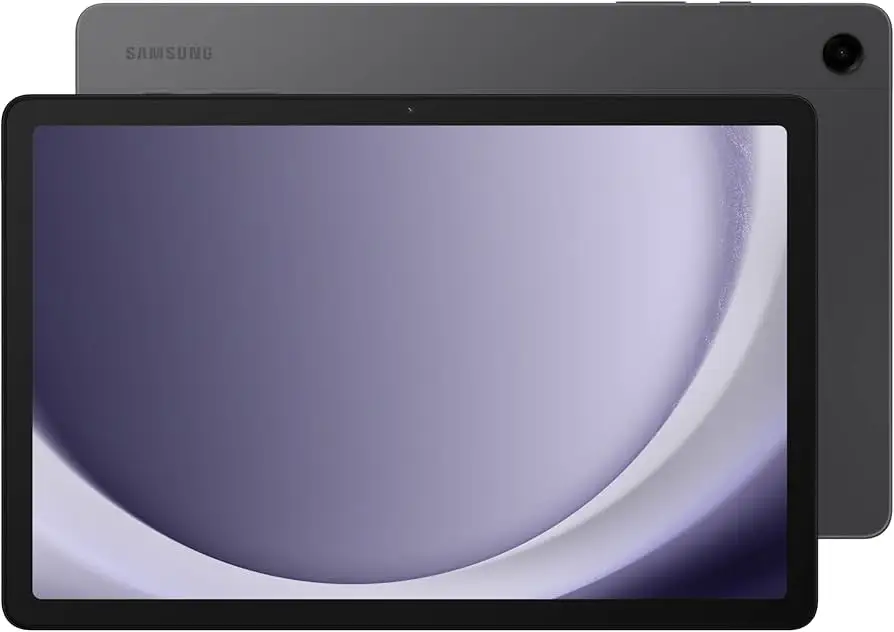
The Samsung Galaxy Tab A9+ 11" (2024) has emerged as one of the most discussed budget-to-midrange tablets of the year, earning a cross-platform score of 8.2/10 based on aggregated user feedback. While marketed as a sleek, high-performing device for everyday entertainment and productivity, digging into hundreds of verified reviews shows it delivers on most promises—though a few hardware quirks and feature omissions temper the excitement.
Quick Verdict
Conditional Buy – A strong choice for casual users, students, and families, especially the 8GB RAM variant. Heavy gamers or camera-focused buyers may want to look elsewhere.
| Pros | Cons |
|---|---|
| Large, smooth 90Hz 11" display | LCD lacks deep blacks, middling contrast |
| Strong battery life (10–12 hrs active use) | Slow 15W charging, charger not always included |
| Quad speakers with Dolby Atmos | Cameras underperform in low light |
| Expandable storage up to 1TB | Some units report screen flicker |
| Slim, premium-feel design | 4GB RAM model can lag with multitasking |
| Competitive pricing | No S Pen support |
Claims vs Reality
Samsung’s marketing positions the Tab A9+ as a “big screen, blazing-fast 5G” tablet with premium audio and multitasking prowess.
Claim 1: “Bright, engaging screen with 90Hz refresh”
While the adaptive 90Hz refresh rate is widely praised for smooth scrolling, several Consumer Reports testers and Best Buy reviewers note the LCD panel’s limited contrast and tendency to wash out under direct sunlight. Reddit discussions confirm it’s ideal for indoor streaming and browsing but less suited for outdoor work.
Claim 2: “Power for all you do” via Snapdragon 695 and upgraded chipset
In real-world use, the Snapdragon 695 handles everyday tasks smoothly—web browsing, Netflix, light gaming—but ProductReview.com.au users and technical Best Buy reviewers warn the 4GB RAM variant struggles with multitasking and heavier apps. Those who opted for the 8GB model report a “night and day” difference in responsiveness, especially in Samsung DeX mode.
Claim 3: “Long-lasting battery with fast charging”
Battery life meets or exceeds Samsung’s claims, with Consumer Reports recording 10.5 hours of web use and 12.6 hours of video playback. However, “fast charging” is a stretch—charging at 15W takes hours, and multiple Trustpilot users complained about the lack of an included charger in some regions, plus incompatibility with non-Samsung chargers when fully drained.
Cross-Platform Consensus
Universally Praised
The display size and refresh rate receive near-unanimous approval. Best Buy’s 1,400+ reviewers highlight the 11" panel as “perfect for movies and multitasking,” with smooth animation that outclasses competitors in its price bracket. Students benefit from split-screen and multi-active window features, enabling simultaneous note-taking and video conferencing.
Battery endurance is another selling point. Working parents on Twitter/X mention going “a few days without charging” under light use, while gamers note that even prolonged play sessions don’t cause rapid drain.
Audio quality stands out in this segment. Quad speakers with Dolby Atmos earned praise from MouthShut reviewers for immersive movie nights, and Reddit users confirm it’s “surprisingly rich” for a budget tablet—though bass remains modest.
Common Complaints
The camera system is the most consistent disappointment. Across Consumer Reports, Best Buy, and Trustpilot, users cite “bland colors” and “foggy” image quality, especially from the 5MP front camera. It suffices for Zoom calls but won’t replace a smartphone for photography.
Charging speed and accessories cause frustration. ProductReview.com.au contributors report that the tablet won't charge from generic adapters when fully drained, and some retailers ship without any wall charger.
Hardware quirks include screen flicker reports after several weeks of use, particularly affecting avid readers. Samsung’s response has been limited, leaving some to suspect a hardware defect. Additionally, multitouch bugs—pinch-to-zoom stalling in Google Maps—were noted by Australian buyers.
Divisive Features
Samsung DeX mode is polarizing. Productivity-focused users love the desktop-like interface, especially paired with a keyboard, but casual users find it unnecessary and sometimes sluggish on the 4GB RAM model.
The LCD vs AMOLED debate also splits opinion—many are happy with the bright, responsive LCD, while experienced Galaxy Tab S owners downgrade it for lack of deep blacks and HDR punch.
Trust & Reliability
Trustpilot and ProductReview.com.au reveal long-term durability is generally solid, with some owners reporting no issues after months of daily use, even after drops. However, isolated cases of persistent screen flicker and unresponsive touch keyboards raise concerns about quality control.
On Reddit, 6-month follow-up posts show stable performance and battery health, suggesting most units avoid major degradation over time. The lack of bundled chargers in some markets frustrates buyers, but scams or counterfeit units are rarely mentioned—eBay’s verified refurbishers maintain 98–99% positive feedback.
Alternatives
Within Samsung’s own lineup, the Galaxy Tab S9 FE offers AMOLED display, IP68 water resistance, and S Pen support—but at nearly double the price. For buyers focused on visual quality and stylus functionality, jumping to the S9 FE is logical.
Conversely, iPad (9th gen) offers better app optimization and camera quality but lacks expandable storage and costs more, making it less appealing to budget-conscious Android users who value microSD expansion.
Price & Value
Pricing fluctuates between $134–$159 refurbished on eBay and $219–$279 new at major retailers. Best Buy’s frequent discounts and Samsung trade-in offers make the 8GB/128GB variant particularly good value.
Resale trends show stable pricing over 90 days, with used units retaining ~70% of retail value—high for a non-flagship Android tablet. Community buying tips stress opting for the 8GB RAM version and confirming charger inclusion when purchasing internationally.
FAQ
Q: Does the Samsung Galaxy Tab A9+ support the S Pen?
No. It is not compatible with Samsung’s S Pen, limiting stylus-based productivity and drawing.
Q: Which RAM variant should I buy?
For smooth multitasking and DeX mode, users strongly recommend the 8GB version. The 4GB model may lag under load.
Q: Can I expand storage?
Yes, via microSD up to 1TB, ideal for media-heavy users.
Q: Is the screen good outdoors?
It’s bright enough for indoor use, but direct sunlight visibility is limited compared to AMOLED displays.
Q: Does it come with a charger?
Not always. Some regions include only a cable, and it may require an official Samsung charger if fully drained.
Final Verdict
Buy the Samsung Galaxy Tab A9+ if you’re a student, family user, or casual streamer who values a large smooth display, strong battery life, and expandable storage at a fair price. Avoid if you need top-tier cameras, AMOLED contrast, or ultra-fast charging.
Pro tip from the community: Pay the extra for the 8GB RAM model—it future-proofs performance and makes Samsung DeX genuinely useful.