RCA 10.1" WiFi Digital Picture Frame Review: Conditional
A single detail keeps surfacing across RCA’s 10.1-inch touchscreen products: when the display behaves, people are happy; when it doesn’t, it becomes “totally unusable.” That gap matters a lot for the RCA 10.1" WiFi Digital Picture Frame with Touch Screen—because the core promise is simple: set it up once, then enjoy photos at a glance. Verdict from the available data: the frame’s marketing claims are clear, but the actual user feedback provided is largely about RCA tablets, not this specific picture frame—so the confidence level on real-world frame performance is limited. Score: 5.6/10.
Quick Verdict
RCA 10.1" WiFi Digital Picture Frame with Touch Screen: Conditional.
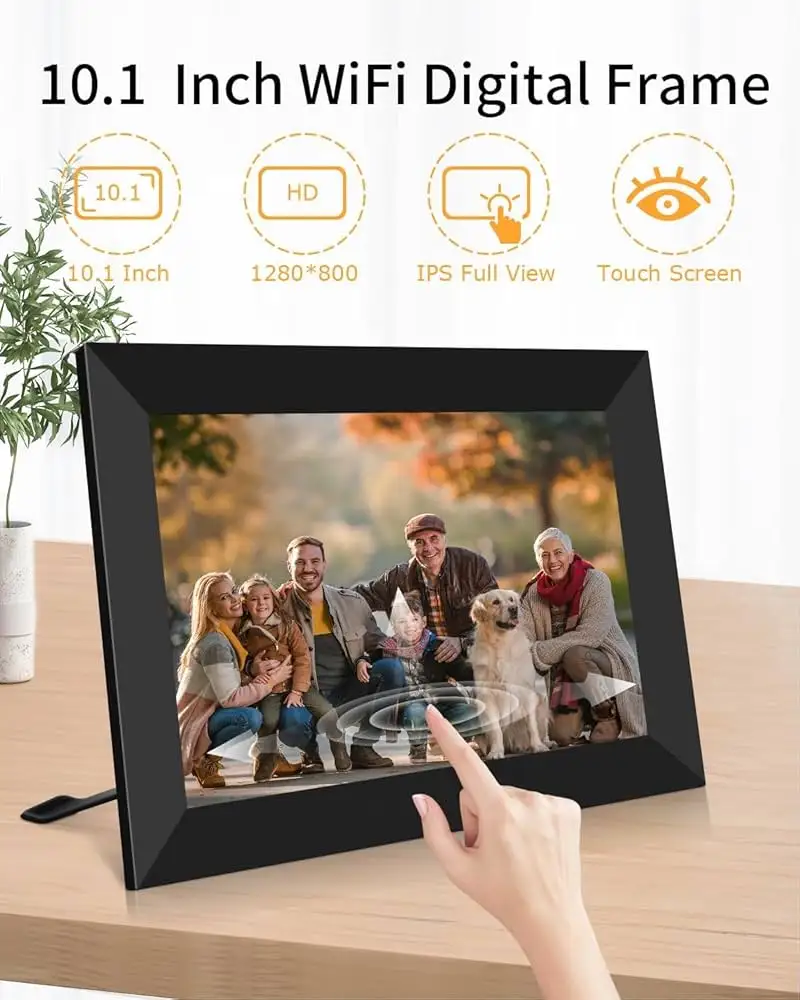
It looks compelling on paper—10.1" IPS touch display, 32GB storage, Wi‑Fi sharing through the Uhale app, auto-rotate, wall-mountable. But the user feedback in the dataset is not from owners of this exact frame; most of the “community” text is Amazon reviews for RCA tablets. That makes the verdict conditional on whether this model shares the same screen/viewing-angle and setup pitfalls users describe in other RCA 10.1" touchscreen devices.
| What matters | Evidence from sources | What it means |
|---|---|---|
| Wi‑Fi photo sharing via Uhale | Amazon listing claims “private wireless sharing… no limit on the number of users” | Promising for families—if the app works as advertised |
| Screen quality claims | Amazon listing: “HD IPS… super clear and bright” | Strong claim, but needs real owner confirmation |
| Viewing angle risk (from RCA touch devices) | Amazon tablet reviewer warned: “it must be viewed directly straight on” | If the frame behaves similarly, it undermines “glanceable” photo display |
| Setup/documentation friction (from RCA touch devices) | Amazon tablet reviewer complained: “lousy documentation!” and confusing charging instructions | Could translate into a harder first-time setup experience |
| Audio limitations (from RCA tablets) | Multiple Amazon tablet reviewers cite low volume | Less relevant unless you rely on video playback with sound |
Pros (from official specs)
- Wi‑Fi sharing through Uhale app; invites multiple users (Amazon listing).
- 10.1" 1280×800 IPS touchscreen; auto-rotate; wall-mount option (Amazon listing).
- 32GB storage and expansion via USB/SD up to 64GB (Amazon listing).
Cons (from user feedback in dataset, but not frame-specific)
- Severe viewing-angle complaints on RCA 10.1" touch displays: “tilt… and it literally disappears” (Amazon tablet review).
- Setup/documentation frustration: “lots of good features very poorly presented” (Amazon tablet review).
Claims vs Reality
Claim #1: “HD IPS touch screen… super clear and bright.”
Digging deeper into the provided user feedback, the strongest “reality check” comes from an Amazon review of the RCA Pro 10 tablet, where one buyer initially said the device “seems to be working fine,” but immediately flagged a display caveat: “the only issue at this point is the clarity of the screen. it must be viewed directly straight on.” That’s not a minor nit—especially for a digital picture frame that’s meant to be seen from across a room or at an angle in a hallway.
That same reviewer later escalated the complaint dramatically: “screen on this device is terrible! tilt the tablet in any direction and it literally disappears and is totally unusable.” While this is tablet feedback, not frame feedback, it’s the most concrete real-world testimony in the dataset about RCA 10.1" touchscreen viewing behavior—an issue that would be especially harmful for a living-room photo display.
Claim #2: “Easy setup… user-friendly for all ages.”
Marketing language positions the experience as straightforward: download the Uhale app, connect to Wi‑Fi, share photos anytime. Yet the closest real setup narrative in the dataset comes again from an Amazon tablet buyer describing confusion and friction: “the startup instructions have everything… except a logical presentation,” adding that Wi‑Fi initially reported “it is not available” and only connected “the third try.” For a gift scenario—one of the frame’s core pitches—this kind of first-day friction can turn “simple for all ages” into a tech-support weekend.
A recurring pattern emerged in these tablet reviews: people want “mini laptop” simplicity but feel the experience is muddled. One Amazon reviewer put it bluntly: “lots of good features very poorly presented with lousy documentation!” If the digital picture frame setup flow relies heavily on app pairing, Wi‑Fi, and onboarding, documentation and UI clarity become the difference between a frame that delights grandparents and one that gets left in the box.
Claim #3: “Share photo/video anytime” (implying a smooth family pipeline).
The official story is strong: “no limit on the number of users you can add,” and uploads from phone or “from your computer… through the ‘u hale’ website.” But none of the user feedback provided is from verified buyers describing Uhale photo delivery, reliability, or app glitches for this frame. The dataset supports the idea of a family-sharing workflow, but it doesn’t supply direct user stories confirming that “share anytime” actually feels consistent day-to-day.
Cross-Platform Consensus
Universally Praised
Value-for-money is the loudest theme in the available user feedback—again, largely about RCA 10.1" touchscreen tablets, but still revealing how buyers think about the brand’s 10.1" devices. One Amazon reviewer called their unit “a very nice tablet for the money!” and framed their purchase around practical needs: “decent sized screen… good graphics… micro sd card slot.” That kind of “good enough at a low price” mindset aligns with why many people buy a Wi‑Fi digital picture frame: it’s a practical family gift, not a luxury art display.
Another Amazon reviewer emphasized ease once things are running: “pleasantly suprised… up and running quickly and able to download a number of favorite apps,” and liked that it’s approachable for less technical users: “i think / hope teaching my non-tech mother may be easier with this device than my ipad.” Translated to a digital photo frame context, that’s the ideal target persona: families trying to keep older relatives connected through shared photos without constant troubleshooting.
There’s also consistent appreciation for the “mini laptop” style when a keyboard is involved (tablet context), which hints at a broader RCA appeal: devices that feel bigger and more legible than a phone. One Amazon reviewer wrote: “love this tablet. it’s like a mini laptop.” For a digital picture frame, the parallel is clear: a larger 10.1" display can make family photos readable and emotionally present, especially for users who struggle with small phone screens.
- Praised theme: “very nice… for the money” (Amazon tablet reviews)
- Praised theme: approachable for non-tech users (Amazon tablet reviews)
- Praised theme: larger-screen readability (“decent sized screen”) (Amazon tablet reviews)
Common Complaints
The most serious recurring complaint in the dataset is screen usability at angles—a problem that’s uniquely damaging for a digital picture frame. One Amazon reviewer described a screen that must be viewed “directly straight on,” and later warned: “tilt the tablet in any direction and it literally disappears.” If a picture frame has similar viewing-angle weaknesses, it stops being ambient home decor and becomes a device you must stand in front of—undercutting the entire product category.
Audio quality is another repeated pain point in the tablet reviews: “speaker volume… could be louder,” “horrible sound quality,” and “volume… too low.” For a photo frame, sound only matters if you frequently send videos with audio. Still, if the frame encourages “share photo/video anytime,” weak speakers could make video clips feel disappointing in group settings where you want to hear a grandchild’s voice without headphones.
Documentation and setup confusion also shows up strongly. One Amazon reviewer criticized the onboarding: “two ‘dc in’ ports where should i start,” and concluded: “lots of good features very poorly presented with lousy documentation!” Digital picture frames are often bought as gifts, and gift recipients are less tolerant of confusing first-run steps. In that persona—grandparents receiving a frame—setup friction can mean the frame never gets properly connected, which defeats Wi‑Fi sharing entirely.
- Complaint theme: extreme viewing-angle sensitivity (Amazon tablet reviews)
- Complaint theme: confusing documentation and setup steps (Amazon tablet reviews)
- Complaint theme: low volume / poor sound (Amazon tablet reviews)
Divisive Features
Keyboard attachments and “tablet-like” behavior are divisive in the tablet reviews, and while the digital picture frame doesn’t ship as a tablet, the underlying theme is expectations. Some buyers love the “mini laptop” vibe—“sleek and easy to use”—while others feel misled when a device behaves more like a phone than a computer. One Amazon reviewer vented: “not a computer - it’s a social media specialist,” describing rotation quirks and navigation frustration: “the ‘back button’ shifts… as it rotates.”
For a digital picture frame, the divisive feature analogue is app dependence. The official promise—Uhale app sharing and web uploads—can be a dream for distributed families, but only if pairing, Wi‑Fi stability, and permissions feel painless. The dataset doesn’t include those direct app stories, so the best we can say is that the broader RCA 10.1" touchscreen experience splits between people delighted by the price/value and people frustrated by the UX details.

Trust & Reliability
Digging deeper into trust signals, the dataset’s “Trustpilot” section is populated with Amazon tablet review text rather than verified Trustpilot entries. That means there isn’t a real Trustpilot pattern here to assess scam concerns, returns disputes, or customer service follow-through specifically for the RCA 10.1" WiFi Digital Picture Frame with Touch Screen.
What the dataset does contain are durability-style anecdotes from Amazon tablet buyers. One reviewer said: “i have had mine for three years now and it still works great,” but added a wear concern: “i wish the keyboard was a little sturdier that just recently gave out.” Another described returning units due to screen issues: “returned one tablet and had another one shipped… returned both for refund.” Those two narratives paint a reliability split: some devices last years, while others are returned quickly due to fundamental usability problems.
Alternatives
Only a few true “alternatives” are explicitly mentioned in the data. One Amazon reviewer compared RCA models directly: “this is an rca atlas… compared to… rca viking pro, it doesn’t stack up,” criticizing missing ports and calling the software “glitchy and unstable,” then advising: “go for the viking.” That’s a tablet alternative, not a picture frame alternative, but it’s the only competitor-style guidance actually present.
Because no other digital picture frame brands are mentioned in the dataset, a direct competitor comparison for the Wi‑Fi digital frame can’t be made from user testimony here. The most relevant “alternative” implied by user behavior is simply opting for a different RCA 10.1" device when expectations are closer to a tablet/laptop, versus choosing the RCA 10.1" WiFi Digital Picture Frame with Touch Screen when the goal is passive photo display.
Price & Value
On Amazon, the RCA 10.1" WiFi Digital Picture Frame with Touch Screen is shown with a deal price around $59.99 (with “25 percent savings”), and other listings show $79.99. The value pitch is central: 10.1" IPS touch display, 32GB storage, and Wi‑Fi sharing through the Uhale app, positioned as a “perfect present for loved ones.”
Resale/secondary-market signals exist in the dataset, but they skew toward tablets (eBay lots of RCA tablets, Craigslist listing mirroring the frame’s spec copy). A Craigslist post lists a “nwt rca 10" wifi digital picture frame” for $45, described as “new unopened.” That suggests some buyers flip or offload them at a discount—useful for bargain hunters, but also a reminder that gift products sometimes get resold when setup feels daunting or the recipient doesn’t want another screen in the house.
Buying tips that emerge from the community feedback—again, from tablets—focus on managing expectations and prioritizing the basics. One Amazon reviewer framed it clearly: “if you want the same performance you would get on an ipad, this is not the tablet for you… this tablet is low budget.” For a digital picture frame buyer, the equivalent lesson is to buy it for simple photo rotation and remote sharing—not for “smart display” ambitions beyond what the Uhale ecosystem supports.
FAQ
Q: Does the RCA 10.1" WiFi digital picture frame really support easy family sharing?
A: Officially, yes—Amazon product info says you can add unlimited users and share via the “u hale” app, plus upload from a PC through the Uhale website. The provided user feedback doesn’t include verified owners describing day-to-day app reliability, so real-world smoothness isn’t confirmed here.
Q: Is the screen easy to view from different angles?
A: The listing claims an “HD IPS” display and “super clear and bright” image quality. However, multiple Amazon reviewers of RCA 10.1" touchscreen tablets reported severe angle sensitivity: one said it “must be viewed directly straight on,” and another warned the screen “literally disappears” when tilted.
Q: Is setup actually simple for non-tech users?
A: Marketing says “easy setup,” but the closest real setup stories in the dataset come from RCA tablet buyers. One complained that startup instructions weren’t “logical,” and another described Wi‑Fi connecting only on the “third try.” If the frame’s onboarding is similar, setup may require patience.
Q: Can it play videos well (including sound)?
A: The Amazon listing says you can share “photo/video anytime,” implying video playback support. Yet several RCA tablet reviewers criticized audio: “speaker volume… could be louder,” and “horrible sound quality.” The dataset doesn’t include frame-specific audio feedback, but if you plan to send lots of videos, sound could be a risk.
Final Verdict
Buy the RCA 10.1" WiFi Digital Picture Frame with Touch Screen if you’re a family organizer who wants a low-cost, app-based way to push photos to a relative’s home and you’re comfortable troubleshooting Wi‑Fi/app setup if needed.
Avoid it if your top priority is wide viewing angles from across a room—because the most vivid user testimony in the dataset about RCA 10.1" touchscreens warns that at an angle “it literally disappears.”
Pro tip from the community mindset: set expectations around “budget value.” As one Amazon reviewer said about their RCA 10.1" device category: “if you want the same performance you would get on an ipad, this is not the tablet for you.” For this frame, the best outcomes come when the goal is simple rotating photos—not a flawless smart-home experience.