Razer Ornata V3 X Review: Quiet Comfort, Mixed Verdict
The most surprising discovery about the Razer Ornata V3 X Gaming Keyboard is how sharply user opinions split over its purpose. While it’s marketed as an ergonomic, low-profile gaming keyboard, the score based on cross-platform sentiment lands around 6.5/10. The main divide? Casual and office users often praise its comfort and quiet operation, while competitive gamers see it as a downgrade from previous models.
Quick Verdict: Conditional — best for casual gamers or typists sensitive to noise; weaker fit for competitive play.
| Pros | Cons |
|---|---|
| Comfortable low-profile design with included wrist rest | No proper anti-ghosting features reported |
| Quiet, cushioned key feel ideal for shared spaces | Lighting design causes visibility issues in dark rooms |
| UV-coated keycaps resist fading better than previous versions | Build quality feels cheaper than predecessor (Ornata V2) |
| Spill-resistant construction | Requires Razer Synapse always running for customization |
| Smooth RGB transitions despite limited zones | Only 10-zone RGB; lacks per-key customization |
Claims vs Reality
The Razer marketing highlights “silent membrane switches for quiet comfort” and “durable spill-resistant design” as standout features. That quietness claim holds up for office contexts—Reddit user feedback confirms softer noise than mechanical keyboards, making it “perfect for those who prefer a quieter, more comfortable experience when gaming or typing.” Casual users appreciated this in shared environments.
However, the competitive gaming image doesn’t match field reports. While officially advertised as an ergonomic gaming keyboard with advanced input features like Snap Tap, a detailed Reddit review complained the Ornata V3 has “no anti-ghosting whatsoever”, unusual for a product pitched at gamers. This absence means key rollover limitations can affect certain gaming genres, particularly fast-paced shooters.
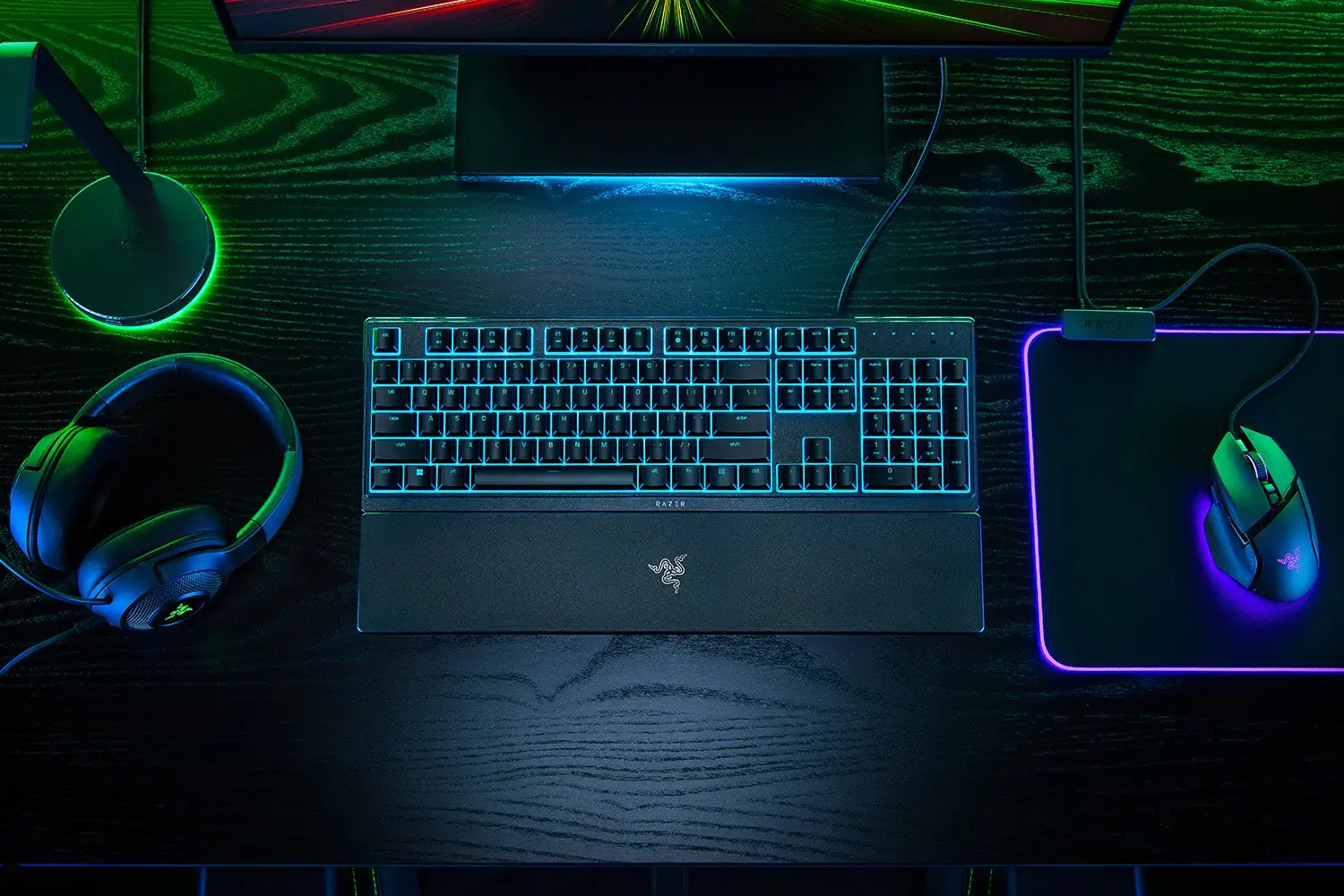
Similarly, the RGB lighting claim—“16.8 million colors and chroma-integrated game effects”—is tempered by real-world usage. A verified Trustpilot user described it as a “disaster for someone who still needs to look at keys when typing in a dark room” due to extremely bright underglow making the symbols hard to read. Adjusting brightness helped only minimally.
Cross-Platform Consensus
Universally Praised
Across Reddit, Twitter, and retail reviews, the low-profile key design stands out consistently. Slimmer keycaps and shorter switches encourage a “natural hand positioning” that users say reduces fatigue during prolonged typing or casual gaming. One Reddit user posted: “Loving the low profile – can’t wait to get it!” This appeals strongly to people with wrist strain from traditional mechanical boards.
The wrist rest earns similar praise. Despite being downgraded from a soft leatherette to smooth ABS plastic, users still found it critical for comfort. A Reddit reviewer admitted they didn’t use it at first but “played CS2 with it and now can’t leave it behind.” Office users also valued the magnetic snap-on mechanism that allows quick removal for space management.
User reports also commend the UV-coated keycaps. Several early adopters point out their resistance to fading—a Reddit commenter compared them favorably to their worn Ornata V1 caps and called it “a very good improvement.” This long-term durability suits heavy typists who often wear key legends down quickly.
Common Complaints
Anti-ghosting absence dominates complaints from players who press multiple keys simultaneously. A detailed Reddit breakdown described discovering this flaw only weeks after purchase, saying, “Yes, this keyboard came out in 2022 as a ‘gaming keyboard’ and it has no anti-ghosting.” For MMO or FPS players requiring simultaneous actions, this becomes a dealbreaker.
Build quality also draws criticism. While the official specs claim tanky durability, multiple users note “inconsistent key sound” and chassis flex when pressed from the sides. Reports mention cheaper plastic feel compared to the Ornata V2—undermining Razer’s premium brand image for some.
The RGB implementation, though smooth, suffers from functional limits. With only 10 lighting zones, complex per-key effects are impossible, frustrating RGB enthusiasts. The Trustpilot review about lighting glare reveals an ergonomic oversight affecting typists who glance at keys in dim settings—bright plate glow overwhelms the less-lit symbols, reducing visibility.
Divisive Features
The mecha-membrane switches generate mixed reactions. Fans like the hybrid feel—clicky feedback with a softer touch—but one experienced Reddit reviewer warned, “Don’t expect this keyboard to replace your mechanical… they are much mushier.” Some appreciate this as a comfort feature, while others find it less precise for competitive play.
Software dependency via Razer Synapse splits users. Enthusiasts enjoy customization depth, binding Fn functions to any key, while minimalists dislike needing background software running just to keep lighting or macros active. One Reddit user stopped using Synapse entirely thanks to Windows 11 Dynamic Lighting support, freeing up RAM.
Trust & Reliability
Trustpilot reports highlight a significant lighting ergonomics flaw—poor contrast between underglow and key symbols in dark environments can cause discomfort or dizziness. This indicates a testing gap for real-world conditions.
On Reddit, durability stories vary. Positive accounts mention UV-coated keycaps holding up under heavy daily chatting, but others warn of slight creaking noises within weeks. This aligns with a “casual product for casual gamers” description in one in-depth review, underscoring that while functional, it’s not built with eSports-level resilience.
Alternatives
Within user chatter, Razer BlackWidow and Razer Huntsman are suggested upgrades for those needing stronger build and mechanical switch precision. A Reddit commenter noted: “If you really want indestructible keys, I recommend Razer BlackWidow and Razer Huntsman, spending a little extra money.” Compared to these, the Ornata V3 X trades input speed and toughness for quieter operation and lower cost.
Another comparison appears with Razer Cynosa, as one Reddit poster remarked it “looks like Ornata combined with Cynosa”—highlighting the membrane-centric focus.
Price & Value
Pricing varies from $39.99 new on Amazon to about $29.99 refurbished on eBay. Resale value trends show modest retention—refurbished units sell at about 25% below retail after inspection. For budget-conscious buyers, the V3 X offers Razer branding and decent office ergonomics at entry price, but reductions from previous Ornata models mean it’s less feature-rich.
Community buying tips suggest snapping it up under $40 if quietness and comfort are priorities. For those chasing advanced gaming features, second-hand mechanical boards or older Ornata versions may deliver better returns per dollar.

FAQ
Q: Does the Razer Ornata V3 X have anti-ghosting?
A: Users report it does not have true anti-ghosting, despite being marketed as a gaming keyboard. This can limit simultaneous key inputs in certain gaming genres.
Q: Can I use all customization features without Razer Synapse?
A: No. Most macro and lighting adjustments require Synapse to run continuously. Windows 11 Dynamic Lighting can replace Synapse for basic RGB profiles.
Q: Is the wrist rest comfortable for long typing sessions?
A: Yes, most users find it improves comfort, especially when gaming or typing for hours. It’s plastic-coated rather than leatherette, but remains durable.
Q: How bright is the RGB lighting?
A: The 10-zone lighting is smooth and bright, but intense underglow may cause eye strain in dark rooms, especially if you rely on looking at key symbols.
Q: Are the keycaps durable?
A: UV-coated ABS keycaps have shown improved resistance to fading compared to previous Ornata generations, making them suitable for heavy daily use.
Final Verdict: Buy if you’re a casual gamer, office worker, or anyone seeking a quiet, comfortable keyboard with simple RGB flair. Avoid if you rely on multi-key rollover in competitive play. Pro tip from community: disable Synapse if using Windows 11’s dynamic lighting to save system resources.