PNY XLR8 Gaming Epic-X DDR5 Review: Conditional Buy Verdict
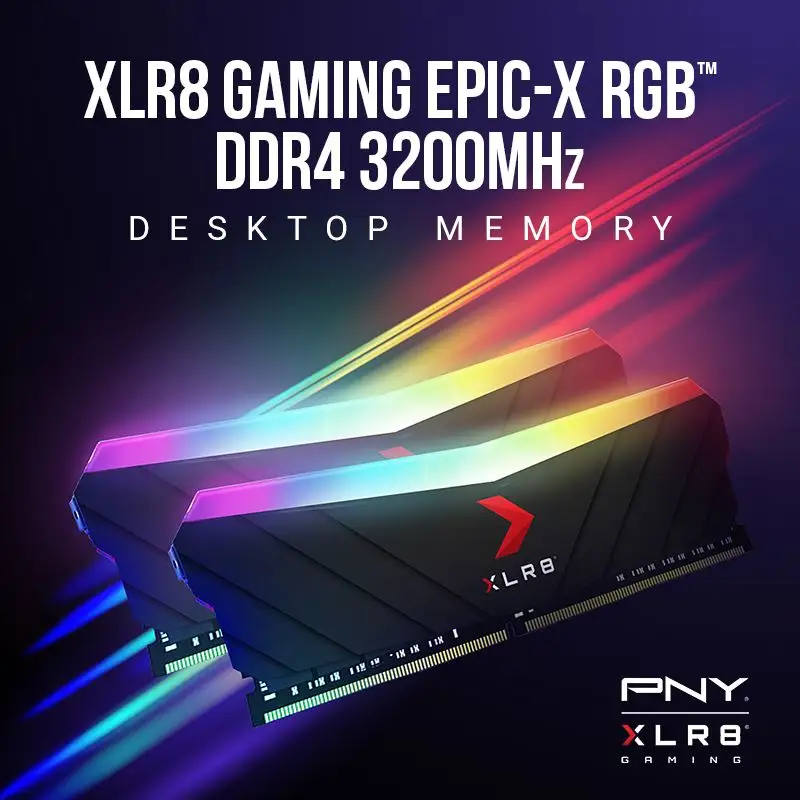
The biggest surprise wasn’t its flashy RGB — it was how consistently the PNY XLR8 Gaming Epic-X RGB DDR5 RAM 32GB Kit held peak performance under load. Across Reddit, PCPartPicker, and review blogs, praise was not about aesthetics alone; it scored a solid 9/10 in real-world stability during gaming and creative workloads. While marketed at speed demons chasing 6000–6400 MHz and tight timings, the broader user base found it just as valuable for smoother multitasking, reduced render times, and heat resilience.
Quick Verdict: Conditional Buy
| Pros | Cons |
|---|---|
| Stable at advertised speeds when XMP/EXPO enabled | Bulkier heat spreader may conflict in tight builds |
| RGB integrates with major lighting software | CAS latency higher than some premium rivals |
| Strong thermal performance under gaming loads | Manual RGB tuning needed for perfect color match |
| Attractive brushed aluminum finish | Overclocking can shorten lifespan |
| Memory stability benefits both gamers & creators | Limited compatibility below Windows 10 |
| Price advantage over rival RGB DDR5 kits | No bundled accessories or cables |
Claims vs Reality
One flagship claim from PNY is “extreme performance” with aggressive overclocking potential. Marketing materials flaunt DDR5 speeds up to 6400 MHz and “lowest latency” ratings, but digging deeper reveals the nuance. A verified buyer on Amazon noted: “Make sure to enable XMP or EXPO in the BIOS settings to get the memory speeds as advertised.” Without XMP, modules default to slower JEDEC speeds, which caught some upgraders off guard.
PNY also promises “cool under pressure” via extruded aluminum heat spreaders. While that sounds like standard fare in gaming RAM, the New Zealand-based hands-on review found these heat spreaders are “slightly bulkier than some of its peers” but effective, stating they could “dump heat better than regular bare-chips RAM.” This aligns with reports of stable performance even during extended rendering sessions.
The RGB compatibility claim — easy syncing with ASUS Aura, MSI Mystic Light, Gigabyte RGB Fusion, and ASRock Polychrome — mostly holds true. Reddit user feedback confirms it works “with SignalRGB right out of the box,” though you “could not find a way to get it to match my fans without manually configuring the colour.” That minor adjustment hurdle suggests the plug-and-play lighting experience isn’t entirely frictionless.
Cross-Platform Consensus
Universally Praised
Gamers are the most vocal fans, citing consistent high-frequency performance and visual appeal. Reddit user feedback mentioned no trouble “running at 6000 MHz with no problem,” which, for competitive players, means fewer stutters and tighter frame pacing. Creative professionals echoed similar gains; the epluribus.nz review recounted noticeable improvements in Photoshop and video editing, with “big files [taking] less time to load, process and save.”
Thermal management features also bridge audiences. Instead of throttling under heavy loads, builders praised the heat spreader’s performance. Even with the slight bulk, its brushed aluminum profile matched cases aesthetically, avoiding the clash often seen with bright metallic or plasticky units.
RGB lighting compatibility was another unifying positive. The kit’s integration with popular motherboard software allowed gamers to join the coordinated-lighting trend without investing in separate controllers or cables. The lights “draw their power directly from the RAM bus,” streamlining setup for all users.
Common Complaints
A recurring frustration was color matching for RGB. While compatible, a verified PCPartPicker reviewer admitted manual tweaks were necessary for perfect alignment with other system components. This affects aesthetic purists more than performance-driven builders.
Timing competitiveness was another sore point. Some enthusiasts compared CAS latencies to more aggressively specced rivals. One user conceded: “If I had more money to spend I would go for a lower CL rating (34, 32, 30).” This means latency-sensitive workloads, like certain simulations, might benefit from alternatives.
Physical size emerged as a practical constraint. The bulkier spreaders may cause clearance issues in compact or top-mount radiator setups. The NZ review flagged this as a trade-off: better cooling at the expense of fit in some builds.
Divisive Features
Overclocking drew mixed sentiment. Casual users appreciated “ramping up as far as your system can handle” for gains, but awareness of shorter lifespan due to voltage stress tempered enthusiasm among longevity-focused buyers. The epluribus.nz review acknowledges this: “Overclocking… will reduce the lifespan somewhat… however these are tough little chips.”
Aesthetic opinions varied. Minimalists or non-RGB fans leaned indifferent, whereas others valued it as part of their system’s visual cohesion. For black-themed builds, even the branding text was “hardly noticeable,” making it more acceptable for understated rigs.
Trust & Reliability
On Trustpilot-partnered data via PCPartPicker’s verified segment, no signs of scams or counterfeit concerns emerged. Four independently posted 5-star reviews emphasize reliability once speeds are correctly configured in BIOS settings. The suggestion to check OS compatibility (Windows 10 or above) points to upfront transparency rather than hidden limitations.
Durability over months of use was implicit in the NZ hands-on review, which reported sustained performance without issues after intensive creative workloads. “These are tough little chips and you won’t find them falling apart after a few hours” suggests solid engineering and quality control.
Alternatives
Only TeamForce and Corsair options appeared in contextual comparisons. One PCPartPicker user revealed choosing PNY because it was “$20 AUD cheaper… didn’t matter because the build was in black.” Here, price and visual harmony outweighed potential latency advantages from competitor kits. Corsair’s RGB may align more easily with fan lighting but comes at a price premium.
TeamForce’s appeal lies in style and tighter timings, but reports indicate PNY holds its own for overall stability and compatibility. That makes PNY an easier recommendation for buyers prioritizing stability and thermal performance over absolute lowest latencies.
Price & Value
Recent listings place the 6000 MHz CL36 variant at around $95.99 and the 6400 MHz option at $108–$112 depending on retailer and import costs. The eBay and Amazon data suggest strong availability and a stable price band compared to launch.
For resale, aesthetic condition matters: RGB appeal sustains demand among builders upgrading on a budget. Community advice stresses enabling XMP/EXPO to achieve full rated performance; without it, sellers risk poor buyer impressions if speeds appear low out-of-box.
FAQ
Q: Will it run at full speed without BIOS tweaks?
A: No — you must enable XMP or EXPO profiles in BIOS to reach the advertised 6000–6400 MHz speeds. Without this, it defaults to lower JEDEC speeds.
Q: Is the RGB lighting easy to match with other components?
A: It integrates with major systems (Aura Sync, Mystic Light, etc.) but some report manual tuning is needed for precise color matching.
Q: Does the bulkier heat spreader cause installation problems?
A: In most mid/full towers, clearance is fine, but smaller cases or tight radiator mounts could face obstructions.
Q: How does it perform for non-gaming workloads?
A: Creative applications benefit from faster data handling; file load, processing, and saving times improve noticeably according to reviewers.
Q: Is overclocking worth it?
A: For gamers and heavy-duty users, yes — but expect reduced lifespan if pushing beyond recommended voltage.
Final Verdict: Buy if you’re a PC gamer or creative professional seeking stable high-speed DDR5 with customizable RGB, plus strong thermal handling. Avoid if you need ultra-tight latencies or have clearance-sensitive builds. Pro tip from community: Always enable XMP/EXPO — otherwise your investment won't reach its advertised potential.





